
Butler
Butler: A $20 one-time Mac launcher for shortcuts, menus, files, searches, and scripts. Ranked #27 of 40 in App Launcher Software by our editors (6.4/10); pricing: Paid; best for mac menu and shortcut launchers.
At a glance
- Editor score6.4 / 10
- PricingPaid
- Best forMac menu and shortcut launchers
- Free planNo
- Paid from$20 one-time
- Supported platformsMacos
- Facts checked19 Sep 2026
Where it wins
- Launch apps, files, folders, and bookmarks from menus or abbreviations
- Use shortcuts, hot corners, and events to trigger actions
- Extend workflows with AppleScript, snippets, and plug-ins
Where it doesn't
- Available only for macOS
- No free plan
- Its broad configuration may be more than a simple app launcher needs
Our verdict on Butler
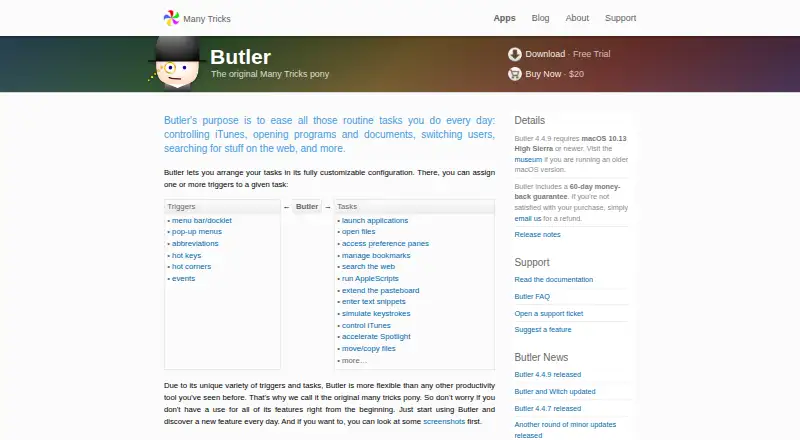
Butler is a macOS utility for people who want to launch more than applications from their Mac. It can open files, folders, bookmarks, and system preference panes, as well as run actions from menu-bar items, pop-up menus, abbreviations, keyboard shortcuts, hot corners, or events. That makes it a fit for users who prefer configurable menu and shortcut launchers; someone looking only for a basic app-opening shortcut may find its range unnecessary.
Its feature set extends into search and automation. Butler can search configured folders and the web with configurable search engines, run AppleScripts and system actions, enter text snippets, simulate keystrokes, and control media applications. It also supports plug-ins and workflows such as launching the immediate children of a container sequentially. Integrations listed include Safari, AppleScript, Spotlight, and Music/iTunes. Those options make Butler more useful for people who want one launcher to connect searches, files, and repeatable actions; the macOS-only platform scope makes it a less suitable choice for anyone who needs a launcher across operating systems.
According to Many Tricks' published pricing, Butler costs $20 as a one-time purchase, rather than a recurring subscription, and includes a 60-day money-back guarantee. The vendor also lists a free trial. For Mac users who will take advantage of its menus, triggers, file search, and scripting features, the single purchase price is straightforward. Buyers seeking a free plan or a cross-platform tool should look elsewhere; for a simpler app-only use case, Butler's broader capabilities may not justify choosing it over a more focused launcher.
Your product? Our editors can test Butler in depth and publish a review, labelled as paid · from $149/mo →
Butler pricing
All 1 Butler plans and prices →
Butler fact sheet
| Free plan | No |
|---|---|
| Paid from | $20 one-time |
| Supported platforms | Macos |
| File search | Yes |
| Command launching | Not verified |
| Workflow support | Yes |
| Plugin support | Yes |
| Cloud sync | Not verified |
| Shortcut limit | Not verified |
| Deployment | Desktop |
| Platforms | macOS |
| Integrations | 4 integrations: Safari, AppleScript, Spotlight, Music/iTunes |
| Pricing | Paid (source) |
| Website | manytricks.com |
| Facts checked | 19 Sep 2026 |
Butler integrations
Butler lists 4 integrations on its own site.
- Safari
- AppleScript
- Spotlight
- Music/iTunes
Alternatives to Butler
- RaycastRaycast combines app and file search with commands, extensions, and optional AI.9.4
- WoxWox combines app launching, search, commands, plugins, and cloud sync in an open-source launcher.9.2
- AlfredA capable Mac launcher whose Powerpack adds automation and productivity tools.8.9



Used Butler? Be the first to review it
The editor score above is our own research. What this page doesn't have yet is a reader's view — what you used Butler for, what worked and what didn't. No stars are seeded and no review is paid for; an editor reads every one before it appears.
Write a reviewTwo minutes · verified accounts only · read by an editor before it appears
Featured on iTechGuides

Butler is listed in our App Launcher Software directory. Add the badge to your site — it links back to this page.
<a href="https://www.itechguides.com/products/butler/"><img src="https://www.itechguides.com/best/badge/butler.svg" alt="Featured on iTechGuides" width="230" height="46"></a>
Reviewed by iTechGuides Editors · Editorial team · Updated Oct 2026
Advertiser disclosure: iTechGuides is reader-supported. Vendors can pay for top positions in our rankings and for a place on other products' pages, and we may earn a commission when you click some links. Bought places stand at the number bought; this page and our disclosure say so. Paying vendors may get a fuller, more detailed review from our editors, and that review can change their score. How we rank.
Last updated · How we research and update