
BrowserOS neo
BrowserOS neo: A free, open-source Chromium browser for coordinating local agents across web tasks. Ranked #14 of 23 in AI Browsers by our editors (7.9/10); pricing: Free plan; best for developers orchestrating local browser agents.
At a glance
- Editor score7.9 / 10
- PricingFree plan
- Best forDevelopers orchestrating local browser agents
- Free planYes
- Paid fromFree
- Browser agentYes
- Facts checked19 Sep 2026
Where it wins
- Runs parallel agents in separate tabs with a live activity dashboard
- Records browser sessions as replayable videos with action timelines
- Stores sessions, screenshots, history and settings locally
Where it doesn't
- Available on macOS and Windows only
- Focused on agent automation rather than general browsing
- Requires compatible agent tools for MCP-based workflows
Our verdict on BrowserOS neo
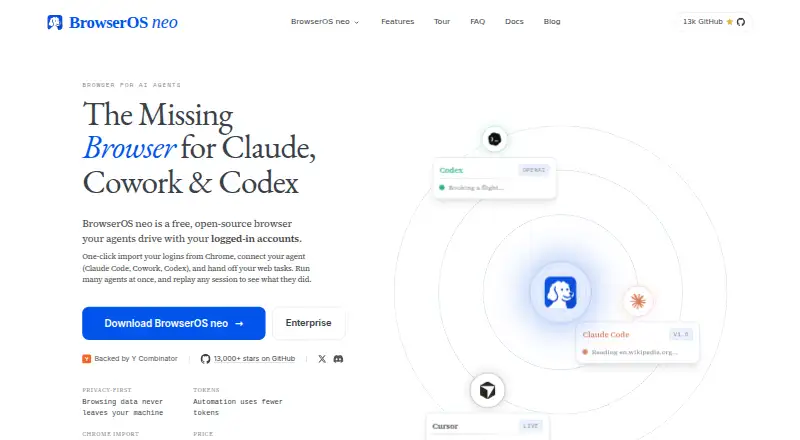
BrowserOS neo is a free, open-source secondary browser for developers who want AI agents to carry out web tasks using logged-in accounts. It runs locally on macOS and Windows, and agents can open tabs, navigate, click and read pages without taking over the user's normal browser. One-click import brings in Chrome logins, bookmarks and extensions, helping teams start from existing browser state. The focus is orchestration and automation, rather than serving as a general-purpose browsing experience.
Its agent controls provide a useful view into ongoing work: a live dashboard shows agent activity, while separate tabs let agents run in parallel. Replayable video recordings include action timelines, giving users a way to review what happened during an automation. BrowserOS neo supports logged-in automation for social media, inboxes, CRM and internal tools. Sessions, screenshots, history and settings are stored on the user's machine, matching its local-browser approach. These features make it suited to developers who need visibility into multiple browser-based agent tasks.
The integration set includes Claude Code, Claude Cowork, Codex, Cursor, VS Code, Zed, GitHub Copilot, OpenClaw, Hermes and MCP. Its Chromium engine and MCP connections make it a fit for coding-agent workflows, though the listed operating systems are limited to macOS and Windows. The product is free and open source, with no paid tier distinctions to weigh in choosing it. BrowserOS neo makes sense for developers orchestrating local agents across authenticated web tools; people looking primarily for a general browsing experience should consider a browser centered on that use instead.
Your product? Our editors can test BrowserOS neo in depth and publish a review, labelled as paid · from $149/mo →
BrowserOS neo pricing
BrowserOS neo fact sheet
| Free plan | Yes |
|---|---|
| Paid from | Free |
| Page summaries | Not verified |
| AI research mode | Not verified |
| Browser agent | Yes |
| Supported platforms | macOS, Windows |
| Browser engine | Chromium |
| Privacy model | Local |
| Deployment | Desktop |
| Platforms | macOS, Windows |
| Integrations | 10 integrations: Claude Code, Claude Cowork, Codex, Cursor, VS Code, Zed … |
| Pricing | Free plan |
| Website | browseros.ai |
| Facts checked | 19 Sep 2026 |
BrowserOS neo integrations
BrowserOS neo lists 10 integrations on its own site.
- Claude Code
- Claude Cowork
- Codex
- Cursor
- VS Code
- Zed
- GitHub Copilot
- OpenClaw
- Hermes
- MCP
Alternatives to BrowserOS neo
- Mind BrowserA free desktop browser combining task agents, cited research, and privacy tools.9.4
- Norton NeoAI search and research tools paired with VPN and browser protections, free to download.9.2
- CometA free, cross-device browser that adds Perplexity search and AI help to familiar browsing.9.1



See all BrowserOS neo alternatives →
Used BrowserOS neo? Be the first to review it
The editor score above is our own research. What this page doesn't have yet is a reader's view — what you used BrowserOS neo for, what worked and what didn't. No stars are seeded and no review is paid for; an editor reads every one before it appears.
Write a reviewTwo minutes · verified accounts only · read by an editor before it appears
Featured on iTechGuides

BrowserOS neo is listed in our AI Browsers directory. Add the badge to your site — it links back to this page.
<a href="https://www.itechguides.com/products/browseros-neo/"><img src="https://www.itechguides.com/best/badge/browseros-neo.svg" alt="Featured on iTechGuides" width="230" height="46"></a>
Reviewed by iTechGuides Editors · Editorial team · Updated Oct 2026
Advertiser disclosure: iTechGuides is reader-supported. Vendors can pay for top positions in our rankings and for a place on other products' pages, and we may earn a commission when you click some links. Bought places stand at the number bought; this page and our disclosure say so. Paying vendors may get a fuller, more detailed review from our editors, and that review can change their score. How we rank.
Last updated · How we research and update