Brisk Table Kitchen View
Brisk Table Kitchen View: A low-cost cloud KDS with station routing, status tracking, and a free plan. Ranked #34 of 49 in Kitchen Display System Software by our editors (5.8/10); pricing: Free plan · 30-day trial; best for small teams wanting low-cost cloud KDS.
At a glance
- Editor score5.8 / 10
- PricingFree plan · 30-day trial
- Best forSmall teams wanting low-cost cloud KDS
- Free planYes
- Paid from$9.99/mo
- Station routingYes
- Facts checked20 Sep 2026
Where it wins
- Routes POS and online orders to configured preparation stations
- Tracks New, Cooking, and Cooked statuses at the kitchen display
- Free plan includes all features with 60 bookings per month
Where it doesn't
- Requires an internet connection to operate
- Receives orders from Brisk Table POS and online ordering only
- Multiple locations are limited to the Premium Plus plan
Our verdict on Brisk Table Kitchen View
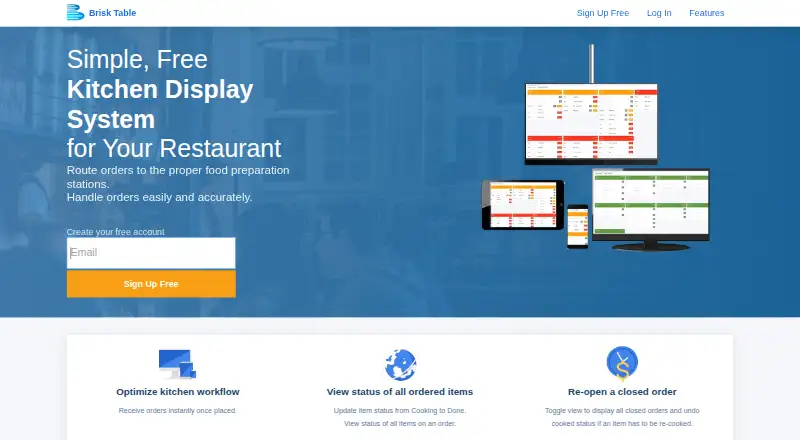
Brisk Table Kitchen View is a cloud kitchen display system for restaurants, cafes, and bars. It receives orders from Brisk Table’s POS and online ordering system, routes them to configured food preparation stations, and displays New, Cooking, and Cooked item statuses. Kitchen staff can update item status from the display, while the system prioritizes orders by order time. It runs on standard internet-connected computers, laptops, tablets, iPads, and smartphones, making it suited to small teams that want a web-based workflow without dedicated hardware.
Pricing is structured around four monthly plans. The Free Plan costs $0 per month and includes all features with 60 bookings per month. The Basic Plan costs $9.99 per month and adds portal customization while retaining all features. The Premium Plan costs $19.99 per month and lists the same included features and portal customization. The Premium Plus Plan costs $49.99 per month and adds multiple locations. The Basic, Premium, and Premium Plus plans include a free 30 day trial period. Prices are quoted in USD, with 10% GST added for customers in Australia.
The workflow goes beyond basic order display: teams can reopen closed orders for re-cooking and reset item status when a plate is dropped or incorrectly prepared. Those controls support active kitchen coordination, while real-time POS and online-order inputs keep incoming work in one display. The trade-off is platform and connectivity scope: it runs on the web and requires standard internet-connected hardware, with no offline mode. Brisk Table Kitchen View fits small restaurant teams already using Brisk Table’s ordering systems; teams needing offline operation or broader ordering integrations should consider another KDS.
Your product? Our editors can test Brisk Table Kitchen View in depth and publish a review, labelled as paid · from $149/mo →
Brisk Table Kitchen View pricing
All 4 Brisk Table Kitchen View plans and prices →
Brisk Table Kitchen View fact sheet
| Free plan | Yes |
|---|---|
| Paid from | $9.99/mo |
| Station routing | Yes |
| Order status tracking | Yes |
| Expo screen | Not verified |
| Display platforms | Not verified |
| Offline mode | No |
| Deployment | Cloud |
| Maximum stations | Not verified |
| Free trial | 30 days |
| Deployment | Cloud |
| Platforms | Web |
| Support | |
| Built for | Small business, Mid-market (editorial estimate) |
| Pricing | Free plan · 30-day trial (source) |
| Website | brisktable.com |
| Facts checked | 20 Sep 2026 |
Alternatives to Brisk Table Kitchen View
- Epson TrueOrder KDSA focused on-premise KDS for Epson-centered routing, expo, printing, and analytics.9.3
- Oracle MICROS Simphony KDSA specialized KDS for coordinating complex restaurant production workflows.9.1
- Clover Kitchen Display SystemA Clover-focused KDS for routing kitchen orders and tracking fulfillment on dedicated displays.8.9


See all Brisk Table Kitchen View alternatives →
Used Brisk Table Kitchen View? Be the first to review it
The editor score above is our own research. What this page doesn't have yet is a reader's view — what you used Brisk Table Kitchen View for, what worked and what didn't. No stars are seeded and no review is paid for; an editor reads every one before it appears.
Write a reviewTwo minutes · verified accounts only · read by an editor before it appears
Featured on iTechGuides

Brisk Table Kitchen View is listed in our Kitchen Display System Software directory. Add the badge to your site — it links back to this page.
<a href="https://www.itechguides.com/products/brisk-table-kitchen-view/"><img src="https://www.itechguides.com/best/badge/brisk-table-kitchen-view.svg" alt="Featured on iTechGuides" width="230" height="46"></a>
Reviewed by iTechGuides Editors · Editorial team · Updated Oct 2026
Advertiser disclosure: iTechGuides is reader-supported. Vendors can pay for top positions in our rankings and for a place on other products' pages, and we may earn a commission when you click some links. Bought places stand at the number bought; this page and our disclosure say so. Paying vendors may get a fuller, more detailed review from our editors, and that review can change their score. How we rank.
Last updated · How we research and update