
BlockBlock
BlockBlock: A focused, free monitor for macOS persistence changes—not a complete antivirus suite. Ranked #36 of 42 in Antivirus for Mac by our editors (5.8/10); pricing: Free plan; best for free monitoring of Mac persistence changes.
At a glance
- Editor score5.8 / 10
- PricingFree plan
- Best forFree monitoring of Mac persistence changes
- Free planYes
- Paid fromFree
- Facts checked22 Sep 2026
Where it wins
- Monitors common macOS persistence locations in real time
- Lets users block or allow changes and save response rules
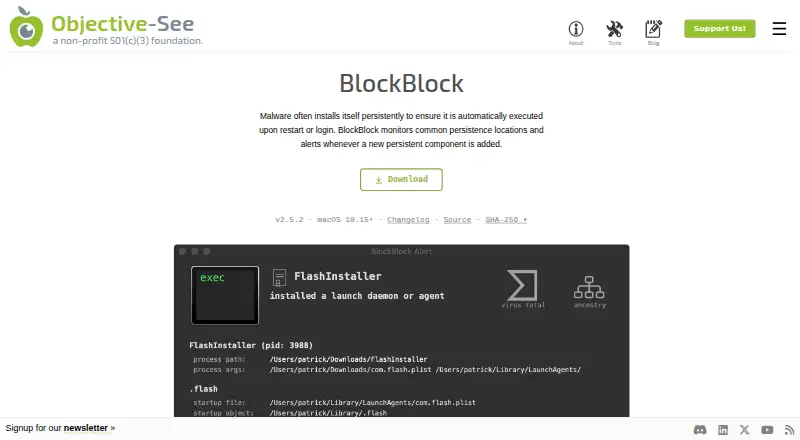
- Shows process, signing, VirusTotal, and ancestry details
Where it doesn't
- Covers macOS only
- Requires macOS 10.15 or later and Full Disk Access
- Focused on persistence rather than full antivirus coverage
Our verdict on BlockBlock
BlockBlock is a free, open-source macOS security utility from Objective-See Foundation. It monitors common persistence locations, including items configured to launch at login or restart, then alerts when a new persistent component is added. Users can allow or block each change, making it a focused option for Mac users who want visibility into software that attempts to remain active after login or restart.
The published product details show a free tool with no paid tiers to compare. Its protection is real time within its defined scope, and optional controls can block non-notarized programs, downloaded scripts, and terminal pastes. Alerts include process and persistence details, along with code-signing, VirusTotal, and ancestry information. Users can also create rules to remember responses, while alert decisions are logged locally. Initial setup includes macOS 10.15 or later and Full Disk Access, so it suits users comfortable granting the required system permission.
BlockBlock’s main strength is focus: it concentrates on persistence changes rather than presenting itself as a complete antivirus suite. That narrow scope can make its alerts easier to interpret when the concern is new login items, launch agents, or other persistent components, while the optional protections extend monitoring into several related behaviors. Choose BlockBlock if free, open-source persistence monitoring is the priority. Choose a broader antivirus product instead if you need protection beyond macOS persistence locations or a wider security feature set.
Your product? Our editors can test BlockBlock in depth and publish a review, labelled as paid · from $149/mo →
BlockBlock pricing
BlockBlock fact sheet
| Free plan | Yes |
|---|---|
| Paid from | Free |
| Ransomware protection | Not verified |
| Phishing protection | Not verified |
| Real-time protection | Yes |
| Coverage scope | Mac-only |
| Devices included | Not verified |
| VPN included | Not verified |
| Password manager | Not verified |
| Deployment | Desktop |
| Platforms | macOS |
| Support | Docs |
| Built for | Solo, Small business, Mid-market, Enterprise (editorial estimate) |
| Pricing | Free plan |
| Website | objective-see.org |
| Facts checked | 22 Sep 2026 |
Alternatives to BlockBlock
- Avast OneBroad multi-device protection with a free entry plan and layered paid features.9.3
- Bitdefender Antivirus for MacFocused Mac protection with ransomware coverage, web defenses, and a 30-day trial.9.2
- Avira Free SecurityA free Mac security package combining malware protection with privacy and performance tools.9.1



See all BlockBlock alternatives →
Used BlockBlock? Be the first to review it
The editor score above is our own research. What this page doesn't have yet is a reader's view — what you used BlockBlock for, what worked and what didn't. No stars are seeded and no review is paid for; an editor reads every one before it appears.
Write a reviewTwo minutes · verified accounts only · read by an editor before it appears
Featured on iTechGuides

BlockBlock is listed in our Antivirus for Mac directory. Add the badge to your site — it links back to this page.
<a href="https://www.itechguides.com/products/blockblock/"><img src="https://www.itechguides.com/best/badge/blockblock.svg" alt="Featured on iTechGuides" width="230" height="46"></a>
Reviewed by iTechGuides Editors · Editorial team · Updated Oct 2026
Advertiser disclosure: iTechGuides is reader-supported. Vendors can pay for top positions in our rankings and for a place on other products' pages, and we may earn a commission when you click some links. Bought places stand at the number bought; this page and our disclosure say so. Paying vendors may get a fuller, more detailed review from our editors, and that review can change their score. How we rank.
Last updated · How we research and update