BDO Optimizer
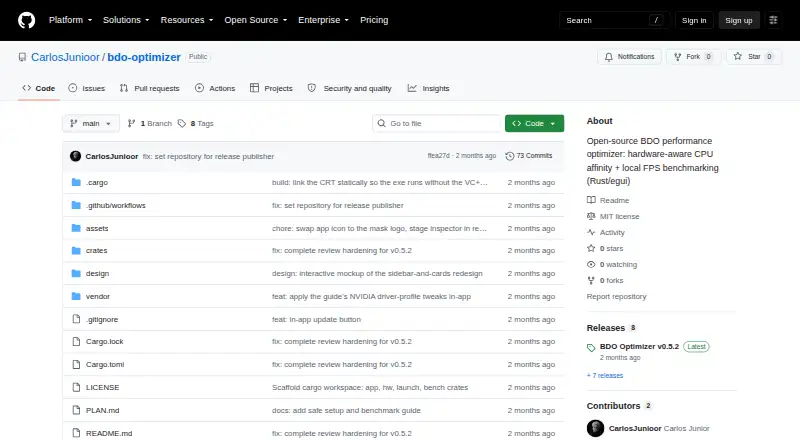
BDO Optimizer: A focused, free toolkit for measuring and tuning Black Desert performance on compatible systems. Ranked #12 of 34 in Game Graphics Optimization Software by our editors (8.2/10); pricing: Free plan; best for black Desert players needing measured tuning.
At a glance
- Editor score8.2 / 10
- PricingFree plan
- Best forBlack Desert players needing measured tuning
- Free planYes
- Paid fromFree
- Auto recommendationsYes
- Facts checked20 Sep 2026
Where it wins
- Hardware-aware CPU-affinity recommendations and safe launcher-based application
- Baseline-versus-optimized FPS and frame-time benchmarking
- Open source with Windows, Linux, and macOS support
Where it doesn't
- Focused on Black Desert rather than broad multi-game optimization
- BDO affinity application and measurement are Windows-only
- Benchmark sessions are stored locally without cloud sync
Our verdict on BDO Optimizer
BDO Optimizer is an open-source desktop application for Black Desert Online players who want hardware-aware performance tuning. It inspects CPU topology, cache layout, RAM, GPU, drivers, and storage, then recommends a CPU-affinity mask for application through BlackDesertLauncher.exe. Hardware inspection and saved-session viewing support Windows, Linux, and macOS, while the BDO apply-and-measure workflow is limited to Windows.
Its standout capability is the measured tuning loop. Before benchmarking, the application can verify affinity in read-only mode, then compare baseline and optimized FPS and frame-time captures. An external FPS overlay supports windowed and borderless-windowed play. Optional NVIDIA per-game driver-profile changes can be restored, and optional Black Desert configuration-file edits include backup and restore support. These features give technically minded players a way to connect hardware inspection, configuration changes, and performance results in one workflow.
The product is free and open source, with benchmark sessions stored locally as JSON. Its focus is narrow by design: Black Desert players who want CPU-affinity guidance, local benchmarking, and reversible configuration changes are the clearest fit. Players seeking a general optimizer for multiple games, cloud-synced benchmark history, or a cross-platform workflow for applying and measuring BDO affinity should choose a broader alternative. Linux and macOS users can inspect hardware and view saved sessions, but Windows is required for the core BDO apply-and-measure process.
Your product? Our editors can test BDO Optimizer in depth and publish a review, labelled as paid · from $149/mo →
BDO Optimizer pricing
BDO Optimizer fact sheet
| Free plan | Yes |
|---|---|
| Paid from | Free |
| Auto recommendations | Yes |
| Per-game profiles | Yes |
| In-game overlay | Yes |
| Game library scanning | Not verified |
| Supported platforms | Windows, Linux, macOS |
| Cloud profile sync | No |
| Deployment | Desktop |
| Platforms | Windows, Linux, macOS |
| Support | Community, Docs |
| Built for | Solo, Small business (editorial estimate) |
| Pricing | Free plan |
| Website | github.com |
| Facts checked | 20 Sep 2026 |
Alternatives to BDO Optimizer
- HoneA broad Windows optimizer with presets, overlays, and a usable free tier.9.4
- GameShiftA free, open-source Windows optimizer with broad game detection and system controls.9.3
- PULSEA deep Windows tuning suite with broad free monitoring and paid optimization controls.9.2


See all BDO Optimizer alternatives →
Used BDO Optimizer? Be the first to review it
The editor score above is our own research. What this page doesn't have yet is a reader's view — what you used BDO Optimizer for, what worked and what didn't. No stars are seeded and no review is paid for; an editor reads every one before it appears.
Write a reviewTwo minutes · verified accounts only · read by an editor before it appears
Featured on iTechGuides

BDO Optimizer is listed in our Game Graphics Optimization Software directory. Add the badge to your site — it links back to this page.
<a href="https://www.itechguides.com/products/bdo-optimizer/"><img src="https://www.itechguides.com/best/badge/bdo-optimizer.svg" alt="Featured on iTechGuides" width="230" height="46"></a>
Reviewed by iTechGuides Editors · Editorial team · Updated Oct 2026
Advertiser disclosure: iTechGuides is reader-supported. Vendors can pay for top positions in our rankings and for a place on other products' pages, and we may earn a commission when you click some links. Bought places stand at the number bought; this page and our disclosure say so. Paying vendors may get a fuller, more detailed review from our editors, and that review can change their score. How we rank.
Last updated · How we research and update