
Batch Resize
Batch Resize: A focused Apple-device batch resizer with practical dimension and crop modes. Ranked #16 of 28 in Photo Resizing Software by our editors (7.5/10); pricing: Free plan; best for iPhone and iPad batch resizing.
At a glance
- Editor score7.5 / 10
- PricingFree plan
- Best foriPhone and iPad batch resizing
- Free planYes
- Batch resizingYes
- Facts checked20 Sep 2026
Where it wins
- Processes batches of up to 500 images at once
- Offers proportional, maximum-dimension, fill, and fit modes
- Saves results to Camera Roll or a custom album
Where it doesn't
- Available on iOS and macOS only
- Free use includes advertising
- Format and quality controls are less documented
Our verdict on Batch Resize
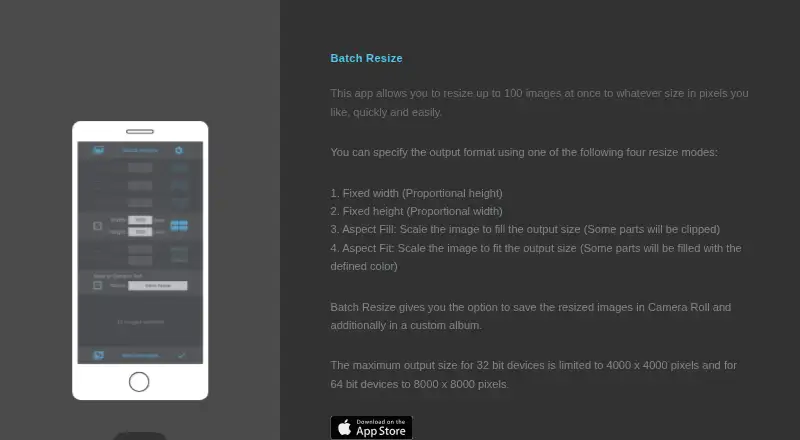
Batch Resize is a freemium image-resizing app for iPhone, iPad, and compatible Apple silicon Macs. It is designed for people who need to resize groups of photos without handling each image individually. The app supports batches of up to 500 images and provides several ways to define the output: fixed width, fixed height, maximum pixel dimension, aspect-fill with cropping, or aspect-fit with a defined fill color. Results can be saved to the Camera Roll or to a custom album.
Its strongest area is practical batch control. Fixed-width and fixed-height modes preserve proportional dimensions, while maximum-pixel resizing offers a way to constrain the longest output dimension. Aspect-fill is useful when cropping is acceptable, and aspect-fit provides a defined fill color around the image. Output sizes can reach 4,000 × 4,000 pixels on 32-bit devices and 8,000 × 8,000 pixels on 64-bit devices. These options make the app a good fit for recurring photo preparation on Apple hardware, especially when album-based organization matters.
The Free plan includes batch resizing with advertising. The Remove Ads plan removes advertising through a one-time in-app purchase. Batch Resize therefore suits users who want a focused resizing utility with a free entry point and an optional paid upgrade. It is less suitable for workflows that require broader platform coverage, detailed format handling, or documented quality controls. Users who primarily work on iPhone, iPad, or macOS and need straightforward batch dimension changes should find its feature set relevant; those needing a wider image-processing toolkit should look elsewhere.
Your product? Our editors can test Batch Resize in depth and publish a review, labelled as paid · from $149/mo →
Batch Resize pricing
All 2 Batch Resize plans and prices →
Batch Resize fact sheet
| Free plan | Yes |
|---|---|
| Paid from | Not verified |
| Batch resizing | Yes |
| Output formats | Not verified |
| Resize methods | Dimensions |
| Quality controls | Not verified |
| Maximum batch size | 500 images |
| Supported platforms | Mobile |
| Deployment | Desktop, Mobile |
| Platforms | iOS, macOS |
| Built for | Solo, Small business (editorial estimate) |
| Pricing | Free plan (source) |
| Website | batchresize.com |
| Facts checked | 20 Sep 2026 |
Alternatives to Batch Resize
- XnResizeA capable offline batch resizer with broad format support and detailed quality controls.9.4
- ConverseenA capable free desktop tool for batch resizing, conversion, compression, and renaming.9.2
- PhotoResize ProA capable desktop batch processor for creative teams handling large image collections.9.1


See all Batch Resize alternatives →
Used Batch Resize? Be the first to review it
The editor score above is our own research. What this page doesn't have yet is a reader's view — what you used Batch Resize for, what worked and what didn't. No stars are seeded and no review is paid for; an editor reads every one before it appears.
Write a reviewTwo minutes · verified accounts only · read by an editor before it appears
Featured on iTechGuides

Batch Resize is listed in our Photo Resizing Software directory. Add the badge to your site — it links back to this page.
<a href="https://www.itechguides.com/products/batch-resize/"><img src="https://www.itechguides.com/best/badge/batch-resize.svg" alt="Featured on iTechGuides" width="230" height="46"></a>
Reviewed by iTechGuides Editors · Editorial team · Updated Oct 2026
Advertiser disclosure: iTechGuides is reader-supported. Vendors can pay for top positions in our rankings and for a place on other products' pages, and we may earn a commission when you click some links. Bought places stand at the number bought; this page and our disclosure say so. Paying vendors may get a fuller, more detailed review from our editors, and that review can change their score. How we rank.
Last updated · How we research and update