Bannerlator
Bannerlator: A broad, free Android compatibility layer for Windows games, with device-dependent results. Ranked #4 of 27 in Game Compatibility Layers by our editors (7.4/10); pricing: Free plan; best for android gamers needing broad Windows game compatibility.
At a glance
- Editor score7.4 / 10
- PricingFree plan
- Best forAndroid gamers needing broad Windows game compatibility
- Free planYes
- Paid fromNone
- Runtime modelTranslation + runtime
- Facts checked20 Sep 2026
Where it wins
- Supports Steam, Epic Games, GOG and Amazon Games integrations
- Combines Wine, Box64/86, Proton, DXVK and VKD3D-Proton
- Offers per-game containers, controllers, cloud saves and achievements
Where it doesn't
- Compatibility varies by device, GPU and Android version
- Anti-cheat support is partial
- The maintainer states that the personal build has no support
Our verdict on Bannerlator
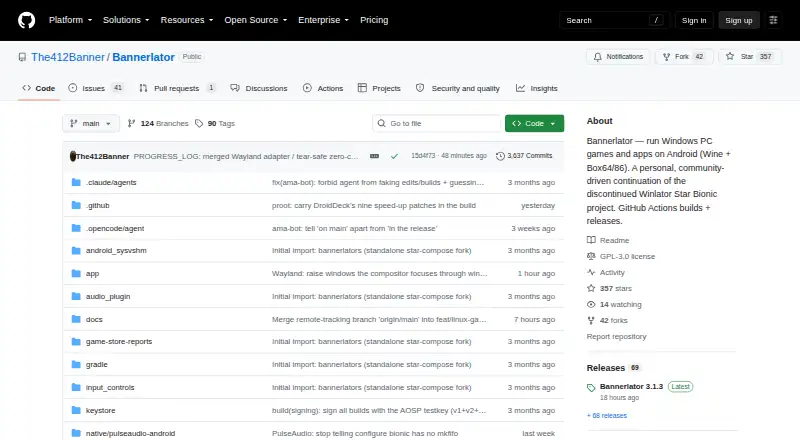
Bannerlator is an open-source Android compatibility layer for running Windows applications and games without a PC or root access. It is aimed at Android gamers who want access to Windows titles through a combination of Wine and Box64/86, Proton compatibility layers, DXVK, VKD3D-Proton and multiple graphics backends. The published feature set covers DirectX 9, 10, 11 and 12, along with Vulkan support, and includes integrations for Steam, Epic Games, GOG and Amazon Games.
Its strongest area is breadth within a single Android-focused tool. Bannerlator supports Vulkan, OpenGL, SurfaceFlinger and VirGL renderers, while per-game containers allow separate game configurations. Controller and Steam Controller support extend its input options, and cloud saves and achievements add features associated with connected game libraries. An experimental Wayland backend with HDR10 support is also included. These capabilities make Bannerlator a fit for users who want to adjust compatibility and graphics settings across different games rather than rely on one fixed runtime.
The trade-off is variability and limited support. Compatibility depends on the device, GPU and Android version, and anti-cheat support is partial, so online games with anti-cheat requirements may not be a good match. The maintainer describes Bannerlator as a personal build rather than an official or general-purpose Winlator release and states that it has no support. Choose Bannerlator if you value a free, open-source Android option with broad Windows compatibility components and several game-store integrations. Choose an alternative if consistent compatibility, official support or complete anti-cheat coverage matters more than configuration breadth.
Bannerlator pricing
Bannerlator fact sheet
| Free plan | Yes |
|---|---|
| Paid from | None |
| Host platforms | Android |
| Runtime model | Translation + runtime |
| DirectX support | Directx 9/10/11 + 12 |
| Vulkan support | Yes |
| Steam integration | Yes |
| Anti-cheat status | Partial |
| Deployment | Mobile |
| Platforms | Android |
| Built for | Solo (editorial estimate) |
| Integrations | 4 integrations: Steam, Epic Games, GOG, Amazon Games |
| Pricing | Free plan |
| Website | github.com |
| Facts checked | 20 Sep 2026 |
Bannerlator integrations
Bannerlator lists 4 integrations on its own site.
- Steam
- Epic Games
- GOG
- Amazon Games
Alternatives to Bannerlator
- CrossOverA mature paid compatibility layer with broad Windows app support for Mac and Linux.9.2
- WineA mature, free compatibility layer for running many Windows apps across Linux and macOS.8.2
- OpenNativeA flexible Android game container with broad runtime controls and unsupported anti-cheat.7.7


See all Bannerlator alternatives →
Bannerlator vs the competition
- Bannerlator vs CrossOver
- Bannerlator vs Wine
- Bannerlator vs OpenNative
- Bannerlator vs Proton-CachyOS
- Bannerlator vs Winlator
- Bannerlator vs PlayOnLinux

Compare Bannerlator with any tool side by side →
Used Bannerlator? Be the first to review it
The editor score above is our own research. What this page doesn't have yet is a reader's view — what you used Bannerlator for, what worked and what didn't. No stars are seeded and no review is paid for; an editor reads every one before it appears.
Write a reviewTwo minutes · verified accounts only · read by an editor before it appears
Featured on iTechGuides

Bannerlator is listed in our Game Compatibility Layers directory. Add the badge to your site — it links back to this page.
<a href="https://www.itechguides.com/products/bannerlator/"><img src="https://www.itechguides.com/best/badge/bannerlator.svg" alt="Featured on iTechGuides" width="230" height="46"></a>
Reviewed by iTechGuides Editors · Editorial team · Updated Sep 2026
Advertiser disclosure: iTechGuides is reader-supported. We may earn a commission when you click some links. How we rank.
Last updated · How we research and update