Aseprite
Aseprite: A focused desktop toolkit for pixel-art sprites, frame animation, and game-ready exports. Ranked #31 of 32 in Game Animation Software by our editors (6.0/10); pricing: Paid; best for focused pixel-art animation workflows.
At a glance
- Editor score6.0 / 10
- PricingPaid
- Best forFocused pixel-art animation workflows
- Animation type2d
- Facts checked21 Sep 2026
Where it wins
- Frame-and-cel timeline with layers, onion skinning, and animation tags
- Pixel-perfect drawing tools, including RotSprite
- Spritesheet, texture-atlas, PNG, GIF, and image-sequence exports
Where it doesn't
- Paid software rather than an open-source option
- Desktop-focused package for Windows, macOS, and Ubuntu/Linux
- Narrower fit for pixel-art and 2D assets than broad animation production
Our verdict on Aseprite
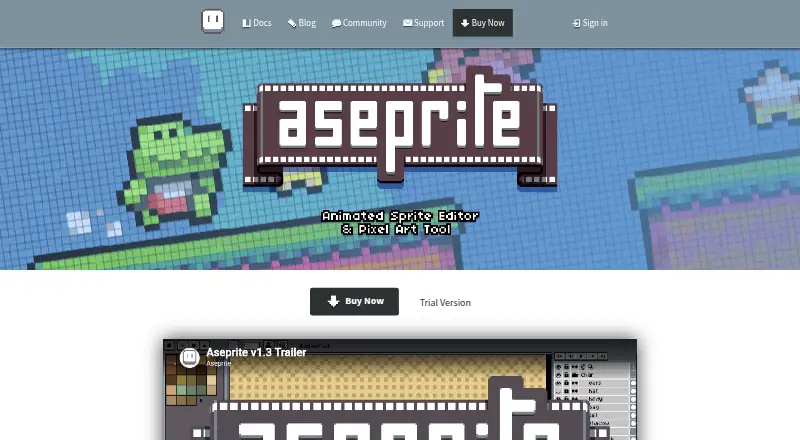
Aseprite is a desktop application for creating pixel-art sprites, frame-based 2D animations, tilesets, and other game-art assets. It is aimed at game artists and developers who need direct control over individual pixels, layers, cels, frames, palettes, and animation timing. The workspace combines pixel-art drawing tools with an animation timeline, onion skinning, animation tags, and editable project files. Packages are available for Windows, macOS, and Ubuntu/Linux, with a Steam key included in the purchase.
The strongest case for Aseprite is its focused animation workflow. Pixel-perfect strokes and RotSprite support detailed sprite creation, while layers and cel editing organize changes across frames. Animation tags help divide sequences, and sprite-sheet import and export plus texture-atlas creation support common game-asset workflows. Exports include PNG, GIF, JSON, and image sequences. Command-line automation and Lua scripting extend the application beyond manual frame editing, particularly for repeatable asset tasks.
Aseprite uses a paid model with one listed plan, Aseprite, and a starting price of 19.99. The purchase covers the Windows installer and portable application, macOS application bundle, Ubuntu packages, and a Steam key. A non-saving trial is also available, and the purchase is described as a minimum pledge. Choose Aseprite when pixel-art animation, sprite organization, and game-ready exports matter more than a broad multimedia animation suite. It is less suitable for teams seeking an open-source tool, a browser-based workflow, or a general-purpose environment centered on animation beyond 2D game assets.
Your product? Our editors can test Aseprite in depth and publish a review, labelled as paid · from $149/mo →
Aseprite pricing
All 1 Aseprite plans and prices →
Aseprite fact sheet
| Free plan | Not verified |
|---|---|
| Paid from | Not verified |
| Animation type | 2d |
| Rigging tools | Not verified |
| Sprite-sheet export | Yes |
| Game engine integration | Not verified |
| Export formats | PNG, GIF, JSON, image sequences |
| Supported platforms | Windows, macOS, Ubuntu/Linux |
| Deployment | Desktop |
| Platforms | Windows, macOS, Linux |
| Support | Email, Docs, Community |
| Built for | Solo, Small business, Mid-market (editorial estimate) |
| Pricing | Paid (source) |
| Website | aseprite.com |
| Facts checked | 21 Sep 2026 |
Alternatives to Aseprite
- CascadeurA capable character animation suite for game teams working across major 3D pipelines.9.4
- CreatureA broad game-animation toolkit with strong export options and a $50 one-time entry tier.9.2
- RiveA cross-platform toolkit for interactive 2D animation, state machines, and runtime delivery.9.0


See all Aseprite alternatives →
Used Aseprite? Be the first to review it
The editor score above is our own research. What this page doesn't have yet is a reader's view — what you used Aseprite for, what worked and what didn't. No stars are seeded and no review is paid for; an editor reads every one before it appears.
Write a reviewTwo minutes · verified accounts only · read by an editor before it appears
Featured on iTechGuides

Aseprite is listed in our Game Animation Software directory. Add the badge to your site — it links back to this page.
<a href="https://www.itechguides.com/products/aseprite-game-animation-software/"><img src="https://www.itechguides.com/best/badge/aseprite-game-animation-software.svg" alt="Featured on iTechGuides" width="230" height="46"></a>
Reviewed by iTechGuides Editors · Editorial team · Updated Oct 2026
Advertiser disclosure: iTechGuides is reader-supported. Vendors can pay for top positions in our rankings and for a place on other products' pages, and we may earn a commission when you click some links. Bought places stand at the number bought; this page and our disclosure say so. Paying vendors may get a fuller, more detailed review from our editors, and that review can change their score. How we rank.
Last updated · How we research and update