
Arrange
Arrange: A focused, budget-conscious planning layer for modeling positions, costs, and approvals. Ranked #7 of 29 in Workforce Planning Software by our editors (7.1/10); pricing: Free plan · 14-day trial; best for budget-conscious teams planning positions.
At a glance
- Editor score7.1 / 10
- PricingFree plan · 14-day trial
- Best forBudget-conscious teams planning positions
- Free planYes
- Scenario modelingYes
- Facts checked20 Sep 2026
Where it wins
- Free plan supports local planning with a full canvas and editable grid
- Models scenarios, positions, dates, funding envelopes, and monthly costs
- PowerPoint and Excel workflows support planning and decision sharing
Where it doesn't
- Web-only, with no integrations or AI features
- Free exports are watermarked PowerPoint files
- Pro and Team prices are planned launch prices, not active charges
Our verdict on Arrange
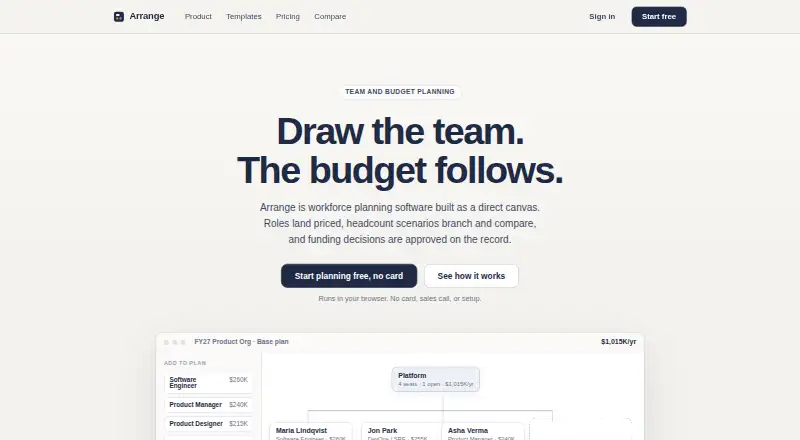
Arrange is browser-based workforce planning software for leaders, Finance teams, and department planners. It connects organization structure with workforce cost planning through a canvas and editable grid, covering teams, roles, reporting lines, filled and proposed positions, dates, loaded costs, vendors, and fractional allocations. It is suited to teams planning future organizations, comparing headcount options, and checking whether proposed positions fit funding envelopes. Arrange is positioned as a planning layer rather than a replacement for an HRIS.
The free plan provides one browser-local plan, the full canvas and editable grid, benchmark rates in seven currencies, two scenarios with cost differences, and watermarked PowerPoint export. Pro is listed at $29 per workspace per month with monthly billing or $24 per workspace per month with annual billing. It adds unlimited plans and scenarios, cloud sync, private share links, editable PowerPoint exports, PowerPoint and Excel import, named versions, and comparison history. Team is listed at $149 per workspace per month monthly or $124 per workspace per month annually, adding funding requests, approvals, verified reviewer invites, checks, comments, conditions, a decision ledger, and an audit record. These Pro and Team prices are planned launch prices, while accessible early-access features remain free until billing opens.
Arrange’s strongest fit is a structured planning workflow that carries position changes through scenario comparisons, monthly cost calculations, funding checks, review conditions, and approval history. Its PowerPoint and Excel support also fits teams that already communicate plans through those formats. The trade-off is a narrow platform footprint: it is web-only, has no integrations, and includes no AI features. Teams seeking connected HR or finance workflows, AI-assisted planning, or a broader HRIS replacement should choose another product. Arrange makes more sense for budget-conscious teams that need a dedicated planning workspace without committing to a larger workforce system.
Arrange pricing
All 3 Arrange plans and prices →
Arrange fact sheet
| Free plan | Yes |
|---|---|
| Paid from | Not verified |
| Scenario modeling | Yes |
| Compensation planning | Yes |
| Headcount forecasting | Yes |
| Org chart planning | Yes |
| Budget variance tracking | Yes |
| Planning horizon | Annual |
| Free trial | 14 days · no card needed |
| Deployment | Cloud, Browser extension |
| Platforms | Web |
| Compliance & security | GDPR |
| Support | |
| Built for | Small business, Mid-market (editorial estimate) |
| Pricing | Free plan · 14-day trial (source) |
| Website | witharrange.com |
| Facts checked | 20 Sep 2026 |
Alternatives to Arrange
- Nakisa Workforce PlanningA broad workforce planning portfolio for complex enterprise organizations.9.0
- Visier Workforce PlanningPredictive workforce planning that connects headcount, costs, scenarios, and budgets.8.2
- OrgvuePosition-level workforce planning for modeling change, cost, skills, and structure.7.7



See all Arrange alternatives →
Arrange vs the competition
- Arrange vs Nakisa Workforce Planning
- Arrange vs Visier Workforce Planning
- Arrange vs Orgvue
- Arrange vs Radix Workforce Planning
- Arrange vs TalentNeuron
- Arrange vs PeoplePLAN


Compare Arrange with any tool side by side →
Used Arrange? Be the first to review it
The editor score above is our own research. What this page doesn't have yet is a reader's view — what you used Arrange for, what worked and what didn't. No stars are seeded and no review is paid for; an editor reads every one before it appears.
Write a reviewTwo minutes · verified accounts only · read by an editor before it appears
Featured on iTechGuides

Arrange is listed in our Workforce Planning Software directory. Add the badge to your site — it links back to this page.
<a href="https://www.itechguides.com/products/arrange/"><img src="https://www.itechguides.com/best/badge/arrange.svg" alt="Featured on iTechGuides" width="230" height="46"></a>
Reviewed by iTechGuides Editors · Editorial team · Updated Sep 2026
Advertiser disclosure: iTechGuides is reader-supported. We may earn a commission when you click some links. How we rank.
Last updated · How we research and update