
AnyToISO
AnyToISO: A flexible Windows and macOS ISO utility with a useful free tier and broad conversion support. Ranked #6 of 32 in ISO Creation Software by our editors (8.6/10); pricing: Free plan; best for cross-platform ISO conversion.
At a glance
- Editor score8.6 / 10
- PricingFree plan
- Best forCross-platform ISO conversion
- Free planYes
- Disc burningNo
- Facts checked20 Sep 2026
Where it wins
- Creates ISO images from discs, files, folders, and supported archives
- Preserves supported boot information and supports BIN/CUE creation
- Adds Explorer, Finder, command-line, and portable Windows operation
Where it doesn't
- The free Lite edition limits files to 870 MB
- It does not burn discs
- Some licenses are platform-specific
Our verdict on AnyToISO
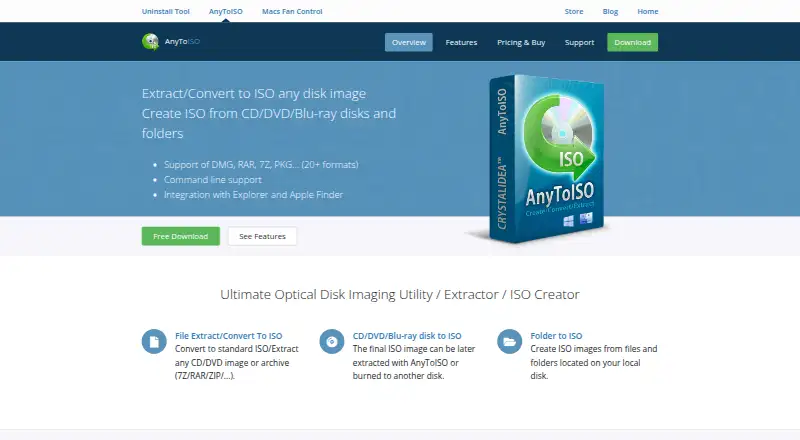
AnyToISO is a desktop utility for Windows and macOS focused on creating, extracting, and converting disc images and archives. It can create ISO images from CD, DVD, and Blu-ray discs as well as files and folders, while converting supported formats to standard ISO. It also creates BIN/CUE raw images from multisession optical media and preserves supported filesystem and boot information. This makes it a practical fit for users who need cross-platform ISO conversion, optical-media imaging, or archive extraction rather than disc burning.
The pricing structure starts with the free Lite plan, which supports files up to 870 MB. The Standard Pro License for Windows costs $22.95 one-time and includes lifetime technical support and volume discounts. The Portable Pro License for Windows costs $34.95 one-time and adds single-user, multiple-PC, and portable USB operation. The Windows and macOS license costs $29.95 one-time and includes lifetime technical support and volume discounts. Bundle options pair AnyToISO with Image Uninstall Tool at $34.95 for the Standard License or $59.95 for the Portable License. The standalone macOS Pro plan is listed separately, while its price is not shown here.
Platform fit is a central strength. Windows Explorer and macOS Finder integration keeps core actions close to the operating system, while command-line batch operations support repeatable processing. Windows users can also run the software from a USB flash drive with the portable license. Its format coverage includes ISO, BIN, IMG, DMG, NRG, RAR, ZIP, TAR variants, and other supported image and archive types. Choose AnyToISO when conversion, extraction, boot preservation, and cross-platform access matter. Choose another tool if disc burning is a requirement.
Your product? Our editors can test AnyToISO in depth and publish a review, labelled as paid · from $149/mo →
AnyToISO pricing
All 7 AnyToISO plans and prices →
AnyToISO fact sheet
| Free plan | Yes |
|---|---|
| Paid from | Not verified |
| Disc burning | No |
| Image editing | Not verified |
| Image conversion | Yes |
| Bootable media | Not verified |
| Image formats | 7Z, B5I, B6I, BIN, CDI, CPIO, CPGZ, CPBZ2, DAA, DEB, DMG, GBI, IMG, ISO, ISZ, MDF, NRG, PDI, PKG, RAR, RPM, TAR, TAR.GZ, GZIP, TAR.BZ2, TGZ, TBZ2, TAR.XZ, UIF, XAR, ZIP |
| Operating systems | Cross-platform |
| Checksum verification | Not verified |
| Deployment | Desktop |
| Platforms | Windows, macOS |
| Support | Email, Tickets, Docs |
| Built for | Solo, Small business, Mid-market, Enterprise (editorial estimate) |
| Integrations | 2 integrations: Windows Explorer, macOS Finder |
| Pricing | Free plan (source) |
| Website | crystalidea.com |
| Facts checked | 20 Sep 2026 |
AnyToISO integrations
AnyToISO lists 2 integrations on its own site.
- Windows Explorer
- macOS Finder
Alternatives to AnyToISO
- Open Burning SuiteA broad, free toolkit for creating, converting, burning, and verifying disc images.9.4
- Disc StudioA broad free ISO utility for Windows users who need local image and boot-media control.9.2
- AnyBurnA broad free Windows toolkit for ISO creation, editing, conversion, and burning.9.0


See all AnyToISO alternatives →
AnyToISO vs the competition
- AnyToISO vs Open Burning Suite
- AnyToISO vs Disc Studio
- AnyToISO vs AnyBurn
- AnyToISO vs GNU xorriso
- AnyToISO vs UltraISO
- AnyToISO vs SysTools ISO Creator

Compare AnyToISO with any tool side by side →
Also Ranked In
AnyToISO is ranked in 2 of our directories.
Used AnyToISO? Be the first to review it
The editor score above is our own research. What this page doesn't have yet is a reader's view — what you used AnyToISO for, what worked and what didn't. No stars are seeded and no review is paid for; an editor reads every one before it appears.
Write a reviewTwo minutes · verified accounts only · read by an editor before it appears
Featured on iTechGuides

AnyToISO is listed in our ISO Creation Software directory. Add the badge to your site — it links back to this page.
<a href="https://www.itechguides.com/products/anytoiso/"><img src="https://www.itechguides.com/best/badge/anytoiso.svg" alt="Featured on iTechGuides" width="230" height="46"></a>
Reviewed by iTechGuides Editors · Editorial team · Updated Oct 2026
Advertiser disclosure: iTechGuides is reader-supported. Vendors can pay for top positions in our rankings and for a place on other products' pages, and we may earn a commission when you click some links. Bought places stand at the number bought; this page and our disclosure say so. Paying vendors may get a fuller, more detailed review from our editors, and that review can change their score. How we rank.
Last updated · How we research and update