AMD Auto-Detect and Install Tool
AMD Auto-Detect and Install Tool: A free Windows utility for detecting AMD hardware and managing compatible driver downloads. Ranked #17 of 23 in Game Driver Updaters by our editors (6.9/10); pricing: Free plan; best for AMD Radeon and Ryzen users.
At a glance
- Editor score6.9 / 10
- PricingFree plan
- Best forAMD Radeon and Ryzen users
- Free planYes
- Paid fromFree
- Hardware scopeGraphics-and-other
- Facts checked20 Sep 2026
Where it wins
- Detects compatible Radeon graphics and Ryzen chipset hardware
- Offers Recommended and Optional driver packages
- Supports Default, Minimal, and Driver Only installations
Where it doesn't
- Works only on Windows systems with supported AMD hardware
- Does not provide automatic driver installation
- Does not include driver rollback
Our verdict on AMD Auto-Detect and Install Tool
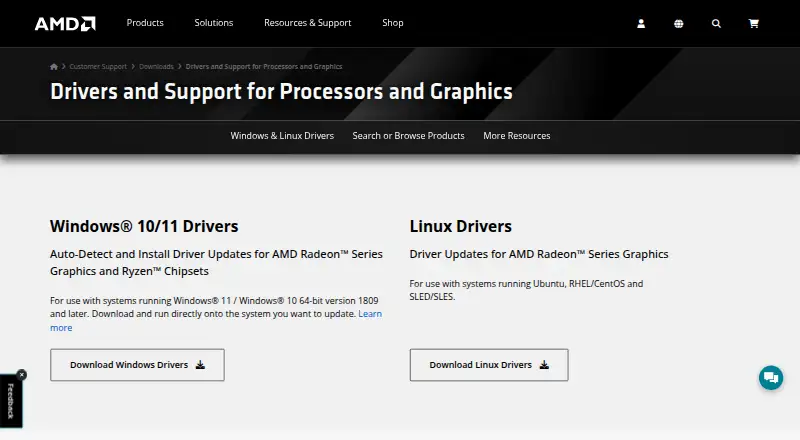
AMD Auto-Detect and Install Tool is a free Windows utility for systems with compatible AMD Radeon graphics or AMD Ryzen chipsets. It checks the installed Windows version, identifies supported AMD hardware, and downloads current supporting drivers. The tool supports Windows 11 version 21H2 and later, plus Windows 10 64-bit version 1809 and later. AMD systems with other products, unsupported hardware, or other operating systems require manual driver selection through AMD’s driver-support site.
Its main strength is focused detection and installation choice. After checking the system, the tool lists Recommended and Optional driver packages rather than presenting only one path. Installation can use Default, Minimal, or Driver Only modes, and an optional Factory Reset is available during installation. This gives Radeon and Ryzen users control over how much AMD software is installed, while keeping the workflow centered on compatible AMD drivers. The tool can also enable automatic updates for AMD software, although automatic driver installation is not provided.
The narrow hardware scope is the key consideration. This is a practical fit for Windows PCs using supported AMD Radeon graphics or Ryzen chipsets, particularly when manual hardware identification would add extra steps. It is not a general-purpose updater for mixed-vendor systems, and it does not offer driver rollback. Buyers who need support beyond AMD hardware, another operating system, or rollback controls should choose a different tool or use manual driver selection. For supported AMD systems, the free price and three installation modes make it a focused option for obtaining current drivers.
Your product? Our editors can test AMD Auto-Detect and Install Tool in depth and publish a review, labelled as paid · from $149/mo →
AMD Auto-Detect and Install Tool pricing
AMD Auto-Detect and Install Tool fact sheet
| Free plan | Yes |
|---|---|
| Paid from | Free |
| Supported platforms | Windows |
| Hardware scope | Graphics-and-other |
| Automatic scanning | Yes |
| Automatic installation | No |
| Driver rollback | No |
| Offline mode | Not verified |
| Device limit | Not verified |
| Deployment | Desktop |
| Platforms | Windows |
| Support | Docs |
| Built for | Solo, Small business, Mid-market, Enterprise (editorial estimate) |
| Pricing | Free plan |
| Website | amd.com |
| Facts checked | 20 Sep 2026 |
Alternatives to AMD Auto-Detect and Install Tool
- Driver BoosterA broad Windows driver updater with gaming tools, rollback, and offline support.9.4
- DriverPack SolutionA free Windows driver tool with online, offline, automatic, and expert installation modes.9.2
- Snappy Driver Installer OriginA free, open-source driver updater built for offline and portable Windows workflows.9.1

See all AMD Auto-Detect and Install Tool alternatives →
Used AMD Auto-Detect and Install Tool? Be the first to review it
The editor score above is our own research. What this page doesn't have yet is a reader's view — what you used AMD Auto-Detect and Install Tool for, what worked and what didn't. No stars are seeded and no review is paid for; an editor reads every one before it appears.
Write a reviewTwo minutes · verified accounts only · read by an editor before it appears
Featured on iTechGuides

AMD Auto-Detect and Install Tool is listed in our Game Driver Updaters directory. Add the badge to your site — it links back to this page.
<a href="https://www.itechguides.com/products/amd-auto-detect-and-install-tool/"><img src="https://www.itechguides.com/best/badge/amd-auto-detect-and-install-tool.svg" alt="Featured on iTechGuides" width="230" height="46"></a>
Reviewed by iTechGuides Editors · Editorial team · Updated Oct 2026
Advertiser disclosure: iTechGuides is reader-supported. Vendors can pay for top positions in our rankings and for a place on other products' pages, and we may earn a commission when you click some links. Bought places stand at the number bought; this page and our disclosure say so. Paying vendors may get a fuller, more detailed review from our editors, and that review can change their score. How we rank.
Last updated · How we research and update