ALTer
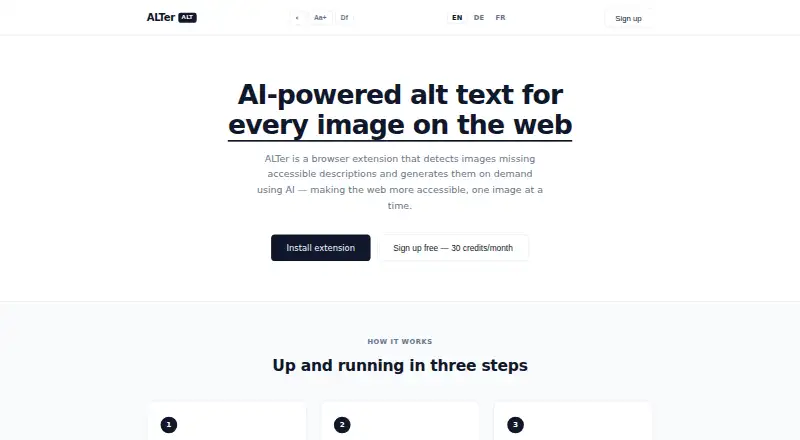
ALTer: A focused, free Chrome extension for checking and improving image descriptions. Ranked #25 of 27 in AI Alt Text Generators by our editors (5.3/10); pricing: Free plan; best for free browser-based accessibility checks.
At a glance
- Editor score5.3 / 10
- PricingFree plan
- Best forFree browser-based accessibility checks
- Free planYes
- Paid fromNone
- Facts checked21 Sep 2026
Where it wins
- Detects images without accessible descriptions
- Generates and injects AI descriptions into image alt attributes
- Offers 30 free credits monthly with screen reader support
Where it doesn't
- Works as a Chrome extension rather than across multiple platforms
- No bulk processing for handling many images at once
- No API access or integrations for broader workflows
Our verdict on ALTer
ALTer is a free Chrome browser extension for people who need better access to image descriptions while browsing the web. It detects images without accessible descriptions, displays an ALT badge over them, and generates alt text with AI. The generated description is injected into the image’s alt attribute and made available to screen readers, making the product especially relevant to blind and low-vision users and to anyone checking accessibility during everyday browsing.
The workflow is focused and browser-based. When an image lacks alt text, the ALT badge identifies it; selecting the badge generates a description and adds it to the image’s alt attribute. This gives ALTer a clear role in accessibility checks and on-page image review, rather than positioning it as a broader content or publishing system. Its platform scope is limited to a Chrome extension, so it fits users who work directly in Chrome and need an in-browser way to identify and improve image descriptions.
The free plan provides 30 credits per month, with one credit used for each image description. That allowance makes ALTer suitable for occasional checks and individual browsing, but users handling large image collections may find the credit-based workflow restrictive. Bulk processing, API access, integrations, and broader platform coverage are not part of its stated scope. Choose ALTer for a free, focused way to generate alt text while browsing; choose another tool if you need batch workflows, connected systems, or use beyond Chrome.
ALTer pricing
ALTer fact sheet
| Free plan | Yes |
|---|---|
| Paid from | None |
| Bulk processing | Not verified |
| API access | Not verified |
| CMS plugins | Not verified |
| Supported languages | Not verified |
| Image formats | Not verified |
| Custom generation rules | Not verified |
| Publishing workflows | Yes |
| Deployment | Browser extension |
| Platforms | Chrome extension |
| Built for | Solo, Small business (editorial estimate) |
| Pricing | Free plan |
| Website | alteralt.com |
| Facts checked | 21 Sep 2026 |
Alternatives to ALTer
- AltTextLabA multilingual alt-text generator with broad CMS, commerce, browser, and API coverage.9.8
- Alt Text StudioA multilingual alt-text workflow with bulk tools, SEO controls, and CMS integrations.8.8
- AltText.aiA capable choice for multilingual teams managing alt text across many content systems.8.3



Used ALTer? Be the first to review it
The editor score above is our own research. What this page doesn't have yet is a reader's view — what you used ALTer for, what worked and what didn't. No stars are seeded and no review is paid for; an editor reads every one before it appears.
Write a reviewTwo minutes · verified accounts only · read by an editor before it appears
Featured on iTechGuides

ALTer is listed in our AI Alt Text Generators directory. Add the badge to your site — it links back to this page.
<a href="https://www.itechguides.com/products/alter/"><img src="https://www.itechguides.com/best/badge/alter.svg" alt="Featured on iTechGuides" width="230" height="46"></a>
Reviewed by iTechGuides Editors · Editorial team · Updated Sep 2026
Advertiser disclosure: iTechGuides is reader-supported. We may earn a commission when you click some links. It never changes a score or a verdict. How we rank.
Last updated · How we research and update