
Actual Multiple Monitors
Actual Multiple Monitors: A feature-rich Windows utility for managing taskbars and desktops across multiple monitors. Ranked #10 of 34 in Taskbar Customization Software by our editors (7.6/10); pricing: 30-day trial; best for powerful multi-monitor taskbar management.
At a glance
- Editor score7.6 / 10
- Pricing30-day trial
- Best forPowerful multi-monitor taskbar management
- Free planNo
- Paid from$34.95 one-time
- PlatformWindows
- Founded2001
- Facts checked20 Sep 2026
Where it wins
- Adds taskbars with Start, notification area, clock and toolbars per monitor
- Supports taskbar positioning, transparency, grouping and custom groups
- Includes profiles, window controls, wallpaper management and gaming options
Where it doesn't
- Windows-only platform support
- No permanent free plan after the trial period
- Broader desktop controls may exceed the needs of basic taskbar users
Our verdict on Actual Multiple Monitors
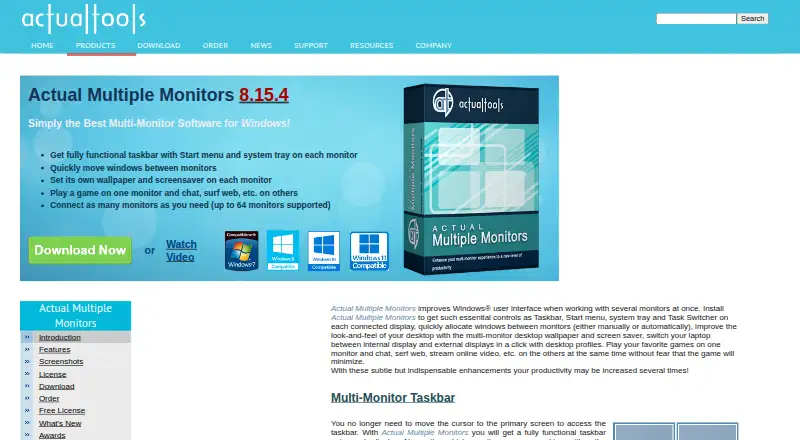
Actual Multiple Monitors extends the Windows desktop across dual-, triple- or larger multi-display setups. It adds taskbars, Start menus, system trays and task switching to additional monitors, while also supporting window movement, desktop profiles, wallpaper management, desktop mirroring and multi-monitor gaming controls. It is intended for Windows users at home or in corporate environments who need more control than a single shared taskbar provides.
Pricing is straightforward: the Single-User License costs $34.95 as a one-time payment. The product includes a 30-day fully functional trial, and registration removes the trial-period limitation. The plan also includes a 30-day money-back guarantee. For taskbar customization, the feature depth is notable: users can choose individual, mirror or mixed taskbar modes; position taskbars on the left, top, right or bottom edge of a monitor; adjust transparency from opaque to fully transparent; and group taskbar buttons or create custom groups. The product does not offer a permanent free plan.
Its broader desktop feature set is a practical fit for users managing several displays rather than only changing taskbar appearance. Desktop profiles can store display layouts and settings, while window movement, maximize-to-desktop controls, snapping and hotkeys support multi-screen workflows. Multi-monitor wallpaper, screen-saver, mirroring and gaming controls extend the utility beyond taskbars. The trade-off is platform scope: it is designed for Windows, with no listed support for other platforms. Choose it if multi-monitor taskbars and related desktop controls are central to your workflow; choose a narrower taskbar customization tool if you only need basic visual changes on one display.
Your product? Our editors can test Actual Multiple Monitors in depth and publish a review, labelled as paid · from $149/mo →
Actual Multiple Monitors pricing
All 1 Actual Multiple Monitors plans and prices →
Actual Multiple Monitors fact sheet
| Free plan | No |
|---|---|
| Paid from | $34.95 one-time |
| Platform | Windows |
| Taskbar positioning | Yes |
| Transparency controls | Yes |
| App grouping controls | Yes |
| Multi-monitor support | Yes |
| Taskbar sizing | Yes |
| Portable version | Not verified |
| Free trial | 30 days |
| Money-back guarantee | 30 days |
| Deployment | Desktop |
| Platforms | Windows |
| Support | Email, Community, Docs |
| Built for | Solo, Small business, Mid-market, Enterprise (editorial estimate) |
| Pricing | 30-day trial (source) |
| Website | actualtools.com |
| Facts checked | 20 Sep 2026 |
Alternatives to Actual Multiple Monitors
- ObjectDockA feature-rich Windows dock replacement with strong customization and multi-monitor support.9.2
- TaskbarXA free, portable Windows 10 taskbar customizer with limited modern Windows 11 support.8.8
- YASB RebornA flexible Windows taskbar replacement for users comfortable with deep customization.8.6


See all Actual Multiple Monitors alternatives →
Also Ranked In
Actual Multiple Monitors is ranked in 2 of our directories.
Used Actual Multiple Monitors? Be the first to review it
The editor score above is our own research. What this page doesn't have yet is a reader's view — what you used Actual Multiple Monitors for, what worked and what didn't. No stars are seeded and no review is paid for; an editor reads every one before it appears.
Write a reviewTwo minutes · verified accounts only · read by an editor before it appears
Featured on iTechGuides

Actual Multiple Monitors is listed in our Taskbar Customization Software directory. Add the badge to your site — it links back to this page.
<a href="https://www.itechguides.com/products/actual-multiple-monitors/"><img src="https://www.itechguides.com/best/badge/actual-multiple-monitors.svg" alt="Featured on iTechGuides" width="230" height="46"></a>
Reviewed by iTechGuides Editors · Editorial team · Updated Oct 2026
Advertiser disclosure: iTechGuides is reader-supported. Vendors can pay for top positions in our rankings and for a place on other products' pages, and we may earn a commission when you click some links. Bought places stand at the number bought; this page and our disclosure say so. Paying vendors may get a fuller, more detailed review from our editors, and that review can change their score. How we rank.
Last updated · How we research and update