Active@ Partition Manager
Active@ Partition Manager: A free Windows partition manager with broad filesystem and boot-media support. Ranked #14 of 22 in Disk Partition Software by our editors (7.6/10); pricing: Free plan · 21-day trial; best for budget-conscious users needing broad filesystem support.
At a glance
- Editor score7.6 / 10
- PricingFree plan · 21-day trial
- Best forBudget-conscious users needing broad filesystem support
- Free planYes
- Paid fromFree
- Partition table supportBoth
- Founded1999 · Mississauga, Ontario, Canada
- Facts checked22 Sep 2026
Where it wins
- Freeware plan covers core partition management under Windows
- Supports FAT, NTFS, exFAT, ReFS, HFS+, Linux, Unix, and BtrFS filesystems
- Includes MBR/GPT tools, boot-sector editing, rollback, and bootable media
Where it doesn't
- Windows only
- Does not provide verified partition move operations
- Does not provide verified partition merge operations
Our verdict on Active@ Partition Manager
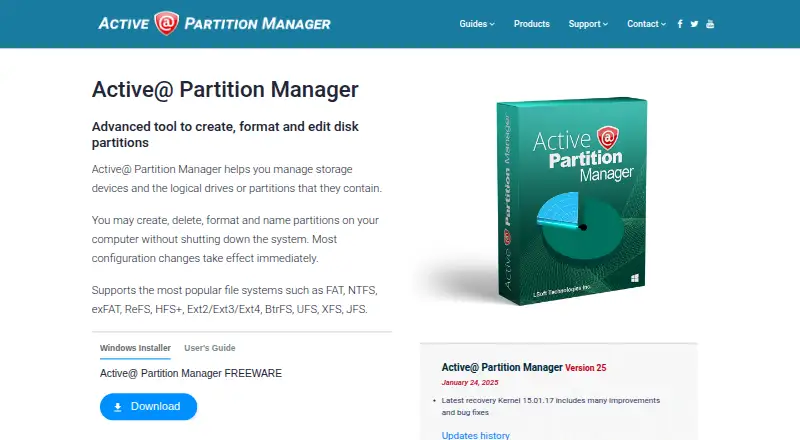
Active@ Partition Manager is a Windows utility for creating, deleting, formatting, naming, and inspecting partitions, logical drives, and disks. It is suited to budget-conscious users who need broad filesystem support and disk-structure tools without a paid base plan. The software supports FAT, NTFS, exFAT, ReFS, HFS+, Ext2, Ext3, Ext4, BtrFS, UFS, XFS, and JFS. It can also initialize disks as MBR or GPT, convert between those partition styles, edit partition tables, and manage boot sectors.
The published plans show a Freeware option with core partition management under Windows. A PRO trial is fully functional for 21 days, while no current paid price is specified here. Features include creating, deleting, formatting, and managing partitions, plus creating multiple partitions on USB flash devices. Rollback for partition layout changes adds a recovery-oriented control, and the ability to boot from CD, DVD, or USB flash media supports access to non-bootable systems.
Active@ Partition Manager has a broad storage-management scope, but its partition-editing depth is narrower where moving or merging partitions is concerned. That makes it a practical choice for creating and maintaining partition layouts, converting between MBR and GPT, inspecting disk properties, and working across varied filesystems. Users who need verified move or merge operations should choose an alternative with those capabilities. The Windows-only platform also limits its fit for users managing disks from another operating system.
Your product? Our editors can test Active@ Partition Manager in depth and publish a review, labelled as paid · from $149/mo →
Active@ Partition Manager pricing
Active@ Partition Manager fact sheet
| Free plan | Yes |
|---|---|
| Paid from | Free |
| Bootable media | Yes |
| Partition table support | Both |
| Filesystem support | FAT, NTFS, exFAT, ReFS, HFS+, Ext2/Ext3/Ext4, BtrFS, UFS, XFS, JFS |
| Operating systems | Windows |
| Move partitions | No |
| Merge partitions | No |
| Free trial | 21 days |
| Deployment | Desktop |
| Platforms | Windows |
| Support | Email, Phone, Tickets, Docs |
| Built for | Solo, Small business, Mid-market (editorial estimate) |
| Pricing | Free plan · 21-day trial |
| Website | pcdisk.com |
| Facts checked | 22 Sep 2026 |
Alternatives to Active@ Partition Manager
- EaseUS Partition MasterA broad freemium toolkit for partition changes, cloning, migration, and recovery.9.4
- AOMEI Partition AssistantA Windows-focused partition manager with a free edition and lifetime paid options.9.2
- GPartedA free, open-source partition editor with unusually broad filesystem support.9.0


See all Active@ Partition Manager alternatives →
Also Ranked In
Active@ Partition Manager is ranked in 2 of our directories.
Used Active@ Partition Manager? Be the first to review it
The editor score above is our own research. What this page doesn't have yet is a reader's view — what you used Active@ Partition Manager for, what worked and what didn't. No stars are seeded and no review is paid for; an editor reads every one before it appears.
Write a reviewTwo minutes · verified accounts only · read by an editor before it appears
Featured on iTechGuides

Active@ Partition Manager is listed in our Disk Partition Software directory. Add the badge to your site — it links back to this page.
<a href="https://www.itechguides.com/products/active-partition-manager/"><img src="https://www.itechguides.com/best/badge/active-partition-manager.svg" alt="Featured on iTechGuides" width="230" height="46"></a>
Reviewed by iTechGuides Editors · Editorial team · Updated Oct 2026
Advertiser disclosure: iTechGuides is reader-supported. Vendors can pay for top positions in our rankings and for a place on other products' pages, and we may earn a commission when you click some links. Bought places stand at the number bought; this page and our disclosure say so. Paying vendors may get a fuller, more detailed review from our editors, and that review can change their score. How we rank.
Last updated · How we research and update