
AccioPix Photo Culling
AccioPix Photo Culling: A free web tool for fast AI-assisted culling and Lightroom-ready decisions. Ranked #5 of 29 in AI Photo Culling Software by our editors (7.7/10); pricing: Free plan; best for free web-based Lightroom culling.
At a glance
- Editor score7.7 / 10
- PricingFree plan
- Best forFree web-based Lightroom culling
- Free planYes
- Paid fromNone
- AI quality scoringYes
- Facts checked20 Sep 2026
Where it wins
- AI scores quality and appeal, with reasons behind each verdict
- Detects faces, subjects, blur, closed eyes, and near-duplicates
- Exports XMP sidecars for Lightroom star-rating workflows
Where it doesn't
- Web-only access limits use to browser-based workflows
- RAW support relies on embedded JPEG previews
- Narrower feature set than paid desktop culling suites
Our verdict on AccioPix Photo Culling
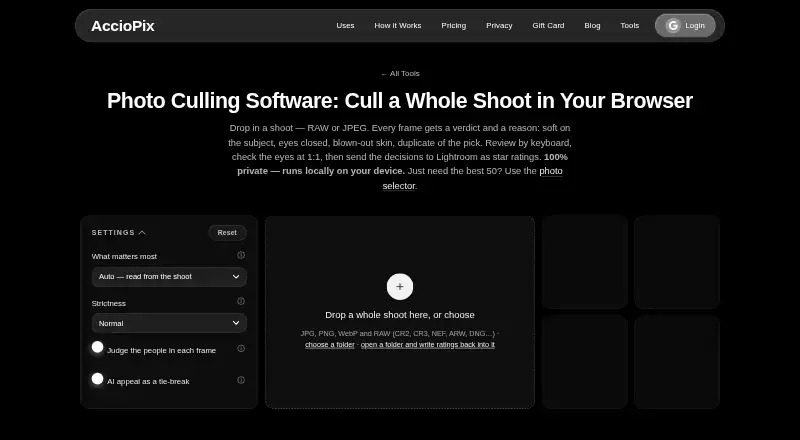
AccioPix Photo Culling is a free browser tool for photographers reviewing large shoots. It analyzes JPEG and RAW files locally in the browser, assessing image quality and appeal while checking subject sharpness, open eyes, exposure, and overall appeal. Face and subject detection, closed-eye detection, blur checks, and duplicate grouping help identify frames that may need attention. The tool requires no sign-up, adds no watermark, and processes photos on the user's device. It is aimed at photographers who want a lightweight culling step before working in Lightroom.
Its standout feature is the combination of AI-assisted scoring and practical review controls. AccioPix assigns verdicts with reasons, supports keyboard-based review, and groups duplicate and near-duplicate frames. RAW files are supported through embedded JPEG previews, which gives the browser tool a way to evaluate RAW-based shoots without positioning it as a full desktop RAW editor. The workflow can also produce XMP sidecars, keeper lists, and CSV files, with Adobe Lightroom listed as the integration. That makes the product most suitable for selecting and rating images rather than completing broader post-production work.
The published Free plan costs 0 and includes no sign-up, no watermark, and local browser processing. Its main trade-off is platform scope: AccioPix is web-only, and its feature set is narrower than paid desktop suites. Photographers who want free AI-assisted culling, keyboard review, duplicate grouping, and Lightroom export should find the feature mix well aligned with that workflow. Those seeking a desktop application or a broader suite of culling capabilities should consider a different tool.
AccioPix Photo Culling pricing
All 1 AccioPix Photo Culling plans and prices →
AccioPix Photo Culling fact sheet
| Free plan | Yes |
|---|---|
| Paid from | None |
| AI quality scoring | Yes |
| Subject detection | Yes |
| Duplicate detection | Yes |
| RAW photo support | Yes |
| Blur detection | Yes |
| Closed-eye detection | Yes |
| Lightroom export | Yes |
| Deployment | Cloud |
| Platforms | Web |
| Support | |
| Built for | Solo, Small business, Mid-market (editorial estimate) |
| Integrations | 1 integrations: Adobe Lightroom |
| Pricing | Free plan (source) |
| Website | acciopix.com |
| Facts checked | 20 Sep 2026 |
AccioPix Photo Culling integrations
AccioPix Photo Culling lists 1 integrations on its own site.
- Adobe Lightroom
Alternatives to AccioPix Photo Culling
- AftershootAn all-in-one desktop workflow for high-volume photo post-production.9.0
- FacetA free, open-source culling engine with broad AI analysis and local deployment.8.2
- OptyxA budget-friendly Lightroom companion for AI-assisted photo selection.7.9


See all AccioPix Photo Culling alternatives →
AccioPix Photo Culling vs the competition
- AccioPix Photo Culling vs Aftershoot
- AccioPix Photo Culling vs Facet
- AccioPix Photo Culling vs Optyx
- AccioPix Photo Culling vs FilterPixel
- AccioPix Photo Culling vs Narrative Select
- AccioPix Photo Culling vs Futura Photo



Compare AccioPix Photo Culling with any tool side by side →
Used AccioPix Photo Culling? Be the first to review it
The editor score above is our own research. What this page doesn't have yet is a reader's view — what you used AccioPix Photo Culling for, what worked and what didn't. No stars are seeded and no review is paid for; an editor reads every one before it appears.
Write a reviewTwo minutes · verified accounts only · read by an editor before it appears
Featured on iTechGuides

AccioPix Photo Culling is listed in our AI Photo Culling Software directory. Add the badge to your site — it links back to this page.
<a href="https://www.itechguides.com/products/acciopix-photo-culling/"><img src="https://www.itechguides.com/best/badge/acciopix-photo-culling.svg" alt="Featured on iTechGuides" width="230" height="46"></a>
Reviewed by iTechGuides Editors · Editorial team · Updated Sep 2026
Advertiser disclosure: iTechGuides is reader-supported. We may earn a commission when you click some links. How we rank.
Last updated · How we research and update