
4DDiG Partition Manager
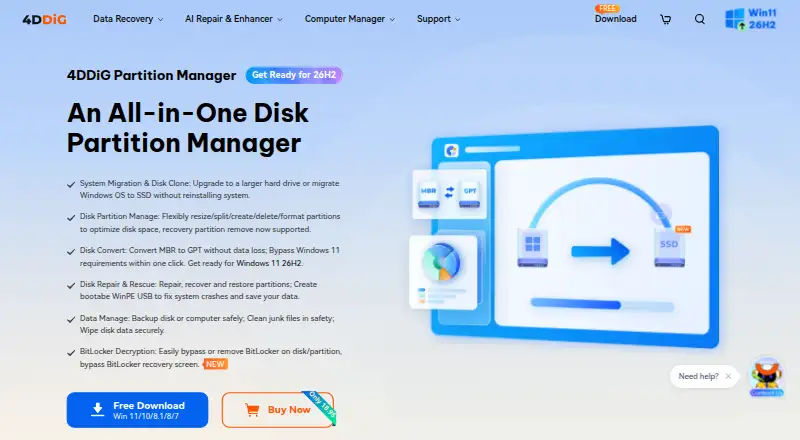
4DDiG Partition Manager: A feature-rich Windows partition tool, but there is no free plan or cross-platform support. Ranked #9 of 22 in Disk Partition Software by our editors (8.2/10); pricing: 7-day trial; best for windows users wanting comprehensive paid features.
At a glance
- Editor score8.2 / 10
- Pricing7-day trial
- Best forWindows users wanting comprehensive paid features
- Free planNo
- Paid from$40.95/device/yr
- Partition table supportBoth
- Founded2007 · Hong Kong
- Facts checked22 Sep 2026
Where it wins
- Combines partition editing, cloning, migration, conversion, and recovery
- Creates WinPE bootable media for partition and boot-repair tasks
- Supports NTFS, exFAT, FAT16, and FAT32 filesystems
Where it doesn't
- Windows-only coverage limits it to Microsoft operating systems
- There is no free plan for ongoing use
- The monthly license starts at $18.95 per license
Our verdict on 4DDiG Partition Manager
4DDiG Partition Manager is Windows software for home users who need more than basic partition resizing. It covers resizing and moving partitions, splitting and merging adjacent partitions, formatting, deletion, drive-letter changes, cloning, and Windows migration to another HDD or SSD. The broader toolkit also includes MBR/GPT conversion, partition recovery and repair, boot repair, backup and restore, secure disk wiping, and BitLocker-related tools. The vendor lists support for Windows 11, 10, 8.1, 8, and 7, with NTFS, exFAT, FAT16, and FAT32 filesystem support.
Pricing is structured around three paid licenses. The 1 Month License costs $18.95 per license per month and covers 1 PC, while adding cloning, Windows system migration, partition recovery and repair, and MBR/GPT conversion. The 1 Year License costs $40.95 per license per year and offers licensing options for 1, 5, 10, or unlimited PCs with the same core capabilities. The Lifetime License costs $59.95 as a one-time purchase for 1 PC and includes lifetime free upgrades. A 7-day free trial is available, but there is no free plan. The pricing page displays USD prices excluding tax.
Its strongest distinction is breadth: partition editing sits alongside cloning, migration, conversion, recovery, backup, wiping, and WinPE bootable-media creation. That makes it a practical fit for Windows users managing upgrades, disk changes, partition repairs, or system moves in one application. However, the platform scope is narrow because it supports Windows only, and users seeking a free long-term option will need to look elsewhere. Choose 4DDiG Partition Manager when comprehensive paid Windows coverage matters; consider an alternative for other operating systems or a no-cost workflow.
Your product? Our editors can test 4DDiG Partition Manager in depth and publish a review, labelled as paid · from $149/mo →
4DDiG Partition Manager pricing
All 3 4DDiG Partition Manager plans and prices →
4DDiG Partition Manager fact sheet
| Free plan | No |
|---|---|
| Paid from | $40.95/device/yr |
| Bootable media | Yes |
| Partition table support | Both |
| Filesystem support | NTFS, exFAT, FAT16, FAT32 |
| Operating systems | Windows |
| Move partitions | Yes |
| Merge partitions | Yes |
| Free trial | 7 days |
| Money-back guarantee | 30 days |
| Deployment | Desktop |
| Platforms | Windows |
| Support | Email, Docs · 24/7 |
| Built for | Solo, Small business (editorial estimate) |
| Pricing | 7-day trial (source) |
| Website | 4ddig.tenorshare.com |
| Facts checked | 22 Sep 2026 |
Alternatives to 4DDiG Partition Manager
- EaseUS Partition MasterA broad freemium toolkit for partition changes, cloning, migration, and recovery.9.4
- AOMEI Partition AssistantA Windows-focused partition manager with a free edition and lifetime paid options.9.2
- GPartedA free, open-source partition editor with unusually broad filesystem support.9.0


See all 4DDiG Partition Manager alternatives →
Also Ranked In
4DDiG Partition Manager is ranked in 2 of our directories.
Used 4DDiG Partition Manager? Be the first to review it
The editor score above is our own research. What this page doesn't have yet is a reader's view — what you used 4DDiG Partition Manager for, what worked and what didn't. No stars are seeded and no review is paid for; an editor reads every one before it appears.
Write a reviewTwo minutes · verified accounts only · read by an editor before it appears
Featured on iTechGuides

4DDiG Partition Manager is listed in our Disk Partition Software directory. Add the badge to your site — it links back to this page.
<a href="https://www.itechguides.com/products/4ddig-partition-manager/"><img src="https://www.itechguides.com/best/badge/4ddig-partition-manager.svg" alt="Featured on iTechGuides" width="230" height="46"></a>
Reviewed by iTechGuides Editors · Editorial team · Updated Oct 2026
Advertiser disclosure: iTechGuides is reader-supported. Vendors can pay for top positions in our rankings and for a place on other products' pages, and we may earn a commission when you click some links. Bought places stand at the number bought; this page and our disclosure say so. Paying vendors may get a fuller, more detailed review from our editors, and that review can change their score. How we rank.
Last updated · How we research and update