
Murmure is a free, open-source dictation app for macOS that lets you speak text into different apps using a keyboard shortcut. Its developer says speech is transcribed on your Mac rather than uploaded, but that is a product claim—not an independently verified privacy guarantee. Here’s how it works, what macOS permissions it needs, and what to know before installing it.
What Murmure does on a Mac
Murmure is speech-to-text software, not a hardware product. After installation and setup, you use a shortcut to start or stop dictation; Murmure transcribes your speech and inserts the resulting text into the active app. That system-wide workflow can be useful in places where you can type, such as a document, email, or text field.
The project describes the app as free and open source under the GNU AGPL v3 license. Although this article focuses on macOS, Murmure’s documentation also lists Windows and Linux builds.
Recognition model and languages
Murmure identifies NVIDIA Parakeet TDT 0.6B v3 as its speech-recognition model and says transcription runs locally, including offline. The vendor lists support for 25 languages: Bulgarian, Croatian, Czech, Danish, Dutch, English, Estonian, Finnish, French, German, Greek, Hungarian, Italian, Latvian, Lithuanian, Maltese, Polish, Portuguese, Romanian, Slovak, Slovenian, Spanish, Swedish, Russian, and Ukrainian.
#1 Best Overall

- [Convenient Setup] Plug and play recording USB microphone for PC, with 5.9-Foot USB cable included for computer PC laptop, is connected directly to USB-A port for recording music, computer singing or podcast. The office condenser microphone for computer is easy to use and install. (NOT compatible with Xbox and Phones)
- [Durable Metal Design] Solid sturdy metal construction design, the computer microphone for Zoom meetings with stable tripod stand is convenient when you are doing voice overs or livestreams on YouTube. Durable material extends the service life of the voice-over microphone.
- [Mic Volume Knob] Gaming condenser USB mic compatible for PS4 with additional volume knob itself has a louder or quieter adjustment and is more sensitive. Your voice would be heard well enough through the zoom microphone USB when gaming, skyping or voice recording. Also, you can adjust your volume to zero and protect your privacy.
- [Widely Use] USB-powered design, the condenser microphone for recording no need the 48v Phantom power supply, works well with Cortana, Discord, voice chat and voice recognition. The podcast microphone for Mac, with USB-B to USB-A/C cable, is compatible with desktop, laptop or PS4/PS5, which meets most of your daily recording needs.
- [Clear Output Voice] Cardioid condenser microphone for PC captures your voice properly, producing clear smooth and crisp sound. Great computer recording mic for gamers/streamers/youtubers focus on the main source and reduces background noise. The streaming microphone does the job well for broadcast ,OBS and teamspeak.
Those are the project’s stated model, language, and processing details. The available information does not establish an independent accuracy comparison with macOS Dictation or other dictation apps.
Does Murmure send your voice recordings to the cloud?
Murmure’s official product page says, “Audio is transcribed on your machine, never uploaded.” The developer also says audio is deleted after transcription, the last five transcripts remain in memory (RAM) until you quit the app, transcripts are not written to logs, and the app has no telemetry, tracking, or account requirement.
Rank #2

- Custom three-capsule array: This professional USB mic produces clear, powerful, broadcast-quality sound for YouTube videos, Twitch game streaming, podcasting, Zoom meetings, music recording and more
- Blue VO!CE software: Elevate your streamings and recordings with clear broadcast vocal sound and entertain your audience with enhanced effects, advanced modulation and HD audio samples
- Four pickup patterns: Flexible cardioid, omni, bidirectional, and stereo pickup patterns allow you to record in ways that would normally require multiple mics, for vocals, instruments and podcasts
- Onboard audio controls: Headphone volume, pattern selection, instant mute, and mic gain put you in charge of every level of the audio recording and streaming process
- Positionable design: Pivot the mic in relation to the sound source to optimize your sound quality thanks to the adjustable desktop stand and track your voice in real time with no-latency monitoring
These are statements from the Murmure project, not findings from a code review, network-traffic inspection, or security audit. The homepage displayed version 1.11.3 when reviewed in 2026; privacy and data-handling details can change, so check the current release and privacy information if they matter to your decision.
Install Murmure and grant macOS permissions
The macOS guide provides separate DMG downloads for Apple Silicon and Intel Macs. Murmure says it needs three macOS permissions for its core workflow:
Rank #3

- 🎙️ Hands-Free Voice Typing for Windows & Mac – Powered by iOS & Android dictation technology, AI VoiceWriter allows fast, accurate speech-to-text directly on your desktop. Simply speak, and your words appear in real time. Compatible with Windows 10 & above, macOS 13 & above.
- ✍️ AI Writing Assistant for Effortless Editing – Boost productivity with AI proofreading, rephrasing, and formatting. Perfect for emails, reports, creative writing, and professional content.
- 💻 Works Seamlessly in Any Desktop App – Type with your voice in Microsoft Word, Google Docs, PowerPoint, Teams, emails, and more. Just place your cursor in any text field and start speaking!
- 📱 Mobile App for Enhanced Voice Input – The AI VoiceWriter mobile app enhances voice recognition by using your phone’s microphone as an input device for clearer, more accurate dictation—while typing on your desktop. Supports iOS 15 & above, Android 9.0 & above.
- 🌎 Multilingual Voice Typing & AI Assistance – Supports 33 languages for dictation, plus AI-powered features in Chinese, English, Japanese, Korean, French, German, Spanish, Italian and, Swedish.
- Microphone: to capture your speech.
- Accessibility: to simulate keyboard input or paste the recognized text into the active app.
- Input Monitoring: to detect the dictation shortcut.
Approve the requests in macOS privacy settings when prompted. If you grant permissions after setup, the guide says to restart Murmure so the changes take effect. The documentation reviewed also includes a one-time permission-reset note for upgrades from version 1.6.0 because its code signature changed; check the current guide before applying that version-specific fix.
Change the shortcut to avoid macOS conflicts
Murmure’s default shortcut, Ctrl+Space, conflicts with the macOS input-source switcher. The project recommends choosing another binding, such as Ctrl+Option+M, a function key, or a mouse button. Its guide cautions that shortcuts involving Space or number keys can leak characters into the active app, so test a new binding in a harmless text field before relying on it.
Rank #4
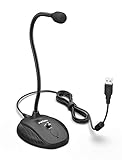
- [Smooth Recording] Flexible gooseneck design allows you to adjust the USB microphone for PC to your level, and features a cardioid polar pattern that with tailored response for speech maximizes intelligibility in speech while reducing the chance for feedback.A suitable solution for meetings and presentation applications,improve people's ability to hear within the Zoom video conference software.
- [USB Plug&Play] The gooseneck provides up to 12" (32.5cm) of length and easy-to-use microphone positioning. Connect the USB cardioid microphone to your laptop or PC via the USB connector and you're on your way to recording, chatting on Skype, Discord and meet all your computer-audio needs. Helps you record directly into your computer.
- [Stylish Design] Gooseneck computer microphone for Zoom meetings can be adjusted by the speaker to accommodate taller or shorter people and so forth. Low-profile and quite appealing gooseneck design making for a very clean appearance. Accurate positioning via bendy youtube microphone is a suitable solution for podiums, houses-of-worship, schools, conference and presentation applications.
- [Volume Knob & Mute Button] Easy for you to adjust the input volume for your condenser microphone, a silent mute switch with LED light can indicate when the computer recording microphone is active to speak. Sturdy weighted base with non-skid rubber mounts to table, desk ensures a firm support for long gooseneck for medical/legal reporting or conference. USB mic is suitable for Zoom meeting, podcasting and live chat, IP communication, vocal recording.
- [Solid Construction] Twitch stream recording vocals USB microphone for PC laptop with adjustable metal gooseneck and heavy-duty ABS base to make sure it stable to use. Non-detachable premium 6.56ft(2 meters) USB cable, a user manual and friendly technical support.
Mac requirements and microphone questions
Murmure recommends at least 2GB of available RAM and 1GB of disk space, and says a GPU is not needed. Its product information does not specify a required Mac model or external microphone. You can try the Mac’s built-in microphone; an external microphone is not established as a requirement.
These are the vendor’s stated recommendations, not independently tested minimum requirements. The product page does not specify whether those figures refer to a particular macOS release or workload.
Recommended Free Tools
Best Value

- Studio-Quality 192kHz / 24-Bit Audio: The desktop microphone's Integrated professional sound card delivers high-resolution recording and clear, natural voice capture for streaming, podcasting, online teaching and conferencing.
- ENC Noise Cancellation: Built-in ENC algorithm, the computer microphone significantly suppresses background noise so your voice comes through clean and intelligible in noisy environments.
- 9.7mm Condenser Capsule: With high-sensitivity Φ9.7mm condenser capsule, BOYA usb pc microphone captures fine vocal detail while comfortably handling up to 130 dB SPL for distortion-free performance.
- USB-C Plug & Play: BOYA laptop microphone is compatible with Windows, macOS and USB-C phones/tablets; dedicated 3.5mm headphone jack for real-time, latency-free monitoring.
- Easy Control & Stable Base: BOYA gooseneck microphone features stepless rotary knob for 0–30 dB gain control plus one-touch mute; 360° flexible gooseneck and anti-slip silicone base ensure easy positioning and rock-solid stability.
How Murmure differs from built-in macOS Dictation
The key distinction established by the available product information is Murmure’s stated design: local speech recognition using Parakeet TDT 0.6B v3, with a shortcut-driven workflow that inserts text into the active app. The sources do not provide a current, like-for-like comparison of accuracy, supported languages, privacy behavior, or setup with Apple’s built-in Dictation. Consider those details separately for your macOS version and workflow rather than assuming one option is more accurate.
Cost, license, and project support
The project presents Murmure as free and open source under the GNU AGPL v3. Its site says it has no business model and links voluntary support through Tipeee and GitHub Sponsors; those are donation routes, not evidence of an affiliate program.
Quick Recap
Product prices and availability are accurate as of the date/time indicated and are subject to change. Any price and availability information displayed on Amazon at the time of purchase will apply.

