
Windows Errors? Fix Them Before They Spread
Repair common Windows errors and clear accumulated junk for a smoother, more stable PC - no reinstall needed.Free scan · no reinstallCrashes, No Sound, or Screen Glitches?
Random freezes, missing sound and display glitches usually trace back to one bad driver. Find and replace yours safely.Free scan · under a minuteUsually, yes: two 8GB RAM sticks with different rated speeds can work together if both match the computer’s memory generation and form factor and are supported by its processor and motherboard. When they do, the system may run them at a lower speed than the faster stick’s rating—but compatibility and booting are not guaranteed for every combination.
What happens when RAM sticks have different speeds?
A memory module’s rated speed is not a promise of the speed it will run in a particular computer. Intel says a motherboard using DIMMs with different supported speeds will downgrade to the lowest frequency among them (Intel’s guidance on mixed memory speeds). The actual operating speed also depends on the processor, motherboard, memory configuration, and BIOS/UEFI settings.
That general rule does not guarantee that every pair will work at the slower module’s rated speed—or even boot. Intel warns that different DIMM part numbers may reduce speed or prevent booting on Intel 600-series motherboards with 12th-generation Core processors. That warning applies to that documented platform, not automatically to every computer.
Check compatibility before mixing two 8GB sticks
Capacity alone does not establish whether a module fits or works. Check these details for your specific computer or motherboard before buying or installing memory:
What’s actually slowing this PC down?
Pick the symptom - the matching free tool is one click away.
#1 Best Overall

- Compatible with select DDR4 Desktop computers + Easy to install at home, no expertise required
- Maximize your system's performance, boost loading speeds and multitask with ease
- Backed by A-Tech's Lifetime Warranty + Friendly tech support team available to help before and after your purchase
- Single 8GB RAM Module | DDR4 DIMM 288-Pin | Speeds up to 2400MHz, PC4-19200 / PC4-2400T
- NON-ECC Unbuffered | 1Rx8 or 2Rx8 - Single or Dual Rank | JEDEC DDR4 standard 1.2V
- Memory generation: Confirm whether the system supports DDR3, DDR4, or DDR5. Generations are not interchangeable; for example, DDR4 and DDR5 modules do not fit one another’s slots. See Crucial’s DDR4 and DDR5 comparison.
- Form factor: Desktop UDIMMs and laptop SO-DIMMs are different module types. Use the system documentation or a compatibility lookup rather than guessing from the 8GB capacity.
- Processor and motherboard support: Check the CPU’s memory specifications and the motherboard or computer maker’s documentation. A motherboard’s qualified vendor list (QVL), if available, can show modules validated for that board.
- Slots and module count: Follow the manual’s slot order and population instructions. Intel notes that supported maximum speeds can be lower when multiple DIMMs are installed per channel; check the processor documentation for its limits.
- Memory profiles and settings: XMP, EXPO, or a module’s advertised speed may depend on compatible hardware, BIOS/UEFI settings, and successful memory training. Intel explains that the system reads SPD information during POST and that profile selection and platform support can affect the configured speed (Intel’s memory configuration guidance).
How to verify the exact pair
- Find your computer model or motherboard model and exact revision.
- Read its manual or use the manufacturer’s compatibility checker to confirm the memory generation, module form factor, maximum capacity, and supported configurations.
- Check the processor’s memory specifications and the motherboard’s supported-memory list or QVL, if one is provided.
- Check the manual for the correct slots and any speed limits based on the number of installed modules.
- Confirm whether the speed you want requires enabling an XMP or EXPO profile; do not assume the faster stick will run at its label speed when paired with a slower one.
Without the computer or motherboard model and the two modules’ exact part numbers, there is no universal speed outcome or guarantee that the pair will work. A matched kit is one way to buy modules designed to work together, but its compatibility still depends on the system.
Independent reader supportYour contribution helps us test, update, and keep practical guides available for everyone.If the computer will not boot or becomes unstable
If the problem starts after mixing sticks, return to the last configuration known to work, then consult the computer or motherboard maker’s troubleshooting instructions. Memory recovery steps vary by platform, so there is no single reset or setting that is appropriate for every system.
Quick Recap
Rank #4

- A-Tech 8GB RAM Module, DDR4 SO-DIMM 260-Pin, 3200MHz PC4-25600 (PC4-3200AA)
- Non-ECC Unbuffered, JEDEC DDR4 Standard 1.2V Operating Voltage
- Compatible with select Laptop, Notebook, Mini PC, and All-in-One (AIO) systems. Please verify your system's memory type, form factor, and maximum supported capacity before purchasing
- Not compatible with desktop DIMM, non DDR4 memory, or ECC memory types such as RDIMM, LRDIMM, and ECC UDIMM
- Increases available memory capacity to enhance system responsiveness, application performance, and multitasking capabilities.
Rank #3
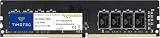
- Capacity – Single Module 8GB Speed up to 2400MHz Non-ECC Unbuffered 288-Pin 1.2V UDIMM.
- Specs – PCB Color (Green or Black) and Rank (1Rx8, 2Rx8, or 1Rx16) may vary depending on production batch. Performance and quality remain consistent across all Timetec products.
- Compatibility – Designed for selected DDR4 Desktop PCs and workstations that support 288-Pin UDIMM memory. NOT compatible with Laptop SODIMM slots.
- Installation – Plug-and-Play Upgrade, Quick and Easy to Install, no expertise required (please refer to your system's manual for guidelines).
- Warranty – All Timetec products are high-quality and rigorously tested to meet stringent standards. Backed by Timetec Limited Lifetime Warranty and professional technical support based in the United States.
Rank #2

- Compatible with select DDR4 Laptop, Notebook computers + Easy to install at home, no expertise required
- Maximize your system's performance, boost loading speeds and multitask with ease
- Backed by A-Tech's Lifetime Warranty + Friendly tech support team available to help before and after your purchase
- Single 8GB RAM Module | DDR4 SO-DIMM 260-Pin | Speeds up to 2400MHz, PC4-19200 / PC4-2400T
- NON-ECC Unbuffered | 1Rx8 or 2Rx8 - Single or Dual Rank | JEDEC DDR4 standard 1.2V
Product prices and availability are accurate as of the date/time indicated and are subject to change. Any price and availability information displayed on Amazon at the time of purchase will apply.

