
iTechGuides is reader-supported. When you buy through links on our site, we may earn an affiliate commission. As an Amazon Associate I earn from qualifying purchases. Learn more
Microsoft’s 2022 update added meeting effectiveness surveys and shared meeting plans to the Viva Insights app in Teams. The rollout dates in the announcement are historical, not a current launch schedule. Microsoft’s current service description lists both features among premium healthy-collaboration plans, but access depends on licensing and tenant context.
What the Microsoft 365 update announced
Microsoft Message Center item MC430100, associated with Microsoft 365 Roadmap ID 85660, was published on September 14, 2022 and updated on November 9, 2022. It covered two capabilities for the Viva Insights app in Teams: meeting effectiveness surveys and shared effective meeting plans. The update and its rollout dates are reproduced in the November 2022 Kressmark digest.
The revised announcement said surveys would begin rolling out in late September 2022 and plans in mid-October 2022, with worldwide availability for both targeted by the end of November 2022. Those dates describe Microsoft’s stated rollout plan at the time; they do not confirm that a particular organization enabled either feature or that it is available to every user today.
What meeting effectiveness surveys do
The announcement described surveys as a way for meeting organizers to view aggregated attendee feedback on meetings they organized. The goal is to help an organizer identify what worked and what could be improved. The announcement does not establish detailed rules such as which meetings qualify, how feedback is collected, whether responses can be linked to individual attendees, or how long results are retained.
#1 Best Overall

- ENGAGING HYBRID COLLABORATION. The Meeting Owl 3 is an all-in-one video conferencing device that captures 360° video in 1080p HD and 360° audio up to 18’ (5.5m) away. Automatically focuses on whoever is speaking to foster active collaboration and increased participation while showing a 360° view of the room.
- AWARD-WINNING INTELLIGENCE. Features the award-winning and proprietary Owl Intelligence System, which uses visual and audio cues to automatically focus on and capture the best view of in-room speakers so remote participants can engage and participate in hybrid discussions effectively and productively.
- EASY DEPLOYMENT. Go from unboxing to your first meeting in 6 min with our plug-and-play USB device. IT admins can seamlessly manage their fleet of devices from our management tool, The Nest, via bulk registration, default settings management, and more.
- SMALL TO LARGE ROOM COVERAGE. The flexibility of the Owl Labs ecosystem is unmatched. Pair two Meeting Owls, a Meeting Owl and an Owl Bar, or add an Expansion Mic to expand video and audio reach in larger spaces. Compatible with Owl Labs’ Whiteboard Owl to complete your hybrid room setup.
- UNIVERSALLY COMPATIBLE. Certified for Microsoft Teams. Compatible with most web-based video conferencing platforms, including Zoom, GoTo Meeting, Google Meet, Cisco Webex, and many others.
For someone asking, “How do I get meeting feedback in Teams?”, this update points to Viva Insights rather than a general Teams poll: the described feature is organizer-facing, provides aggregated feedback, and is associated with meetings the organizer held. Check the current app and your organization’s Microsoft 365 administrator for the controls and availability that apply to your tenant.
What the shared Viva Insights meeting plan is for
A shared effective meeting plan lets a meeting organizer create and share a plan intended to foster team meeting norms. In practical terms, it is a way to make shared expectations for meetings explicit. The announcement establishes that purpose, but does not specify a template, required steps, or particular norms built into the plan.
Rank #2

- All-in-One Video Bar: The MeetingBar A10 integrates a 4K camera, 8 MEMS microphones, speaker, computing unit, Android OS, Wi-Fi, and Bluetooth into one compact device for home offices and small meeting rooms
- Intuitive Touch Control: Includes the CTP18 8-inch touch panel for seamless meeting control, supporting native Microsoft Teams and Zoom experiences
- AI-Powered Video: Features Auto Framing, Speaker Tracking, and an electric privacy shutter for smart, secure, and professional video conferences
- Crystal-Clear Audio: Advanced noise cancellation and full-duplex audio ensure everyone is heard clearly, even in noisy environments
- Easy Setup & Deployment: Plug-and-play design with included HDMI and Ethernet cables, wall-mount options, and flexible connectivity via Wi-Fi or wired network
Is it available now, and who can use it?
Microsoft’s current Microsoft Viva service description lists “meeting effectiveness surveys” and “shared meeting plan (organizer)” in the premium plans for healthy collaboration feature row. That is current product context, distinct from the 2022 rollout estimate.
The Tool Desk
Outbyte Driver Updater FREEFix the driver behind crashes, sound loss and screen glitchesFind Drivers →Outbyte PC Repair FREERepair Windows errors before they cause bigger problemsFix Now →The same service description distinguishes premium healthy-collaboration capabilities from personal insights and notes that some personal insights require a Viva Insights subscription. It describes Viva Insights as available in Teams, web, and Outlook, but that does not mean every feature is included for every user in all three surfaces. Feature availability can change, and licensing or tenant configuration can affect access.
Rank #3

- Office Supplies : TOUCAN conference camera, supports 360° omni-directional shooting, no matter where you are in the office, you can easily show your facial expressions and gestures, so that communication is more vivid and intuitive. Plug and play, convenient and fast, high-quality conference camera helps us to improve the efficiency of office communication. Through face-to-face video communication, it can enhance the trust and cooperation between the team and promote the work more smoothly
- High-definition Image Quality: Our conference camera delivers crystal-clear visuals, ensuring every detail is visible during presentations, slideshows, and video conferences. Experience a vivid and lifelike display that enhances your meeting
- Superior Microphone: Equipped with a high-quality microphone, our webcam captures voices with precision, ensuring clear and audible communication. Your voice will be heard loud and clear, improving overall meeting effectiveness
- Plug-and-play Convenience: Our conference camera supports instant plug-and-play functionality, eliminating the need for complicated setup and installation. Simply connect the 4K webcam to your computer or conference device, and you're ready to start the meeting. It's that easy and time-saving, Includes a Type-C Male to USB-A Female OTG Adapter for PC compatibility
- Universally Compatibility: Our conference web cam offers broad compatibility, seamlessly integrating with various conference software and devices. Whether you use Zoom, Microsoft Teams, or any other conferencing platform, you can effortlessly connect and ensure smooth meetings
To check eligibility, use Microsoft’s current Viva plans comparison and ask your Microsoft 365 administrator which licenses and tenant settings apply to your organization. Do not infer eligibility from the historical rollout announcement alone.
Independent reader supportYour contribution helps us test, update, and keep practical guides available for everyone.What the update does not establish
- It does not provide a named statistic about meeting outcomes or survey effectiveness.
- It does not state detailed eligibility rules, survey anonymity or identifiability, meeting-size limits, or administrative controls.
- It does not confirm the feature status of any individual tenant.
Microsoft characterizes Viva Insights as providing “data-driven visibility into how work patterns affect wellbeing, productivity, and business performance” in its service description. That broad description provides context for the app, not a measured outcome for these two particular features.
Quick Recap
Best Value
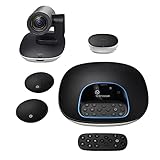
- Complete audio/video conferencing bundle for big rooms: HD video camera, speakerphone and expansion mics in one affordable package
- Optimized for up to 20 participants: Extended 28 ft. audio range and 90-degree field of view for large group conferences
- Business grade speakerphone and expansion mics: Plug-and-play HD audio allows everyone around the conference table to clearly hear and be heard
- Easy video conferencing: Launch video meetings with a plug-and-play USB connection to a laptop and your video conferencing program of choice
- Razor sharp video: HD 1080p video with autofocus, digital pan/tilt/zoom and premium Zeiss-certified optics
Rank #4

- Logitech's premier ConferenceCam specifically designed for business-grade video meetings in huddle rooms and small conference rooms
- Super-wide 120-degree field of view enables everyone in the room to be seen, even people sitting close to the camera or at the edges of the room
- Expansion mic extends camera's audio range from 8 to 14 feet; audio system features 3 microphones and a custom-tuned speaker specifically optimized for ultra-clear conversations in huddle rooms
- Supports the highest HD video quality for your network bandwidth and apps now and in the future with multiple video resolutions, including Ultra 4K, 1080p and 720p
- Doubles as a speakerphone with an easy wireless connection to Bluetooth mobile devices
Product prices and availability are accurate as of the date/time indicated and are subject to change. Any price and availability information displayed on Amazon at the time of purchase will apply.

