
Recommended Free Tools
PicoGlitcher is an open hardware voltage fault-injection platform that pairs a Raspberry Pi Pico-family controller with MOSFET glitch circuitry and the Python-based findus toolchain. It lets researchers configure timed or trigger-driven power glitches against microcontrollers and other targets; it is a bench research tool, not a general-purpose Raspberry Pi accessory.
What PicoGlitcher does
Fault injection deliberately applies an external disturbance to make a target behave incorrectly. In voltage glitching, the target’s supply voltage is briefly reduced—typically for nanoseconds to a few microseconds—so a chip may fail to complete an operation as intended. The result depends on the target, its power circuitry, the timing, and the injected disturbance; a glitch is not guaranteed to produce a particular outcome.
PicoGlitcher creates that disturbance with crowbar-style MOSFET stages, while trigger logic and level shifting help coordinate the event with the target. The controller can also manage target power. Matthias Kesenheimer’s findus software supplies Python tooling for configuring experiments on microcontrollers, SoCs, and other targets. The project documentation describes its goal as making fault-injection projects possible with inexpensive, readily available hardware.
What hardware each PicoGlitcher revision adds
| Revision | Controller and voltage options | Notable hardware features |
|---|---|---|
| v1 | Raspberry Pi Pico; 1.8 V, 3.3 V, and 5 V reference options | Low- and high-power MOSFET glitch stages and level shifters. The project overview describes the SI4134DY high-power path as capable of switching up to 50 A; the repository README separately describes glitching transistors capable of up to 66 A. These are different published descriptions, not a single universal rating for every board or setup. |
| v2 | Voltage options are not stated in the cited v2 description | Adds a multiplexing stage for quickly switching among up to four voltage levels, plus filtered EXT1 and EXT2 trigger inputs. |
| v3 | Raspberry Pi Pico 2; 1.2 V, 1.8 V, 3.3 V, and 5 V support | Adds direct 1.2 V support and improved Schmitt-trigger inputs. The project overview says the Pico 2’s higher clock speed improves timing resolution, which can help with glitch placement and repeatability. |
The ampere figures describe switching capability as stated by the project’s documentation; they should not be read as a recommended current for a target or as a guarantee that a particular experiment will work. Target power design and wiring matter.
The Tool Desk
Outbyte Driver Updater FREEFix the driver behind crashes, sound loss and screen glitchesFind Drivers →Outbyte PC Repair FREEClear out junk files and repair common Windows errorsFree Scan →#1 Best Overall

- The Raspberry Pi Pico is a beginner-friendly microcontroller board that uses MicroPython to give you a taste of the Internet of Things and microcontrollers. The RP2040 is a well-designed microprocessor that can be utilized in almost any Internet of Things project. It has enough power to complete the task quickly.
- 【Raspberry Pi RP2040 Microcontroller】Raspberry Pi Pico features Dual-core ARM Cortex M0+ processor, flexible clock running up to 133 MHz. With 264KB of SRAM, and 2MB of on-board Flash memory.Supports up to 16 MB of off chip flash memory via a dedicated QSPI bus
- 【Multiple Software Support】Pico has rich and complete software support, it comes with a complete Rasberry Pi official C/C++ SDK, Micropython SDK.The programming and burning of Pico need to be carried out on the computer. Supported operating systems and computers include:Raspberry Pie with Raspberry Pi OS,Other platforms equipped with Debian based Linux system Computer with MacOS, Computers with Windows, etc.
- 【Rich Hardware Interface】Raspberry Pi Pico has 30 GPIO pins, 4 pins for analog signal input and 26 × multi-function GPIO pins, 2 × SPI, 2 × I2C, 2 × UART, 3 × 12-bit ADC, 16 × controllable PWM channels.USB 1.1 supported by host and device, The installation mode can be flexibly selected by users to facilitate welding with other development boards.
- 【Build Project in Tiny Size】Only 2.1cm*5.1cm ( as small as your thumb). Pico has been designed to use either soldered 0.1" pin-headers or can be used as a surface-mountable 'module'.
How the Python and firmware pieces fit together
findus is the software layer for setting up and running experiments. Its examples include timed glitches and UART-triggered glitches. On the device side, the firmware uses MicroPython and Pico hardware APIs. The firmware class exposes functions for initialization, trigger-mode configuration, CPU-frequency control, glitch-output selection, target power control, and firmware-version reporting.
To prepare a board, install the findus package, connect its serial interface, and use the project’s documented update-fw command when firmware configuration or updating is needed. The command takes the board’s serial port and the Pico Glitcher version as arguments; select the values that match the connected device rather than copying a port name from another computer.
Rank #2

- ALL-IN-ONE INTERACTIVE DEVELOPMENT KIT: Combines a 3.5-inch 320×480 capacitive touchscreen, Mini PSP joystick, RGB LED, buzzer, and two buttons for interactive Pico projects.
- WIDE PICO COMPATIBILITY: Designed for Raspberry Pi Pico, Pico W, Pico 2, and Pico 2W series boards. Plug in a compatible Pico and start developing without soldering.
- TOUCHSCREEN & CONTROLS: Create calculators, menus, control panels, games, and graphical interfaces using the 3.5-inch capacitive touchscreen, joystick, and dual buttons.
- GPIO & POWER EXPANSION: Provides full 40-pin GPIO access plus 3.3V and 5V power interfaces, making it convenient to connect additional hardware for DIY projects.
- BUILT FOR STEM & DIY: Equipped with online documents and video tutorials for comprehensive guidance; suitable for STEAM classrooms, allowing students to make their own Pico small computer in 10 minutes, perfect for programming learning and project practice.
Verify the glitch output before connecting a target
The project documents a simple bench check that lets you observe the output without first risking a target board. Follow the official wiring diagrams: the examples warn that some connections are not obvious and that incorrect wiring can cause errors or destroy hardware.
- With the board unpowered, connect
TRIGGERtoRESET. - Place a 10-ohm resistor between
GLITCHandVTARGET. - If available, connect an oscilloscope to monitor
RESETandGLITCH. - Run the documented example using delay and pulse-length ranges, then check the observed pulses before attempting work with a real target.
Use the board-specific diagrams and example instructions for pin orientation and any additional connections; the abbreviated bench procedure above is not a substitute for the complete wiring documentation. Do not connect equipment or targets you are not authorized to test.
Rank #3

- with pre-soldered header Raspberry Pi Pico. RP2040 microcontroller chip designed by Raspberry Pi in the United Kingdom
- Dual-core Arm Cortex M0+ processor, flexible clock running up to 133 MHz. 264KB of SRAM, and 2MB of on-board Flash memory.
- Castellated module allows soldering direct to carrier boards. USB 1.1 with device and host support. Low-power sleep and dormant modes. Drag-and-drop programming using mass storage over USB. 26 × multi-function GPIO pins.
- 2 × SPI, 2 × I2C, 2 × UART, 3 × 12-bit ADC, 16 × controllable PWM channels.Accurate clock and timer on-chip.Temperature sensor.
- Accelerated floating-point libraries on-chip.8 × Programmable I/O (PIO) state machines for custom peripheral support
How PicoGlitcher compares with ChipWhisperer
findus explicitly supports Pico Glitcher as well as ChipWhisperer Pro and Husky hardware, so the software can provide a shared starting point for experiments on those platforms. The available project descriptions do not establish a like-for-like price, timing-precision figure, or universal performance ranking between them.
| Comparison point | PicoGlitcher | ChipWhisperer Pro / Husky |
|---|---|---|
| Software support | Supported by findus; Python tooling and firmware configuration are documented. |
Pro and Husky are also explicitly supported by findus. |
| Target voltage and hardware details | Documented by revision; v3 supports 1.2 V, 1.8 V, 3.3 V, and 5 V interfaces. | Not stated in the cited project descriptions. |
| Timing, trigger options, and power control | Timed and UART-triggered examples are documented; v2 adds filtered external trigger inputs. Firmware exposes target power control. | Not stated in the cited project descriptions. |
| Price and total cost | Not stated in the cited project descriptions. | Not stated in the cited project descriptions. |
That evidence supports treating ChipWhisperer Pro and Husky as compatible alternatives within the findus ecosystem, but it is not enough to conclude that PicoGlitcher is cheaper overall or to rank the platforms on precision. A practical choice depends on the required target voltage, trigger method, glitch-current needs, power-cycling workflow, and the complete cost of the hardware and setup.
Rank #4

- 【RP2040 Development Platform】It uses the Raspberry Pi Pico development board and is equipped with the RP2040 microcontroller, making it suitable for e-learning, programming instruction, and embedded project development.
- 【Multiple programming methods】Supports MicroPython, C/C++, and Piper Make graphical programming to meet the needs of users at different learning stages.
- 【Rich experimental modules】Includes common electronic components such as LCD1602 display module, SG90 servo motor, human body sensing module, WS2812 RGB LED strip, buzzer, and buttons, covering basic applications such as display, input, sensing, and execution control.
- 【Comprehensive learning tutorial】The kit provides detailed project tutorials and sample code to help users quickly complete circuit connections, program downloads, and experimental verification.
- 【Suitable for STEM education】Ideal for electronics beginners and school lab teaching. Through hands-on project practice, it effectively improves practical skills, logical thinking and innovation ability, making it a great choice for programming enlightenment and hobby cultivation.
Who PicoGlitcher is for
PicoGlitcher is suited to people learning or conducting authorized hardware-security experiments who are comfortable following wiring diagrams, configuring firmware, and interpreting bench measurements. Its Pico-based design and Python workflow make experiments programmable, while its voltage-switching hardware makes careful setup essential. Start with the documented resistor-and-oscilloscope check and the official examples before moving to a target.
Quick Recap
Best Value
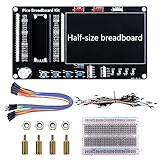
- Application: This bread board development kit which provides experimental platform for Raspberry Pi Pico.
- Convenient: It carries LED lights, buttons, buzzer and bread board, which makes the experiment circuit of Pico more convenient and convenient to takeout.
- Features: Bult-in LED lights;Bult-in Buttons;Bult-in Buzzer;Bult-in Half-size breadboard;Suitable for primary users to build DIY circuit;Size:145mmx80mm
- Package Includes: 1 x Breakout Board For Raspberry Pi Pico / Pico W;4 x M2.5x11+6 Copper Pillar;4 x M2.5 Nut;1 x Jumper wire Pack;15 x Male to Female Jumper wire; 15 x Male to Female Jumper wire; 1xTransparent Breadboard
Product prices and availability are accurate as of the date/time indicated and are subject to change. Any price and availability information displayed on Amazon at the time of purchase will apply.
Quick wins for a faster PC:
Fix the driver behind crashes, sound loss and screen glitchesFind Drivers →Clear out junk files and repair common Windows errorsFree Scan →Scan for outdated or missing drivers - takes under a minuteDriver Scan →
