
The Tool Desk
Outbyte PC Repair FREEClear out junk files and repair common Windows errorsFree Scan →Outbyte Driver Updater FREEFix the driver behind crashes, sound loss and screen glitchesFind Drivers →If your Lenovo Legion Go battery is not charging, start by checking the outlet, USB-C connections and charger, then try the other USB-C port. If it charges slowly, stops at a partial level or loses power during a demanding game, the cause may be different from a complete charging failure. These steps cover both the original Legion Go and Legion Go Gen 2; check your model before applying generation-specific settings.
First, identify what “not charging” means
Check whether the battery indicator never rises, rises unusually slowly, stops at a set level, or falls while the device is plugged in. Those symptoms point to different possibilities: a connection or adapter issue, a charge limit, or power draw that exceeds the incoming power during heavy gameplay. Lenovo documents a high-load charging-speed setting for the original Legion Go, but it is not a universal fix for a device that fails to recognize power.
The original Legion Go and Legion Go Gen 2 each have two multi-purpose USB Type-C ports. Their specifications and some menu labels differ, so do not assume a setting or adapter rating for one generation applies to the other. See Lenovo’s original Legion Go user guide and Legion Go Gen 2 user guide.
Eight fixes for a Legion Go that will not charge
1. Check the outlet and connections
- Plug the adapter into a wall outlet you know works.
- Unplug and firmly reconnect the USB-C cable at both the Legion Go and the adapter.
- Look over the cable and connector for visible damage.
A visual check cannot confirm that a port or cable is electrically sound. If you see damage, stop using that cable and test with a suitable alternative.
Free tools Windows power users keep installed
One-click scans. No signup required.
#1 Best Overall

- 77Wh Minimum Capacity &81Wh Typical Capacity & Transparent Rating:- Features a high-quality 81Wh (Typical Capacity) lithium-polymer battery. We clearly disclose a minimum guaranteed capacity of 77Wh for honest performance expectations.
- Compatible: - L23B2PK0 L23M2PK0 5B11M36298 5B11M36299 5B11M36296 L23C2PK0 L23L2PK0 L23D2PK0 SB11M36297
- Compatible: - Legion Go 8APU1 8.8" AMD Ryzen Z1 Extreme Handheld Gaming PC Series, For Legion Go 8APU1 Handheld Mini PC Z1 Extreme Series
- Easy Installation: - Replacement process is straightforward and provide our tools.
- Quality Assured: - Rigorous quality control and testing processes guarantee that this battery meets high standards for performance and durability, backed by our commitment to customer satisfaction.
2. Test with the supplied or a compatible charger
If you still have the supplied adapter, try it first. Otherwise, use a reputable USB-C Power Delivery (PD) charger that is appropriate for your Legion Go generation. Lenovo’s Legion Go Gen 2 specifications list a 65 W USB-C PD 3.0 adapter for model 8ASP2. Adapter bundles vary by country or region, and that rating should not be treated as the confirmed requirement for the original Legion Go.
A charger’s connector fitting the port does not by itself establish compatibility. If changing the adapter does not help, test the cable as well, since it may be the source of the problem.
Rank #2

- 【Customer Service】Rest assured with 30 days Refund and 12 months Warranty; Note: Amazon return windows will close after one month, don’t worry about it, you can click on seller store on right corner “ask a question” and contact seller directly
- 【Basic Details】Item Model: L23M2PK0; Battery Type: Li-ion; Voltage: 7.76V; Capacity: 82Wh/10567mA; Battery Color: Black
- 【Compatible P/N 】L23M2PK0 L23B2PK0 5B11M36296 5B11M36298 5B11M36299 L23D2PK0 SB11M36297 L23C2PK0 L23L2PK0
- 【Compatible Laptop Models】Fit for Lenovo Legion Go 8APU1 8.8" AMD Ryzen Z1 Extreme Handheld Gaming PC Series, For Lenovo Legion Go 8APU1 Handheld Mini PC Z1 Extreme Series
- 【Note】The package includes: 1*battery and 1*Instructions. Before purchasing, please open the back cover of the laptop to confirm the battery model and shape
3. Try the other USB-C port
Disconnect the charger and reconnect it to the Legion Go’s other USB-C port. Both cited generations have two multi-purpose USB Type-C connectors. If charging behavior changes between ports, that is useful evidence of a port-specific problem, but it does not by itself diagnose the fault.
4. Let an overheated device cool
Lenovo’s general battery troubleshooting guidance says an overheated battery may not charge and recommends letting the system cool to room temperature before trying again. This is general Lenovo PC advice, not a Legion Go-specific temperature threshold. Disconnect the charger if appropriate, stop demanding gameplay and let the device cool naturally; do not put it in a refrigerator or apply external heat.
Rank #3

- Unmatched charging: Harness a full 65 watts of charging power—matching your Legion Go’s stock adapter. That means rapid recharging, so you’re back in the fight faster than your opponents can blink.
- Locked and loaded: Magnetically snap the power bank onto the rear of your Legion Go using the in-box iron plate, charging through the integrated USB-C cable. Clean, compact, and battle-ready—no cable clutter holding you back.
- Superior control: Instantly create a stand that props your Legion Go at the perfect angle for intense battles. Play without limits, stay focused, and own every moment.
- What’s in the Box: Lenovo Legion Go 65W 12800 Power Bank 1.5 m USB-C to USB-C Cable Iron Plate Quick-Start Guide Warranty
5. Check for a charge limit if it stops below 100%
If the battery consistently stops at a partial level, check whether a charge limit or conservation setting is enabled before treating it as a failure. Lenovo documents conservation mode and charge thresholds on some of its PCs, but the cited guidance is for other Lenovo model families and does not establish that the same setting or menu exists on every Legion Go. Look only for a setting applicable to your exact model.
6. Check for Legion Space driver and BIOS updates
Lenovo’s guides provide a Legion Space route for checking model-supported updates:
Rank #4
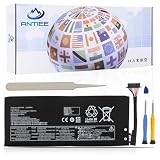
- 【Specification】Voltage: 7.82V. Capacity:81Wh/10360mAh. Battery Type: Li-Polymer. Condition: Brand new, from durable materials, top circuit boards and smart chip
- 【Replace Part Number】Fit for L23B2PK0 L23M2PK0 5B11M36298 5B11M36299 5B11M36296 L23C2PK0 L23L2PK0 L23D2PK0 SB11M36297
- 【Compatible Laptop Models】Fit for Lenovo Legion Go 8APU1 8.8" AMD Ryzen Z1 Extreme Handheld Gaming PC Series, For Lenovo Legion Go 8APU1 Handheld Mini PC Z1 Extreme Series
- 【ANTIEE Promise】Each products has undergone rigorous testing to ensure the correct voltage, circuit protection, stable current, low self-discharge and CE / FCC / RoHS Certified for safety. About 500 recharge cycles over the life
- 【ANTIEE After-sales】We offer 12 months of warranty and 24 x 7 email support. If you have any questions while using your product, please contact us via the "Your Orders" section of your Amazon account. We guarantee a response within 24 hours.
- Open Legion Space.
- Open Settings, then Disks and Drives on the original Legion Go, or Disks and Drivers on Gen 2.
- Select Check for Updates.
- Download and install any offered drivers or BIOS updates, following the on-screen instructions.
Keep the device connected to stable power during an update when possible, and do not interrupt a BIOS update. The exact route is documented in Lenovo’s original Legion Go guide and Gen 2 guide.
7. If the battery drains during demanding play, adjust the original Legion Go BIOS setting
This applies to the original Legion Go when the battery level declines during high-load gaming while plugged in—not to a device that never recognizes the charger. Lenovo documents this BIOS setting for charging speed under high load:
Crashes, No Sound, or Screen Glitches?
Random freezes, missing sound and display glitches usually trace back to one bad driver. Find and replace yours safely.Free scan · under a minutePC Slower Than It Used to Be?
A free scan shows the junk files, broken settings and background clutter dragging Windows down - then fixes them in one click.Free scan · Windows 10 & 11Best Value

- Battery Type:Li-ion Voltage:7.82V Capacity: 81Wh 10360mAh
- Compatible Part Number: L23B2PK0 L23M2PK0 5B11M36298 5B11M36299 5B11M36296 L23C2PK0 L23L2PK0 L23D2PK0 SB11M36297
- Fits Model: Replacement for For Lenovo Legion Go 8APU1 8.8" AMD Ryzen Z1 Extreme Handheld Gaming PC Series, For Lenovo Legion Go 8APU1 Handheld Mini PC Z1 Extreme Series
- New from manufacturer. CE/FCC/RoHS certified for safety.
- 12 Months After Sales, 30 Days REFUND Promise, 24 x 7 Email Support.
- Enter BIOS Setup.
- Open More Settings, then Configuration.
- Set Charging Speed Selection under high loading to Medium or Fast.
- Save the change and exit BIOS Setup.
Confirm that your device is the original Legion Go and that the BIOS menu contains this setting before changing it. Do not apply these steps to Gen 2 by assumption; follow the guide for your generation.
8. Contact Lenovo if the basic checks fail
If the device still will not charge after testing a known-compatible adapter, checking both ports, letting it cool and installing applicable updates, contact Lenovo Support. A battery, USB-C port or charging-circuit fault cannot be identified from the symptom alone. Lenovo’s general troubleshooting also recommends contacting support when the battery remains unable to charge.
Independent reader supportYour contribution helps us test, update, and keep practical guides available for everyone.What the specifications do—and do not—tell you
For Legion Go Gen 2 model 8ASP2, Lenovo lists a 65 W USB-C PD 3.0 adapter and a 74 Wh rechargeable Li-ion battery. Those are Gen 2 specifications, not specifications to attribute to every Legion Go generation; Lenovo also notes that battery capacity declines with time and use. See the Lenovo PSREF for Legion Go 8ASP2. These figures do not establish that a particular charger or battery is faulty.
Lenovo’s overheating and charge-threshold guidance is general advice for its PCs, rather than proof that every Legion Go has the same thermal behavior or charge-limit menu. Use it to guide low-risk checks, not as a model-specific diagnosis.
Quick Recap
Product prices and availability are accurate as of the date/time indicated and are subject to change. Any price and availability information displayed on Amazon at the time of purchase will apply.

