
No: Kodi 19 “Matrix” RC1 is not the stable release. Kodi formally released stable version 19.0 on February 19, 2021. The RC remains listed in some official archives, but it is a historical prerelease; choose a final build for your platform from Kodi’s official download pages.
What “RC” means for Kodi 19 Matrix
RC stands for release candidate: a prerelease made available near the end of testing. Kodi published its Matrix RC announcement on January 16, 2021, describing a move from beta into the RC stage. Its statement that the code was “stable, reliable” referred to that candidate at the time; it did not make the RC the final 19.0 release.

On February 19, 2021, Team Kodi announced that Kodi 19.0 “Matrix” had been formally released after the alpha, beta, and RC stages. The Kodi 19.0 release announcement is the relevant distinction: RC1 and final 19.0 are separate builds.
Where official archives list RC1 and stable 19.0
Kodi’s official mirrors retain both RC1 and final-release files for some platforms. Their presence shows that the RC can still be downloaded from those archive listings; it does not mean RC1 is the current stable version or that every platform has the same archive entries.
Crashes, No Sound, or Screen Glitches?
Random freezes, missing sound and display glitches usually trace back to one bad driver. Find and replace yours safely.Free scan · under a minuteWindows Errors? Fix Them Before They Spread
Repair common Windows errors and clear accumulated junk for a smoother, more stable PC - no reinstall needed.Free scan · no reinstall#1 Best Overall
| Platform and build | What the official listing shows |
|---|---|
| Windows 64-bit, RC1 | kodi-19.0-Matrix_rc1-x64.exe, dated January 15, 2021. |
| Windows 64-bit, final 19.0 | kodi-19.0-Matrix-x64.exe, dated February 18, 2021. |
| Android arm64, RC1 | kodi-19.0-Matrix_rc1-arm64-v8a.apk is listed alongside the final APK. |
| Android arm64, final 19.0 | kodi-19.0-Matrix-arm64-v8a.apk is listed alongside RC1. |
Check the listing for your platform and architecture on Kodi’s official Windows 64-bit archive or official Android arm64 archive. These examples are archive directories, not a claim that RC1 is available in every platform’s current download flow.
Which Matrix build should you choose?
- For a Matrix 19.0 final build: select the file without “rc” in its name, such as the final 19.0 entries shown above.
- For the old prerelease specifically: RC1 is present in the cited Windows 64-bit and Android arm64 archives. It is not the stable release.
- If you want a later Matrix release: Kodi announced version 19.4 in 2022, and the Windows archive lists stable Matrix point releases beyond 19.0. Use Kodi’s official download pages to find the build for your device rather than assuming the old 19.0 files are the latest appropriate option.
The cited listings establish that files are present in those directories; they do not establish that any particular build is currently security-supported, compatible with your setup, or suitable for a new installation. The sources also do not report checksum or signature verification, so do not treat this article as verification of an individual download.
Rank #2

- Multifunction, Wireless Mini QWERTY Keyboard & IR remote & Fly Mouse Combo, with USB interface receiver . Generally, this keyboard works well on smart TV. But different smart TVs have diverse systems,especially Samsung smart TV. so we can't make sure it is compatible with any system.:) Before you place order . Try the common wired keyboard and mouse on your smart TV.If the keyboard and mouse all work well, this keyboard-mouse combo can,too.
- Built-in advanced lithium-ion battery, energy-efficient.support USB charge,when press and drag at the same time,if the mouse freezes for a couple of seconds,you can use the USB extension cable on your device . You can use it for emails,to enjoy your favorite games. It is compatible with HTPC,TV BOX running Android systems
- Innovative Shape,Portable, elegant, Perfect for PC, Pad, Android Tv Box, Google TV Box, Xbox 360, PS3, HTPC, IPTV.Not work with the amazon fire tv stick !
- In any circumstance, it does a good job! 1. Press the SET button for more than 4 seconds, the yellow LED will blink once and lit. 2. Align the Rii remote IR Light with the original remote IR Light. (note: distance less than 7cm). Then, press the key to be programmed, LED indicator will flash twice and be on, which means the key is ready for programming. 3. Press the key to be programmed in the original remote. Rii remote LED will flash three times and be on, indicating the programming is complet
- Repeat steps 2-4 and finish the programming for other keys. 5. Press Set or leave it without any operation 10 seconds. Rii remote will exit programming mode. Note: The remote control can only support a remote control.
Android store availability is a dated caveat
In its 2022 Kodi 19.4 announcement, Kodi said Android 19.4 could not be uploaded to Google Play at that time because of an API-level requirement, and provided manual-download options. That is a record of the situation described in 2022, not evidence of a current Google Play restriction. Check Kodi’s current download guidance and your device’s available installation method.
Quick Recap
Best Value

- 【Before Purchasing】The keyboard uses 2.4G connection technology.Please make sure your device has an available USB port to insert the receiver.If not, the keyboard is not suitable for your device
- 【Be sure to recharge the batteries for 1 hour before use】For the safety of transportation, the battery is nearly empty when you receive the device. When the battery is low, 2.4G cannot be paired or the connection is unstable
- 【Perfect combo】73 keys Wireless QWERTY keyboard + Touchpad,Key layout in line with the universal keyboard layout, fully functional, plug and play,White soft backlight design, use in the dark also unimpeded
- 【Multi-finger touchpad】a single finger click as left mouse function, two-finger click as the right mouse function, double finger drag as the rolling, bringing more convenience to your use
- 【Multifunctional mini wireless keyboard】3 in 1 Multifunction 2. 4GHz Mini Wireless QWERTY keyboard+ touchpad + LED Backlit(Fn+Win)
Rank #4

- Device Codes using the IReTV IR Receiver are: Kodi-02000, Fire TV-02049 (Fire-TV devices require a "Y" Cable), Media Center-01272 & Nvidia Shield (2nd Gen)-04918. These codes only work when the IReTV is used with this remote. Contact us for information about the "Y" Cable and a set-up diagram.
- Pre-programmed for Apple TV, XBox One, Media Center and Roku device codes which are easily changed. Full LED Backlighting-All buttons.
- Macro Programming-This allows the programming of a string of commands (up to 15) within a mode or mode independent. You can also program Volume Lock, Channel Lock & ID Lock.
- Button Labels- These self-adhesive labels, as pictured, can be cut out and applied under the buttons that you program for your device functions; Key Punch Through-Allows the user to configure the same key function in one mode into any or all other modes; Warranty: One Year Replacement for Defects.
Rank #3
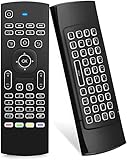
- Multifunctional fly Remote : 2.4G wireless Keyboard and Combo, 6-Axis Somatosensory and Infrared remote control,please note that this remote do not fit for amazon fire TV and Fire TV stick ,or some samsung and sony smart TV (the User manual Attention ).
- Plug and Play: With 3-Gyro + 3-Gsensor, it’s more convenient to operate in horizontal and vertical mode for games and typing,how to pair,firstly, make sure the new enough power battery install properly,secondly press OK+TV at the same time for 3 seconds,the red LED indicator will flash fast,then insert the USB dongle into the USB port of the device,red LED indicator stopped flashing,means pairing succeed.
- Wireless remote keyboard with LED Backlight buttons, its much convenient for you to use in the pitch-dark night,please note that the batteries not included ,Please use 2*AAA to install,how to use,remove the back cover,and insert 2*AAA batteries,then plug the USB dongle into the USB port of your device ,remote will paired with the device automatically, test by moving remote to see if the cursor is moving,if not, and red LED indicator is not flashing,press cursor lock button and try again,if still not,try plug the USB dongle into another USB port .
- It Support Android TV Box, Android Smart TV, Projector, HTPC, All-in-one PC,Xbox, Raspberry Pi,Mini PC,Networked set-top Box, etc.
- This remote is a universal remote controller, it is normal thata few keys might not be applicable to your device because of different codes by different manufacturer, Up to 5 keys can be programed from your TV remote, it is much easier for you to control both TV and Android TV Box with one remote.
Product prices and availability are accurate as of the date/time indicated and are subject to change. Any price and availability information displayed on Amazon at the time of purchase will apply.
Free tools Windows power users keep installed
One-click scans. No signup required.

