
Free tools Windows power users keep installed
One-click scans. No signup required.
Neither iPhone nor Samsung Galaxy is better for everyone. Choose based on the specific phone you want, the software you prefer, the devices you already own and the features you will actually use. For a current premium comparison, Apple lists iPhone 18 Pro models and Samsung lists Galaxy S26 models in the US; those are examples, not a reason to buy either brand’s most expensive phone. Check local models and prices before deciding.
Start with the models, not the brand names
Apple’s current comparison page lists iPhone 18 Pro and iPhone 18 Pro Max alongside other iPhones. Samsung’s US phone page lists Galaxy S26, S26+, S26 Ultra and S26 FE, as well as Z Fold8 and Z Flip8 foldables. The range matters: a standard iPhone and a Galaxy foldable are not like-for-like alternatives. Compare phones at similar local prices, storage capacities and sizes, and confirm that the configuration you want is available in your country. Apple’s iPhone comparison page and Samsung’s US smartphone lineup show the current examples.
A useful premium-tier starting point is iPhone 18 Pro versus Galaxy S26 Ultra, but the right matchup depends on your budget and preferred size. The manufacturer pages establish the model ranges; they do not establish a matched price winner. Check current local listings for both phones, including storage and any trade-in conditions, before comparing cost.
Which software experience fits you?
iPhone: iOS and Apple continuity
iPhone is the natural fit if you prefer iOS or already rely on Apple devices and services. Apple’s iOS 26 announcement describes features including Live Translation in Messages, FaceTime and Phone. These are platform features, not proof that iOS is better for every user. Apple’s iOS 26 announcement was published June 9, 2025.
#1 Best Overall

- [Dual Flash Drive] This 2-in-1 USB flash drive is designed with a Type-C plug and a USB-A plug at each end, working across all your Type-C Android phones, iPhone 15/15 Pro/15 Pro Max, iPhone 16/16Pro/16E, tablets, iPad Pro, Macs and USB-A computers, game consoles, car audios, and more (Not for Lightning iPhone/iPad).
- [Fast Speed] Optimizing the USB 3.0 technology, this USB-C flash drive fast transfers and backs up your high-res photos, videos, music, and heavy files at a read speed of up to 130MB/s and a write speed of up to 35MB/s, 10X faster than USB 2.0 flash drives.
- [Wide Use] This Type-C flash drive supports Windows, Android, Linux, and Mac OS, and is backward compatible with USB 2.0 ports. Plug and play, no need to install any software, working seamlessly with USB-C and USB-A devices.
- [Durable and Reliable] This dual USB 3.0 flash drive adopts superb memory chips thus ensuring extremely reliable performance, plus the premium plastic enclosure offers excellent heat dissipation. The cap protects the connectors from dust and damage, providing extended durability and security.
- [Compact and Portable] Constructed in a mini size of 63.5x17.8x8.4mm/2.5x0.7x0.3inch, this slim USB-C thumb drive can fit into your pocket, letting you enjoy the instant large capacity at any time.
Samsung: Android with One UI personalization
Samsung’s One UI offers ways to personalize home screens, themes, wallpapers and widgets. That may appeal if you want more control over the phone’s appearance and layout. Samsung’s feature descriptions do not establish that every Galaxy model offers identical options or that customization alone makes one platform better. See Samsung’s One UI page.
Compare AI features by task and eligibility
Do not treat “AI” as a single feature or assume that similar labels mean equivalent capabilities. Apple says its Live Translation uses Apple-built models running entirely on-device, but availability is limited by supported languages and use case: its announcement specifies one-on-one Phone and FaceTime calls in listed languages. Check the supported languages and eligible devices for the task you care about.
Rank #2

- UNIVERSAL: Our Phone lanyard is designed to work with almost all phone with phone case.You can adjust the length to suit you body best
- MATERIALS: The lanyard's marerials is made of Anti pulling tear-proof waterproof nylon.The tether-tab has ordinary or adhesive provide to you choose
- EASY INSTALLATION: Ultra-thin phone anchor fits between your phone and phone case and connect to the lanyard through the charging port of your phone case
- DOES NOT INTERFERE WITH CHARGING: Compatible for both corded and wireless charging without being removed
- MULTIPLE FUNCTIONS: Not only the phone, you can also use the stretchy strap to hang keys, USB flash drives, car keys, headphones, ID cards, and other compact things that need to be carried around
Samsung says Galaxy AI processing can be set to on-device or cloud-based in privacy settings. That is a processing choice described by Samsung, not an independent assessment of accuracy or privacy outcomes. Check the phone, region, language and account requirements for each Galaxy AI feature. Apple’s availability details are in its iOS 26 announcement; Samsung describes its AI and personalization features on its One UI page.
Consider the devices and sharing habits you already have
If you use a Mac, Apple Watch or other Apple services, consider how much you depend on iPhone continuity before switching. If you use Galaxy devices, Samsung describes connections across its ecosystem. The practical question is which integrations you use regularly, rather than which company has the longer feature list.
Outdated Drivers Are Slowing You Down
One free scan finds every outdated or missing driver and matches the right update for your exact hardware.Free scan · exact hardware matchWindows Errors? Fix Them Before They Spread
Repair common Windows errors and clear accumulated junk for a smoother, more stable PC - no reinstall needed.Free scan · no reinstallRank #3
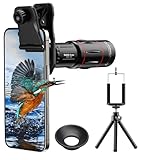
- 【Upgraded 18X Telephoto Lens】: This 18X telephoto lens features an adjustable focal length, allowing you to effortlessly capture crisp and clear images of distant subjects by simply twisting the focus ring. Whether you're an outdoor enthusiast or a passionate photographer, this lens is a game-changer, enabling you to see and capture the world in stunning detail.
- 【BAK4 Prisms & FMC Lens】: Equipped with high-quality BAK4 prisms and FMC (Full Multi-Coated) glass, this lens delivers exceptional image quality, vibrant colors, and minimal distortion. Whether you're shooting in challenging lighting conditions or capturing intricate details, the telephoto lens for iphone ensures stunning results. Say goodbye to glare, and hello to sharp, vivid photos that truly bring your scenes to life.
- 【Polymer Material & Portable】: This 18X telephoto phone lens for Android is crafted from durable polymer material and high-quality optical glass, ensuring both strength and clarity. With an ergonomic design and lens weighing only 120g, it's compact and easy to carry. The included storage bag makes it convenient to slip into your pocket or backpack without taking up space, so you can enjoy telephoto shooting anytime, anywhere.
- 【2 Models & With Tripod】: The telephoto Lens features 2 modes, cell phone shooting and naked-eye observation. With the eyecup attached, it becomes a monocular telescope for clear distant viewing. The included aluminum alloy tripod supports hands-free use, ensuring stable photos and videos without blur.
- 【Widely Compatible & Multipurpose】: Universal detachable clamps make installation and removal easy. The lens is designed with a maximum clip opening width of 0.98in (2.48cm) and a distance of 1.38in (3.5cm) from the clip top to the lens center, fitting most smartphones, including iPhone, Samsung Galaxy and Note, Google Pixel, Huawei, OnePlus, and more. Perfect for camping, sports events, moon watching, bird watching, fishing, hiking, golf, concerts, and travel. IMPORTANT NOTE: This lens fixture supports cell phones ≤ 0.98in thick (including phone case).
Sharing files between platforms has become more model-specific. Samsung says Quick Share supports AirDrop connectivity on the Galaxy S26 series, Galaxy Z Fold8 Ultra, Galaxy Z Fold8 and Galaxy Z Flip8. Do not assume this capability applies to every Galaxy phone; check current availability for the named model and region. Samsung’s details are on its US smartphone page.
Privacy and security depend on controls and upkeep
Apple documents controls for reviewing app permissions, granting location access and managing Location Services for individual apps. Samsung describes Knox security features, permission tools and choices for Galaxy AI processing. These are vendor descriptions of available controls, not independent evidence that one ecosystem is categorically more secure. Your model, software updates, settings and habits also matter.
Rank #4

- 【Stylus Pen for Touchscreen】Our stylus pen requires no Bluetooth pairing or charging, you can unleash your creativity anytime and anywhere, just pick up the stylus and express your thoughts freely on the touch screen.
- 【2-in-1 Stylus Pen】: Tablet pen for touch screen, made of lightweight alloy, no need for Bluetooth connection or charging, ready to use after opening the package, comfortable in hand, sturdy, durable and anti-aging, so you can use it anytime, anywhere Easily capture inspiration and make everything feel like writing on paper, giving you a more accurate writing/drawing/touching experience.
- 【High Sensitivity & Precision】Acempire stylus can flexibly fit on the screen without delays, interruptions, or screen scratches, allowing you to have a smoother writing or drawing experience and enhance your creative pleasure.
- 【Compatibility and multi-purpose】: Universal stylus, suitable for touch screen devices (for nintendo switch stylus, for switch 2 stylus, Apple, Samsung, Moto, Lenovo, Xiaomi, etc., and also compatible with major operating systems, such as: Google, Android, Microsoft, etc.), you can use it like a real pen, You can use our stylus to write on drawing applications, take notes, read news, play games, etc. just like any other touch screen device.
- 【Professional customer service】: we provide professional 24-hour customer service. If you encounter any product problems, please feel free to contact us through the store, and you will get a solution in the shortest time.
On iPhone, Apple’s support guide explains how to review and change app access to location and other information: control access to information in apps on iPhone. For Galaxy AI processing choices and other ecosystem controls, consult Samsung’s One UI information and check the settings on your specific phone.
Independent reader supportYour contribution helps us test, update, and keep practical guides available for everyone.Switching from iPhone to Galaxy: what transfers?
Samsung documents transfer to Galaxy through cable, wireless and iCloud methods in Smart Switch. It recommends cable for the broadest range of supported transfer types. Its wired-transfer list includes contacts, photos and videos, calendars, files, notes, messages, alarms and voice memos. Samsung states that iMessage special effects do not transfer, so do not assume every message behavior will be preserved.
Do these 3 things before closing this tab:
1Fix the driver behind crashes, sound loss and screen glitches2Repair Windows errors before they cause bigger problems3Scan for outdated or missing drivers - takes under a minuteBest Value

- 【Stylus Pen for Touchscreen】Our stylus pen requires no Bluetooth pairing or charging, you can unleash your creativity anytime and anywhere, just pick up the stylus and express your thoughts freely on the touch screen.
- 【2-in-1 Stylus Pen】: Tablet pen for touch screen, made of lightweight alloy, no need for Bluetooth connection or charging, ready to use after opening the package, comfortable in hand, sturdy, durable and anti-aging, so you can use it anytime, anywhere Easily capture inspiration and make everything feel like writing on paper, giving you a more accurate writing/drawing/touching experience.
- 【High Sensitivity & Precision】Acempire stylus can flexibly fit on the screen without delays, interruptions, or screen scratches, allowing you to have a smoother writing or drawing experience and enhance your creative pleasure.
- 【Compatibility and multi-purpose】: Universal stylus, suitable for touch screen devices (for nintendo switch stylus, for switch 2 stylus, Apple, Samsung, Moto, Lenovo, Xiaomi, etc., and also compatible with major operating systems, such as: Google, Android, Microsoft, etc.), you can use it like a real pen, You can use our stylus to write on drawing applications, take notes, read news, play games, etc. just like any other touch screen device.
- 【Professional customer service】: we provide professional 24-hour customer service. If you encounter any product problems, please feel free to contact us through the store, and you will get a solution in the shortest time.
Samsung’s newer QR-based wireless instructions specify iOS 26.6 or later on the iPhone and Android 17 with One UI 9 or later on the Galaxy. Other Smart Switch instructions cover broader, older software versions. Check Samsung’s instructions for your devices before beginning, and inventory important content and account access first.
- Review Samsung’s Smart Switch transfer instructions and choose cable, wireless or iCloud based on your devices and the data you need.
- Check your iPhone and Galaxy software against the requirements for the method you plan to use, especially for the newer QR-based wireless process.
- Make a list of essential data and access needs, including contacts, photos, messages, notes, passwords, app data and two-factor authentication, then verify what the selected method supports.
- Run the transfer and check the results on the Galaxy before relying on it as your only copy. In particular, expect iMessage special effects not to transfer through the documented wired method.
Form factor may decide the comparison
Apple’s listed iPhones are conventional slab phones, while Samsung’s current US range includes both slab phones and foldables such as the Z Fold8 and Z Flip8. If a foldable matters to you, you are choosing a form factor as well as a software ecosystem. Compare the exact models’ dimensions and handling in person when possible; the listed lineup alone does not establish which phone will feel right in your hand. Check Apple’s iPhone comparison page and Samsung’s US lineup for the models available in the relevant market.
Make the decision against your priorities
- Lean iPhone if you want iOS or depend on Apple devices and services for everyday continuity.
- Lean Samsung Galaxy if you want Android with One UI personalization, or specifically want a Samsung foldable.
- Compare feature by feature if AI translation, privacy controls or cross-platform sharing is central: verify the exact model, language, region and software requirements.
- Compare cost only after matching the phones by local price, storage and size; the available manufacturer pages do not establish a price winner.
- Plan a platform switch around the data and app behaviors that matter to you, not just the transfer tool’s headline promise.
The available manufacturer information does not establish a controlled cross-brand winner for camera quality, battery life, performance, durability or software-support duration. For those questions, compare the exact models and current local terms rather than inferring an answer from the brand name.
Quick Recap
Product prices and availability are accurate as of the date/time indicated and are subject to change. Any price and availability information displayed on Amazon at the time of purchase will apply.
What’s actually slowing this PC down?
Pick the symptom - the matching free tool is one click away.

