
Quick wins for a faster PC:
Clear out junk files and repair common Windows errorsFree Scan →Scan for outdated or missing drivers - takes under a minuteDriver Scan →Repair Windows errors before they cause bigger problemsFix Now →The HP OfficeJet Pro 7720 is a four-function office inkjet that can print up to A3/11 × 17 inches, but its scanner does not handle A3 originals. It is a useful fit for a small office that needs occasional large-format plans, spreadsheets, or posters alongside everyday printing, copying, scanning, and faxing. Its main trade-offs are that it cannot automatically scan both sides of a document, and its rated print speeds do not reflect every real-world job.
What the HP OfficeJet Pro 7720 does—and does not do
The 7720 prints, copies, scans, and faxes. Its signature feature is large-format printing: HP lists support through Tabloid/11 × 17 inches in its US specifications. That does not make it an A3 scanner or copier. HP’s technical datasheet gives a maximum scan size of 216 × 356 mm, and Expert Reviews explicitly notes that the printer cannot scan or copy A3 originals.
In other words, it can produce a large print from a file or a smaller original, but it is not an all-in-one solution for digitizing or duplicating A3 documents at their original size. If A3 scanning is essential, verify the scanner’s maximum original size before choosing any printer.
HP OfficeJet Pro 7720 specifications
| Feature | Published specification |
|---|---|
| Functions | Print, copy, scan, and fax (HP) |
| Maximum print size | Tabloid/11 × 17 inches in HP’s US specifications |
| Maximum scan size | 216 × 356 mm in HP’s technical datasheet |
| Automatic document feeder | 35 pages (HP store listing) |
| Automatic duplex | Two-sided printing for A4/Letter; duplex scanning is not supported, according to Expert Reviews |
| Paper capacity | 250-sheet input tray and 75-sheet output tray (HP US support specifications) |
| Connectivity | Built-in 2.4 GHz Wi-Fi, USB, and Ethernet (HP US support specifications); HP also lists Wi-Fi Direct |
| Memory and print technology | 512 MB; four-cartridge HP Thermal Inkjet (HP US support specifications) |
| Recommended monthly volume | 250–1,500 pages (HP US support specifications, created September 11, 2026) |
| Maximum monthly duty cycle | Up to 30,000 pages (HP US support specifications, created September 11, 2026) |
The recommended monthly volume is the more useful operating guide for routine use; the maximum duty-cycle figure is not a recommended target. HP’s published features and cartridge details can differ by region.
Recommended Free Tools
#1 Best Overall

- Perfect FOR OFFICE - The wide-format OfficeJet Pro 9720 is perfect for offices printing professional-quality color documents like floorplans, mood boards and spreadsheets. Print speeds up to 22 ppm black, 18 ppm color.
- 3 MONTH TRIAL OF INSTANT INK INCLUDED – Subscribe to the Instant Ink delivery service to get ink delivered directly to your office door before you run out and after 3 months, a monthly fee applies unless cancelled
- KEY FEATURES – Fast color printing up to 11 x 17, copy, auto 2-sided printing, auto document feeder and 250-sheet input tray
- EASILY ACHIEVE VIBRANT, SCREEN-ACCURATE PRINTS – Print true to screen with the world's first and only wide-format printer with P3 for a wider color gamut vs. sRGB
- 2.7-INCH TOUCHSCREEN – Quickly navigate your printer with a large color touchscreen and a phone-like user interface
Print speed: HP’s rating versus review tests
HP lists speeds up to 22 pages per minute (ppm) in black and 18 ppm in color in its stated ISO-comparable mode. These are manufacturer ratings, not a guarantee for mixed documents, graphics-heavy jobs, or every setting.
In Tom’s Guide’s historical review, a five-page text document printed at 12.4 ppm. A six-page mixed text-and-color job averaged 6.4 ppm, while a letter-size glossy photo at the review’s maximum-dpi setting took 1 minute 41 seconds. Those are results from that reviewer’s tests, not a current standardized comparison.
Rank #2

- FROM AMERICA'S MOST TRUSTED PRINTER BRAND – The wide-format OfficeJet Pro 9730 is perfect for offices printing professional-quality color documents like floorplans, mood boards and spreadsheets. Print speeds up to 22 ppm black, 18 ppm color.
- 3 MONTH TRIAL OF INSTANT INK INCLUDED – Subscribe to the Instant Ink delivery service to get ink delivered directly to your office door before you run out, and you save up to 50% on ink; after 3 months, a monthly fee applies unless cancelled
- KEY FEATURES – Fast color printing up to 11 x 17, copy, auto 2-sided printing, auto document feeder with single-pass 2-sided scanning, and two 250-sheet input trays
- EASILY ACHIEVE VIBRANT, SCREEN-ACCURATE PRINTS – Print true to screen with the world's first and only wide-format printer with P3 for a wider color gamut vs. sRGB
- 4.3-INCH TOUCHSCREEN – Quickly navigate your printer with a large color touchscreen and a phone-like user interface
Print, copy, and scan quality
Reviews found strengths in ordinary office output, though their assessments were not identical. Tom’s Guide described text as dark and sharp, graphics as saturated with sharp detail, and copy quality as high. It called scans good overall but noted mild bit-mapped artifacts in fine details on 600-dpi photo scans.
TechRadar reported variable black density and less-defined dark areas in photos from its review sample. Taken together, these historical observations suggest the 7720 can produce capable text and color documents, but they do not establish uniform photo quality or a model-wide defect. Neither review is a new hands-on test.
Rank #3

- The OfficeJet Pro 8125e is perfect for home offices printing professional-quality color documents like business documents, reports, presentations and flyers. Print speeds up to 10 ppm color, 20 ppm black
- PERFECTLY FORMATTED PRINTS WITH HP AI – Print web pages and emails with precision—no wasted pages or awkward layouts; HP AI easily removes unwanted content, so your prints are just the way you want
- UPGRADED FEATURES – Fast color printing, scan, copy, auto 2-sided printing, auto document feeder, and a 225-sheet input tra
- WIRELESS PRINTING – Stay connected with our most reliable dual-band Wi-Fi, which automatically detects and resolves connection issues
- 3 MONTHS OF INSTANT INK WITH HP+ ACTIVATION – Subscribe to Instant Ink delivery service to get ink delivered directly to your door before you run out. After 3 months, monthly fee applies unless cancelled.
ADF and document workflow limits
The 35-page ADF can help with batches of pages, but capacity alone does not mean it can process both sides automatically. Expert Reviews reported that the 7720’s ADF does not provide duplex scanning. If your routine involves two-sided originals, check whether you are willing to turn pages manually or need a printer with single-pass duplex scanning.
Expert Reviews also noted software friction and a copy-interface quirk: the machine defaulted to color for a copy operation. That review, dated May 15, 2018, characterized the 7720 as a capable A3-capable multifunction printer for moderate small-office use, while identifying those workflow limitations.
Rank #4
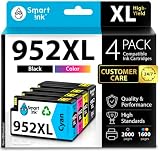
- Compatible with HP OfficeJet 8702 OfficeJet Pro 7720 7730 7740 8200 8210 8216 8218 8700 8710 8714 8715 8716 8717 8718 8719 8720 8724 8725 8726 8727 8728 8730 8732M 8734 8735 8736 8740 8743 8744 8745 8746 8747 printers series
- Package Contents: 1 x Black 952 XL, 1 x Cyan 952 XL, 1 x Magenta 952 XL, 1 x Yellow 952 XL (4 cartridges in total)
- Print More with XL. Page yield: Up to 2,000 pages per XL Black, 1,600 pages per XL color cartridges (Cyan, Magenta, Yellow)
- Customer Care 24/7: We provide exceptional Customer Live Support daily (even on holidays). Call or write to us if you need manufacturer support
- No updates - No headaches: Printer auto-updates may interrupt your printing with compatible cartridges when most needed; we recommend turning off the auto-updates to avoid unpleasant surprises (read the instructions in the photo slides)
Ink cartridges and historical running-cost estimates
Cartridge numbers vary by market. HP’s specifications identify HP 952 supplies in North America, 953 in EMEA, 954 in Latin America, and 955 in Asia-Pacific. Check the cartridge number shown on your printer or on the support page for your country before buying; do not assume a cartridge family listed for another region will fit.
HP states cartridge yields as averages under specified testing and notes that actual yield varies with content and other factors. Tom’s Guide’s 2018 review estimated costs of 2.1 cents per text page and 11.1 cents per color page using standard cartridges. Those are historical estimates, not current local cartridge prices or a guarantee of your cost per page. For a present-day cost comparison, use current prices and yields for the correct regional cartridge family.
Quick Recap
Who should consider the OfficeJet Pro 7720?
A sensible fit
- Small offices or home offices that occasionally need A3/11 × 17-inch output for plans, posters, spreadsheets, or similar documents.
- Users who want print, copy, scan, and fax functions in one device and can work within its smaller scan-size limit.
- Moderate-volume users who value a large-format print option more than fast, fully automated document scanning.
Look elsewhere if you need
- A3 scanning or copying at original size.
- Automatic two-sided scanning through the document feeder.
- A printer selected for heavy recurring volumes rather than occasional large-format work.
What to check before buying
- Confirm the scan size. Compare your largest original with HP’s listed 216 × 356 mm scan maximum; A3 print support does not imply A3 scanning.
- Check the feeder workflow. If you scan two-sided originals regularly, confirm duplex scanning support rather than relying on the ADF’s 35-page capacity.
- Compare like-for-like speed figures. Distinguish HP’s ISO-comparable ratings from measured results on mixed or photo jobs.
- Verify regional ink. Identify whether your unit uses 952, 953, 954, or 955 cartridges before checking current prices and yields.
- Match volume to the recommendation. HP’s US specification gives a recommended monthly volume of 250–1,500 pages; its 30,000-page maximum duty cycle is not an everyday target.
Product prices and availability are accurate as of the date/time indicated and are subject to change. Any price and availability information displayed on Amazon at the time of purchase will apply.

