
Zebra supports frontline work with connected devices and software that help employees capture information, find and track items, print labels, communicate and complete tasks where the work happens. Its offering spans rugged mobile computers, barcode scanners, thermal printers, RFID, software, AI, machine vision and automation. The practical benefit depends on how well those tools fit a worker’s environment and connect to the organization’s systems; Zebra’s company materials describe intended uses, not a universal, independently measured productivity gain.
What Zebra technology does for frontline workers
Zebra’s approach is to connect physical work to digital information. A scan, label, inventory check or image can become an event in a business workflow, giving workers and managers information to act on. The device is only one part of that process: applications, connectivity and integration with inventory, point-of-sale, clinical or field-service systems determine what happens next.
| Technology | Frontline task it can support | What it adds to the workflow |
|---|---|---|
| Mobile computers | Inventory checks, restocking, returns, order fulfillment, mobile point of sale and communications | Applications and task information available at the point of work, on handhelds, tablets, wearables or vehicle-mounted devices |
| Barcode scanners | Checking products, packages, medications or assets | Turns a barcode read into a digital event that can update records, verify an item or trigger the next step |
| Thermal printers | Printing price, shelf, shipping, patient or traceability labels | Produces labels where they are needed, subject to the printer, media and connected workflow |
| RFID | Tracking items, assets and operational activity | Can provide visibility beyond individual line-of-sight barcode scans |
| Software, AI and machine vision | Accessing task guidance, interpreting images or video, and supporting decisions | Adds application workflows and context to data captured by devices and sensors |
| Automation and robotics | Moving goods or automating selected operational tasks | Extends the technology stack beyond worker-operated devices; the appropriate role depends on the operation |
Zebra describes this portfolio for retail, warehousing and distribution, manufacturing, healthcare, transportation and logistics, field service, government and public safety, and hospitality. The device and workflow differ by setting: a retail associate might check a price in an aisle, while a warehouse employee scans an order or a clinician uses a mobile device during patient-side work.
How the tools fit common frontline workflows
Retail: check, replenish and serve
A mobile computer can let an associate check product or price information, manage inventory, restock shelves, process a return or support mobile point of sale without leaving the work area to find a fixed terminal. Scanning connects a physical product to its digital record. A point-of-use printer can produce labels for shelf, price or other store workflows. These steps depend on the retailer’s applications and system integrations; a device alone does not ensure that inventory or pricing records are accurate.
Quick wins for a faster PC:
Fix the driver behind crashes, sound loss and screen glitchesFind Drivers →Clear out junk files and repair common Windows errorsFree Scan →Scan for outdated or missing drivers - takes under a minuteDriver Scan →#1 Best Overall

- The kit comes with one barcode scanner, one cradle, one battery, one USB cable and manual.
- Eliminate Bluetooth Interference with Zebra’s Proprietary Wi-Fi Friendly Mode------Ensure that your wireless DS2278 Bluetooth imagers only operate on channels that are not shared with your WLAN, protecting WLAN service levels for your workers and your customers.
- Unsurpassed Scanning Range------Workers can scan barcodes across a wide range (0.5 in./1.23 cm to 14.5 in./36.8 cm), improving checkout speed and reducing training time.
- Pre-configured and Ready to Use, Right Out of the Box------Since the default settings are optimized for the majority of scanning applications, you can use the DS2278-SR imager the moment you take it out of the box — no configuration required. With omni-directional scanning, users never need to line up the imager and the barcode — unlike 1D scanners.
- Control Your Scanners from a Smartphone, Tablet or PC------You can easily control the beeper, LED and Symbology settings; display scanned barcode data; access model and serial number information and more from Windows, Android and iOS hosts.
Warehousing and distribution: identify and fulfill
Workers can use mobile computers and scanners to capture item and package information during receiving, picking, packing and order fulfillment. Each scan can provide a record for the next step in the workflow, while RFID may offer a different kind of visibility for operations that need to track items or assets without relying on a separate line-of-sight barcode read for every event. Label printing supports shipping and traceability tasks.
Zebra names the cordless DS3678 as one scanner example. It may illustrate rugged scanning in a warehouse or retail operation, but the exact configuration matters: confirm the model, accessories, compatibility and regional availability against the actual workflow before choosing a unit.
Manufacturing: capture and trace work
On a factory floor, scanning and printing can support item identification, production steps and traceability. Mobile computers can give workers access to operational applications where tasks take place; fixed industrial scanning and machine vision can support processes that call for automated capture or image-based information. Those capabilities are not interchangeable: the choice depends on what must be identified, where capture occurs and how the data is used.
Healthcare: support patient-side work
Mobile devices and scanning can support patient-side workflows by giving staff access to information and a way to capture identifiers or task updates at the point of care. Printers can support patient-label workflows. The organization’s clinical systems and configured processes remain essential: the device should be selected and deployed to work with them, rather than treated as a substitute for clinical procedures.
Rank #2

- Fast 1D/2D Scanning Performance – Instantly reads barcodes from labels, receipts, and mobile screens with high accuracy, even if damaged or poorly printed.
- USB Plug-and-Play Connectivity – Simple setup with standard USB connection ensures quick integration with most POS systems without extra configuration.
- Compact Ergonomic Design – Lightweight handheld form factor provides comfortable use during long shifts in retail and hospitality environments.
- High-Volume Retail Ready – Built for fast-paced checkout counters, improving transaction speed and reducing customer wait times.
- Durable & Reliable Build – Designed for daily commercial use, delivering consistent performance in demanding business environments.
Field service and other mobile work
Handhelds, tablets and wearables can keep applications and communications available when employees work away from a fixed desk or terminal. Zebra also lists transportation, logistics, public safety and hospitality among the settings for its technology. The relevant requirement may be access to a field-service application, asset identification or communication, so device choice should follow the job and environment rather than a general preference for one form factor.
Why device choice depends on the job
Zebra’s mobile-computer category includes handhelds, tablets, wearables and vehicle-mounted devices. They are not simply different sizes of the same tool: workers hold, wear or mount them differently, and each form factor suits different tasks and environments. Before comparing models, define the workflow and its constraints.
- Environment: Is the device used in a retail aisle, warehouse, factory, bedside setting or outdoors in the field?
- Capture method: Does the task call for barcode scanning, RFID, image capture or manual entry?
- Mobility and ergonomics: Does the worker need a handheld device, a wearable, a tablet or a vehicle-mounted unit?
- Durability and shift length: What conditions must the device withstand, and how long must it remain usable during a shift?
- Printing: Are labels needed at the point of work, and what print method, connectivity and media are required?
- Systems and management: How will the equipment connect to inventory, point-of-sale, clinical or field-service applications, and how will the organization manage devices?
- Automation: Is the need for a worker-operated tool, fixed capture equipment, machine vision or a higher level of automation?
For a concrete printer example, Zebra names the ZD621d desktop thermal printer for workflows such as retail, warehousing and traceability. Check the exact print method, connectivity and compatible media for the intended setup; a model name alone does not establish that a printer will meet every labeling need.
What software, AI and automation add
Mobile hardware captures data and presents applications, but software determines how that data fits into a task. Zebra says its frontline software is intended to help workers focus on customers. Its 2025 annual report describes on-device and cloud AI companions as a way to augment productivity, and computer vision as a way to extract information from images or video. The report also presents machine vision and robotics as part of the company’s broader direction.
What’s actually slowing this PC down?
Pick the symptom - the matching free tool is one click away.
Rank #3
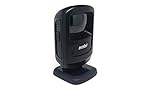
- Scans 1-D, 2-D and PDF417 bar codes on paper, mobile phones and computer displays------Scan virtually any bar code on any medium; supports the technology your customers are embracing — mobile bar codes
- New small footprint------Most compact device in its class, fits in the most space constrained areas, yet offers flexibility of a much larger scanner — the large high-mounted exit window enables scanning of even taller items
- New sleek design------Perfect in the most design conscious environments, Omnidirectional scanning------Eliminates the need to align bar code and scanner
- Handheld and hands-free modes------Dual mode functionality saves time; keeps lines moving and minimizes wait times; eliminates the need to lift heavy items, reducing the opportunity for injury
- 5 ft./1.5 m drop spec and recessed exit window------Increased durability: can endure drops; prevents nicks and scratches on the exit window that could degrade performance
These are descriptions of capabilities and strategy, not proof that every deployment delivers a particular result. Organizations evaluating AI or computer vision should identify the decision or task the tool is meant to support, what data it uses, how it connects to existing systems, and when a worker must review or act on its output. Automation likewise makes sense only where the process, operating conditions and integration support it.
Independent reader supportYour contribution helps us test, update, and keep practical guides available for everyone.How Zebra’s frontline offering developed
Zebra’s October 28, 2024 retrospective describes its October 2014 acquisition of Motorola Solutions’ Enterprise Business as its largest acquisition by deal size and employee integration. Zebra says the acquisition expanded mobile-computing and advanced data-capture capabilities for frontline organizations. It presents its current portfolio as combining those foundations with RFID, sensors, software, machine vision, AI and robotics.
This history helps explain why Zebra’s offering extends beyond handheld scanners: it brings together technologies for capturing, processing and acting on information across frontline operations. The acquisition date and Zebra’s account of its impact are company-reported history, rather than an independent assessment of outcomes for every customer.
Deployment, support and evidence of impact
Zebra reports a channel network of more than 10,000 partners in about 179 countries in its corporate overview, and describes services and managed support around its technology. That ecosystem can matter for organizations that need help selecting devices, integrating them with existing systems or supporting a rollout. Partner availability and the scope of support should be confirmed for a specific country, project and service arrangement.
Recommended Free Tools
When assessing whether the technology improves an operation, define a baseline and measure the outcome that matters for that workflow—for example, inventory accuracy, fulfillment time or the number of steps required to complete a task. Zebra’s product and company materials explain intended mechanisms and use cases, but they do not establish one independent causal estimate of productivity improvement that applies across frontline workers, industries and deployments. A particular customer result requires evidence tied to that customer, deployment and date.
Quick Recap
Product prices and availability are accurate as of the date/time indicated and are subject to change. Any price and availability information displayed on Amazon at the time of purchase will apply.

