
To update GST rates and tax codes safely, first confirm your country’s rule, the supply’s tax treatment and the effective date. Then change only the affected settings in your invoicing software, handle transactions that cross the date under the official transition rules, and test a draft before sending a live invoice. GST rules and software controls vary by jurisdiction and product, so there is no single rate or menu path that applies everywhere.
How do I update GST rates and tax codes in my invoicing software?
Use this workflow before changing a rate or code. It helps prevent an update to a default from being applied to the wrong products, services or historical transactions.

- Identify the rule: confirm the country, your GST registration status, the supply type and the official effective date. Check the tax authority’s current notice or rate schedule.
- List affected supplies: record each affected product or service, its current code, the new treatment and the date the treatment applies.
- Resolve transition transactions: check the local rules for supplies where invoice issue, payment, delivery or service dates fall on different sides of the change.
- Update the matching software settings: create or edit the relevant rate or code, assign it only to affected items, and set an effective date if the application supports one.
- Review saved defaults: check recurring invoices, templates and item defaults for stale tax settings.
- Test and verify: prepare draft examples, compare the tax calculation and invoice details with official requirements, then review the first live transactions.
Software labels and behavior differ. Do not assume changing a default will update—or preserve—existing invoices in a particular way. If the application does not support effective-dated rates or separate item mappings, consult its vendor guidance or support team before making a bulk edit.
What should I check before changing the rate?
Confirm the country, registration and supply type
GST is not one global tax schedule. Confirm which jurisdiction’s rules apply, whether the business is registered, and how the specific supply is classified. Check the current official schedule for categories recognized locally, such as exempt, zero-rated or reverse-charge treatment; do not assume those labels or rules are identical across countries.
Free tools Windows power users keep installed
One-click scans. No signup required.
#1 Best Overall
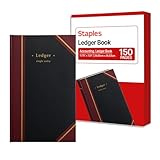
- 150 ruled sheets designed for structured accounting, recordkeeping, and data logs.
- Hardbound black cover offers durability and professional appearance.
- Ledger ruling supports clear entry alignment and consistent tracking.
- Premium paper reduces ink bleed for crisp, permanent records.
- Ideal for finance teams, education, business administration, and archival use.
For example, Singapore’s Inland Revenue Authority of Singapore (IRAS) describes a 9% GST rate for standard-rated local supplies, alongside other supply categories and customer-accounting rules. That rate is specific to Singapore and the applicable supply: IRAS guidance on GST rates.
Record the effective date and exceptions
Use the date in the applicable official notice, not a date inferred from a software update or a news headline. A general start date can have product-specific exceptions. In India, the Ministry of Finance said most rate changes recommended by the 56th GST Council took effect on 22 September 2025, while specified tobacco products remained at existing rates until a later notified date. The ministry’s 18 September 2025 FAQ identified Notification No. 9/2025-Central Tax (Rate), dated 17 September 2025, for CGST rate changes on goods. These are India-specific examples; confirm the current notification and product schedule before changing a code: Ministry of Finance GST Council FAQ, 3 September 2025 and Ministry of Finance GST Council FAQ-3, 18 September 2025.
How do I change the GST rate in my invoicing system?
Map the change before editing
Make a short working list so each software change has a clear target. Include only supplies affected by the official change.
- Product or service name
- Current tax code and treatment
- New tax code and treatment
- Effective date and any transition rule that applies
Avoid changing a company-wide default if only some items are affected. If the change involves multiple local categories or tax components, confirm that the software can represent them correctly before assigning codes.
Do these 3 things before closing this tab:
1Fix the driver behind crashes, sound loss and screen glitches2Clear out junk files and repair common Windows errors3Scan for outdated or missing drivers - takes under a minuteUpdate the tax setting and item mappings
In your application, look for its tax, GST or sales-tax settings. Add or edit the applicable rate or code, assign it to the affected products and services, and configure an effective date if supported. Menu names and whether a setting affects saved transactions vary by product, so follow the documentation for your exact application and version.
Review recurring invoices, templates and saved item defaults: they may hold their own tax selections. Keep prior-period entries and issued invoices intact. If the software cannot separate the new treatment from earlier transactions, or a bulk edit could rewrite history, pause and get vendor guidance before proceeding.
Rank #3

- KEEPING MONEY ORGANIZED: Our account ledger books offer versatile functionality for managing finances, budgets, expenses, and other vital records, catering to individuals, entrepreneurs, and small businesses alike.
- EASY TO USE: Tailored for both small business owners and individuals, this ledger book is an ideal tool for managing business finances or monitoring personal expenses, providing a clear overview of all transactions to detect any discrepancies.
- KEEP TRACK: With this accounting log book at your disposal, you gain the ability to comprehensively analyze your financial activities, understand your income and expenditure patterns, and generate accurate financial reports to support informed decision-making.
- COMPACT FOR EASY CARRY: Crafted from premium materials, including eco-leather hardcover and thick 100gsm paper, this A5 size columnar book is built to last. Features like a pen loop, elastic band closure, lay-flat binding, bookmark, and a pocket for loose notes ensure convenience and organization.
- PERFECT FOR YOUR NEEDS: If you struggle with managing your finances, often forgetting what you spend, where, and how much, then this companion is for you. Always by your side, it ensures you record every spend, everywhere you go. Give it a try and take control of your finances.
How should I handle invoices that cross the effective date?
Do not choose the rate from the invoice date alone unless the local rule says that is the deciding date. Depending on the jurisdiction and transaction, invoice issue, payment, delivery or service performance may matter.
Singapore’s IRAS transition guidance for its 2024 increase from 8% to 9% explains how invoice, payment and delivery or service dates can affect supplies spanning the change, with specific examples and concessions: IRAS transitional rules for GST rate change. For the applicable Singapore adjustments and concessions, see IRAS adjustments and concessions.
Recommended Free Tools
India’s Ministry of Finance FAQ also addresses cases where supply and invoicing fall on different sides of a rate change: GST Council FAQ, 3 September 2025. Apply the rules for your jurisdiction and the facts of the specific transaction rather than copying another country’s transition method.
Rank #4

- Standard Compatible Size: ledger paper measuring 5" x 8.5", these ledger sheets fit most common ledgers and binders. The ledger books for bookkeeping serve as useful refills for ledger books for bookkeeping and work with typical ledger book storage systems
- Structured Column Design: columnar pad with clear columns for debit, credit, and balance enhance efficiency in your accounting ledger and bookkeeping ledger. This functional layout supports smooth entry and organization within any standard ledger book and complements your daily use of ledger paper
- Durable Quality Material: our ledger Paper are made of 80g coated paper. The ledger paper resists ink bleed and yellowing, the quality acid-free paper works well with pens, pencils and ballpoint pens, without ink ghosting and bleed-through. This quality material supports long-term record keeping in ledger books for bookkeeping
- Practical Versatility: our bookkeeping ledger are suitable to help you budget, financial record keeping, record income and expenditure, keeping household accounts, keep your different accounts organized and up to date, track all of your bills, etc
- Sturdy 6 Ring Notebook for Business: the PU leather cover protects your accounting ledger from daily wear and tear. The 6 ring binder design allows you to add, remove, or rearrange sheets freely. This is more than just a ledger book for small business use; it is a sturdy, refillable ledger notebook that grows with your bookkeeping needs over time
How can I test the change before issuing invoices?
Create drafts for a normal affected sale and any relevant transition or special-category case. Check the calculation against the official rate and rules, and verify the customer-facing document before sending it.
- Correct product or service and tax code
- Taxable value, tax amount and invoice total
- Rate and description shown to the customer
- Required supplier and recipient details, invoice number and date, and other locally required information
India’s CBIC sectoral FAQs list invoice details including supplier and recipient identifiers, a unique invoice number and date, description, value, tax rate and tax amount: CBIC GST Sectoral FAQs. Document requirements differ elsewhere. In New Zealand, Inland Revenue says taxable supply information replaced the tax-invoice requirement from 1 April 2023; previously compliant invoice wording remains compliant, and the information may be exchanged electronically: Inland Revenue: Taxable supply information for GST.
If your software provides a GST summary or tax report, compare a sample transaction with a manual calculation under the official rule. Retain the relevant tax notice and a record of when the configuration changed. IRAS notes that accounting software can help with record keeping and tax obligations, but the software does not determine the legally correct treatment for you: IRAS: Getting ready for GST rate change.
The Tool Desk
Outbyte PC Repair FREERepair Windows errors before they cause bigger problemsFix Now →Outbyte Driver Updater FREEFix the driver behind crashes, sound loss and screen glitchesFind Drivers →Best Value

- Hard bound, permanent storage columnar account books are made with acid-free paper
- 3-columns
- High gloss cover with foil stamp title and spine
- Includes place marking ribbon
- White paper
Will changing a tax code affect old invoices?
That depends on the application. A rate or code may be a reusable setting, a saved item default or a value stored on each transaction; product behavior is not established by a general GST rule. Check your vendor’s documentation and test in a draft or other safe workflow before making a bulk change. Preserve issued invoices and prior-period records rather than assuming an edit to a setting is harmless to history.
What if I already issued an invoice with the wrong rate?
Do not silently overwrite a finalized document. Check the tax authority’s correction process, required supporting information and any applicable deadline, then use the software’s correction workflow. Depending on local rules and the error, this may involve a credit note, replacement or revised invoice, or a debit note.
For Singapore, IRAS describes credit notes and replacement tax invoices for affected supplies, including supporting details for adjustments; it also states that the GST rate change does not change how a GST return is completed: IRAS adjustments and concessions. For India, Rule 53 of the CGST Rules sets particulars for revised invoices and credit or debit notes: CBIC Central Goods and Services Tax Rules, Rule 53. These are jurisdiction-specific examples, not a universal correction procedure.
Quick Recap
Product prices and availability are accurate as of the date/time indicated and are subject to change. Any price and availability information displayed on Amazon at the time of purchase will apply.

