
To turn keyboard lighting on or off, look for a key marked with a keyboard-backlight icon and press it; try holding Fn if pressing it alone does not work. The shortcut varies by computer model, and not every keyboard has backlighting. On a Mac, use the Keyboard brightness slider in System Settings.
Turn keyboard lighting on or off on a Mac
- Open the Apple menu and choose System Settings.
- Select Keyboard.
- Move the Keyboard brightness slider to set the level. Drag it all the way left to turn off backlighting.
If your Mac has dedicated keyboard brightness keys, use the increase or decrease key. Keep pressing the decrease key until the light turns off.
To have lighting adjust automatically, enable Adjust keyboard brightness in low light in Keyboard settings. You can also choose an inactivity period next to Turn keyboard backlight off after inactivity. Apple notes that the ambient-light sensor is near the camera, so do not cover that area when using automatic low-light adjustment.
Turn keyboard lighting on or off on a Windows laptop
- Find the key marked with a keyboard-backlight icon. The icon may be on a function key or another key.
- Press the marked key once. If nothing happens, hold Fn while pressing it.
- Press the key repeatedly to cycle through the lighting modes or brightness levels available on your model. Some keyboards cycle through levels and off.
There is no universal Windows setting for a physical keyboard backlight. The key assignment, Fn or FnLock behavior, and available lighting modes depend on the computer and keyboard. Check the manual or official support page for the exact model.
Outdated Drivers Are Slowing You Down
One free scan finds every outdated or missing driver and matches the right update for your exact hardware.Free scan · exact hardware matchPC Slower Than It Used to Be?
A free scan shows the junk files, broken settings and background clutter dragging Windows down - then fixes them in one click.Free scan · Windows 10 & 11#1 Best Overall
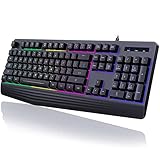
- Vibrant Rainbow Backlight: The rainbow backlight enhances the gaming atmosphere, making typing in the dark easier. Featuring both steady and breathing backlight modes, you can adjust brightness and backlight speed according to your preference or completely disable the lights.There is only a rainbow backlight, no solid color light and no customization.
- Comfortable and Quiet Typing Feel: Unlike mechanical keyboards, the membrane keys move a short distance, making typing faster and easier. At the same time, there is no "click" sound when typing, and it will not disturb others, which is very suitable for games or office work. Crater structure, button life more than 5000W times.
- Ergonomic Wrist Rest: Integrated ergonomic hand rest, the appropriate height enables the wrist to be comfortably placed on the wired keyboard and supports the wrist effortlessly. The scientific stepped keycap design allows easy finger access to all keys, maximizing hand comfort for long hours of gaming or work.
- Dedicated Media Control & Anti-Ghosting: The computer keyboard features 12 dedicated multimedia keys for quick access to functions like calculator, music media, volume control, email, and more. With 19 anti-ghosting keys, multiple key presses are recognized simultaneously, ensuring rapid gaming response. Additionally, you can swap WASD and arrow keys by pressing FN+W and lock the Win key with FN+Win.(Multimedia keys are not available on Mac).
- Durable & Splash-Resistant: Crafted from eco-friendly and durable ABS material, this silent gaming keyboard ensures the laser-engraved lettering on keycaps won't wear off. The pc keyboard offers plug-and-play compatibility and is widely compatible with Windows 95/98/XP/2000/ME/VISTA/7/8/9/10, as well as Mac.
Examples from laptop makers
| Maker | Documented examples | What to check |
|---|---|---|
| HP | On many supported consumer notebooks, the key is F5 or F4; some models may use Fn with the marked key. | Not all HP notebooks have a backlit keyboard. Check the exact model’s specifications and use its marked key. |
| Dell | Some Latitude, Vostro, and Inspiron models use F5, F6, F7, or F10. Other models may place the icon elsewhere. | Depending on FnLock, press the marked key alone or with Fn. Supported configurations may cycle Off, Low, High, Off. |
| Lenovo | Fn + Spacebar is one documented example; Esc is used on some keyboards. | Confirm the marked key and shortcut in the documentation for your model. |
These are examples, not guarantees for every laptop from a maker. If you have a gaming computer, a manufacturer application may provide additional lighting modes or customization; availability depends on the model and installed software.
Use keyboard lighting in Windows on an Intel Mac with Boot Camp
This applies only to Windows running on an Intel-based Mac with Boot Camp, not to ordinary Windows PCs. Apple’s Boot Camp guide says the covered setup uses F5 to decrease and F6 to increase keyboard brightness, potentially with Fn. Boot Camp Control Panel’s Keyboard pane also offers low-light adjustment and an inactivity timeout.
Rank #2

- Wireless keyboard has 7 colors & 4 modes RGB backlit options and adjustable brightness to provide you with more visual aesthetics typing atmosphere.
- Computer keyboard designed with 8.7" convenient device holder to hold your phone or tablet, keep your desk clean and tidy.
- The wireless keyboard features lighted and responsive tactile keystrokes for a smooth and quiet typing experience, ability to increase your work efficiency.
- Keyboard wireless layout with convenient access to all the right shortcut and multimedia keys, achieve more with less effort.
- Backlit wireless keyboard with built-in 1500mAh rechargeable battery that reduce the hassle of traditional battery replacement and wiring.
What to do if the keyboard light will not turn on
- Confirm the keyboard has backlighting. Look for the icon or check the official specifications for the exact computer model. A shortcut cannot light keys that do not have the feature.
- Try both key modes. Press the marked key alone, then try it with Fn. On some computers, FnLock changes which mode works.
- Cycle through the available levels. The light may be off or set to a low level, and repeated presses may be needed to reach the setting you want.
- Check automatic settings on a Mac. Low-light adjustment or an inactivity timeout can change or switch off the backlight. Keep the sensor area near the camera uncovered if using automatic adjustment.
- Follow the maker’s troubleshooting for your exact model. Some configurations have firmware illumination or timeout settings. Use the computer maker’s official instructions rather than changing unrelated settings.
- Consider an external backlit keyboard if the built-in one is not illuminated. Before choosing one, check its connection type, layout, size, and compatibility with your computer.
How to tell whether a keyboard has backlighting
Look for a key with a glowing-keyboard icon, then confirm the exact computer configuration in its official specifications or manual. A model family may include both backlit and non-backlit configurations, so the brand name alone is not enough to establish support.
Quick comparison
| Computer or setup | First place to check | Possible automatic controls |
|---|---|---|
| Mac | Apple menu > System Settings > Keyboard | Adjust brightness in low light; turn off after inactivity |
| Windows laptop | Marked backlight key, with or without Fn | Varies by model; consult the maker’s instructions |
| Windows on an Intel Mac with Boot Camp | F5/F6 brightness keys in the covered Boot Camp setup | Boot Camp Control Panel’s Keyboard pane |
| External keyboard | Its marked lighting key or manufacturer instructions | Varies by keyboard and its software |
FAQ
How do I turn on the keyboard light on my laptop?
Press the key marked with a keyboard-backlight icon. If it does not work, try holding Fn while pressing it. The correct key and shortcut depend on the model.
Recommended Free Tools
Rank #3

- 【Large Print Keyboard】- 4X larger than standard keyboard fonts, clear and easy to find, and can really help those who have trouble seeing keyboards. Perfect for elderly, the visually impaired, schools, special needs departments and libraries, etc
- 【White LED Backlight】- Bright and evenly distributed backlit keys, easy typing in lower light environment. Ideal for studio work, office. Backlit can choose to turn on/off and adjust brightness.
- 【Full Size & Ergonomics Design】- Unfold the feet at back of the keyboard to reduce hand fatigue and enjoy long hours of playing. Full QWERTY English (US) 104 key keyboard layout with numeric keypad, Large Print keys provides superior comfort without forcing you to relearn how to type.
- 【Plug and Play & Wide Compatibility】 - This USB keyboard takes away the hassle of power charging or swapping out batteries and is easy to setup. No drivers required.Compatible with Windows 2000/XP/7/8/10, Vista,Raspberry Pi 3/4, Mac OS(Note: Multimedia keys may not fully compatible with Mac, OS System).Works with your PC, laptop.
- 【Spill-proof】- This durable keyboard features a spill-resistant design. So you don't have to worry about spilling coffee and water. Enjoy Keys life of more than 5000W times.
How do I turn off the keyboard backlight?
Press the marked key repeatedly until the light turns off, if your model cycles through brightness levels and off. On a Mac, drag the Keyboard brightness slider in System Settings all the way left.
Does Windows have a keyboard-backlight setting?
There is no universal Windows switch for the physical keyboard backlight. Use the model-specific key or the computer maker’s instructions.
Rank #4

- 7 Unique Backlight Color: 7 Elegant LED backlight with 3 brightness level.
- Easy Setup: Simply insert the 1.2M (4 feet) USB wire into your computer and use the keyboard instantly.
- Ergonomic design: Scissors X structure gives you the comfortable typing experience, low-profile keys offer quiet and comfortable typing.
- Ultra Thin and Light: Compact size (16.7 X 4.5 X 0.24in) and light weight (17.4oz) but provides full size keys, arrow keys, number pad, shortcuts for comfortable typing.
- Package contents: Arteck Backlit USB wired Keyboard, welcome guide, our 24-month warranty and friendly customer service.
How do I know whether my laptop has a backlit keyboard?
Look for a backlight icon and check the exact model’s official specifications or manual. Not every configuration in a laptop family includes backlighting.
Why does pressing the keyboard-light key do nothing?
The keyboard may not have backlighting, the shortcut may require Fn, FnLock may affect the key, or the model may have a setting that changes the light automatically. Check the exact model’s documentation and settings.
Best Value

- SEE WITH EASE, TYPE WITH CONFIDENCE – Featuring large, bold print, this large font key board makes every character easy to see. A great solution for seniors, students, and visually impaired users who want a more comfortable computer keyboard experience.
- SEE KEYS CLEARLY IN ANY LIGHT – Work day or night with a lighted keyboard for PC that includes 7 colors and 4 brightness levels. This backlit keyboard design ensures the keyboard light up keys stay visible in dim rooms, offices, or late-night study sessions.
- BOOST YOUR PRODUCTIVITY – The full-size 107-key layout includes a number pad and 12 shortcut keys, making this keyboard wired perfect for faster navigation, smoother workflow, and more efficient typing on any project.
- PLUG AND PLAY RELIABILITY – A simple USB keyboard connection delivers instant setup for PC, Chromebook, or as a keyboard for laptop. No software required, just connect this wired keyboard and start typing right away.
- DURABLE AND DEPENDABLE DESIGN – Built to handle daily use, this desktop keyboard is a long-lasting solution for home, office, or shared workspaces. A reliable keyboard designed for comfort and ease of use.
Can I adjust keyboard lighting automatically?
Some Macs offer a low-light adjustment and an inactivity timeout in Keyboard settings. On other computers, automatic behavior depends on the model and its software.
Sources: Apple Mac keyboard brightness guide; Apple Boot Camp guide; HP notebook keyboard backlight guidance; Dell backlit-keyboard guide; Lenovo keyboard-backlight support.
Quick Recap
Product prices and availability are accurate as of the date/time indicated and are subject to change. Any price and availability information displayed on Amazon at the time of purchase will apply.

