
To take a screenshot on a Samsung Galaxy A12, press the Power/Side button and Volume Down together briefly, then release when the screen flashes. Find the image in Gallery > Albums > Screenshots. If the buttons are awkward to use, Palm swipe or an Edge panel shortcut may be available, depending on your phone’s software and settings.
Take a screenshot with the buttons
- Open the screen you want to capture.
- Press the Power/Side button and Volume Down at the same time.
- Release both buttons as soon as the display flashes.
Samsung identifies Power/Side and Volume Down as the common screenshot method. Use a brief press rather than holding the buttons: a long press may open the power menu, depending on the software. Samsung’s Galaxy screenshot guidance describes the method and notes that controls can vary by device.
Other ways to capture the screen
The button combination is the default method. These alternatives need the relevant feature to be present on your A12 and, in some cases, enabled first.
| Method | What it uses | Setup and availability |
|---|---|---|
| Power/Side + Volume Down | Hardware buttons | No setup; Samsung’s common method for Galaxy devices. |
| Palm swipe | A hand swipe across the display | Enable it if available; Samsung says availability varies by device, and some A12 users report that the setting is missing. |
| Tasks in the Edge panel | An on-screen shortcut | Add Take screenshot to the Tasks panel if the Edge panel and option are available on your software configuration. |
Check for Palm swipe
- Open Settings > Advanced features > Motions and gestures.
- If you see Palm swipe to capture, turn it on.
- Swipe the edge of your hand across the screen to take a screenshot.
If that setting is absent, this method is not available through that menu on your current configuration; use the buttons or check for the Edge panel option instead. Samsung’s general instructions describe Palm swipe as available on most, not all, Galaxy phones, and A12 community reports also note that it may be missing. Samsung’s feature guidance and the A12 community discussion reflect that variation.
What’s actually slowing this PC down?
Pick the symptom - the matching free tool is one click away.
#1 Best Overall
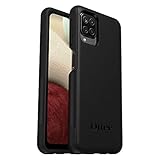
- Compatible with Samsung Galaxy A12
- DOES NOT come with a screen protector
- Soft inner and hard outer layers absorb and deflect impacts, open access to ports and speakers (no port covers)
- Thin profile slips in and out of pockets
- Trusted OtterBox Quality: With OtterBox, you're not just buying a case; you're investing in peace of mind. Our limited warranty covers material and workmanship defects.
Try the Edge panel Tasks shortcut
If your phone has the Edge panel, open its handle, select the Tasks panel, and tap Take screenshot. If Tasks is not shown, add it to the Edge panel first if your software offers that option. Menu names and availability can differ by configuration. Samsung’s Galaxy instructions explain the Tasks-panel shortcut; a Samsung Community moderator response to an A12 question also describes it.
Find, edit, and share the screenshot
- Gallery: Open Gallery > Albums > Screenshots.
- My Files: Open My Files > Images.
- Edit or share: Open the screenshot in Gallery or My Files, then use the available edit, crop, or share controls. The toolbar and controls can vary with software.
For a long page, take a regular screenshot and tap the scroll-capture control if it appears. Scroll capture is not available for every app or screen. Samsung’s support guidance covers screenshot storage, editing, sharing, and scroll capture.
Quick Recap
Best Value
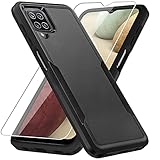
- 【Compatible Model 】Only compatible with Galaxy A12, Not compatible with other models.Wireless charging can be supported without removing the phone case.
- 【Non-Slip Design & Great Grip】For galaxy a12 phone case added the ergonomics design on the bumper, which fits the palm better, bringing a natural and comfortable hand feeling without bulky. Non-slip TPE material on the side of the case make it hard to slip out from your hand
- 【Military Grade Drop Tested】For galaxy a12 case has been tested on Military Grade Drop Test by SGS, and cushioned corners can prevent your Galaxy A12 5G from accidental drops, bumps, dust and scratches.
- [2-Layer Protection] Flexible TPU + Hard PC with 4 cushioned corner bumpers and raised lips camera protection bumper, this a12 case guaranteed to withstand shocks and scratches.
- 【Perfect Fit】Precise clipping,easy access to all buttons,ports and features, camera and speaker,power button, charging port and volume button. You can still use all the functions of the phone perfectly.
Rank #4
![Aozuoton for Samsung Galaxy A12 Phone Case, Samsung A12 Case with HD Screen Protector, [Military Grade 16ft. Drop Tested] Ring Shockproof Protective Phone Case for Samsung Galaxy A12,Blue](https://m.media-amazon.com/images/I/51YEI5dNuQL._SL160_.jpg)
- 👍🎁【Perfect Protection】 Unique edge TPU is combined with the built-in PC to protect your Samsung Galaxy A12 phone from drops, scratches and bumps. Military-Grade Protection with Air-Cushion Technology for all corners, and all around protection for your Samsung Galaxy A12 device with a slim design.
- 👍🎁【Rotable Kickstand Design】 Samsung Galaxy A12 Case's Metal kickstand can rotate 360°, easy to rotate and sturdy on the Samsung Galaxy A12 case. This Compatible with Samsung Galaxy A12 case Built in kickstand gives you the convenience to watch videos and movies hands-free with desired comfort and stability. Besides, built-in metal magnetic sheet for stable adsorption, which can be directly adsorbed to the magnetic car mount holder. (Not includes the magnetic car mount holder).
- 👍🎁【Compatible With】Specially designed for Samsung Galaxy A12 . Come with 1pcs Samsung Galaxy A12 Phone Case and HD screen protector.
- 👍🎁【CUTOUT PRECISE】Samsung Galaxy A12 Case All buttons and interface user-friendly design to avoid frequent disassembly. And the case perfect cutouts for speakers, camera and charging hole allow you to easy access to all features and convenient for charging your phone without take off the Samsung Galaxy A12 Case.
- 👍🎁【WHAT YOU GET】 Our Samsung Galaxy A12 Case come with 90 days warranty. If you Have Any Questions or Anything You Feel Unsatisfied, Please Feel free to Contact Us by E-mail. Auzuoton will happy to solve for you within 12 hours.
Rank #3

- Compatible With: Specially designed for Samsung Galaxy A12. Package includes 2pcs 9H Hardness Glass Screen Protector
- Military Grade Drop Protection: Double combination of soft TPU frame and anti-scratch hard PC back achieves military grade drop protection. Perfectly passed thousands of high altitude drop tests to ensure forceful protection after an accidental drop
- Extra Screen and Camera Protection: Subtly enhanced 2mm lifted bezel on screen and camera lens can prevent daily scratches when you put cellphone face down. Ensuring every aspect of your phone is protected with uniquely
- Built in Metal Kickstand: Built in kickstand gives you the convenience to watch videos and movies hands-free with desired comfort and stability. Additional, magnetic stand can be directly stably attached to the magnetic car phone mount. You will love how convenient it is with such powerful functions
- Perfect Fit: All buttons and interface user-friendly design to avoid frequent disassembly. And the case perfect cutouts for speakers, camera and charging hole allow you to easy access to all features. And easy to install, just followed the directions had it done in no time
Rank #2

- Compatible with Samsung Galaxy A12
- DOES NOT come with a screen protector
- Soft inner and hard outer layers absorb and deflect impacts, open access to ports and speakers (no port covers)
- Thin profile slips in and out of pockets
- Trusted OtterBox Quality: With OtterBox, you're not just buying a case; you're investing in peace of mind.
If screenshots are not working
- The power menu opens: Press Power/Side and Volume Down together briefly, then release at the flash instead of holding them.
- Palm swipe does nothing: Check that the setting exists and is enabled under Settings > Advanced features > Motions and gestures. It may not be offered on your configuration.
- A screenshot is blocked: Some apps and protected screens prevent capture for security or privacy. Samsung says a security-measure message may appear; use the app’s permitted options rather than trying to bypass the restriction.
- Menus or optional features differ: Galaxy A12 variants and software versions can have different menus and feature availability. Samsung provides manuals for different Android versions in its Galaxy A12 support materials.
Product prices and availability are accurate as of the date/time indicated and are subject to change. Any price and availability information displayed on Amazon at the time of purchase will apply.

