
Yes—you may be able to preview a book you find through Google Search, but previews are not available for every title. Open the book’s Google Books page and select Preview if that option appears.
How do I preview a book on Google Books?
-
Search Google Books for the book using its title, author, ISBN, or keywords.
-
Open the book’s title page from the results.
-
Select Preview if Google Books offers it. The preview lets you read only part of the book.


Google documents this workflow in Use the new Google Books. A Google Search result may help you find a book, but the preview option is offered on the book’s Google Books page.
Recommended Free Tools
#1 Best Overall

- 6” B/W E Ink 300 ppi: Experience eye-comfort like paper & glare-free touchscreen. Fast page turns, brightness/color temperature adjustment - perfect for comics, manga, books, & magazines.
- Powerful Performance: Quad-core processor (2.0GHz) with 2GB RAM + 64GB storage, running Android for seamless multitasking.
- Read Anywhere, Anytime: The glare-free display and auto-adjusting front light adapt seamlessly for comfortable reading, whether in bright sunlight or dim nighttime conditions.
- Supported formats: image format: jpg,jpeg,png Book format: txt,epub,pdf,umd,mobi ,ebk2,ebk3,azw3 Font format: ttf,otf,ttc Audio format: mp3,flac,wav,m4a,aac Office documents: xls,xlsx,ppt,pptx .doc, docx
- Supported the Bluetooth connect,Wifi connect,USB connect .Supports 3rd-Party apps.To use Google Play, navigate to :click “Settings,” select “System & Update,” then select “Google settings,” and turn on GMS.
What do “Read free of charge” and “Preview” mean?
-
Read free of charge means Google Books makes the book available to read.
-
Preview means only part of the book is available to read.
Rank #2
 HNVHNV Android Tablet 7 Inch Tablet, E-Reader, 6GB RAM 32GB ROM 1TB Expansion, Quad-core Processor, Dual Camera, WiFi, Bluetooth, Parental Control (Pink)
- 【Android Tablet】Equipped with the latest Android system, it has stronger compatibility, faster response speed and smoother operation. It is GMS certified, pre-installed with Google Play, and supports social applications such as Facebook, Twitter, YouTube, and TikTok. It is very suitable for watching videos, online chatting, reading e-books, etc.
- 【Smooth Performance】This tablet is equipped with a 1024x600 IPS touch screen, Unisoc SC7731E quad-core processor, 6GB memory (2GB + 4GB virtual memory), 32GB ROM, and the tablet storage space can be expanded to 1TB using an SD card, which can store everything you need.
- 【Powerful Function】This is a cost-effective tablet. Affordable price and excellent configuration. Equipped with 2MP+5MP dual cameras, Bluetooth, 5G/2.4G dual-band WiFi, FM radio, speakers, 3.5mm headphone jack, etc. Suitable for reading, photography, video, music, etc., meeting most of your daily needs.
- 【Child-friendly functions and parental control】Pre-installed Google Kids Space application, providing rich content suitable for different age groups. Equipped with a parental control mode, it allows you to filter content, set educational goals, and manage screen time limits based on your child's age, providing a safe use environment that does not require constant supervision.
- 【Portable & Lightweight & Protective Case】- The tablet body is slim and lightweight, easy to carry. It can be easily put into a bag, backpack or even back pocket. In addition, the durable and environmentally friendly protective case can effectively protect your tablet from drops, scratches and dust. You can use it anywhere you want.
These options depend on the individual title. Do not assume a particular book will have either one until you open its page.
Why can’t I see the full book?
Google Search Help explains: “The owner hasn’t agreed to show the entire book, or it might not be fully scanned.” A publisher or rights holder can limit what readers see, and incomplete scanning can also prevent full display. Google Play Books Partner Center Help says publishers can choose how much of a book is browsable; its preview-program guidance allows settings from 20% to 100% of the content. That is a publisher control range, not a promise about the portion available for any particular title.
Do these 3 things before closing this tab:
1Scan for outdated or missing drivers - takes under a minute2Clear out junk files and repair common Windows errors3Fix the driver behind crashes, sound loss and screen glitchesPublishers can also set preview territories and availability dates in Partner Center. Those settings can affect whether a preview appears for you and when it is available. See Google’s guidance on how the Google Books Preview Programme works and the Settings tab.
What can I do if there is no preview?
On the title page, check Get the book. Google Books may show providers where you can buy a print or digital edition, or a library option to borrow it. The choices depend on the book and the providers available for it. Downloads are offered for some books, not all.
If the current Google Books interface does not work for you, Google also documents a classic Google Books interface, though interface and feature availability can vary.
Independent reader supportYour contribution helps us test, update, and keep practical guides available for everyone.Is previewing a book the same as Google Search book recommendations?
No. Previewing is a Google Books feature available from a book’s title page when offered. Google’s separate Find books on Google recommendation feature is documented as mobile-only and limited to English in the United States. That restriction applies to recommendations, not to Google Books previews generally.
Quick Recap
Best Value
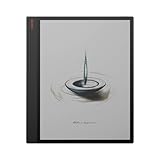
- 13.3" Kaleido Canvas with 13.3" E ink: Provides a large, vibrant canvas ideal for reading and annotating documents.
- High Performance Hardware: Features a 2.8GHz octa-core processor and 6GB RAM for trouble-free multitasking
- Generous Storage Capacity: 128GB of internal storage accommodates extensive libraries and files.
- Smart Pen Included: Provides precise input with 4096 pressure sensitivity levels, perfect for notetaking and sketching.
- Adjustable two-tone front light: ensures comfortable reading in various lighting conditions.
Product prices and availability are accurate as of the date/time indicated and are subject to change. Any price and availability information displayed on Amazon at the time of purchase will apply.

