
Free tools Windows power users keep installed
One-click scans. No signup required.
Check the port on your iPad and the connector on your headphones before buying an adapter. USB-C iPads can use compatible USB-C headphones or 3.5 mm headphones with a USB-C adapter; Lightning iPads can use Lightning headphones or 3.5 mm headphones with a Lightning adapter. Bluetooth headphones connect wirelessly through Settings.
Identify your iPad’s port and headphone plug
Look at the iPad’s charging port, then compare it with the headphones’ plug. Depending on the model, the iPad may have USB-C or Lightning; do not assume it has a round 3.5 mm headphone jack. Choose an adapter only when the headphone plug and iPad port do not match.
- USB-C: A small, oval-shaped port. It accepts USB-C headphones and USB-C adapters.
- Lightning: Apple’s narrower proprietary connector. It accepts Lightning headphones and Lightning adapters.
- 3.5 mm: The round plug used by many wired headphones. It needs a matching headphone jack or an adapter for the iPad’s port.
Connect wired headphones to a USB-C iPad
USB-C headphones
Plug USB-C headphones directly into the iPad’s USB-C port. Apple lists wired headphones with USB-C connectors among the audio devices that can connect through that port. No adapter is needed for this matching connection. Apple’s USB-C iPad guidance
3.5 mm headphones
Use a USB-C to 3.5 mm headphone adapter: connect its USB-C end to the iPad, then plug the headphones into the adapter’s 3.5 mm socket. Apple documents its USB-C to 3.5 mm Headphone Jack Adapter for playing audio through the USB-C port; the adapter is sold separately. Apple’s USB-C iPad guidance
#1 Best Overall
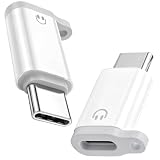
- ⚠️⚠️For wired headphones/earphones/earbuds connection ONLY!!❌❌Not support any other connections/functions!!!
- ONLY AUDIO FUNCTION DESIGN - This Lightning female to USB-C male adapter is professionally customized for audio-only use, fully supporting wired headphone functions including crystal-clear calling, music playback, wired volume adjustment, track switching and pause/play control. Note: It does NOT support device charging and data transfer, focusing on stable and pure audio transmission without redundant functional interference
- PLUG & PLAY UNIVERSAL USAGE - No extra drivers, software installation or complicated settings required. Simply plug and play to connect your original Lightning wired earphones to all USB-C port devices. It perfectly adapts to daily scenarios like music listening, movie watching, FaceTime video calls, online meetings and gaming, retaining all original headphone line control functions for seamless and convenient operation
- UPGRADED LOSSLESS HI-FI AUDIO QUALITY - Built with premium independent DAC decoding chip, this audio adapter delivers stable and high-fidelity audio signal transmission. It effectively filters current noise, background static and sound distortion, restores original stereo sound quality, greatly optimizes voice call clarity and music listening experience, bringing you professional-level immersive audio enjoyment
- PORTABLE ANTI-LOST DUAL-PACK DESIGN - Comes with 2 packs of adapters and matched anti-lost cords, equipped with reserved anti-lost cord holes for easy fixation on daily cables. Effectively avoiding accidental loss and solving the trouble of frequent replacement. The ultra-compact and lightweight body is easy to store and carry, perfectly suitable for home, office, travel and outdoor portable use
Connect wired headphones to a Lightning iPad
3.5 mm headphones
Use a Lightning to 3.5 mm Headphone Jack Adapter. Plug the Lightning end into the iPad and the headphones’ 3.5 mm plug into the adapter. Apple identifies this adapter for connecting 3.5 mm headphones and other audio devices to an iPad with a Lightning connector. Apple’s Lightning headphone guidance
Lightning headphones
Plug Lightning headphones directly into the iPad’s Lightning port. Apple EarPods with a Lightning connector require a device with a Lightning connector, so check the iPad’s port before buying. Apple’s Lightning headphone guidance
Rank #2

- [Lightning EarPods Adapter]: Mxcudu USB-C to Lightning Headphone Audio Adapter allows you using your Lightning EarPods to connect your USB-C device such as iPhone 17/16/15, iPad Pro, MacBook for audio. No bother to prepare another pair of USB C earphone. In addition, this audio adapter also support wire control function such as volume up/down, playback and pause. Please Note: Only for Audio, Not for Charging and Data Transfer
- [HiFi Audi Performance]: This Lightning female to USB C male audio adapter equipped with high performance DAC audio chip which ensures stable audio transmission, offering you 24Bit/96Khz distortion-free audio listening experience. Ideal for listening to music/playing games/making on-line voice/video chatting
- [Wide Compatibility]: Compatible with most of USB C device such as iPhone 17/Air/17 Pro/17 Pro Max/16/16 Plus/16 Pro/16 Pro Max/15/15 Plus/15 Pro/15 Pro Max, iPad Pro, iPad Air 6/5/4, iPad Mini 6, iPad 10, MacBook Pro/Air, iMac, Samsung Galaxy S25/S24/S23/S23 Ultra, Google Pixel 9/8/7. NOTICE: This is an Audio Adapter, Not a Charging Adapter
- [Plug & Play]: There is no need for any driver installation, just plug your Lightning EarPods into this adapter and then connect them together to your USB C device, and you can start to enjoy music or make a call freely
- [Premium Material]: We adopt TPE shell make it’s a durable and heat dissipation Lightning to USB C adapter. Each adapter withstand strict tests of multiple plugs and unplugs to ensure long-lifespan without breaking, double nylon braided cable. And it won’t get over-heat completely safe to use
Pair Bluetooth headphones with an iPad
- Put the headphones in discovery or pairing mode. If you are unsure how, follow the headphone maker’s instructions.
- On the iPad, open Settings > Bluetooth and turn Bluetooth on.
- Tap the headphone name when it appears in the device list. A PIN or passcode may be required.
- Keep the iPad within about 10 meters (33 feet) while pairing, Apple’s stated approximate distance for connecting a Bluetooth accessory.
These steps follow Apple’s Bluetooth accessory instructions.
Choose the connection that fits your headphones
| What you have | What to use | Adapter needed? |
|---|---|---|
| USB-C iPad and USB-C headphones | Plug the headphones into the iPad’s USB-C port. | No |
| USB-C iPad and 3.5 mm headphones | USB-C to 3.5 mm headphone adapter. | Yes |
| Lightning iPad and Lightning headphones | Plug the headphones into the iPad’s Lightning port. | No |
| Lightning iPad and 3.5 mm headphones | Lightning to 3.5 mm Headphone Jack Adapter. | Yes |
| Any iPad and Bluetooth headphones | Pair through Settings > Bluetooth. | No physical adapter |
If you already own wired headphones, matching the correct adapter to both connectors is usually the simplest way to keep using them. Bluetooth avoids a physical cable and adapter, but requires pairing. The connection guidance above does not establish sound-quality or latency rankings between these options.
Rank #3

- Special Reminder: This adapter can only be used for lightning wired headphone. Not Support any other accessories
- Function: Specially designed for iphone wired earbuds, with this adapter, you can connect the earbuds to your iPhone 17/16/15 series, iPad Air/Pro, and other phones and tablets with USB C port
- Fully Audio Functions: It supports double-sided insertion of iphone earphone, allow you to listen music, make conference calls and video calls, and supports wired control functions such as play, pause, and volume control
- Hi-Fi Sound Quality: The USB C adapter uses a highly integrated DAC decoding chip. Support Hi-Fi audio quality decoding, stable and noise free conversion, clearer voice calls
- Small and Portable: Ultra thin size, ultra compact design, durable aluminum shell. Easily be carried in your pocket to the office, conference room, or home. And it does not require additional drivers and software
Troubleshoot headphones that will not connect
A wired plug does not fit
Do not force it. Check whether the iPad has USB-C or Lightning and whether the headphone plug is USB-C, Lightning, or 3.5 mm. Use the adapter for that specific port-and-plug combination; USB-C and Lightning adapters are not interchangeable.
Quick Recap
Best Value

- The USB-C to Lightning Adapter lets you connect your Lightning accessories to a USB-C–enabled iPhone or iPad to conveniently provide three key functions—charging, data, and audio—with a single adapter. This adapter has a braided cable for added durability.
- Plug the USB-C end of the adapter into the USB-C connector on your iPhone or iPad, then connect your Lightning accessory.
- This adapter supports connection to most cars including those that work with CarPlay. You can also directly connect a USB cable from your car into the USB-C connector on your iPhone.
Rank #4

- 【USB C to Lightning Converter】Built-in DAC high performance Audio chip, The Lightning Female to USB C Male Adapter provides a perfect fit for your lightning headset and supports lightning dual-sided insertion, so you can maintain high fidelity sound whether you're listening to music,or playing a game
- 【Stereo Audio Performance】Lightning female to usb c male audio adapter features with high performance audio chip which confirms stable audio transmission, bringing you distortion-free audio listening experience. Both usb c male and lightning female are reversible, you can insert them on both side without checking. Ideal for listening to music/ playing games/ making on-line video chatting with others
- 【Charge and Data Transfer】This adapter can connect your iPhone 16/16 Plus/16 Pro/16 Pro Max/15/15 Pro/15 Pro Max/15 Plus and more USB C mobile phone, tablet and other devices through lightning cable, Uses USB 3.0 protocol for PD 100W fast charging and the data transfer speed is up to 480 Mbps
- 【Wide Compatibility】USB C to Lighting Adapter Cable For iPhone 16/16 Plus/16 Pro/16 Pro Max/15/15 Plus/15 Pro/15 Pro Max MacBook Pro 14" 16" 2021, Mac, iMac 2021 M1, and for Samsung Galaxy S23 Ultra, S23 Plus, S23, S22 Ultra, S22 Plus, S22, S21 and Other USB C phone devices, USB C tablets/ laptops and computer with Windows 10
- 【Durable & High-quality Material, 1 Year Warranty】Metal-plated contacts greatly reduce the phenomenon of poor contact, Stretch resistant, long-lasting; flexible TPE coating got through bend bears test, which is durable for daily usage;No driver is needed, plug and play. We offer 1 year warranty for this adapter
Bluetooth headphones do not appear
- Confirm Bluetooth is on at Settings > Bluetooth.
- Put the headphones into discovery mode using the manufacturer’s instructions.
- Wait for the headphone name to appear, then tap it. If prompted, enter the PIN or passcode specified for the accessory.
- Keep the iPad within Apple’s approximate pairing distance of 10 meters (33 feet).
Product prices and availability are accurate as of the date/time indicated and are subject to change. Any price and availability information displayed on Amazon at the time of purchase will apply.

