
Quick wins for a faster PC:
Clear out junk files and repair common Windows errorsFree Scan →Fix the driver behind crashes, sound loss and screen glitchesFind Drivers →Repair Windows errors before they cause bigger problemsFix Now →YouTube gives you several layers of comment control: review individual comments, automatically hold suspicious ones, block words and links, restrict who can comment, and hide repeat offenders. The controls are split between video settings and channel settings, so the right path depends on whether you are fixing one video or changing moderation for future uploads.
This guide covers the current YouTube Studio desktop paths, the mobile option for individual videos, and what happens to comments that appear to be missing.
Review comments in YouTube Studio
The main moderation queue is in YouTube Studio. It separates comments that are already public from comments waiting for your decision.
- Sign in to YouTube.
- Open YouTube Studio.
- Select Community from the left menu.
- Open either the Published or Held tab.
Published contains comments currently visible to viewers. Held contains comments caught by your moderation settings and comments YouTube identifies as likely spam.
#1 Best Overall

- WORKS WITH ANY DEVICE YOU OWN: iPhone, Android, DSLR, mirrorless, camcorder, GoPro, or laptop. Cables for cameras included — newer USB‑C/Lightning phones may need a 3.5mm adapter. Your go‑to external microphone for phone and camera.
- BUILT TO LAST, READY TO TRAVEL: Solid aluminum body won't break in your bag. The built‑in shock mount absorbs bumps and handling noise so your audio stays clean, no extra gear required.
- DIRECTIONAL SOUND, NOT BACKGROUND NOISE: This directional shotgun microphone focuses on what's in front of it and rejects distractions from the sides. Ideal for vlogging, podcasts, interviews, and recording on the go.
- SOUND LIKE A PRO ON SOCIAL: Whether you're vlogging, live‑streaming, or capturing interviews and music, this compact camera microphone makes your voice clear and your content stand out on YouTube, TikTok, and Instagram.
- EVERYTHING YOU NEED IN THE BOX: Fuzzy windscreen for outdoor recording, carrying case, camera cable, original and Rycote shock mounts, and smartphone cable — all included. Unbox it, plug it in, hit record.
Actions for held comments
On the Held tab, select the action you want for a comment:
| Action | Result |
|---|---|
| Approve | Publishes the comment so viewers can see it. |
| Remove | Deletes the comment from the public conversation. |
| Report spam or abuse | Permanently hides the comment from your channel and may cause YouTube to review the commenter’s behavior. |
| Hide user | Hides the user’s activity from your channel going forward. See the section on hidden users below. |
Held comments are not public unless you approve them. YouTube keeps held comments for up to 60 days, according to YouTube Help, so review the queue regularly rather than assuming it is a permanent archive.
Actions for published comments
On the Published tab, select More beside a comment to see moderation actions. You can remove a comment, report it, hide the user, or choose Always approve. The last option automatically approves and publishes future comments from that viewer.
Use Always approve carefully. It is useful for a trusted contributor whose harmless comments are repeatedly caught by an over-sensitive filter, but it can bypass filtering for that viewer.
Find comments without scrolling through the queue
YouTube Studio’s desktop comment search can search by topic or meaning, not just an exact word. This is useful when looking for comments about a product fault, a sponsor, or a particular question even when commenters use different wording. YouTube Help says searches cover comments from the previous 90 days and queries can contain up to 100 characters.
- Searches cover comments from the previous 90 days.
- A query can contain up to 100 characters.
- You cannot search for a specific user with this tool.
- Your own comments on the channel are excluded.
For a viewer trying to find a comment on the watch page, Top comments is not a complete chronological list. Changing the sort control to Newest first is the better way to locate a recently posted comment.
YouTube Studio can also generate comment-topic summaries on eligible videos with large comment sections when enough comments represent a theme. According to YouTube Help, these summaries use Google-owned AI models and do not use held comments, comments containing blocked words, or comments from hidden users. There is no opt-out setting.
Change moderation for one video
To change how comments work on an existing video from a desktop browser:
The Tool Desk
Outbyte PC Repair FREERepair Windows errors before they cause bigger problemsFix Now →Outbyte Driver Updater FREEScan for outdated or missing drivers - takes under a minuteDriver Scan →Rank #2

- Universal Compatibility: Just switch"Camera" or "Phone" on the microphone body without the TRS &TRRS cable adapter. Universal for iPhone, Android Phones, Cameras, Camcorders, Audio Recorders, etc. (the devices should have a 3.5mm mic jack) Video Mic for filming YouTube Vlogs, interviews, etc.
- No Battery Drive Design: Powered by camera/smartphone plug-in power which can minimize handling noise and help you solve the problem of insufficient battery power for long time recording.Plug and play.
- Excellent Shock Mount: Features a shock-absorption shock mount, effective at minimizing unwanted vibrational, handling noise.
- Super Cardioid Polar Pattern Microphone: CVM-V30 LITE shotgun microphone is giving excellent off-axis rejection for desired sounds, which can effectively pick up the sound in front of the microphone, blocking the excess noise around.
- Cold-shoe Design with 1/4 Thread at the Bottom:The 1/4 screw hole & cold shoe are universal for various recording devices and accessories
- Open YouTube Studio.
- Select Content.
- Select the video’s thumbnail.
- Open Show more.
- Scroll to Comments and ratings.
- Choose the desired comment setting.
- Select Save.
You can also change an individual video in the YouTube mobile app:
- Open one of your videos.
- Tap Comments.
- Tap Settings.
- Under For this video, tap Comments.
Choose On, Pause, or Off
| Setting | What it does |
|---|---|
| On | Allows comments, subject to your moderation controls. |
| Pause | Preserves existing comments but accepts no new comments until you turn commenting back on. |
| Off | Prevents viewers from commenting and displays a message that comments are turned off. |
Turning comments off temporarily hides existing comments from the watch page and Studio. Turning comments back on makes those existing comments reappear.
Choose a moderation level
When comments are turned on, the Comment moderation choices are:
- None: YouTube does not hold comments for moderation.
- Basic: Holds comments that may be spam, self-promotion, gibberish, or potentially inappropriate.
- Strict: Holds a broader range of potentially inappropriate comments than Basic.
- Hold all: Holds every comment for your approval.
Basic and Strict use automated detection and can make mistakes. A legitimate comment can be held, while an unwanted comment can still get through. If you choose Hold all, expect to review every comment before it appears publicly.
Crashes, No Sound, or Screen Glitches?
Random freezes, missing sound and display glitches usually trace back to one bad driver. Find and replace yours safely.Free scan · under a minuteWindows Errors? Fix Them Before They Spread
Repair common Windows errors and clear accumulated junk for a smoother, more stable PC - no reinstall needed.Free scan · no reinstallRestrict commenting to subscribers and members
You can require viewers to be subscribers or channel members before they comment on a particular video. This is a video-level control, not a channel-wide setting.
The available minimum subscription times are:
- Any duration
- 1 hour
- 1 day
- 1 week
This option is useful during a sudden wave of abuse or on a video receiving a lot of drive-by spam. It also reduces legitimate comments from new viewers, so it is usually better as a targeted measure than a permanent default.
Set defaults for new uploads
To set channel-wide defaults on desktop, open:
YouTube Studio → Settings → Community moderation → Content controls
From there, you can configure controls for:
- Comments on new videos and posts
- Messages in live chat
- Posts in your Community
- Blocked words
- Link text
In the YouTube Studio Android app, use Profile picture → Settings → Community → Content controls. You can also reach the same area through Community → Moderation → Content controls.
Recommended Free Tools
Rank #3

- Standard 3.5mm (1/8") TRS stereo plug and standard universal connector to cameras. Designed to fit most DSLR cameras with this 3.5mm (1/8") TRS plug such as Canon, Nikon, Sony, Panasonc, etc.! Microphone is only work for cameras with 3.5mm (1/8") TRS jack. Not compatible with XLR connector (Cannon plug) and USB Plug.
- ⚠️Incompatible camera model: Canon rebel t5 t6 t7,R50, Nikon d350,etc. Incompatible with mobile phones, tablets and computers.If you are not sure whether it fit your camera, please take picture of your camera's mic plug and contact us before buying. We will reply you at the first time.
- 【Applicable range】Effective pickup range is 0-5m(15ft). Especially effective for close up within 3 meters(10 ft) such as interviews. Not suitable for noisy and long-distance place like concerts. Tikysky camera microphone is high-quality shotgun condenser microphone designed to capture clear, precise audio while reducing background noise. Fit for close up interviews, Facebook Live broadcasts, YouTube,Tiktok, Vlog and other professional fields.
- Ultra-high sensitivity, large pickup range, with a built-in professional interview microphone, high-performance super-cardioid pickup, alongside single-head mutual complementary sound pickup technology, this camera microphone has a wide frequency response, and high-definition sound resolution,built-in high-quality electronic components.
- Long standby time, this video microphone on camera uses energy-saving and environmentally friendly AAA alkaline batteries, thus offering long working time and also includes a low power indication function. Please turn off when you are not using the microphone to save battery power.
These defaults apply to new videos and posts. Changing the default does not change the comment setting on videos you have already published. Adjust older videos individually through Content → video thumbnail → Show more → Comments and ratings.
Block words and links
Block words or phrases
In Content controls, enter words or phrases in the Blocked words field, separated by commas. The filter applies to comments, live-chat messages, and Community posts.
Comments containing, or closely matching, a blocked term may be held for up to 60 days, according to YouTube Help. They are not necessarily deleted immediately. Review them at YouTube Studio → Community → Held, where you can approve a legitimate comment.
Use specific terms rather than broad fragments. An overly short blocked string can catch ordinary words that happen to contain the same characters.
Hold comments containing links
Turn on Link text to hold comments and viewer posts containing hashtags and URLs for review. URLs in live-chat messages are also blocked by this control.
There are important exceptions: links from the channel owner, moderators, or approved users are not blocked. YouTube does not provide a supported way to apply blocked words or link blocking to only one video. These controls apply across the channel, including the channel homepage.
Hide a repeat offender
Hiding a user is stronger than removing one comment. To hide someone directly from a comment:
- Find one of the person’s comments.
- Select More.
- Select Hide user from channel.
You can also add someone by channel URL:
YouTube Studio → Settings → Community moderation → User management → Automated Filters → Hidden users
Do these 3 things before closing this tab:
1Repair Windows errors before they cause bigger problems2Scan for outdated or missing drivers - takes under a minute3Clear out junk files and repair common Windows errorsRank #4
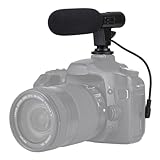
- Universal Compatibility Universal mini shotgun microphone designed for use with cameras, camcorders, DSLR cameras, and compatible smartphones using a 3.5mm audio input for external audio recording.
- Compact & Lightweight Design Small, lightweight form factor makes this microphone easy to carry and ideal for handheld shooting, travel videos, vlogs, and on-the-go content creation.
- External Audio Upgrade Improves audio capture compared to built-in device microphones by positioning the mic closer to the sound source for clearer video recordings.
- Simple Plug-and-Play Setup Connects via included 3.5mm plug cable with no apps or software required, making setup quick and beginner-friendly.
- Ideal for Content Creators Suitable for YouTube videos, vlogging, live streaming, online meetings, interviews, and short-form video recording for social media platforms.
Paste the channel URL, then select Save.
YouTube does not notify the hidden user. Their comments, live-chat messages, and Community posts are hidden from your channel, and the associated accounts cannot create clips from your videos or live streams.
Hiding is not the same as deleting every trace of a person across YouTube. YouTube states that past activity from associated accounts is not hidden on every surface. However, past comments from the hidden user no longer appear on your channel’s Comments page in Studio or on your videos, and hidden-user comments cannot be reviewed and approved later.
Add a comment moderator
A comment moderator can help flag or hold comments, but does not receive access to your YouTube Studio account.
On desktop, go to:
YouTube Studio → Settings → Community → Standard moderators
Enter the moderator’s channel URL and select Save. You can also add one from the YouTube mobile app by opening one of your video comments, selecting More → Add as moderator, and choosing Managing moderator or Standard moderator.
Managing moderators have more permissions than Standard moderators, although both can hold comments for your review. Actions taken by moderators can place comments in your Held queue; other viewers cannot see a held comment unless you approve it.
YouTube does not automatically notify a moderator when you add them through this workflow, so tell the person separately.
Independent reader supportYour contribution helps us test, update, and keep practical guides available for everyone.Why a comment is missing
If someone says their comment disappeared, check these possibilities before assuming YouTube has a technical fault:
Free tools Windows power users keep installed
One-click scans. No signup required.
Best Value

- Ultra-compact on-camera shotgun microphone that instantly improves the audio quality of your videos.
- Highly directional pickup pattern ensures you clearly capture your subject and nothing else
- Incredibly compact and lightweight, measuring just 80mm in length and weighing 39g, VideoMicro II fits in every backpack, camera kit and handbag
- Innovative Helix isolation mount system protects your audio from knocks, bumps and handling noise
- Built-in shoe mount and cable management to keep your setup minimal and tidy
| Possible cause | What to check |
|---|---|
| It was held by your settings | Open Community → Held. |
| YouTube identified it as spam | Look in the Held queue; repeated comments, high-volume commenting, link sharing, excessive emoji, and unusual characters can trigger spam detection. |
| It matched a blocked word or link rule | Review your channel’s Blocked words and Link text controls. |
| You or a moderator removed it | Check your moderation history and ask other moderators what action they took. |
| YouTube removed it for a policy violation | The comment may not remain available in the normal review queue. |
| The commenter is hidden | Hidden users’ comments do not remain available for approval in Studio. |
| The viewer is using Top comments | Ask them to change the video sort order to Newest first. |
Comments can also be unavailable because the video is made for kids, private, or otherwise subject to restrictions. Made-for-kids videos have comments turned off, and comment settings cannot be changed for a made-for-kids video. Settings also cannot be changed while using a supervised account or for a private video.
A private video does not permit comments. If you need comments while limiting general visibility, YouTube’s documented alternative is an unlisted video.
Practical moderation setup
- Start new uploads with Basic moderation rather than Hold all.
- Turn on Link text if unsolicited promotions or phishing links are a recurring problem.
- Add precise blocked words for repeated abuse, but inspect Held before approving or rejecting borderline matches.
- Use subscriber or member restrictions on the individual video experiencing abuse.
- Hide users who repeatedly evade removals instead of deleting each comment separately.
- Use Strict or Hold all temporarily during a coordinated attack, then return to a less restrictive setting if the queue becomes unmanageable.
- Check Community → Held regularly because held comments are not visible to viewers and may include legitimate questions.
FAQ
Can I turn on subscriber-only comments for my entire channel?
No. Restricting comments to subscribers and members, including the minimum subscription time, is a video-level control. Set it separately on each video where you need it.
Does changing my default comment setting affect older videos?
No. Channel defaults apply to new videos and posts. Change an older video through YouTube Studio → Content → select the video → Show more → Comments and ratings.
Are blocked-word comments deleted immediately?
Not necessarily. They may be held for up to 60 days and reviewed at YouTube Studio → Community → Held. You can approve a legitimate comment.
Can a hidden user’s comments be approved later?
No. Hidden users’ comments do not remain available in Studio for later approval, and their past comments no longer appear on your channel’s videos or Comments page.
Can comment moderators access my YouTube Studio?
No. Comment moderators do not receive Studio access. They can help hold comments, while you retain control of the Held queue and final approval.
Why are comments turned off on my video when I did not disable them?
The video may be designated made for kids, or it may be private. YouTube turns comments off on made-for-kids videos, and private videos do not permit comments.
What’s actually slowing this PC down?
Pick the symptom - the matching free tool is one click away.
The Bottom Line
Use Community → Published and Held for day-to-day review, video-level settings for one-off problems, and Settings → Community moderation → Content controls for defaults, blocked words, and links. Remember that defaults affect future uploads only, while hiding a user removes their comments from your channel without giving you a later approval option.
Quick Recap
Product prices and availability are accurate as of the date/time indicated and are subject to change. Any price and availability information displayed on Amazon at the time of purchase will apply.

