
Recommended Free Tools
To integrate Trello with Slack, choose the route that matches what you want to do: use the Trello app for Slack to create, find, and capture cards from conversations; add the Slack Power-Up to a Trello board for selected board alerts; or connect Slack in Trello Automation to post messages when an automation runs. These options differ in where you start, where information goes, and whether you need to link the Trello and Slack workspaces.
Choose the right Trello–Slack integration
| Goal | Integration | How it works | Workspace linking |
|---|---|---|---|
| Create or search cards, link a board to a channel, or capture a Slack message | Trello app for Slack | Use slash commands or message actions in Slack to work with Trello. | Not required just to install the app or create cards; required for some other features. |
| Send selected activity from a board to a Slack channel | Slack Power-Up on a Trello board | Choose a Slack workspace, channel, and the board actions that should generate alerts. | Link the Trello and Slack workspaces first. |
| Post a Slack message when a Trello automation runs | Trello Automation Slack actions | Add a Slack action to an automation, such as a rule or calendar or due-date automation. | Connect Slack in Automation and authorize the workspace. |
The Trello app for Slack guide covers the app and board alerts. For rule-driven messages, see Atlassian’s Trello Automation Slack instructions.
Install the Trello app for Slack and link your account
-
If Trello is not listed in Slack’s Apps section, ask a Slack workspace administrator to add it.
-
In Slack, enter
/trello login. -
Select Link account and approve the requested access for Trello and Slack.
Special offer. See more information about Outbyte and uninstall instructions. Please review EULA and Privacy policy.#1 Best Overall
 Delton 35X Bluetooth Computer Headset with Noise Cancelling Mic
- Superior Sound with Advanced Noise Cancellation: Experience unmatched clarity in every conversation with Delton 35X bluetooth usb headset with microphone. Its high-quality omnidirectional microphone ensures crystal-clear audio. The environmental noise cancellation (ENC) technology guarantees that your voice is heard with exceptional clarity, eliminating all background noise. Enjoy supreme clarity in every call, making this bluetooth headset the perfect choice for clear communication.
- Seamless Multi-Device Connectivity: Our headset noise cancelling microphone has advanced Bluetooth 5.0 technology and the Delton dongle, ensuring a stable and reliable connection. This bluetooth headset with microphone seamlessly connects to multiple devices, allowing you to easily switch between two connected Bluetooth devices without manual reconnection. This capability is ideal for those who frequently alternate between different devices for calls, music, and multimedia.
- Rapid Charging with Extended Playtime: Enjoy rapid charging capabilities with these bluetooth headsets, featuring two-way charging with a USB-C rapid charging port and a charging dock, minimizing downtime and maximizing efficiency. Our wireless Bluetooth headset offers up to 30 hours of talk time on a single charge, with only a 2-hour charge time. Its impressive standby time of up to 200 hours ensures it is always ready to perform for long meetings and conference calls.
- Long-Lasting Comfort and Durability: Designed with your comfort in mind, these bluetooth headset with mic feature plush cushions and a soft head cushion for unparalleled comfort during extended wear. The flexible boom mic allows for perfect positioning, and with 270° rotation, it's versatile for use on either the left or right ear. Our wireless headset with dongle features flexible construction and adjustable design to ensure a snug and secure fit for users of all head sizes.
- Universal Compatibility & Intuitive Control Buttons: Our noise cancelling headset for work offers universal compatibility. This computer headset with microphone works flawlessly with PCs, smartphones, tablets, computers, and all Bluetooth devices, ensuring a seamless audio experience. Moreover, Our bluetooth headset for work has intuitive control buttons, including a multi-function button, volume adjustment options, and a dedicated microphone mute button for added convenience.
-
Each person who wants to use the app must link their own Trello and Slack accounts.
After linking, you can create cards with /trello create [title], search with /trello search [terms], link a channel to a board with /trello link [search term or board URL], view linked-board information with /trello info, and change the default list for new cards with /trello set-list. The app also documents /trello help, /trello previews, and /trello logout.
Link Trello and Slack workspaces when a feature requires it
Linking an individual account is not the same as linking workspaces. You can install the Trello app and create cards from Slack without linking a Trello Workspace to a Slack Workspace. Workspace linking is needed for features such as board alerts.
-
Open the Trello Workspace settings and find the Slack workspaces linking section.
The Tool Desk
Outbyte PC Repair FREEClear out junk files and repair common Windows errorsFree Scan →Outbyte Driver Updater FREEFix the driver behind crashes, sound loss and screen glitchesFind Drivers →Special offer. See more information about Outbyte and uninstall instructions. Please review EULA and Privacy policy. -
Select Add to Slack, choose the Slack Workspace, and approve access in both services.
Rank #2
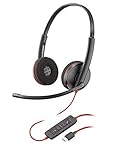 Plantronics Blackwire 3220 USB-C Headset, On-Ear Mono Headset, Wired
- USB HEADSET: Hi-fi stereo USB headset with microphone (Blackwire 3220) for those who want a richer, immersive experience.
- SIMPLE DESIGN: Microphone headset allows you to easily manage calls from PC using USB-C type connection, and inline controls let you answer/end, mute, and control the volume of PC calls with ease.
- SECURE FIT: Plantronics Blackwire headset features a lightweight metal headband for durability and a custom, comfortable fit.
- ENHANCED AUDIO: Noise-canceling microphone headset with wideband audio and enhanced Digital Signal Processing (DSP) delivers clear, natural, and rich audio.
- COMPATIBILITY: Plantronics headset is built to work with Amazon Connect, Chime and other UC applications and softphones from Microsoft, Avaya, Cisco and others.
-
Confirm the link. Linking a Workspace automatically adds the Trello app to that Slack Workspace.
On Premium and Enterprise, settings may restrict who can create a workspace link.
Send Trello board activity to a Slack channel
-
Link the Trello and Slack workspaces using the workspace settings steps above.
PerformancePC Slower Than It Used to Be?DriversCrashes, No Sound, or Screen Glitches?PerformanceWindows Errors? Fix Them Before They SpreadSpecial offer. See more information about Outbyte and uninstall instructions. Please review EULA and Privacy policy. -
Open the Trello board that should send alerts. It must be in the linked Trello Workspace.
-
Add the Slack Power-Up to that board.
-
Open the Power-Up from the board header and select Add Slack alert.
Rank #3
 IPD IPH-160 Phone Headset with Noise Cancelling Microphone for Office and Call Center - Compatible with with All Yealink SIP,Snom, Greandsteam & LG landline Phones
- [WIDEBAND AUDIO & NOISE CANCELLING MICROPHONE] IPD IPH-160 Professional,Monaural, wired phone headset has a HD Wideband speaker to be clear sound and passive noise cancelling microphone make clearer conversation by reducing background noise.
- Ready to Use] Quick Disconnect (QD) to RJ9 with IPD Headset allow easy connection to the headset port of desk phones. Plug and play.
- [WARRANTY] 3 years after purchased date. [ASP Circuit] Acoustic shock protection circuit on the speaker protect you from unwanted peak noises on desk phones. Cut over 105dB and keep less 105dB level.
- [All day Comfort] Light weight, Very comfort, endurable and smart designed for office, contact center and home workers. Softy foam cushions is included.
- [Features] Ergonomic curved headbands for comfort wearing with smooth click stop for adjustment and strong connection between headband and speaker body.
-
Choose the Slack Workspace and channel. Complete any requested linking or permission steps.
-
Select the Trello actions to report, such as creating a card or changing a due date, then save the alert.
Do these 3 things before closing this tab:
1Fix the driver behind crashes, sound loss and screen glitches2Clear out junk files and repair common Windows errors3Scan for outdated or missing drivers - takes under a minuteSpecial offer. See more information about Outbyte and uninstall instructions. Please review EULA and Privacy policy.
This route sends selected board events to a channel; it is different from using a Slack command to create a Trello card.
Post to Slack when Trello Automation runs
-
In Trello Automation, open Connected Apps in the Automation directory.
-
Connect Slack and authorize the Slack Workspace.
-
In the automation builder, add a Slack action and configure the message destination and content.
Rank #4
 VoicePro 80 Office Wired Computer Headset with Teams Focus Busy Light | Noise Canceling Microphone | in-line Call Control | Compatible With All Call Platforms | USB-A and USB-C for PC and Cell Phone
- TEAMS FOCUS LIGHT: The VoicePro 80 model includes a fully illuminated focus light which illuminates every time the user activates a Microsoft Teams Call. The Glowing LED light will light up red when a call is made and will stay red during the call, this unique feature limits interruptions from co-workers so you can fully focus on the caller.
- TEAMS CALL CONTROL: Thanks to this feature the user can answer and end calls, control call volume, and mute the headset microphone with a simple touch of a button.
- ENC NOISE CANCELING WITH HD AUDIO: High Quality Noise Canceling microphone with Flexible 330-degree Rotational Microphone Boom, our Speakers include acoustic shock protection and HD Audio Sound – It is the perfect solution for call center, office, or homeworkers.
- COMFORT: The lightweight Voicepro 80 is made of high-quality plastics and reinforced with a metal frame for durability. Along with the breathable ear cushions, the padded headband makes all day wearing comfortable for the user. Whether you are working from home, in an office, or in a call center, this is the perfect headset for you.
- PC AND CELL COMPATABILITY: The VoicePro 80 headset is Fully Compatible with Microsoft Teams but will also work ALL Windows applications such as Skype, Teams and Zoom and softphone Applications from, Avaya, Cisco, RingCentral, Dragon and others. If the headset does not auto register, please go into sound settings, and change the sound from speaker to headset. The headset comes with both USB-A and USB-C connections and Headset will also connect and work with All Cell phones with a USB-C Type Connection.
-
For a rule, calendar, or due-date automation, configure its trigger before adding the Slack action.
Recommended: Crashes or Glitches? A Free Driver Scan Usually Finds the Culprit →Recommended: Fix Windows Errors and Clear Junk Files in Minutes - Free Scan →Recommended: Update Every Outdated Driver on Your PC in One Scan - Free →Special offer. See more information about Outbyte and uninstall instructions. Please review EULA and Privacy policy.
Slack actions are available across automation types. Automation is designed by default for public Slack channels. To post in a private channel, add the Butler by Trello app to that channel. To send a direct message, the documented integration requires sending “as myself”; it does not support sending a DM “as Butler.”
Independent reader supportYour contribution helps us test, update, and keep practical guides available for everyone.Save Slack messages to Trello Inbox
To turn a conversation into a Trello action item, use one of the Trello app’s Slack message-capture options:
-
Use Slack’s Save for later feature.
-
React to the message with
:inbox_tray:. -
Open the message’s More actions menu and select Create card from message.
You can configure quick-capture preferences from the Trello app’s Home tab in Slack. The app can use AI to summarize a captured message, suggest a title, extract due dates, and create an action checklist while attaching the original Slack message to the card. Atlassian says AI summary is on by default, but availability may depend on the account plan and Enterprise AI settings. Attachments are added to the card but are not summarized, and very short messages may not contain enough context for a useful summary. See Atlassian’s instructions for saving Slack messages to Inbox.
Best Value
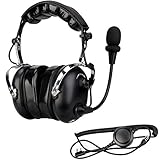
- Clear sound transmission; dual electret microphone and 50mm diameter speaker of walkie talkie headset provide clear and loud sound transmission
- Noise reduction; two way radio headset with mic has good noise reduction effect; it can achieve clear communication in a noisy environment such nascar racing utv atv agricultural industry; effectively improve work efficiency
- Strong and sturdy; the elastic metal bracket of walkie talkie headset with mic is durable to use; in addition; use of kevlar type PU wire effectively extends service life of headphone
- Volume adjustment; there is a volume adjustment knob on 2 way radio headset earmuff; you can easily adjust the sound according to the environment you are in
- K head 2 pin; for most Retevis Radios; compatible with Baofeng Kenwood Rugged Radios pxton Samcon Arcshell AnyTone Radios etc; for example H-777 H-777H RT21 RT22 RT68 RT-5R NR10 RT86 RA89 RA79 A1 C2 RB26H RB66P; compatible with Baofeng UV-5R 5RM BF-F8HP BF-888S AT-D878UVII Plus etc; not compatible with Motorola and Retevis B3 series walkie-talkies
Review permissions and message visibility
During setup, review the Slack consent screen and follow your organization’s app-approval process. Atlassian’s requested-scopes documentation describes permissions used for commands, messages, link previews, associating boards with channels, and handling some conversation or file content.
-
The Trello app does not automatically join Slack channels. If it needs to participate in a channel, invite it with
/invite @Trello. -
Trello link previews are limited to content visible to the linked Trello Workspace; private boards are not unfurled.
-
Saving a Slack message to Trello may expose it to people who could not see the original Slack message. Check the destination board’s membership and visibility before capturing or sharing content.
Quick wins for a faster PC:
Scan for outdated or missing drivers - takes under a minuteDriver Scan →Clear out junk files and repair common Windows errorsFree Scan →Fix the driver behind crashes, sound loss and screen glitchesFind Drivers →Special offer. See more information about Outbyte and uninstall instructions. Please review EULA and Privacy policy.
Troubleshoot a broken link or app
If account linking fails or Trello app features stop working, Atlassian’s recommended reset is to revoke the Trello Slack App authorization in Trello account settings, then sign out and reconnect from Slack:
-
Revoke the Trello Slack App authorization in Trello account settings.
-
In Slack, enter
/trello logout. -
Enter
/trello loginand repeat the account-linking and authorization flow.
If a board alert is not arriving, check that the board is in the linked Trello Workspace, that the alert targets the intended Slack Workspace and channel, and that the selected board action matches the activity you expect. For private-channel automation messages, verify that Butler by Trello has been added to the channel.
Free tools Windows power users keep installed
One-click scans. No signup required.
Quick Recap
Product prices and availability are accurate as of the date/time indicated and are subject to change. Any price and availability information displayed on Amazon at the time of purchase will apply.

