
What’s actually slowing this PC down?
Pick the symptom - the matching free tool is one click away.
To make a published Blogger post appear wider, open your blog’s Theme > Customize controls and look for a column-width or layout setting. Increase the content column gradually, then preview the published page on desktop and mobile. The available controls depend on the active theme; if there is no width setting, Blogger also provides a custom CSS field.
Change the post width with the Blogger theme customizer
-
Sign in to Blogger and select the blog you want to change.
-
Open Theme, then click Customize.
-
Look through the layout and width controls for a setting that changes the post or content column. Some themes place options inside an expanded menu, so inspect the available sections rather than assuming a missing top-level control means the theme cannot be adjusted.
-
Increase the content-column width in small increments. If the theme separates content width from margins, changing the content width makes the post area wider; reducing side margins can also create more room, but affects the surrounding layout.
Special offer. See more information about Outbyte and uninstall instructions. Please review EULA and Privacy policy. -
Save the change and preview a published post at desktop and mobile sizes.


Google documents the theme customizer as a way to change column widths, but the names and availability of controls vary by theme. There is no single pixel width that is appropriate for every Blogger layout. Google’s guide, Change the design of your blog, describes layout and design customization.
Rank #2
If your theme has no width control, try custom CSS
Blogger’s documented CSS route is Theme > Customize > Advanced > Add CSS. You can use it when the visual controls do not provide the adjustment you need. Blogger provides the CSS entry point, but not a single width rule that works across all themes. CSS selectors are tied to theme structure, so a rule intended for another theme may have no effect or may change the wrong area.
-
Open Theme > Customize, then expand Advanced and choose Add CSS.
Special offer. See more information about Outbyte and uninstall instructions. Please review EULA and Privacy policy.Rank #3
Sale Comkiso Password Book with Individual Alphabetical Tabs Laminated, Large Print Password Keeper Book for Seniors, A5 Hardcover Internet Password Log Book to Record Website Login Details - Bloom
- Individual Alphabetical Tabs - A to Z single tabs per letter allow you to quickly flip to the section you need, saving time when searching for specific entries. The tabs are laminated to resist tearing or wearing out quickly, even with frequent use.
- Plenty of Space - The A5 password book has an amazing 624 entry spaces to record website login details. Each entry has a wide line spacing of 8mm and is combined with a large font. What's more, it adds extra pages for INTERNET CONNECTION (1 page), EMAIL SETTINGS (2 pages), SOFTWARE LICENSE (3 pages), and NOTES (10 pages).
- Practical Design - The PU leather hardcover password book include a pen loop, ribbon bookmark, elastic band, and back pocket to store cards, loose papers, etc. Additionally, there are three sheets of password correction labels and one important websites sticker stored in the sturdy back pocket.
- Offline Security and Accessibility - The Comkiso internet password logbook with alphabetical tabs is not susceptible to hacking, providing a secure option for storing sensitive information offline. It's easy for you to write and access your passwords anytime, anywhere.
- Thoughtful Gift - This elegant password journal book is designed to organize all passwords. It's an excellent gift for your friends and family. With big print and wide line spacing, our password books are ideal for elderly person to write in and read.
-
Add a small, targeted change for the content column in your active theme. Avoid copying a selector or fixed width from an unrelated theme without confirming it applies to yours.
-
Save, then inspect a published post at desktop and mobile sizes. Check that text, images, and the surrounding layout still fit.
For Blogger’s documented editing options, see Google Blogger Help. The documentation explains where to add CSS; it does not prescribe a universal post-width snippet.
When to edit the theme HTML
Use Theme > More > Edit HTML only when a theme-level change cannot be made through the customizer or its CSS field. This is the more technical route because the change depends on the theme’s code and structure. Back up the theme before substantial edits, make one change at a time, and test the result. Google warns that adding code or third-party widgets is at the author’s own risk.
The Tool Desk
Outbyte PC Repair FREERepair Windows errors before they cause bigger problemsFix Now →Outbyte Driver Updater FREEScan for outdated or missing drivers - takes under a minuteDriver Scan →Best Value
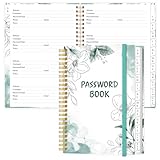
- NEVER FORGET YOUR PASSWORDS AGAIN - Store your passwords & online login details safely in this password notebook. Quick & easy to use, you'll never have to reset forgotten passwords again.
- ALPHABETICAL A-Z TABS - Password book with alphabetical tab system for easy to record the passwords you need
- LOADS OF SPACE FOR MULTIPLE LOGINS - The password journal with 128 pages total, 3 entries per page. The Logbook also has space to write 2 pages important data,2 internet service provider, 2 pages wireless & email settings, 2 pages software license information & 5 pages notes
- HIGH QUALITY & MEASURE - The password keeper book is used to high quality 120gsm pure white acid-free paper that won't bleed through.Password notebook size of 6.4" x 8.5". Pick the size best suited for your needs!
- CHANGE YOUR PASSWORD REGULARLY - New password? No Problem! Keep your account safe by updating your password frequently, Password books for seniors, Each website has 4 password lines, and you can easily update your new password
Check whether the problem is the post column or an image
The width of the post editor while you write, the published post column, and the width of an image in the post are separate things. If text wraps in a narrow area on the live blog, adjust the theme’s content column. If only an image looks small, changing the column may not resize it; check the image’s own display settings as well. Theme-specific community advice can offer clues, but its steps and code should not be treated as universal Blogger documentation.
Choose the adjustment that matches your goal
| Option | Best for | Trade-off |
|---|---|---|
| Theme customizer width or layout controls | A theme that exposes a post or content-column setting | Usually the simplest approach, but the control’s name and location vary by theme. |
| CSS in the theme customizer | A targeted adjustment when the visual controls are insufficient | Requires a selector compatible with the active theme and responsive testing. |
| Edit theme HTML | A more involved change that cannot be handled through the customizer | Most technical option; theme code changes can break or alter other parts of the layout. |
Preview before considering the change finished
-
Check a published post, not just the writing editor.
-
Look at both a text-heavy post and one with images; a wider column can change line lengths and how media fits.
-
Inspect desktop and mobile layouts after every saved change.
DriversCrashes, No Sound, or Screen Glitches?PerformanceWindows Errors? Fix Them Before They SpreadDriversOutdated Drivers Are Slowing You DownSpecial offer. See more information about Outbyte and uninstall instructions. Please review EULA and Privacy policy. -
If a CSS change has no visible effect, confirm that the selector matches the active theme before increasing the width further.
Quick Recap
Product prices and availability are accurate as of the date/time indicated and are subject to change. Any price and availability information displayed on Amazon at the time of purchase will apply.

