
Do these 3 things before closing this tab:
1Clear out junk files and repair common Windows errors2Scan for outdated or missing drivers - takes under a minute3Repair Windows errors before they cause bigger problemsWindows 11 has no built-in switch to restore the complete Windows 10 Start menu. Its settings can move Start to the left and help organize pins, folders, and the remembered Start view, but the menu remains Windows 11’s design. For a classic-style menu, Open-Shell is a documented free option; Start11 and StartAllBack are other utilities to consider after checking support for your Windows version.
“Classic” can mean a Windows 7-like menu or a Windows 10-like layout. Decide which you want before choosing a replacement, and download software only from its official project or vendor source.
First, move the Windows 11 Start button to the left
This changes taskbar alignment, not the Start menu layout.
- Right-click the taskbar and select Taskbar settings.
- Open Taskbar behaviors.
- Set Taskbar alignment to Left.
Organize the built-in Start menu
If you do not need a replacement, Windows 11 lets you organize the current Start menu while keeping its design.
#1 Best Overall
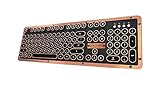
- Genuine & Luxurious: Genuine leather top plate. Leather reflects taste, craftsmanship, and exclusiveness while emitting a unique charm that inspires.
- Forged. Polished. Plated: The keyboard frame is forged with Zinc aluminum alloy and plated into a beautiful chrome/satin finish to accompany the leather top plate.
- Tactile. Clicky. Backlit: The backlit mechanical keys are tuned to be tactile and "clicky", reminiscent of vintage typewriters.
- High Versatility: Fully supports Windows or Mac and connects wirelessly via Bluetooth or wired via USB.
- Extended Battery Life: Built-in is a ginormous 6,000mAh Li-ion rechargeable battery. Up to a year on a single charge without backlight and 1 to 2 months with backlight.
- Open Settings > Personalization > Start.
- Arrange pinned apps and create folders for related pins, where available.
- Choose the preferred remembered Pinned or All view, if that setting is available on your build.
- Choose which useful folders appear beside the power button, if the option is available.
These options help organize Start; they do not recreate the Windows 10 tile-based menu or a Windows 7-style menu. Controls can vary by Windows version and rollout.
Choose a classic-style Start menu utility
These tools modify or replace parts of the desktop experience. Check the official documentation for compatibility with your Windows build before installing, and check again after feature updates.
| Option | What the sources document | Considerations |
|---|---|---|
| Open-Shell | Classic-style Start menus, including Windows 7-style options; its project lists Windows 11 support. | Free project option. On Windows for ARM, use version 4.4.196 or newer; the project warns older versions may prevent login after reboot. |
| Start11 | Stardock describes multiple Start menu styles, customization, and taskbar features. | Commercial utility with trial and license options. Check current terms and system requirements with the vendor. |
| StartAllBack | Its documentation lists Windows 11 as a system requirement and positions it for classic Start menu and taskbar restoration. | Check the vendor’s current version, compatibility details, and terms before installing. |
Option 1: Use Open-Shell
Open-Shell is a free project whose README lists classic-style Start menus for Windows 7, 8, 8.1, 10, and 11. Get it from the project’s official GitHub repository and review its current instructions and releases.
Rank #2

- The Keychron C2 (non-backlight version) is a 104 keys full size wired retro color keycaps mechanical keyboard made for Mac and Windows. Engineered to maximize your productivity with most popular full size layout with number pad.
- With a layout optimized for Mac, the C2 has all necessary multimedia and function keys (Num Lock works with Windows only), while compatible with Windows, and comes with a dedicated Siri or Cortana key. Extra keycaps for both Mac and Windows operating systems are included.
- Designed with reliability in mind, the C2 comes with USB Type-C wired connection with a braid cable, which ensures a constant power supply, and best to fit home and light gaming. Inclined bottom frame and 2 level adjustable feet (6˚ & 9˚) makes the C2 more comfortable to type.
- The pre-installed tactile Keychron switch providing unrivaled tactile responsiveness with up to 50 million keystroke durable lifespan.
- Outfitted the C2 Non-Backlight version with retro-inspired color scheme looks as good in the office as it does in the game room.
Install and choose a menu style
- Download Open-Shell from its official project source.
- Install it and open Open-Shell Menu Settings.
- Choose a classic-style menu that matches your preference, such as a Windows 7-style layout.
- Save the setting and check that the result suits your needs.
For Windows on ARM, the project says compatibility starts with version 4.4.196 and warns that older versions may prevent login after reboot. Check the project’s current release information before installing.
Recommended Free Tools
Option 2: Consider Start11
Start11 is Stardock’s Start replacement for Windows 10 and 11. The vendor describes multiple menu styles, customization, and taskbar features. Its page lists trial and license options and system requirements, including Windows 10, Windows 11, and ARM. Check the vendor’s current details for features, compatibility, and terms.
Option 3: Consider StartAllBack
StartAllBack is another utility positioned around classic Start menu and taskbar restoration. Its official documentation lists Windows 11 as a system requirement. Because the documentation reviewed provides limited detail, verify current features, compatibility with your Windows build, and terms on the vendor’s official site.
Rank #3

- Genuine & Luxurious: Genuine leather top plate. Leather reflects taste, craftsmanship, and exclusiveness while emitting a unique charm that inspires.
- Forged. Polished. Plated: The keyboard frame is forged with Zinc aluminum alloy and plated into a beautiful chrome/satin finish to accompany the leather top plate.
- Tactile. Clicky. Backlit: The backlit mechanical keys are tuned to be tactile and "clicky", reminiscent of vintage typewriters.
- High Versatility: Fully supports Windows or Mac and connects wirelessly via Bluetooth or wired via USB.
- Extended Battery Life: Built-in is a ginormous 6,000mAh Li-ion rechargeable battery. Up to a year on a single charge without backlight and 1 to 2 months with backlight.
Check compatibility before and after Windows updates
Third-party menu utilities can change parts of the desktop experience. Do not assume a tool supports every Windows 11 build or that support for one version guarantees support for another.
- Check the utility’s official documentation for your Windows version and hardware, including ARM where relevant.
- Download updates only from the official project or vendor source.
- After a Windows feature update, check the utility’s support information again before relying on it.
- If the utility causes a problem, consult its official troubleshooting instructions and consider uninstalling it.
What about managed Start layouts?
Microsoft documents LayoutModification.json for certain customizable pinned layouts in managed or OEM scenarios. Microsoft also says that Windows Configuration Designer (WCD) and Unattend are unsupported ways to customize the Windows 11 Start menu. These are not the ordinary personal-computer steps for getting a classic menu.
The Tool Desk
Outbyte Driver Updater FREEFix the driver behind crashes, sound loss and screen glitchesFind Drivers →Outbyte PC Repair FREEClear out junk files and repair common Windows errorsFree Scan →What about new Start controls in preview builds?
Microsoft’s May 29, 2026 Experimental-channel notes describe Start section visibility and size controls as a gradual Insider rollout. Microsoft cautions that preview features may change, be removed, or never reach general availability. Do not assume these controls are available on every stable Windows 11 PC.
Rank #4

- Innovative SilentTouch technology for same typing and clicking feel with 90% less noise (1)
- Keyboard with 8 convenient shortcuts and full numpad for efficient data entry and easier navigation. Gives you one-touch access to play/pause, volume, mute, and the Internet
- Contoured and portable shape with smooth, precise clicking and pointing on most surfaces and SilentTouch technology for quiet clicks
- Connect in 3 seconds (2) with a tiny receiver that delivers a strong, reliable 2.4 GHz wireless connection and 10 m range for a clean, clutter-free desk area
- Compatible with Windows or Chrome OS and easily connects for plug-and-play simplicity
Which option should you choose?
| Your goal | Option to consider | Limit |
|---|---|---|
| Move Start to the left | Windows taskbar alignment setting | Changes alignment, not the menu design. |
| Organize or simplify the current menu | Windows Start settings | Start keeps the Windows 11 design. |
| Use a free classic-style menu | Open-Shell | Check current compatibility; ARM users must heed the version caveat. |
| Explore multiple menu styles and extra taskbar customization | Start11 | Commercial utility; check current license and compatibility details. |
| Consider another classic Start and taskbar utility | StartAllBack | Verify current features and support with the vendor. |
FAQ
Can I get the Windows 10 Start menu back without an app?
No built-in switch restores the complete Windows 10 Start menu. Windows settings can move taskbar alignment and organize the current Start menu, but the design remains Windows 11’s.
Can I get a Windows 7-style Start menu on Windows 11?
Open-Shell documents classic-style menus, including Windows 7-style options, and lists Windows 11 support. Check its current instructions and compatibility information before installing.
Is Open-Shell compatible with Windows on ARM?
The project says Windows on ARM compatibility starts with version 4.4.196 and warns that older versions may prevent login after reboot. Check the project’s current release information.
What’s actually slowing this PC down?
Pick the symptom - the matching free tool is one click away.
Best Value

- 7-Color Backlit Wireless Keyboard & RGB Mouse - Choose from 7 soft backlight colors to match your workspace, day or night. Clear light-up keys make night typing easier, while the RGB mouse offers 11 switchable lighting modes to add a clean, modern glow—never harsh or distracting.
- Retro Look, Modern Feel - Round typewriter keyboard bring a timeless look, paired with a sleek, spill-resistant body. A stylish yet practical keyboard that fits home offices, studios, and professional workspaces — a thoughtful gift for teachers, coworkers, or anyone upgrading their desk.
- Soft Magnetic Wrist Rest - The detachable wrist rest features soft sponge padding with a skin-friendly outer surface, gently supporting your wrists during long typing sessions. Magnetically attached, easy to remove, and simple to wipe clean.
- Built-In Phone Holder - Keep your phone upright and always in view. Check messages, calls, or videos at a glance without picking it up—perfect for multitasking, online meetings, and focused work.
- Plug & Play Wireless Setup - One tiny USB receiver connects both keyboard and mouse instantly. Enjoy a stable 2.4GHz wireless connection up to 33 ft—no cords, no extra setup, just a cleaner desk and smoother workflow.
Is Start11 free?
Stardock’s page lists trial and license options. Check the vendor’s site for current pricing and terms.
Will a Start replacement work after every Windows update?
Compatibility can depend on the Windows build and the utility version. Check the project or vendor’s official support information after feature updates.
The Bottom Line
Use Windows settings if moving Start to the left or organizing pins and folders is enough. For a classic-style menu, Open-Shell is a documented free option; Start11 and StartAllBack are alternatives with vendor-documented classic menu features. Check each tool’s official compatibility information for your Windows version before installing and after feature updates.
Quick Recap
Product prices and availability are accurate as of the date/time indicated and are subject to change. Any price and availability information displayed on Amazon at the time of purchase will apply.

