
Recommended Free Tools
If your Vivo V80 is getting hot, running slowly, or losing charge quickly, first identify when it happens. Heat during charging or demanding tasks and temporary lag after an update can have different causes from a problem that persists across ordinary use. Work through the checks below before considering a reset or service; the available guidance is mostly general Vivo troubleshooting, not a V80-specific defect notice.
Start by identifying when the problem occurs
Note whether heat or rapid drain appears while charging, gaming, using the camera or video calls, navigating, using mobile data or a hotspot, transferring data, or shortly after a system update. Vivo’s Global FAQ index treats these as distinct heat and power-consumption scenarios. If the symptom is tied to one app or activity, investigate that first rather than assuming the battery is defective.
- Move the phone out of direct sunlight and hot surroundings.
- Avoid covering it with bedding or other materials that can trap heat.
- For a short check during a demanding activity, remove a thick case and see whether the phone cools more readily. Vivo China offers general guidance favoring a light, breathable case; menu names and recommendations can vary by region.
Stop intensive use if a temperature warning appears. If the phone remains unusually hot after you stop the workload and move it somewhere cooler, contact Vivo support. Do not put the phone in a refrigerator or apply ice or liquid to cool it.
Check battery use and reduce avoidable drain
Find the apps using the most power
Open Settings > Battery and review battery use or the app power-consumption ranking. The path and labels can vary by model and software version, and Vivo’s manual describes these readings as approximate rather than a precise measure of an app’s true consumption. If one app stands out, update it, close or restrict it when you do not need it, or uninstall and reinstall it if it continues to misbehave. Vivo’s support resources also cover high consumption after updates, during standby, and under heavy workloads.
#1 Best Overall

- vivo V80: This Zipper wallet phone case is Compatibility for vivo V80. Magnetic + Stand + Card Holder + Zipper Wallet Case + Wrist Strap
- Wallet Phone Case:This Zipper vivo V80 case includes 6 card slots, 1 zippered coin pocket, and 1 bill compartment. Comes with a detachable wrist strap for extra convenience
- All-in-One Functional Wallet Cover:Combines a wallet and a protective phone case into one compact design. This vivo V80 Zipper case features magnetic snap closure for security. No need to carry a separate wallet
- Kickstand Case: The vivo V80 case With built-in kickstand, convenient for watching movie or chatting video. Combined with full-body protection, it safeguards your phone against drops, scratches, and daily impacts
- Shockproof TPU Inner Shell: The vivo V80 cover crafted with soft PU leather and reinforced stitching. The inner TPU case offers easy installation and protects your device from scratches. The case stays firmly attached to the wallet with enhanced adhesion
Use a power-saving mode when runtime matters more
Try Battery Saver or Super Battery Saver if you need the phone to last longer and can accept reduced background activity. Vivo says these modes reduce power use; its manual notes that Super Battery Saver limits features and performance and may not be available on every device or in every app.
Reduce heat while charging
Avoid gaming, video calls, or other demanding use while charging if the phone is heating up. Use the original charger and cable when available. Vivo India’s V80 store listing specifies up to 90W FlashCharge when using the original charger and cable; that is a device charging specification, not evidence that a different charger caused an individual phone’s symptoms.
Rank #2

- Magnetic Phone Case Compatible with VIvo IQOO Z11S / V80 Lite 5G
- 【Built-in Magnetic Sheet for Secure Snap-On Charging】Embedded magnetic ring aligns perfectly with magnetic wireless chargers and car mounts—stays firmly attached, no slipping or frequent adjustments
- 【PU Leather Texture + Soft TPU Bumper】Elegant leather-like back offers a comfortable, anti-slip grip and refined look, while the flexible TPU edges absorb shocks and make installation effortless without scratching your device
- 【Raised Camera & Screen Protection】Reinforced raised bezels around the camera lenses and screen keep them lifted off flat surfaces, guarding against daily scratches, dust, and minor bumps. Precision cutouts preserve full button and port access
- 【Slim, Lightweight & Drop-Resistant】Streamlined profile stays pocket-friendly; four-corner cushioning and full-edge TPU frame help buffer everyday drops and bumps
The same India listing gives a 7200 mAh typical battery capacity and 7015 mAh minimum rated capacity. These are the figures for the India listing and should not be assumed to describe every regional version or later hardware revision.
Work through lag in a practical order
- Restart the phone. This can clear apps and processes left running in the background.
- Check free storage. Vivo UAE recommends using iManager to free space and keeping at least 20% of storage free as part of its lag troubleshooting. The recommendation is from Vivo UAE, and the available tools or labels may differ by region or software version.
- Check whether one app is slow. Update it and see whether other apps behave normally. If only one app is affected, focus on that app rather than treating the whole phone as slow.
- Check the network. If slowdowns affect online tasks, test a stable connection; a weak network can make online apps appear unresponsive.
- Install an available system update. If lag began just after an update, Vivo UAE says optimization can cause temporary slowdown and recommends allowing 1–3 days for it to settle.
If one app remains slow, back up any important app data before clearing its storage. Clearing storage can remove locally saved information or reset the app. A factory reset is a later option, not a first step: back up the phone before resetting because data may be lost.
Rank #3
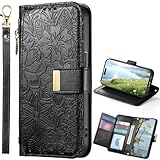
- vivo V80 5G: This Zipper wallet phone case is Compatibility for vivo V80 5G. Magnetic + Stand + Card Holder + Zipper Wallet Case + Wrist Strap
- Wallet Phone Case:This Zipper vivo V80 5G case includes 6 card slots, 1 zippered coin pocket, and 1 bill compartment. Comes with a detachable wrist strap for extra convenience
- All-in-One Functional Wallet Cover:Combines a wallet and a protective phone case into one compact design. This vivo V80 5G Zipper case features magnetic snap closure for security. No need to carry a separate wallet
- Kickstand Case: The vivo V80 5G case With built-in kickstand, convenient for watching movie or chatting video. Combined with full-body protection, it safeguards your phone against drops, scratches, and daily impacts
- Shockproof TPU Inner Shell: The vivo V80 5G cover crafted with soft PU leather and reinforced stitching. The inner TPU case offers easy installation and protects your device from scratches. The case stays firmly attached to the wallet with enhanced adhesion
Know when to contact Vivo service
Use Vivo’s local support or authorized service route if repeated temperature warnings occur, heat or battery drain remains abnormal after checking the workload and apps, or lag continues across multiple apps after the basic checks. Vivo UAE’s lag FAQ directs unresolved problems to an authorized service center. Bring the phone and proof of purchase when seeking service; the available service route depends on your country.
These symptoms alone do not establish that the V80 needs a battery replacement, and the official material reviewed does not establish a V80-wide hardware fault, a guaranteed software fix, or a universal repair price. If service is needed, ask the local authorized center to diagnose the device.
Quick Recap
Best Value

- 1. Introducing HULLIN Phone Cases, exclusively designed for vivo V70 / vivo V70 Elite. Check product images before purchasing to confirm your phone model.
- 2. Our phone cases are precision-engineered with easy access to all functions. Crafted from high-quality materials with impeccable workmanship.
- 3. Choose from a wide range of vibrant colors for a personalized touch. These cases are built to withstand drops, scratches, and provide a non-slip grip.
- 4. Enjoy a comfortable hold with the ultra-thin design that doesn't compromise on protection. HULLIN offers outstanding value for your money.
- 5. Elevate your phone's style and durability with HULLIN Phone Cases. Order now for a stylish and functional accessory.
Rank #4
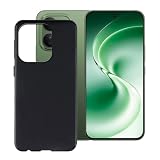
- for Vivo V80 Lite case, Precise cutouts for a perfect fit with all phone ports
- Made from high-quality materials that are wear- and scratch-resistant, protecting your phone from damage
- Slip-resistant and shock-absorbing, effectively reducing the risk of damage from accidental drops
- Slim and lightweight with a comfortable grip that won’t tire your hand even during extended use
- Unique, elegant, and stylish design that showcases your personality
Product prices and availability are accurate as of the date/time indicated and are subject to change. Any price and availability information displayed on Amazon at the time of purchase will apply.

