
Quick wins for a faster PC:
Repair Windows errors before they cause bigger problemsFix Now →Fix the driver behind crashes, sound loss and screen glitchesFind Drivers →Clear out junk files and repair common Windows errorsFree Scan →First confirm that the reported temperature is actually from the motherboard’s VRM/MOS sensor—not the CPU package—and identify the exact motherboard and sensor limit. There is no universal WRX80 VRM cutoff established by the available manufacturer specifications. The 3995WX’s 90°C maximum operating temperature is a CPU specification, not a VRM limit.
Eight 128 GB DIMMs add up to 1 TB, which is below AMD’s stated WRX80 platform maximum of 2 TB. That does not confirm compatibility with an unidentified motherboard, BIOS, or DIMM population. Diagnose the board and memory configuration before changing cooling or firmware settings.
Is the VRM actually overheating?
Start with the exact monitoring tool and sensor label. A CPU package reading, motherboard VRM/MOS reading, and a generic temperature reading are not interchangeable. Record the temperature over time and note the workload, ambient temperature, fan speeds, and whether the system slows down, shuts down, or logs hardware errors.
AMD lists the Ryzen Threadripper PRO 3995WX as a 64-core, 128-thread processor with a 280 W default TDP and a 90°C maximum operating temperature (Tjmax). That 90°C figure applies to the CPU; it does not establish a safe or unsafe VRM temperature. Use the exact motherboard vendor’s documentation or support guidance for its VRM sensor and limits. AMD’s 3995WX specifications list the processor ratings.
The Tool Desk
Outbyte PC Repair FREEClear out junk files and repair common Windows errorsFree Scan →Outbyte Driver Updater FREEScan for outdated or missing drivers - takes under a minuteDriver Scan →#1 Best Overall
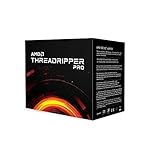
- Industry Leading 64 Cores and 128 Processing Threads, the Highest Multiprocessing Performance You Can Get In a Professional Workstation Processor
- Incredible 4.2 GHz Max Boost Frequency, with a Huge 288MB Cache
- Eight-channel DDR4 and 128 total PCIe 4.0 lanes, the most bandwidth and I/O you can get on workstation desktop processor
- AMD Ryzen Threadripper PRO processors provide unique, built-in data protection, seamless manageability, and reliable longevity so you can work confidently and more securely.
- 280W TDP, Cooler not included
Confirm the motherboard and 1 TB memory configuration
Identify the exact board
Read the motherboard model and revision printed on the PCB or shown in firmware. Then use that model’s official support page and manual to check the CPU support list, BIOS notes, memory QVL, DIMM population rules, and cooling instructions. Do not assume a board based on the processor or chipset alone.
For example, ASUS lists the 3995WX as supported on the Pro WS WRX80E-SAGE SE WIFI starting with BIOS 0211. This applies to that model only; consult the current ASUS CPU-support page for the board you actually own.
Rank #2

- For AMD Ryzen Threadripper Pro 3995WX 64 Core 100-000000087 4.2GHz Desktop Processor Tray Pack Processor only
Verify every DIMM
Record the manufacturer and full part number for all eight modules, along with whether each is ECC and RDIMM, UDIMM, or LRDIMM, its rank/density, and the slot it occupies. Compare those details with the exact board’s QVL and its memory population instructions. A board can have stricter module and slot requirements than the platform maximum.
AMD describes WRX80 as an eight-channel DDR4 platform supporting up to 2 TB of ECC RDIMM, UDIMM, and LRDIMM memory. That is a platform-level maximum, not a guarantee that a particular motherboard supports eight 128 GB modules. See AMD’s WRX80 specifications. Board-specific specifications differ: for instance, MSI’s WS WRX80 specification describes its own slot count, capacity, memory modes, and DIMM types. Neither example identifies the reader’s board.
Rank #3

- AMD Ryzen Threadripper Processors for Desktop Workstations
- Ryzen Threadripper PRO 9000 WX-Series
Check installation and airflow before stress testing
With the system powered down, follow the motherboard manual to inspect the installation conditions that affect VRM cooling and power delivery:
- Confirm all required EPS and ATX power connectors are fully seated.
- Check that the VRM heatsink is present, secure, and unobstructed.
- Verify any heatsink fans run and face the direction specified by the board maker.
- Look for blocked airflow from a GPU, cabling, dust, or restrictive filters, and note the ambient conditions.
- Do not probe energized power circuitry.
VRM cooling designs vary by model. ASRock describes the WRX80 Creator R2.0 as having a composite VRM heatsink with dual fans, aluminum fins, and a heat pipe; its product page also specifies thermal pads rated at 7 W/mK. These are ASRock’s specifications for that board, not evidence about another model or a universal requirement for an added fan. ASRock WRX80 Creator R2.0 product page.
Rank #4
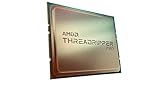
- The World's Most Powerful 32 Core and 64 Thread Professional Workstation Processor
- Incredible 4.2 GHz Max Boost Frequency, with a Huge 144MB Cache
- Eight-channel DDR4 and 128 total PCIe 4.0 lanes, the most bandwidth and I/O you can get on workstation desktop processor
- AMD Ryzen Threadripper PRO processors provide unique, built-in data protection, seamless manageability, and reliable longevity so you can work confidently and more securely.
- 280W TDP, Cooler not included
Reproduce the problem and record useful evidence
If the machine is stable and the board documentation permits it, reproduce the reported behavior under a consistent workload while logging:
- CPU temperature, clock speeds, and any reported throttling;
- the VRM/MOS sensor reading, if the board exposes one, including its exact label;
- fan speeds and ambient temperature;
- the workload and duration; and
- shutdowns, hardware errors, or other symptoms.
Compare the readings with limits or service instructions published for the exact motherboard. The cited WRX80 and processor specifications do not supply a universal VRM temperature threshold, so a temperature number without its sensor identity and board-specific context cannot establish overheating.
Free tools Windows power users keep installed
One-click scans. No signup required.
Best Value

- [ Unleash Precision Engineering ] Dominate complex workflows with the AMD Ryzen Threadripper PRO 7965WX. Featuring 24 cores and 48 threads on 5nm Zen 4 architecture, this is a powerhouse for Architectural and Engineering firms. Accelerate BIM software, execute massive structural simulations, and handle generative design with ease. With 128 PCIe 5.0 lanes, it is the affordable, high-speed solution for managing multi-GPU arrays and comprehensive professional workflows without bottlenecks.
- [ Cinematic Power for Creators ] Transform your production suite with the ultimate workstation CPU. Designed for Media and Entertainment professionals, the 7965WX excels at 8K video editing, 3D rendering, and real-time VFX. Use 8-channel DDR5 memory (up to 2TB) to manage massive datasets without a hitch. Whether you are a content creator or a high-end studio, this processor delivers the throughput needed to meet the most aggressive deadlines.
- [ Enterprise-Grade Security And Performance ] The 7965WX is built for the Enterprise and Business sector. With AMD PRO Technologies, get a multi-layered security stack including AMD Memory Guard and full manageability for large-scale deployments. It is the ideal engine for Data Analysis, Software Development, and Virtualization. Ensure your data stays protected while your team enjoys the stability and longevity required for mission-critical operations.
- [ Scientific Discovery at Scale ] Push the boundaries of Scientific Research and AI with unrivaled power. The Threadripper PRO 7965WX provides the massive parallel processing required for bioinformatics, CFD, and AI training. With a 5.3GHz Boost Clock and 128MB L3 Cache, it slashes through math-intensive workloads, turning months of calculation into days of insight. Upgrade to a higher pinnacle of workstation performance at an affordable price.
- [Reliability Guaranteed] Shop with total peace of mind knowing that every new computer component we sell is backed by our Empowered PC 1-year warranty. We stand firmly behind the quality of our hardware, ensuring that your setup remains fast, stable, and secure for years to come. NOTE: OEM/Bulk/Tray Packaging. Retail Packaging is NOT included. See below for more tech specs.
When an extra fan may be worth trying
If logging points to the VRM area and the board lacks directed airflow, a PWM case fan aimed at the VRM heatsink may be a reasonable, conditional airflow experiment. First confirm mounting clearance, the intended airflow path, motherboard-header capacity, and the board maker’s instructions. Adding a fan is not a diagnosis and will not repair a failed VRM or an inaccurate sensor.
When to stop and get service
Stop stress testing and contact the motherboard vendor or a qualified workstation service provider if temperatures remain abnormal, the system throttles or shuts down, or readings conflict. Provide the board model and revision, BIOS version, DIMM part numbers and slot layout, sensor name, temperature log, workload, ambient temperature, and symptoms. Do not respond to an uncertain reading by changing voltages, disabling protections, or replacing the board without a board-specific diagnosis.
Quick Recap
Product prices and availability are accurate as of the date/time indicated and are subject to change. Any price and availability information displayed on Amazon at the time of purchase will apply.

