
You can erase an M1 or M2 Mac in macOS Recovery and reinstall macOS, but Recovery does not guarantee that the reinstall will be exactly Sequoia 15.4. Back up anything you need first: erasing deletes accounts, network settings, files, and folders. Then start Recovery by holding the power button after shutdown, erase the startup volume in Disk Utility, and choose Reinstall macOS.
Before you erase your Mac
- Back up files you want to keep. Erasing removes user accounts, network settings, files, and folders. Apple advises backing up first; you can copy important files to another storage device. Apple’s Recovery instructions describe what an erase removes.
- Prepare internet access. Recovery needs a working broadband connection for installation and activation. Apple specifies broadband using DHCP over Wi-Fi or Ethernet. Captive login pages, 802.1X networks, and some PPPoE setups can prevent installation, so arrange a compatible network if yours has those restrictions. See Apple’s Recovery guidance and Apple’s macOS reinstall instructions.
- Decide whether you need precisely version 15.4. The Recovery reinstall version depends on the Mac’s installation history; it is not a reliable way to select a specific point release. If 15.4 is essential, verify that a compatible full installer is available before erasing. Apple’s full-installer instructions explain how to obtain a specified compatible version, but availability of Sequoia 15.4 is not established here.
Keep a laptop connected to power as a precaution. If you use Ethernet, you may need a compatible adapter for your Mac; an adapter is not required for Recovery when suitable Wi-Fi is available.
Start macOS Recovery on an M1 or M2 Mac
On Apple silicon, use the power-button startup-options process. Do not use Intel Mac Recovery keyboard shortcuts.
- Shut down the Mac.
- Press and hold the power button. Keep holding it until startup options appear or you see “Loading startup options.”
- Select Options, then click Continue.
Apple’s step-by-step instructions are at Use macOS Recovery on a Mac with Apple silicon.
What’s actually slowing this PC down?
Pick the symptom - the matching free tool is one click away.
#1 Best Overall

- 【Versatile Storage Expansion – For Gaming, Work & Everyday Use】 Running out of space on your PS5 or Xbox Series X/S? This external hard drive lets you store and play PS4 / Xbox One games directly, instantly freeing up your console’s internal storage for next‑gen titles. At the same time, it handles work file backups, media libraries, and cross‑device data transfers with ease. One drive, all your needs. *(Note: PS5 / Xbox Series X|S games cannot be run or stored directly from the external hard drive. However, by offloading your PS4 / Xbox One games, you can free up valuable space for newer titles.)*
- 【Patented Silicone Sleeve – Data Protection You Can Count On】 Worried about drops? We’ve got you covered. The patented built‑in silicone sleeve acts like a shock‑absorbing armor, cushioning your drive against bumps and falls. Whether it’s important work documents, precious family photos, or hard‑earned game saves, your data deserves this level of protection.
- 【Plug & Play, Compatible with Computers & Consoles】 No complicated setup—just plug in and go. Works seamlessly with Windows, Mac, and Linux computers, as well as PS4, PS5, Xbox One, and Xbox Series X/S. Process files at the office, back up data at home, or enjoy gaming in your downtime—one drive handles all your devices, simply and hassle‑free.
- 【USB 3.0 Ultra‑Fast Transfer – No More Waiting】 Tired of watching progress bars crawl? With USB 3.0 speeds up to 5Gbps, large files transfer in seconds. Whether you’re moving work documents, transferring hundreds of gigs of games, or backing up a year’s worth of photos, you get more done in less time.
- 【Sleek, Lightweight, and Ready to Go】 Weighing just 0.16 kg—lighter than a can of soda—this compact drive features a stylish mirror‑and‑frosted finish. Toss it in your bag and go, whether you’re heading to the office, visiting a friend for a gaming session, or giving a presentation on the road.
Erase the startup volume and reinstall macOS
- In Recovery, select Disk Utility, then click Continue.
- In the Disk Utility sidebar, select Macintosh HD, the startup volume.
- Choose Erase, set the format to APFS, and confirm. If Disk Utility offers Erase Volume Group, choose it.
- After the erase finishes, quit Disk Utility to return to the Recovery utilities window.
- Select Reinstall macOS, click Continue, and follow the onscreen prompts.
- Connect to a usable network when prompted so the Mac can activate and download the installation software.
For Apple’s detailed erase and reinstall flow, see the Apple silicon Recovery guide and Reinstall macOS.
Which macOS version will Recovery install?
Apple says Recovery on Apple silicon installs the current version of the most recently installed macOS. If you upgraded macOS and then erased the disk, the Mac may instead install the version that was present before that upgrade. As a result, an M1 or M2 Mac’s Recovery reinstall cannot be promised to install Sequoia 15.4 specifically. Apple’s explanation is in Use macOS Recovery on a Mac with Apple silicon.
Rank #2

- 【External floppy disk drive 3.5 are widely compatible】GODBPNYMU floppy drive is compatible with Windows :ME/2000/XP/Vista/7/8/8.1/10/11, Mac OS, and Linux.
- 【Plug-and-Play usb floppy drive 3.5-inch external】Once the floppy drive is inserted into the drive, the system automatically recognizes it without requiring a driver. Go to “This PC,” locate “Drive A,” and double-click to open it. You can then copy, paste, and cut files just like you would with a regular USB flash drive, making it quick and easy to access the contents of the floppy disk. ⚠️Note: Connect the 3.5 floppy disk drive directly to the computer's native USB port. Do not use a hub or docking station, as insufficient power may result in poor disk reading performance.
- 【Dual USB-A/USB-C ports for convenient use】 Most modern laptops and desktop computers no longer come with built-in floppy drives. This 3.5 floppy drive usb external offers a simple and efficient alternative: it features both USB-A and USB-C ports and is compatible with USB 3.0, 2.0, and 1.1. Even if your computer lacks a USB-A port, you can connect it directly via the USB-C port. 3 1/2 fdd usb reliably reads and writes 1.44 MB high-density floppy disks and operates just as conveniently as a traditional built-in floppy drive,(⚠️Note:floppy disk drive Does not support 720 KB low-density floppy disks.)
- 【Industrial and Professional Equipment Support】This floppy disk reader is an essential tool for accessing industrial machinery, including CNC machines, embroidery machines, medical equipment, and musical instruments that still rely on floppy disks for storage. It allows you to read or back up configuration files, patterns, or logs without modifying the original syste
- Retro Data Recovery and Migration】The usb floppy drive It is the ideal choice for recovering old files and transferring retro data. Easily transfer old documents from vintage floppy disks to modern computers. Perfect for personal archiving, digitizing family history, or retrieving old projects.
If you need a specific compatible release, Apple’s full-installer process uses Terminal’s softwareupdate --fetch-full-installer --full-installer-version [number] command, followed by opening the downloaded installer app. Check whether the required version is still obtainable and compatible before you erase; the availability of 15.4 has not been confirmed. The instructions are at How to download and install macOS.
If Recovery cannot connect or installation will not proceed
- Try a different Wi-Fi network or Ethernet connection that does not require a captive-portal sign-in and supports DHCP.
- If the network uses 802.1X or PPPoE, switch to a network compatible with Recovery’s installation requirements.
- If your goal is a particular release rather than simply a clean reinstall, do not erase until you have confirmed that a compatible full installer for that release is available.
Apple’s requirements for the network connection are listed in its Reinstall macOS guidance.
Quick Recap
Best Value

- Easy-to-use desktop hard drive — simply plug in the power adapter and USB cable.Specific uses: Business, personal
- Fast file transfers with USB 3.0
- Drag-and-drop file saving right out of the box
- Automatic recognition of Windows and Mac computers for simple setup (reformatting required for use with Time Machine)
- Enjoy peace of mind with the included limited warranty and Rescue Data Recovery Services
Rank #4

- Dual Drive USB C + USB A: Equipped with an USB-C port and USB-A 3.2 port,the Dual USB SSD flash drive allows you transfer data between smartphone/tablet and computer more conveniently. Instantly release space or quickly move pictures or movies on your OTG enabled Android Type C phone, tablet, MacBook, Windows computer, car audio system, smart TV and more.
- Ultra Fast High Speed: SSK USB 3.2 GEN 2 flash drive up to 550mb/s read speeds and 500mb/s write speed, which is 10 times faster than traditional USB 3.0 memory stick. Let you move high-resolution photos, videos fast and large-capacity files. Based on internal testing, performance may vary slightly due to factors such as host equipment, interfaces, and usage conditions.
- Plug and Play: Ultra dual drive supports plug and play, without any software installation. At the same time, USB stick storage can expand the capacity of phones and computer. It is convenient for everyone to use the mobile phone to directly read the flash drive for file sharing, data transmission, and video playback when working or studying. Work with most systems such as Windows / Android/ Macbook Pro and Mac OS. (incompatible with lightning port)
- Safe & Reliable: USB SSD drive is made of high-grade zinc alloy shell, which is resistant to falling and abrasion. The design of the double-head protective cover better protects the two interfaces. External memory stick have excellent shock resistance and fast heat dissipation performance to better protect your data.
- Universal Compatibility: High speed USB stick external storage compatible with computer equipment, smart TV, car audio, smart phones, iPhone 15, iPad, Laptops, Macbook and more. Backward-compatible with USB 3.0 and USB 2.0 ports. Comes with default format EXFAT, it works with most systems such as Windows/Linux/Mac OS./Android(Incompatible with lightning port)
Rank #3
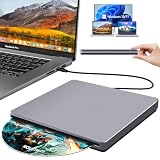
- Special Design — Premium Space Grey SuperDrive for Apple Mac: This external DVD drive features a slot-in loading and a USB-C data cable connection. Its 100% Space Grey aluminium alloy full casing that resists fingerprints and scratches, this DVD drive is perfect match for your Mac, MacBook Air, MacBook Pro, MacBook Neo or iMac. At just 17mm thick and weighing only 300g, this ultra-slim, sleek and compact CD/DVD drive slips easily into any laptop bag for true on-the-go use, even in tight spaces
- Plug and Play — No Drivers Needed on macOS or Windows: Simply connect the built-in USB-C cable(a free USB3.0 adapter included) to modern laptops or desktops without optical drives. No extra power required, the single USB-C cable handles all data transfer and power delivery. This external CD drive is compatible with Windows 11/10/8.1/7/XP, macOS (including MacBook Air, MacBook Pro, MacBook Neo, Mac and iMac) and Linux. The CD drive can be used with laptops/desktops that have a USB-C or USB port
- Read, Rip and Burn — All-in-One CD Burner for Laptop: This external CD drive for laptop supports CD-ROM, CD-R/RW, DVD-ROM, DVD±R/RW and DVD±R DL discs. Read and burn/write speeds: CD 24x/DVD 8x. This multifunctional USB DVD drive external is ideal for organising family old photo discs (parents' wedding DVD), ripping and backing up data, watching movies and burning old music CDs. The USB CD drive is the perfect computer accessory for rediscovering your disc collection and easy to use and reliable
- Ultra-Slim, Slot-Loading and Portable DVD Player for Laptop: The NOLYTH external DVD player for laptop has a minimalist design with no buttons or indicator lights. Its dust-proof slot-loading design accepts discs with a mechanical feel. When you need this USB-C superdrive, simply slide the disc in gently, and it will work for you reliably and quietly. Its premium, sleek grey aluminium casing complements any computer perfectly, making it look like a work of art that you can easily take anywhere
- Computer Use only — Please Read Before Purchase: This CD reader for laptop is designed exclusively for laptops and desktop computers. Not compatible with Blu-ray/M-Disc, PS4/PS5/Xbox/Switch, tablets/iPads, smartphones, TVs, projectors, cars or Chromebooks. Do not connect this CD rom external drive for laptop to a USB hub or extension cable. Desktop computers need to be plugged into a USB port at the back of the motherboard. We provide 24-hour customer service and satisfactory after-sales support
Product prices and availability are accurate as of the date/time indicated and are subject to change. Any price and availability information displayed on Amazon at the time of purchase will apply.

