
Choose a robot vacuum by matching its room-mapping controls, carpet behavior, mopping safeguards, and maintenance demands to your home—not by relying on one headline specification. Before buying, verify those features for the exact model: combo robots do not all recognize rugs or keep them dry, and upkeep schedules vary.
Start with your home’s layout and floor mix
List the things the robot must handle before comparing models: how many floors it will clean, whether you need room-by-room scheduling, what kinds of rugs or carpet are present, and whether thresholds or clutter may obstruct its route. These details help distinguish useful features from ones you may never use.
- For multiple floors: Check whether the model saves more than one map and how you select the map for each floor.
- For selective cleaning: Look for room selection, zone cleaning, schedules, and editable boundaries in the exact model’s app and manual.
- For mixed flooring: Verify carpet detection, carpet boost, and the robot’s behavior when a mop is attached.
- For a busy or changing layout: Check whether you can edit zones easily, and plan to clear cords and shoelaces that may interfere with mapping or navigation.
What mapping and room controls should you look for?
Mapping is most useful when you want to clean a particular room, schedule rooms separately, or keep the robot away from selected areas. iRobot says its Smart Maps can be customized after a run. Its support guidance also recommends placing map zones with a margin because a robot may be slightly off during a mission. iRobot’s Smart Maps guide describes those features and considerations.
The Roborock Q7+ instructions document multiple-map management, real-time route display, map zoning and editing, scheduled cleaning, room and zone cleaning, and no-go zones. These are documented Q7+ capabilities, not a guarantee that other models or app versions offer identical controls. The Q7+ instructions are a useful example of the details to check in a model’s manual.
The Tool Desk
Outbyte Driver Updater FREEFix the driver behind crashes, sound loss and screen glitchesFind Drivers →Outbyte PC Repair FREEClear out junk files and repair common Windows errorsFree Scan →#1 Best Overall
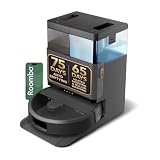
- A DEEPER CLEAN—EVEN WHERE DIRT LOVES TO HIDE. With advanced DualClean Mop Pads and PerfectEdge technology the Roomba Plus 505X reaches deeper into corners and along walls, covering 18% more floor area* so spills, crumbs, and sticky spots don’t get left behind. * Compared to standard vacuum & mop mode on coffee and grime.
- THE DOCK THAT HANDLES THE DIRTY WORK. The AutoWash Dock empties debris for up to 75 days and washes, refreshes, and heat‑dries mop pads—so you enjoy up to 4 weeks of hands‑free mopping* with consistently fresh results.
- POWERFUL ENOUGH FOR REAL‑LIFE MESSES. From scattered cereal to muddy pawprints, enjoy confident cleaning with up to 70× stronger suction* paired with dual mop pads, a multi‑surface rubber brush, and edge‑sweeping brush. * As compared to Roomba 600 series robots.
- AVOIDS CORDS, SOCKS—EVEN PET ACCIDENTS. PrecisionVision AI instantly recognizes common household obstacles and steers around them. It also detects wet and dry messes ahead and automatically makes extra passes for a noticeably cleaner result.
- SMARTER NAVIGATION, FEWER WORRIES. ClearView Pro LiDAR maps your home precisely and cleans efficiently day or night, while built‑in cliff sensors help prevent falls near stairs and ledges.
Before purchase, confirm the saved-map count, room-selection options, and whether you can draw and adjust boundaries. Manufacturer feature documentation can establish what a model offers, but it does not by itself demonstrate how well that robot navigates compared with another.
How much suction do you need?
There is no cross-brand suction figure in the cited manufacturer material that establishes which robot will clean a particular home best. The Roborock Q7+ manual lists four suction levels and carpet boost; ECOVACS product materials provide advertised suction specifications, but the cited pages do not supply comparable lab or independent pickup tests. Treat a Pa figure as a specification, not proof of better cleaning on your carpet or debris.
Rank #2

- 𝟳𝟬 𝗗𝗮𝘆𝘀 𝗼𝗳 𝗛𝗮𝗻𝗱𝘀-𝗙𝗿𝗲𝗲 𝗖𝗹𝗲𝗮𝗻𝗶𝗻𝗴 - Enjoy ultimate convenience with the self-emptying station. The large 2.7L dust bag provides up to 70 Days of maintenance-free cleaning, perfect for busy households and pet owners.
- 𝟭𝟬,𝟬𝟬𝟬 𝗣𝗮 𝗛𝘆𝗽𝗲𝗿𝗙𝗼𝗿𝗰𝗲 𝗦𝘂𝗰𝘁𝗶𝗼𝗻 - With an impressive 10,000 Pa suction, it effortlessly lifts embedded pet hair, crumbs, and debris from carpets, hardwood floors, and crevices.
- 𝗗𝘂𝗮𝗹 𝗔𝗻𝘁𝗶-𝗧𝗮𝗻𝗴𝗹𝗲 𝗦𝘆𝘀𝘁𝗲𝗺 – Equipped with a JawScrapers Comb main brush and a specialized anti-tangle side brush, this innovative system minimizes hair tangling, ensuring smoother performance and reducing the need for frequent maintenance.
- 𝗩𝗶𝗯𝗿𝗮𝗥𝗶𝘀𝗲 𝟮.𝟬 𝗠𝗼𝗽𝗽𝗶𝗻𝗴 𝗦𝘆𝘀𝘁𝗲𝗺 - Experience the power of dual-zone sonic vibration technology, with scrubbing up to 3000 times per minute to remove all stains and mess, leaving your floors spotless. It lifts up to 8mm on carpets for seamless transitions. You can freely select different mopping modes on the app to clean your home.
- 𝗦𝗺𝗮𝗿𝘁 𝗖𝗮𝗿𝗽𝗲𝘁 𝗖𝗮𝗿𝗲 𝘄𝗶𝘁𝗵 𝗨𝗹𝘁𝗿𝗮𝘀𝗼𝗻𝗶𝗰 𝗗𝗲𝘁𝗲𝗰𝘁𝗶𝗼𝗻 - Intelligently identifies carpets and lifts mopping modules to avoid wetting, while automatically increasing suction power for deeper cleaning. This ensures effective dirt removal and a cleaner home without compromising delicate surfaces.
For a carpeted home, check whether the exact model detects carpet, increases suction automatically, crosses your thresholds, and avoids wetting rugs during a mop run. These practical behaviors may matter more than a high advertised number. If you need evidence of pickup on a specific carpet type, seek model-specific independent testing rather than inferring performance from the specification alone.
Will a robot vacuum-mop keep rugs dry?
Do not assume that a combo robot recognizes carpet or protects rugs automatically. The iRobot guide for the Combo i5/i5+ and j5/j5+ says those cited models cannot detect floor types or carpet locations; it also says the i5 does not support keep-out zones. Depending on the model and setup, iRobot advises using supported no-mop zones, virtual barriers, physical barriers, or temporarily removing rugs. See the iRobot Combo mopping guide for those model-specific limits and options.
Quick wins for a faster PC:
Clear out junk files and repair common Windows errorsFree Scan →Fix the driver behind crashes, sound loss and screen glitchesFind Drivers →Rank #3

- 75 DAYS HANDS‑FREE .The Roomba 105X Combo + AutoEmpty Dock captures dirt and dust in a sealed bag that locks in 99% of allergens (0.7 microns), so you can cleanup without touching the mess or releasing dust into the air.
- VACUUMS & MOPS TOGETHER TO SAVE TIME. Combines powerful vacuuming with a built‑in microfiber mop to clean hard floors in one run—less manual work for busy homes.
- POWERFUL CLEANING YOU CAN SEE—AND FEEL. Devours dirt with 70X more power‑lifting suction* to pull embedded dust, crumbs, and pet hair from carpets and hard floors. The 3‑Stage Cleaning System combines intense suction, a Multi‑Surface brush, and an Edge‑Sweeping brush to leave floors truly barefoot‑clean—not just surface tidy.*Compared to Roomba 600 series robots.
- 2× DEEPER SCRUBBING FOR STICKY FLOORS. SmartScrub uses a micro‑pump to keep the mop pad evenly moist for deeper cleaning of footprints, spills, and dried‑on messes.**
- SMART LIDAR MAPPING = NO MISSED ROOMS. ClearView LiDAR maps your home quickly and cleans in neat, efficient rows, delivering consistent coverage instead of random paths.
When comparing a combo model, verify each of the following in its own documentation:
- Does it recognize rugs or carpet while a mop is attached?
- Does the mop lift, detach, or park away from carpet?
- Can you create no-mop zones, and are they supported on this model?
- Can it run vacuum-only, and can you remove rugs or block access when needed?
- Which cleaning liquids, if any, does the manufacturer approve?
A mop attachment alone does not establish that a robot can safely mop a home with rugs that cannot be moved. Use only liquids approved for the specific model; iRobot’s cited guidance warns against unapproved liquids for its combo robots.
Rank #4

- 【2-in-1 Mopping and Vacuuming】 The ROPVACNIC Robot S1 integrates advanced electronically controlled mopping technology, significantly enhancing both cleaning efficiency and effectiveness, which makes your floors remain free from footprints, dirt, and dust throughout the day. It features an upgraded high-capacity water tank with a four-stage personalized water adjustment system, enabling it to address various stains across different settings according to user requirements.
- 【Comprehensive Intelligent Control】 Multiple Cleaning Modes, combined with personalized settings, allow you to easily accomplish various household cleaning tasks with zero effort from your smartphone. Moreover, by voice commands, you can start your cleaning while kicking back and relaxing (compatible with Alexa or Google Assistant). Enjoy an utterly hands-free cleaning experience.
- 【5200Pa Powerful Suction】A 3-point cleaning system coupled with strong suction ensures your floors are free from all dirt, dust, and crumbs for a thorough, superior clean. The highly passable compact design combined with 3-level suction facilitates cleaning in hard-to-reach areas where you can't, making it suitable for a wide range of surfaces from wood, and hard floors to low pile carpets.
- 【Smarter High Automation & Self-Recharge】 The robot aspiradora is equipped with an advanced high-coverage sensing system and multiple algorithmic data points, enabling autonomous completion of cleaning tasks—from scheduled starting, detecting obstacles, adjusting direction, and switching modes, to automatically returning to recharge. This hassle-free operation ensures a clean home when you return.
- 【Engineered for Pet Owner】 The exclusive no-entanglement design negates the need for your dirty hands to clean up tangled dog or cat hair, unlike traditional roller brushes. Its dual rotating electric side brushes sweep and collect hidden pet hair more efficiently throughout the house, saving you the hassle.
What maintenance will you have to do?
Robot vacuums still require attention to parts such as brushes, filters, wheels, mop cloths, tanks, and dock trays. A self-emptying or mop-washing dock may change the routine, but it does not eliminate maintenance. Compare the hands-on tasks and replacement supplies for the exact robot and station.
The Roborock Q7+ manual specifies these intervals for that model:
Best Value
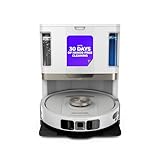
- POWERFUL SUCTION ON CARPET & HARD FLOORS: High suction power pulls up dirt, debris, pet hair, and fine dust from carpets and hard floors, delivering deep, consistent, whole-home cleaning performance.
- SONIC MOPPING FOR STUCK-ON STAINS: Sonic mopping scrubs floors up to 100x per minute to lift tough stains, grime, and dried spills, while intelligently avoiding carpets; use the SharkClean app to set carpet zones for vacuum-only cleaning.
- SELF-EMPTYING & SELF-CLEANING BASE: The NeverTouch base self-empties debris into a 60- day capacity bagless bin, refills water for up to 30 days, and automatically washes and dries the mop after every clean for convenient, hands-free cleaning.
- PERFECT FOR HOMES WITH PETS: Advanced suction and sonic mopping removes pet hair, dirt, and dander, while HEPA filtration with Anti-Allergen Complete Seal helps trap dust and allergens for a fresher home.
- EDGE & CORNER CLEANING WITH EDGE DETECT: Blasts of air pull debris from edges and corners into the cleaning path, ensuring more thorough pickup along walls and tight spaces.
| Part | Cleaning interval | Replacement interval |
|---|---|---|
| Main brush | Every 2 weeks | Every 6–12 months |
| Side brush | Every month | Every 3–6 months |
| Mop cloth | After each use | Every 3–6 months |
These are Q7+ instructions, not a universal schedule. Follow the manual for the model you buy. For the cited iRobot combo models, the mopping guide says to empty remaining liquid and debris after each job and rinse and dry the pad as needed. It also states that their Combo Bin is not compatible with the Clean Base self-emptying feature, so that configuration requires manual emptying.
Check replacement-part compatibility before buying
Filters, dust bags, brushes, mop pads, and cleaning solutions are not universal. Match each item to the exact model and use only manufacturer-approved liquids. ECOVACS, for example, organizes support and accessory information by product family for its N20 and N30 models: DEEBOT N20 PLUS and DEEBOT N30 OMNI. Check the compatibility details for your robot rather than buying a part because it looks similar.
Replacement availability and the frequency of hands-on cleaning are sensible ownership comparisons. The cited manufacturer materials do not establish a standardized cross-brand lifetime cost, so compare compatible supplies and care instructions for the models you are considering.
Quick Recap
A practical pre-purchase checklist
- Map your home: Count the floors, note the rooms you want to clean selectively, and identify clutter or thresholds that could affect navigation.
- Check mapping controls: Confirm saved maps, room and zone cleaning, schedules, and no-go or no-mop boundaries on the exact model.
- Assess carpet protection: Verify carpet recognition, mop lifting or removal, and vacuum-only options; plan barriers or rug removal if protection is not automatic.
- Evaluate cleaning controls: Check selectable suction levels and carpet boost, but do not use an advertised suction number as a substitute for evidence of cleaning performance.
- Estimate the routine: Read the care schedule for the robot and dock, including emptying, rinsing, drying, and part replacement.
- Confirm supplies: Check that compatible brushes, filters, bags, mop pads, and approved cleaning liquids are available for the model.
Product prices and availability are accurate as of the date/time indicated and are subject to change. Any price and availability information displayed on Amazon at the time of purchase will apply.
Recommended Free Tools

