
Outdated Drivers Are Slowing You Down
One free scan finds every outdated or missing driver and matches the right update for your exact hardware.Free scan · exact hardware matchWindows Errors? Fix Them Before They Spread
Repair common Windows errors and clear accumulated junk for a smoother, more stable PC - no reinstall needed.Free scan · no reinstallWindows 11 does not have one setting called startup picture. The image may be the lock-screen background, the sign-in background, your account photo, the desktop wallpaper, or the manufacturer logo shown immediately after you press the power button.
Use the section below that matches what you see. For the lock-screen background, go to Settings > Personalization > Lock screen.
Identify the picture you want to change
| Where the image appears | Setting or component |
|---|---|
| Before you enter your PIN or password | Lock-screen background |
| Behind the PIN or password box | Sign-in-screen background |
| Beside your account name | Account picture |
| Immediately after pressing the power button | BIOS/UEFI boot logo |
| After Windows finishes loading | Desktop background |
Change the Windows 11 lock-screen picture
- Open Start and select Settings.
- Go to Personalization > Lock screen.
- Expand the Personalize your lock screen menu.
- Select Picture.
- Choose one of the suggested images, or select Browse and open an image stored on your PC.
The lock screen can also use Windows spotlight, which rotates Microsoft-selected images, or Slideshow, which displays pictures from one or more folders.
Microsoft documents these options in its guide to customizing the Windows lock screen.
Free tools Windows power users keep installed
One-click scans. No signup required.
#1 Best Overall

- Segmented Dynamic Color: Featuring RGBICWW technology, this silver light bar offers tunable cool-to-warm white and vivid RGBIC colors for immersive gaming and viewing ambiance to suit your mood and needs. (Recommended for monitors under 45 inches.)
- Music Sync Lighting: The built-in mic detects ambient sound to dynamically sync color and effects. Enjoy ultra-responsive, natural lighting transitions that deepen immersion in games and movies—all without any complex setup or extra hub needed
- Matter-Supported Smart TV Lightbar: Voice-control colors, brightness & power via Alexa, Google Home. Create cozy scenes, set schedules, and sync with your smart home—no hub needed. Instant response times for seamless smart lighting
- Smart App Control: Customize the exact light you want with Govee Home App. Control segmented color and brightness, group with other Govee lights by rooms, automate lighting schedules, and discover more user-generated effects in the Light Studio
- Versatile Placement Options: Install Govee LED TV lights just the way you want. Lay flat, stand vertically, or mount behind a monitor or TV using the included brackets. Suitable for your spaces and lighting styles (Cord Length: 106 inches)
Use the same image on the sign-in screen
Changing the lock-screen picture does not automatically mean the same image will appear behind the PIN or password controls. To use it on both screens:
- Open Settings > Personalization > Lock screen.
- Turn on Show the lock screen background picture on the sign-in screen.
This changes the background behind the sign-in controls. It does not change your account picture or the manufacturer logo displayed during boot.
Change the account picture shown at sign-in
If you mean the small circular image next to your name, change your Windows account picture instead:
- Open Start > Settings > Accounts > Your info.
- Under Adjust your photo, select Choose a file.
- Select Browse files, choose the image, and confirm.
On a computer with a camera, you can select Open camera to take a new picture. Windows keeps the last three account pictures available on the Your info page.
Recommended Free Tools
Remove an old account picture
To delete pictures that Windows still offers as previous account-picture choices:
Rank #2

- 【TV LED Backlight with Music Sync】KANTUTOE's TV LED Backlight features over 20 dynamic modes and 16 million color variations. Press the music button on the remote control or app to activate the TV LED light's built-in high-sensitivity microphone, which captures real-time music and ambient sound intensity. The light strip displays different colors and rhythms that are synchronized with the music.
- 【Wide Range of Applications】KANTUTOE's LED lights for TV offer over 20 dynamic modes and 16 million color variations. These RGB LED TV lights can be used to decorate and illuminate any space, such as TV ambient lighting, computer monitors, kitchens, living rooms, bedrooms, and more.
- 【Infinitely Dimmable】Our TV LED strip lights use high-quality LED beads and have an induction dimming function, allowing for free adjustment to increase the ambient light around the TV and reduce eye fatigue caused by contrast of brightness in the dark.
- 【Easy to Install and Mini Receiver】KANTUTOE's TV Backlight lights can illuminate every side of your TV, and the mini receiver can be easily concealed behind your TV. Unique stronger foam adhesive and clips ensure the RGB LED light bar is securely attached to your TV.
- Premium After-Sales Service】Buy our TV LED Backlight with confidence, and enjoy our top-tier customer service. If there are any issues with the product, please feel free to contact us for technical support within 24 hours.
- Open File Explorer.
- Enter this path in the address bar, replacing yourname with your Windows user-folder name: C:\Users\yourname\AppData\Roaming\Microsoft\Windows\AccountPictures.
- Delete the unwanted image files.
If you cannot see AppData, select View > Show > Hidden items in File Explorer.
If you use a Microsoft account, changing your profile photo online may also update Microsoft-account-connected apps and devices. Microsoft says that synchronization can take up to 24 hours. See Microsoft’s account-picture instructions for more information.
Change the desktop picture
If the image appears only after you reach the Windows desktop, it is the desktop background:
- Open Start > Settings > Personalization > Background.
- Under Personalize your background, select Picture.
- Select Browse and choose the image.
You can also right-click an empty area of the desktop and select Personalize. Windows 11 supports Picture, Solid color, Slideshow, and Windows spotlight backgrounds. More details are available in Microsoft’s guide to changing the desktop background.
Can you change the manufacturer logo at startup?
If you see a Dell, HP, Lenovo, ASUS, or company logo immediately after pressing the power button—before the Windows lock screen appears—that is normally a BIOS/UEFI firmware logo. It is not a Windows personalization image.
Rank #3
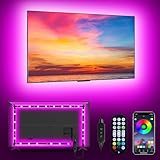
- [ AMBIENT LED LIGHTS FOR TV] - MATICOD led lights for tv is suitable for various places and atmospheres. A bright led lights for tv can provide a good viewing experience in the dark and relieve the visual fatigue caused by the dim space. Variety of color and dynamic options make tv lights the perfect atmosphere maker. Can be a novelty gifts for your family, friends, loved ones!
- [ MUSIC SYNC TV LED BACKLIGHT ] – Do you want a tv led lights that sync with tv? Look here, our tv led backlight within a built-in high-sensitivity microphone. Open the microphone mode through our APP, the tv led backlight will automatically change with surrounding sounds. No matter if you want to listen to a relaxing song or watch an exciting movie, our tv led backlight will be the best atmosphere creator!
- [ 3 WAYS CONTROLL YOUR TV LED BACKLIGHT ] - We provide three methods to control the led lights for tv, including Bluetooth app control/21-key remote control/3-key controller control. Allows you to choose the fastest and most convenient way to adjust the led lights for tv anytime, anywhere. Start DIYing your mood lighting now!
- [ SMART APP BLUETOOTH TV LED LIGHTS ] - Use a smart, simple way to control your tv led lights. Download the free APP "duoCo Strip", then connect the tv led lights to usb power and turn on Bluetooth. The immersion tv led lights will automatically connect and display in the device list on the far left of the APP. Offers over 16 million colors and 21+ dynamic modes, music mode, timing mode, mic mode.
- [ EASY TO INSTALL RGB 5050 LED LIGHTS FOR TV ] - Latest 5050 model LED lamp beads can provide brighter and colorful lighting effects and more diverse dynamic change modes. After tearing off the protective paper on the back of the tv lights, you can stick it on any smooth and dry and clean surface. Very easy and fast. If you have any questions, please contact us, we will reply within 24 hours.
Windows Settings does not provide a normal option for replacing it. Microsoft’s boot-screen documentation describes this image as an OEM logo supplied through firmware and the Boot Graphics Resource Table (BGRT).
Some computers expose a related option in firmware setup. Restart the PC, enter its UEFI settings using the key shown by the manufacturer—commonly F2, Delete, F10, or Esc—and look for labels such as:
Quick wins for a faster PC:
Repair Windows errors before they cause bigger problemsFix Now →Scan for outdated or missing drivers - takes under a minuteDriver Scan →- Boot Logo
- Full Screen Logo
- OEM Logo
- Show Logo
- Quiet Boot
- Custom Logo
The available options depend entirely on the computer or motherboard manufacturer. Quiet Boot may hide the logo or POST messages, but it usually does not let you select a replacement image. Firmware documentation also specifies a black boot-screen background and does not support transparency for the OEM logo.
Do not confuse these images:
- Changing the lock-screen picture does not replace the firmware logo.
- Changing your account picture affects only the profile image beside your name.
- Changing the desktop wallpaper has no effect on startup.
- Registry tweaks or replacing Windows system files cannot normally replace a UEFI logo and may be undone by updates.
What to do if Windows will not change the lock-screen image
On a work- or school-managed PC, an administrator may enforce the lock-screen or sign-in image through Group Policy or mobile-device management. Typical signs include a message saying that some settings are managed by your organization, or a selected picture that never appears.
In Group Policy, the relevant settings are located at Computer Configuration > Policies > Administrative Templates > Control Panel > Personalization.
Rank #4

- Govee VibraMatch Technology: With Govee's VibraMatch color-matching technology, vivid RGBIC lighting is presented by reading pixel points on the screen when playing games with high scene-changing speed and vibrant colors.(Note: Some streaming media content has copyright protection, and the content of the screen cannot be selected)
- Enhanced RGBIC Lighting: High-density LED gaming light beads make a more even distribution of the lights to create exquisite lighting effects. Divide and filter the RGB values to highlight game elements such as explosions and lightning.
- Non-Divisive Atmosphere: With Govee PC DreamView Technology, you can achieve intelligent synchronization with at least 10 Govee gaming LED light products and create an all-encompassing lighting experience. The lights are also compatible with Razer Chroma.
- Personalization Settings via App: With 123 preset scene modes and 11 music modes, users can freely select the lighting effects suitable for different scenes and moods, creating more focused lighting effects and making their gaming world more dynamic.
- 360° 4-sided Color Matching: The length of the gaming strip light fits perfectly on all four sides of the screen, fully capturing color changes on the screen for an all-around presentation of color effects, creating more realistic visual experiences.
The policies commonly involved are:
- Force a specific default lock screen and logon image
- Prevent changing lock screen and logon image
On supported editions, you can open the Local Group Policy Editor by pressing Windows key + R, entering gpedit.msc, and selecting OK. Local Group Policy Editor is not included with Windows 11 Home. On an organization-managed device, only the organization’s administrator can remove or change an enforced policy. Do not try to bypass a company policy without permission.
Quick answer
For the picture most people call the Windows 11 startup picture, open Start > Settings > Personalization > Lock screen.
Select Picture, choose your image, and enable Show the lock screen background picture on the sign-in screen if you want it behind the PIN or password box.
If the image appears before the Windows lock screen—especially a Dell, HP, Lenovo, or ASUS logo—it is probably the UEFI boot logo. That can normally be changed only through a manufacturer-provided firmware option, if one exists.
FAQ
Why does my new picture appear on the lock screen but not behind the PIN box?
Open Settings > Personalization > Lock screen and enable Show the lock screen background picture on the sign-in screen. The two backgrounds are related but controlled separately.
The Tool Desk
Outbyte PC Repair FREERepair Windows errors before they cause bigger problemsFix Now →Outbyte Driver Updater FREEScan for outdated or missing drivers - takes under a minuteDriver Scan →Best Value

- Unique RGBIC Lighting Effects: Govee TV LED Backlight allows to customize each strip segment and display multiple colors at the same time. More vibrant colors in your TV backlight can upgrade your visuals and bring you a better viewing experience.
- Smart App & Voice Control: Manage the LED lights for TV with Govee Home App via Bluetooth & Wi-Fi, or use Alexa & Google Assistant for voice control. (Note: This model doesn't capture colors from your TV and 2.4G Wi-Fi only)
- 77 Preset Scene Modes: Govee Home App offers 77 preset scene modes and 11 music modes, from which you can choose the lighting effects that suit your mood or the atmosphere around you to provide an immersive viewing experience.
- Music Sync: Govee TV LED backlight allows the colors and brightness levels to sync with the rhythm, helping you create the vibe you need. You can also choose one of your favorite modes to suit your moods and enhance your TV-watching experience.
- Flexible Installation: This 7.8ft led lights for TV can cover 4 sides of 40-50 inch TVs. It is recommended to use the cable clips to secure the TV LED strip lights to make them snugly fit your TVs.
Can I use a personal photo as the Windows 11 startup picture?
Yes. For the lock screen, select Picture and then Browse. For the desktop, use Settings > Personalization > Background > Picture > Browse. A personal photo cannot normally replace a manufacturer’s UEFI boot logo.
How do I change the logo shown before Windows starts?
Enter the computer’s BIOS/UEFI setup and look for Boot Logo, Full Screen Logo, OEM Logo, Show Logo, Quiet Boot, or Custom Logo. Many systems allow only showing or hiding the logo, not replacing it.
Why is the lock-screen picture option greyed out?
A work or school administrator may be enforcing a lock-screen image through Group Policy or mobile-device management. Contact the administrator rather than changing system policies yourself.
Does changing my Microsoft account photo change the Windows sign-in picture?
It may update the account picture used by Microsoft-account-connected apps and devices. Microsoft says synchronization can take up to 24 hours. The lock-screen background remains a separate setting.
The Bottom Line
Use Settings > Personalization > Lock screen to change the Windows 11 lock-screen picture, and enable Show the lock screen background picture on the sign-in screen to place it behind the PIN or password box. Account photos and desktop wallpapers have their own settings. A logo shown immediately after power-on belongs to the computer’s BIOS/UEFI firmware and is not normally changeable from Windows.
Quick Recap
Product prices and availability are accurate as of the date/time indicated and are subject to change. Any price and availability information displayed on Amazon at the time of purchase will apply.

