
To change display sizing on a Chromebook, open Settings > Device > Displays. For the built-in screen, adjust Display size; for a connected monitor, select the monitor and choose a setting under Resolution. ChromeOS generally scales built-in interface elements rather than changing the panel’s physical pixel output.
Change the built-in Chromebook screen size
- Select the time in the bottom-right corner of the screen, then select Settings.
- Under Device, select Displays.
- For the Chromebook panel, select Built-in display, then move the Display size slider. Moving toward a larger display size makes interface elements appear larger; moving toward a smaller size fits more content on screen. Google explains that the built-in display generally uses this control for relative interface size, not raw output pixels: Chromebook display settings and screen scaling details.
Use a keyboard shortcut to resize the display
Google Chromebook Help lists these shortcuts for changing screen resolution and apparent size:
- Ctrl + Shift + + makes everything larger by decreasing resolution.
- Ctrl + Shift + – makes everything smaller by increasing resolution.
- Ctrl + Shift + 0 resets the resolution.
These shortcuts are useful for a quick adjustment. For the built-in screen, the Settings slider provides the clearest way to control interface scaling. See Google’s Chromebook screen-size and resolution instructions.
Change resolution on an external monitor
- Connect the monitor to your Chromebook.
- Open Settings > Device > Displays.
- Select the connected monitor by name.
- Under Resolution, choose the output resolution you want. Google’s instructions use the same wording: “Under ‘Resolution’, choose an option.” Some monitor panels also provide refresh-rate choices. Google Chromebook Help: display settings
Unlike the built-in panel’s usual Display size scaling control, the external monitor’s Resolution selector changes the output mode sent to that display.
Outdated Drivers Are Slowing You Down
One free scan finds every outdated or missing driver and matches the right update for your exact hardware.Free scan · exact hardware matchPC Slower Than It Used to Be?
A free scan shows the junk files, broken settings and background clutter dragging Windows down - then fixes them in one click.Free scan · Windows 10 & 11#1 Best Overall

- Made from the high quality Japanese PET film for easy installation and no residue when removed
- High definition transparency film that ensures maximum resolution
- Real touch sensitivity for a natural feel that provides flawless touch screen accuracy
- Protects your screen from daily scratches, dust and scrapes
- Include 3 pcs screen protectors
Connect a monitor or TV
Chromebooks can connect to displays through HDMI, DisplayPort, DVI, VGA, or USB-C. Match an available Chromebook output to an input on the monitor or TV; if the connectors differ, an adapter or conversion cable may be needed, such as DisplayPort-to-HDMI. Google’s monitor connection guidance
For multiple displays, Google documents mirroring through Settings > Device > Displays > Mirror built-in display. Depending on the Chromebook, a docking station may support one to three external monitors. Google recommends looking for Works With Chromebook certification when choosing peripherals. Google Chromebook Help
Rank #2

- 【𝗦𝗰𝗿𝗲𝗲𝗻 𝗣𝗿𝗼𝘁𝗲𝗰𝘁𝗼𝗿 𝗦𝗶𝘇𝗲】 Actual Screen Protector dimensions are 11.6 inch measured diagonally. 10.12 inch width x 5.71 inch height.
- 【𝗕𝗲𝗻𝗲𝗳𝗶𝘁 𝗼𝗳 𝗕𝗹𝘂𝗲 𝗟𝗶𝗴𝗵𝘁 𝗦𝗰𝗿𝗲𝗲𝗻 𝗣𝗿𝗼𝘁𝗲𝗰𝘁𝗼𝗿】 Ideal for individuals such as insomniacs, students, office workers, gamers, beauty and fashion enthusiasts, pregnant women, and seniors. This screen protector helps filter blue light and ease eye strain, contributing to better sleep and eye comfort.
- 【 𝗕𝗹𝘂𝗲 𝗟𝗶𝗴𝗵𝘁 𝗕𝗹𝗼𝗰𝗸𝗶𝗻𝗴 𝗧𝗲𝗰𝗵𝗻𝗼𝗹𝗼𝗴𝘆】 Our screen filter effectively blocks up to 80% of harmful blue light and radiation, helping to prevent digital eye fatigue and reduce the risk of vision problems. Enjoy prolonged screen use with improved eye protection.
- 【𝗔𝗻𝘁𝗶-𝗚𝗹𝗮𝗿𝗲 𝗠𝗮𝘁𝘁𝗲 𝗙𝗶𝗻𝗶𝘀𝗵】 Unlike traditional glass or film protectors, this version features a matte anti-glare coating that minimizes screen reflections and visual distractions, especially in brightly lit environments.
- 【𝗘𝗮𝘀𝘆 𝗜𝗻𝘀𝘁𝗮𝗹𝗹𝗮𝘁𝗶𝗼𝗻 𝗮𝗻𝗱 𝗥𝗲𝗺𝗼𝘃𝗮𝗹】 Simple to apply and take off. Each package includes three screen protectors and a complete installation kit for your convenience.
Why a resolution or refresh rate may be missing
If the option you want does not appear, the Chromebook, monitor, connection, or adapter may not support that mode together. Check the following:
- Monitor input: Confirm that the input you are using supports the resolution and refresh rate the display advertises.
- Cable or adapter: Verify that it supports the desired mode, not just that its plugs fit.
- Chromebook model and port: Check the device’s display-output capabilities.
- Display specifications: Google’s peripheral requirements say display inputs must support their advertised resolution and refresh rate through EDID. Google display specifications
Fix a blurry Chromebook display
First check whether you changed the apparent size or the external monitor’s output resolution. On the built-in screen, adjust Display size in Settings > Device > Displays. On an external monitor, select the monitor in that same Displays page and choose a resolution it supports. If the desired resolution is unavailable, check the monitor input, cable or adapter, and Chromebook port; those connection limits can prevent a mode from being offered.
Quick Recap
Rank #4
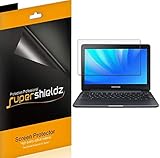
- Made from the high quality Japanese PET film for easy installation and no residue when removed
- High definition transparency film that ensures maximum resolution
- Real touch sensitivity for a natural feel that provides flawless touch screen accuracy
- Protects your screen from daily scratches, dust and scrapes
- Include 3 pcs screen protectors
Rank #3
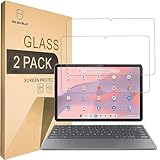
- Include 2 PCS Screen Protector, Tailored-fit to your device's screen, Maximum Strength.
- From scratches to high impact drops, you are protected with Mr.Shield HD Clear Ballistic Glass.
- Surface hardness 9H - Highly durable, and scratch resistant.
- Precise laser cut tempered glass made with polished, rounded edges. 99.99% HD Clarity and Touchscreen Accuracy.
- 100% bubble free with high technology glues.
Product prices and availability are accurate as of the date/time indicated and are subject to change. Any price and availability information displayed on Amazon at the time of purchase will apply.

