
iTechGuides is reader-supported. When you buy through links on our site, we may earn an affiliate commission. As an Amazon Associate I earn from qualifying purchases. Learn more
How to Buy, Sell and Transfer a Used Starlink is possible, but the transaction requires an official hardware transfer—not merely a Wi-Fi password or account-email change. The seller must release the owned terminal through Starlink, and the buyer must activate it on a separate account with an eligible plan and service address.
This guide covers the 2024 use case with the transfer checks verified on August 18, 2026. Starlink’s account labels, plan availability, prices, regional rules, and eligibility requirements can change, so treat the current Starlink portal and Help Center as authoritative at the time of purchase.
Key takeaways
- Starlink’s current transfer rule generally requires 120 days after purchase or 90 days after activation, whichever comes first, plus 90 days of active service from activation.
- Rented Starlink kits are not eligible for ordinary service transfer and must be handled under the rental terms.
- The seller must cancel service and separately select the device’s Transfer control; cancelling service alone does not necessarily release the terminal.
- Transfer permanently removes the hardware from the seller’s account and stops the seller’s service immediately.
- The buyer needs a separate Starlink account, a supported service address, an available plan, the correct Starlink identifier, and a complete compatible kit.
- Country certification, network capacity, hardware generation, account standing, and plan eligibility can prevent activation even when the dish powers on.
Can you buy a used Starlink?
Yes, you can generally buy and transfer an owned Starlink kit, provided the seller and terminal meet Starlink’s eligibility rules. A used Starlink purchase is not just a second-hand electronics transaction: it combines a hardware sale with an account release, a new service subscription, and a service-availability check.
The seller’s monthly plan normally does not transfer to the buyer. The buyer activates the transferred hardware under a separate account and selects an eligible service plan. Starlink’s Terms of Service distinguish the equipment from the service agreement and make service dependent on account standing, plan eligibility, network capacity, and other conditions.
Popular on Amazon

- Compatibility: Our 2 Ports Starlink Ethernet Adapter is specially designed for the Starlink Standard Actuated Generation 2, with optimal connection guaranteed.
- Gigabit Ethernet Support: The adapter features two Gigabit Ethernet (RJ45) ports, allowing you to connect two wired devices directly to your Starlink system, taking full advantage of Starlink’s high-speed internet capabilities.
- Convenience: Just plug in to use, easy to install and no complicated setting up necessary.
- Seamless Performance: Ensures minimal lag and uninterrupted connectivity for demanding tasks, whether for work, entertainment, or smart home management.
- Secure Cable Connections: Features well-designed ports that provide a snug fit, reducing the risk of disconnection and maintaining a stable connection at all times.
Do not pay solely because the dish powers on. A powered-on terminal can still be attached to another account, be rented, be restricted to another country, lack required components, or fail the buyer’s service-address check.
Is buying a used Starlink worth it?
Buying used can be worthwhile when the kit is substantially cheaper than a new one, the seller can prove ownership, the complete hardware is included, the buyer’s location has service, and the seller completes the official transfer before final payment. Buying new is usually safer when the used price is close to the current official price or when the connection is business-critical.
| Decision factor | Used Starlink | New Starlink | What matters |
|---|---|---|---|
| Upfront hardware cost | May be lower, but missing parts can erase the saving | Current official price for the buyer’s market | Compare the complete delivered cost, not only the listing price |
| Transfer risk | Seller must release an eligible terminal | No second-hand account-release risk | Do not complete an irreversible payment before transfer is verified |
| Warranty | Remaining warranty is tied to the original purchase date | New hardware starts from its original purchase date | Ask for the invoice or order confirmation |
| Hardware condition | May have cable, weather, lightning, mount, or water damage | Factory-supplied equipment | Inspect labels, connectors, power equipment, and the dish |
| Support | Support may require proof of purchase and transfer details | Cleaner ownership and support history | Important for remote sites and business-critical connectivity |
| Best fit | Budget buyers, local pickup, spare equipment, or quick replacement | Risk-averse buyers and specialized or commercial deployments | Choose new when reliability is more important than the lowest hardware price |
Starlink does not provide a universal current price in the supplied sources. Hardware and service prices vary by country, tax, shipping, promotion, hardware generation, plan, and availability. Check the live Starlink order flow for the buyer’s location before deciding whether a used kit is genuinely cheaper.
PC Slower Than It Used to Be?
A free scan shows the junk files, broken settings and background clutter dragging Windows down - then fixes them in one click.Free scan · Windows 10 & 11Crashes, No Sound, or Screen Glitches?
Random freezes, missing sound and display glitches usually trace back to one bad driver. Find and replace yours safely.Free scan · under a minuteWhat exactly should be included in a used Starlink kit?
A complete used kit should normally include the dish or user terminal, the Starlink router, the power supply where it is separate, the dish cable, router and power cables, and the stand or kickstand. The seller should also include the original mounting hardware, purchased mounts, and other accessories if the listing promises them.
Starlink’s hardware-transfer instructions tell the seller to provide all items in the kit and share the Starlink identifier with the new owner. Request photographs of the dish, router, connectors, power supply, labels, serial numbers, cables, mounts, and accessories before paying.
Do not assume that parts from different Starlink generations are interchangeable. Ask the seller to identify the exact hardware generation and connector arrangement. A dish without the correct router, power supply, or cables may not be a usable bargain; replacement components can be generation-specific, expensive, or difficult to authenticate.
What should you verify before buying a used Starlink?
Verify ownership, transfer eligibility, service availability, country of origin, completeness, and payment protection before money changes hands. Use the following checklist with an eBay, Facebook Marketplace, Craigslist, local, or reseller purchase.
Free tools Windows power users keep installed
One-click scans. No signup required.
- Confirm that the kit was purchased, not rented. Rented kits are not ordinarily transferable to a new customer.
- Request proof of purchase. Ask for an invoice, order confirmation, or retailer receipt showing when the kit was bought.
- Ask when the terminal was first activated. The date affects transfer eligibility and the remaining warranty period.
- Ask the seller to confirm that the account has no outstanding balance. An unpaid balance can block transfer.
- Ask whether the seller can see the device-level Transfer control. A promise to cancel later is not enough.
- Check your intended service address before payment. Use Starlink’s order or availability flow, because a transferable terminal does not guarantee capacity at your address.
- Confirm the country of original purchase and country of intended use. Country certification and service restrictions may prevent activation abroad.
- Request the Starlink identifier. Compare it with the label and account record, but do not request unnecessary personal account information.
- Inspect the complete kit. Ask about cracks, dents, corrosion, water, lightning, freezing, animals, roof-installation damage, repaired cables, missing labels, and unofficial modifications.
- Ask for a live demonstration when practical. A connection test is useful, but it does not replace an account-transfer check.
- Use a payment method with buyer protection. Make official transfer and activation conditions of the sale, or hold final payment until the buyer can activate and test the equipment.
The safest sequence is: verify location → verify ownership and eligibility → agree on protected payment → seller transfers the terminal → buyer activates it → buyer inspects and tests it → final payment is released.
How long must a Starlink owner wait before transferring a kit?
For an ordinary purchased kit, Starlink’s current Help Center says transfer is unavailable until 120 days after purchase or 90 days after activation, whichever comes first. Starlink also requires service to have remained active for 90 days from activation. The seller’s account must be in good standing with no outstanding balance.
Also popular on Amazon

- ⚠️ COMPATIBILITY WARNING: Designed EXCLUSIVELY for Starlink Standard Actuated Gen 2. ❌NOT COMPATIBLE with Starlink Gen 3, Flat High-Performance, or any other models. Please verify your dish model before purchase!
- PLUG & PLAY INSTALLATION: Simply connect the adapter between your Gen 2 Starlink router and the cable. No drivers or complex setup needed. Ensure a firm click on both ends for a stable connection.
- ENABLE HARDWIRED SPEEDS & STABILITY: Unlock the full potential of your Starlink by connecting gaming consoles, PCs, and smart TVs directly via Ethernet for lower latency and smoother streaming.
- RELIABLE DATA TRANSFER: Experience lag-free online gaming, 4K video conferencing, and ultra-fast file transfers with a stable, wired internet backbone.
- TROUBLESHOOTING TIP: If not working, first check both connections are secure and restart your Starlink router.
These are separate checks. A seller who bought the kit more than 120 days ago may still encounter a problem if the required active-service period has not been completed. A seller who activated the kit more than 90 days ago may still be affected by the purchase-date rule if the applicable eligibility window has not passed. Confirm the dates in the account and the current Help Center rather than relying on a seller’s estimate.
Starlink’s transfer eligibility guidance also identifies account balance, service availability, return status, and other device conditions that can affect eligibility.
What’s actually slowing this PC down?
Pick the symptom - the matching free tool is one click away.
How does the seller transfer a used Starlink?
The seller must release the terminal through the Starlink account and then give the buyer the equipment and Starlink identifier. Current labels can change, but Starlink’s documented path is:
- Log in at starlink.com.
- Open Subscriptions and select the relevant subscription.
- Open Manage in the service-plan box.
- Select Cancel Service.
- Under Devices, locate the relevant Starlink terminal and select Transfer.
- Read and confirm the transfer conditions.
- Enter the buyer’s email address if the portal offers an activation-link option.
- Factory-reset the router.
- Give the buyer every item included in the kit and the Starlink identifier.
Cancellation and device transfer are not necessarily the same action. Starlink’s reseller-related instructions separately describe cancellation, device unlocking, identifier exchange, and service-line creation, so the seller should confirm that the device itself has been transferred rather than assuming cancellation completed the process.
Starlink’s Help Center also says a kit in a return process can be transferred only if the carrier has not scanned the return label. Once the return has progressed beyond that point, the seller should resolve the return instead of promising a buyer that the device can be transferred.
What does the buyer do after the Starlink transfer?
The buyer activates the transferred terminal on a separate Starlink account, chooses an available plan, enters the service address and billing details, and then completes the physical setup.
The Tool Desk
Outbyte Driver Updater FREEFix the driver behind crashes, sound loss and screen glitchesFind Drivers →Outbyte PC Repair FREEClear out junk files and repair common Windows errorsFree Scan →- Check service availability first. Confirm the intended address and plan through Starlink’s current order flow.
- Create or use your own Starlink account. Do not take over the seller’s login as a substitute for a hardware transfer.
- Open the official activation page: starlink.com/activate.
- Enter the requested Starlink or kit identifier. Use the identifier supplied by the seller and compare it with the equipment label.
- Select an available service plan. The seller’s plan, billing history, remaining billing period, and subscription do not normally transfer.
- Enter your service address and billing information. Cross-border, mobile, Residential, Business, Priority, Maritime, Aviation, and Enterprise use cases may have different requirements.
- Connect the dish, router, power supply, and cables. Follow the current app and on-screen instructions for the hardware generation.
- Use the Starlink app to complete setup. Check for obstructions and confirm that the terminal appears under your account.
- Run connectivity and performance tests. Confirm that the terminal is online and that the result is reasonable for the location, placement, plan, and local network.
The exact activation fields and menu labels may change. Follow the current wording in the activation flow instead of treating older screenshots or 2024 instructions as authoritative.
Why can a used Starlink fail to activate?
A used terminal can be technically functional but commercially or geographically unusable. The most common blockers are account status, transfer timing, rental status, incorrect identifiers, country restrictions, service capacity, and specialized account arrangements.
| Problem | Likely cause | Recommended action |
|---|---|---|
| No Transfer control | Waiting period, incomplete active-service requirement, unpaid balance, rental kit, return workflow, wrong account area, or specialized account | Verify purchase and activation dates, clear the balance, confirm ownership, inspect the device-management page, and contact Starlink Support if unresolved |
| Seller cancelled service but device remains assigned | Cancellation was completed without the separate device-transfer action | Ask the seller to return to the device-management page and complete Transfer |
| Buyer sees “already assigned” or cannot activate | Seller did not release the device, the identifier is wrong, or the terminal is attached to another account | Compare the identifier with the label, ask the seller to confirm the device disappeared from the seller account, and contact Support |
| Service unavailable at the buyer’s address | Local availability, network capacity, plan, or regulatory restriction | Check the address before purchase; do not assume transferability guarantees service |
| Activation fails in another country | Country certification, original-purchase-country restriction, local regulation, payment, or plan limitation | Verify the destination country’s current eligibility and whether a new local account or plan is required |
| Dish activates but performance is poor | Obstructions, poor placement, damaged cable, weather, Wi-Fi limitations, congestion, plan characteristics, or hardware failure | Use the app’s obstruction and diagnostic tools, inspect cables and placement, and separate satellite-link performance from Wi-Fi performance |
Can you transfer a rented Starlink?
No—not through the ordinary used-hardware transfer process. Starlink’s Terms state that rented kits are not eligible for ordinary service transfer and must be returned under the rental terms.
Also popular on Amazon

- Compatibility -- Works seamlessly with Starlink Gen3/ Standard 4X and Starlink Mini antenna, suitable for various environments.
- Multi-Device Connectivity -- 4 Gigabit Ethernet ports support multiple devices simultaneously, maximizing Starlink's high-speed internet.
- Reliable Performance -- Tested for 72 hours under full load, ensuring stable performance with no speed drops or interruptions.
- Easy to Use -- Plug-and-play design makes installation quick and hassle-free.
- High-Speed Stability -- Whether for work, entertainment, or smart home management, this adapter delivers fast, stable, and convenient networking performance. Upgrade your network setup today
Ask explicitly whether the seller owns the terminal. A listing that says “paid off,” “working,” or “ready to use” does not by itself prove that the hardware was purchased rather than rented. Request proof of purchase and do not buy a rental kit on the assumption that Starlink will convert it into transferable equipment.
Can you transfer a used Starlink to another country?
International transfer is not guaranteed. Starlink says kits are certified for specific countries, and some services may be restricted based on the country of original purchase. The buyer must check the destination country, plan, regulatory eligibility, payment requirements, and service availability before purchase.
Moving within the same country is different from transferring a kit across borders. A Roam or mobile plan is also different from Residential service at a fixed address. Business, Priority, Maritime, Aviation, Enterprise, and reseller arrangements can have separate rules and account controls.
Do not assume that changing the account address transfers a subscription internationally. A cross-country move may require a new local account, a different payment arrangement, a different plan, or separate regulatory eligibility. Review Starlink’s country-certification guidance and the applicable country-transfer Help Center information for the relevant market.
What should you inspect on a used Starlink?
Inspect the equipment before installation and photograph the kit as received. Keep the listing, seller messages, serial numbers, payment record, proof of purchase, and transfer confirmation.
- Look for cracks, dents, bent mounts, damaged connectors, corrosion, and water intrusion.
- Inspect every cable for fraying, crushed sections, repaired ends, exposed conductors, or incompatible replacements.
- Confirm that the correct router, power supply, and cables are present.
- Check the dish’s factory labels and serial numbers; do not accept obscured or removed identifiers without a clear explanation.
- Ask whether the terminal experienced lightning, power surges, flooding, freezing, severe weather, animals, or an improper roof installation.
- Check for unofficial modifications that could affect safety, power, weather sealing, or support.
- Where applicable, confirm that dish motors or actuators move correctly.
- Use the Starlink app to check obstructions and placement after setup.
- Test both the satellite connection and local Wi-Fi, because poor Wi-Fi does not necessarily indicate a satellite-terminal fault.
Starlink says the warranty is based on the original purchase date, not the resale date. A second-hand buyer receives only the remaining warranty period, if any; the warranty does not restart when the kit changes hands. Request the original purchase date and proof of purchase from the seller.
Should you use the seller’s Starlink account?
No. A clean transaction uses the seller’s account to release the hardware and the buyer’s own account to activate it. Taking over the entire account leaves the seller’s payment method, address, personal information, billing history, disputes, and possible unpaid charges connected to the buyer.
Starlink’s Terms require customers to create and use an account in their own name and restrict unauthorized assignment or transfer of the agreement, software, or service access. Account handover is therefore a poor workaround for a missing device transfer and does not establish clean ownership.
Independent reader supportYour contribution helps us test, update, and keep practical guides available for everyone.How should the buyer and seller structure payment?
The safest structure makes official transfer and successful activation conditions of payment. The buyer should confirm availability, the seller should demonstrate that transfer is available, and final funds should be released only after the buyer receives the correct identifier and can activate or inspect the equipment.
Also popular on Amazon
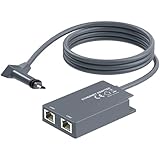
- 【Dual-Port Connection】For Starlink Gen2 Ethernet Adapter simplifies wiring with two ports.Connect devices like a PC+game console or NAS + smart TV simultaneously.Overcome your Starlink Gen2 router's limit for a reliable wired network — ideal for streaming,gaming,and remote work.
- 【Optimized for Starlink Gen2 Routers】Optimized for Starlink Gen2 satellite router, this adapter delivers broad compatibility — seamlessly works with Starlink Gen2 routers paired to Enterprise, mobile HP-Flat High Performance Kit (Gen2), High Performance (Gen1), and Standard Actuated (Gen2) systems.
- 【Multi-Device Compatibility】This Ethernet Adapter supports diverse third-party devices — including PCs, Macs, PS5, Xbox, Smart TVs, NAS, mesh routers, and security systems. It automatically optimizes network performance for reliable connectivity.
- 【High-performance network speed】Support Gigabit wired transmission, provide low-latency, high-bandwidth network, perfect for 4K/8K streaming media, online games, large file downloads, network speed up to 1Gbps say goodbye to wireless lag
- 【Enhanced Reliability:】Features gold-plated ports, energy-efficient chips, and ABS housing with IP65 rating in a compact design. Validated by 72-hour industrial stress testing — rated for 24/7 operation in multiple environments.
- Buyer verifies service availability at the intended address.
- Seller provides proof of purchase, purchase and activation dates, equipment photographs, and ownership status.
- Both parties write down that the terminal must be transferred through Starlink’s official process.
- Seller completes cancellation and device transfer.
- Buyer receives the complete kit and identifier.
- Buyer activates the terminal on a separate account and performs an initial test.
- Buyer releases final payment within the agreed inspection period.
Avoid irreversible bank transfers, cryptocurrency, gift cards, or cash sent before the device is released. A marketplace listing or local seller’s promise cannot override Starlink’s account status and regional eligibility.
Seller checklist for a used Starlink
- Confirm that the kit is purchased rather than rented.
- Locate proof of purchase and the original purchase date.
- Confirm that the transfer waiting period and active-service requirement are satisfied.
- Clear every outstanding account balance.
- Check the buyer’s intended country and service address when the transaction requires it.
- Photograph the complete kit, labels, serial numbers, cables, power equipment, and accessories.
- Disclose damage, missing parts, modifications, and known performance problems.
- Agree on a protected payment and transfer sequence.
- Cancel service for the relevant subscription.
- Select the device’s Transfer control and complete the confirmation.
- Factory-reset the router.
- Give the buyer the complete kit and Starlink identifier.
- Keep confirmation of the transfer and the sale record.
Buyer checklist for a used Starlink
- Do not pay yet if the seller will not confirm purchased ownership.
- Request proof of purchase, purchase date, activation date, and original country.
- Confirm that the seller’s account has no outstanding balance.
- Ask the seller to show that the device-level Transfer control is available.
- Check your service address and plan eligibility before payment.
- Confirm the exact hardware generation and every included component.
- Compare the Starlink identifier with the physical label after receipt.
- Use buyer-protected payment.
- Require the seller to complete the official transfer instead of handing over an account.
- Activate the kit with your own account at Starlink’s activation page.
- Photograph the equipment on receipt and retain all transaction records.
- Test the dish, router, cables, obstructions, Wi-Fi, and internet connection promptly.
When should you buy new instead?
Buy new from Starlink when the used price is close to the current official price, the seller refuses a protected transfer, proof of purchase is unavailable, the original country is unclear, the kit is incomplete, warranty coverage matters, or the connection supports an emergency, business-critical, remote, maritime, aviation, or commercial operation.
A new purchase also makes more sense when the buyer needs a specialized plan, official installation, current support, or accessories guaranteed to match the hardware generation. Buyers should compare the official Starlink purchase flow with the total used cost, including missing parts, shipping, mounts, installation, and the risk of an unusable terminal.
Frequently Asked Questions
Can I use a Starlink bought from eBay or Facebook Marketplace?
Yes, a marketplace-bought Starlink can be usable if the kit is owned, eligible for transfer, released by the seller, and supported at the buyer’s intended location. The buyer must activate the hardware on a separate account rather than using the seller’s login.
Do these 3 things before closing this tab:
1Scan for outdated or missing drivers - takes under a minute2Clear out junk files and repair common Windows errors3Fix the driver behind crashes, sound loss and screen glitchesDoes the seller’s monthly Starlink plan transfer with the hardware?
No, the seller’s subscription, billing history, remaining billing period, and service plan do not generally transfer with the equipment. The buyer activates the hardware under a separate account and selects an eligible plan.
Does the warranty restart when a used Starlink is sold?
No, Starlink bases the warranty on the original purchase date. The buyer receives only the remaining warranty period, if any, and should request proof of purchase.
What happens to the seller’s unused service days after transfer?
Starlink says service stops immediately when the transfer is completed and the hardware is permanently removed from the seller’s account. The seller should review the current account screen and applicable terms before transferring because remaining billing-period service may be lost.
Can I activate a used Starlink if the seller has disappeared?
Usually, the buyer needs the seller to complete the official device transfer. If the terminal remains assigned to another account, collect proof of purchase and the identifier, then contact Starlink Support; do not treat the seller’s account credentials as a substitute for a clean transfer.
Quick wins for a faster PC:
Fix the driver behind crashes, sound loss and screen glitchesFind Drivers →Repair Windows errors before they cause bigger problemsFix Now →Scan for outdated or missing drivers - takes under a minuteDriver Scan →The Bottom Line
Bottom line: Buy a used Starlink only after confirming that the terminal is owned, eligible, complete, supported at your location, and available for official transfer. The safest transaction is availability check → ownership and eligibility check → protected payment → seller transfer → buyer activation → inspection and testing. If the seller refuses that sequence, the country of origin is unclear, or the used price is close to new, buying directly from Starlink is the safer choice.

