
Free tools Windows power users keep installed
One-click scans. No signup required.
Build the core system on the MEG Maestro 900R’s removable motherboard tray, validate it outside the chassis, then reinstall the tray in one of four orientations and complete the wiring and cooling setup. Before buying or installing parts, check motherboard footprint, GPU length, CPU-cooler height, PSU length and the clearances created by your chosen radiator and fan layout: MSI’s published maximums do not guarantee that every largest component will fit together at once.
Check dimensions and choose a layout before assembly
The MEG Maestro 900R is a full-tower case supporting E-ATX, ATX, Micro-ATX and Mini-ITX motherboards. MSI specifies E-ATX support up to 280 × 305 mm. Its published component limits are 440 mm for graphics-card length, 170 mm for CPU-cooler height and 200 mm for ATX power-supply length. These are individual maximums, not a guarantee that parts at every maximum will fit together in a particular configuration. Check the exact dimensions of your parts and account for the radiators, fans, cables and brackets you plan to install.
| Item | MSI-published specification |
|---|---|
| Motherboard formats | E-ATX up to 280 × 305 mm; ATX; Micro-ATX; Mini-ITX |
| Maximum graphics-card length | 440 mm |
| Maximum CPU-cooler height | 170 mm |
| Maximum ATX PSU length | 200 mm |
| Radiator support | Up to two 420 mm radiators; 420 mm at the top and bottom, up to 360 mm at the side |
| Chassis size and net weight | 695 × 379 × 671 mm; 33 kg |
These are MSI specifications, accessed October 4, 2026. Review the MSI MEG Maestro 900R specifications for the full compatibility details. The case is large and heavy, so prepare a stable, clear work surface and make sure you can safely move it into position.
Decide how to cool the system
You can build around air cooling, an AIO radiator or a custom loop. MSI lists support for as many as two 420 mm radiators, with 420 mm support at the top and bottom and up to 360 mm at the side. Confirm the dimensions and clearance of the actual combination of radiators, fans, motherboard, memory, graphics card and tubing before committing to a layout. The published capacities do not establish that every supported radiator can be installed alongside every other maximum-size component.
Recommended Free Tools
#1 Best Overall

- Support Back-Connect Motherboard - enables easy installation without the worry of forgetting to connect cables, which might otherwise require disassembling graphics cards and coolers
- 270-degree Panoramic Display - the front interior of the chassis incorporates a space for displaying figurines, complemented by a 270-degree panoramic tempered glass, transforming it into a showcase-style chassis
- GPU Support Stand - equipped with a level indicator to ensure effortless adjustment of the support height during installation, preventing sagging
- Dust Filter - filters on the top and bottom are designed to give users the best experience in cleaning
Choose a graphics-card orientation
The case supports conventional horizontal mounting and includes a vertical GPU bracket and PCIe 5.0 riser cable. Vertical mounting changes how the card is displayed and how its power and riser cables need to route; horizontal mounting avoids that vertical riser connection. Check the card’s dimensions and the clearance around it in the configuration you choose. MSI’s included riser means a separate riser is not established as necessary for the included vertical-mount option.
Use the detachable tray to build and validate the core system
MSI describes the removable motherboard tray as an open test bench for installing, configuring and validating key components before final assembly. This lets you do much of the close-in motherboard work outside the full tower. For exact fasteners, removal order and cable routes, follow the case manual; MSI’s support page is the place to check for the current manual and downloads.
Rank #2
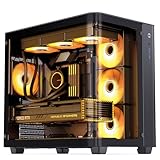
- JONSBO TK-3 integrated glass ATX mid tower pc case, gabinete pc,separated cabinet case-One-piece Curved Glass: 270 Degree Side View Display,column-less,full display of hardware,High compatibility: ATX PSU, 40series GPU, BTF Motherboard. Tips: No tear off the curved-glass explosion-proof film
- 【Separated cabinet case】: Support back plane (BTF) motherboard,ATX/Micro-ATX/ITX One-piece Curved Glass,Easier to build your PC,More convenient.
- 【Cooling system 】: Support Dual 360 AIO (up/down)/10fan positions (Vertical upward path without heat accumulation)
- 【PSU Support】: ATX 220mm/8.66inch 【Max.CPU Cooler】:H165mm/6.49inch 【Max.GPU】:L 420mm/16.53inch 【Cooling System】: Top120mm*3/140mm*2(Optional)OR AIO360x1 or 280x1 Bottom120mm*3(Optional)OR AIO 360mmx1 MB Side120mm*3(Optional) Rear120mm*1(Optional) 【Drive Bay】:2.5SSD*2 +3.5HDD*1 OR 3.5HDD*2+2.5SSD*1
- 【Specification】 Front I/O Port:1*USB3.2 Gen2 Type-C/2*USB3.0 Size:288mm(W) * 438mm(D) * 415mm(H) ( Included the foot) Material: 0.7mm Steel PCI Expansion Slot:7
- Prepare the case and parts. Confirm your component dimensions against MSI’s limits and decide on motherboard orientation, GPU position and cooling layout. Put the chassis on a stable work surface with enough room to handle the 33 kg case.
- Remove the motherboard tray. Follow the MEG Maestro 900R manual’s instructions for releasing and lifting out the tray. Do not guess at fastener locations or force the tray if it does not release as expected.
- Mount the motherboard and core components. With the tray on a stable surface, install the motherboard and components you can conveniently fit there, such as the CPU, memory and CPU cooler. Follow the motherboard and component manuals for their installation steps.
- Connect the essentials and validate. Attach the necessary power and storage connections, then perform an initial startup and hardware check while the tray is accessible. MSI identifies outside-the-case validation as an intended use of the tray; this guide does not claim a tested benchmark or a particular test result.
- Select and install one of the four tray orientations. Use the case manual to position the tray correctly. Plan cable routing for the chosen orientation; MSI describes the front I/O and mounting brackets as repositionable or rotatable to adapt the layout.
- Complete the chassis build. Install the PSU, storage, fans or radiators, and graphics card in the planned configuration. Keep the published 440 mm GPU, 170 mm CPU-cooler and 200 mm PSU limits in view, while checking the actual combined clearances.
For manual downloads and case support, use MSI’s MEG Maestro 900R support page.
Connect front I/O and verify the motherboard’s USB-C support
MSI lists four USB-A ports, four 10 Gbps USB-C ports and one 20 Gbps USB-C port on the case. Connect the case leads to the matching motherboard headers, following both manuals for header names, orientation and routing. Do not assume every motherboard can provide every advertised function simply because the port is present.
The Tool Desk
Outbyte Driver Updater FREEFix the driver behind crashes, sound loss and screen glitchesFind Drivers →Outbyte PC Repair FREEClear out junk files and repair common Windows errorsFree Scan →Rank #3

- Optimized Air Flow - Up to 11 x system fans could be installed. Provides the whole system with ventilation for better stability
- ARGB Fan - Built-in ARGB fan with striking lighting and vivid lighting effects
- 1 to 6 ARGB LED Control board - Bundle with 1 to 6 ARGB LED control board that gives you more ways to decorate your gaming rig
- Mystic Light Sync - MSI Mystic Light provides you complete control of ARGB lighting of your PC in one software.
- Magnetic Filter - The magnetic dust filter on top is designed to give users an easy un-installing and cleaning experience
The 20 Gbps Type-C port’s advertised power delivery of up to 60 W depends on a supported motherboard. MSI names X870E, X670E, Z890 and Z790 MEG-series support models on its product page. Check the exact motherboard model and header capability before expecting that port to deliver the advertised power.
Check the build before closing the case
With the system assembled but still accessible, work through these checks before replacing panels or treating the build as finished:
Rank #4

- After view MUSETEX item description,you will be pleasantly surprised by our configuration.Reasons:①Has 6 auto-adjustable speed PWM ARGB fans;②Computer cases Bestselers top10 are all old designs,none of which are as popular as our cases that have side opening door.No need to remove screws,can super easily open inner case to clean radiator and graphics card dust,also easy to put in different dolls.Friends will think your case is cool!
- 6 Highly Configurable PWM ARGB Fans Pre-installed- (1) Ensure your motherboard has a 3PIN rgb interface and use the motherboard lighting software to control the fans, each addressable ARGB fan can offer 16.8 million colors of special customizable lighting. (2) Adjustable speed PWM fans allow pc case for better silence and better cooling depending on demand. Also the fan with new upgraded bearings greatly extends the service life. Easy disassembly operation facilitates PC hardware assembly.
- Expensive Glass Side Door - Not only is it more stylish than other brands of gaming cases, but it also solves cooling problems much better. Tempered glass side panel with metal pull ring and magnets that can be opened at any time for 76% better cooling than non-side-opening mid-tower pc cases. Easily install internal PC components and place any hand puppet you like. Add to the fun!
- Large-space ATX mid-tower case - Meets the installation needs of over 95% of customers. Plenty of room to easily install the top 280 water drain without touching the memory sticks. Plenty of space for cable management in case, provides multiple HDD mounting slots, large storage capacity, maximum capacity 5*SSD+1*HDD/4*SSD+2*HDD.
- Meet the installation needs - the chassis provides a variety of graphics card installation methods. When the graphics card is inserted vertically, the design of the high-transparency glass door can show off your GPU very well. Compared with other chassis of the same type, the door can also be opened to increase the heat dissipation of the gaming cases. ability to protect the pc case hardware.
- Confirm power, front-panel, USB and audio leads are connected to the correct motherboard headers, using the motherboard and case manuals.
- Make sure cables are clear of fan blades and are not obstructing the selected airflow path.
- If using the vertical GPU position, check that the included riser is seated securely at both ends and that the card is supported by its bracket.
- Start the system and check that the motherboard detects the installed storage and other expected components.
- Confirm that fans and any installed cooling system operate as expected before final closure.
If a check fails, switch the system off and disconnect power before reseating a cable or component. Use the motherboard’s diagnostic indicators and manuals to identify the problem rather than forcing connectors or repeatedly attempting to start an uncertain connection.
Independent reader supportYour contribution helps us test, update, and keep practical guides available for everyone.What to expect from the 900R’s design
The tray’s four orientations offer flexibility in presentation and layout, while the large chassis accommodates substantial cooling hardware. Those features do not by themselves establish better temperatures, lower noise or faster assembly. MSI’s specifications describe support and dimensions; they are not independent thermal, acoustic or build-time comparisons.
Windows Errors? Fix Them Before They Spread
Repair common Windows errors and clear accumulated junk for a smoother, more stable PC - no reinstall needed.Free scan · no reinstallCrashes, No Sound, or Screen Glitches?
Random freezes, missing sound and display glitches usually trace back to one bad driver. Find and replace yours safely.Free scan · under a minuteBest Value

- Support Back-Connect Motherboard: Supports ATX and Micro-ATX Back-Connect PROJECT ZERO motherboards, simplifying cable management for a clean, clutter-free, and aesthetically pleasing setup
- Upgrade Airflow Layout: This model supports up to 10 fans and 360 mm radiator on top and side. The lower chamber also surrounded by vents further enhance heat dissipation for optimal performance
- Dust Filter: Magnetic top and removable bottom dust filters enhance airflow while keeping your system clean, protecting internal components from dust buildup
- Pre-build with Reverse Blades Fan: Pre-installed reverse blade fans on the side allow the unobstructed display of the ARGB fan's beauty without interference
MSI announced the MEG MAESTRO 900R and MEG CORELIQUID E15 360 on July 9, 2026, and said the products would be sold through its global partner network and authorized retailers. The liquid cooler is an option to consider, not a requirement for building in this case. Check regional availability and confirm radiator fit for your intended placement before choosing it.
Quick Recap
Product prices and availability are accurate as of the date/time indicated and are subject to change. Any price and availability information displayed on Amazon at the time of purchase will apply.

