
To add a co-host to Zoom, enable the Co-host setting in the Zoom web portal if it is available to your account, then start the meeting as host and assign a participant from the Participants panel. You cannot assign a co-host before the meeting starts. Zoom lists Pro, Business, Education, and Enterprise accounts as eligible; an administrator may also control whether the setting is available.
Enable the Co-host setting
Zoom’s co-host requirements and instructions list Pro, Business, Education, or Enterprise accounts. The setting may be managed for the whole account, a group, or an individual user. If it is grayed out, an administrator may have locked it.
- Account administrator: Sign in to the Zoom web portal and go to Account Management → Account Settings → Meeting → In Meeting (Basic). Enable Co-host. The administrator can lock the setting.
- Group administrator: Go to User Management → Groups, select the relevant group, then open Meeting and enable Co-host.
- Individual user: In the web portal, go to Settings → Meeting and enable Co-host if the option is available.
Assign a co-host during the meeting
The host makes the assignment after the meeting has started. The participant does not assign themselves, and the host cannot schedule the co-host role in advance.
- Start the meeting as host and open Participants.
- Find the participant you want to designate. On desktop, hover over their name and choose More. On Android or iOS, tap their name.
- Select Make co-host and confirm if Zoom prompts you.
Zoom says there is no limitation on the number of co-hosts in a meeting or webinar. The host remains the person who assigns them.
#1 Best Overall

- 🔥【Excellent Performance】 Beelink SER3 equipped with AMD Ryzen 3 3200U (up to 3.5GHz), which adopts an 2-core/4-thread. The base frequency is 2.6GHz / Max turbo frequency can reach 3.5GHz. Ensure seamless multitasking and no-delay switching at work, provide the next generation of multitasking experience, and bring processing speed, energy efficiency, productivity, and all-around performance to new heights.
- 🔥【Capacity Storage】Beelink Mini PC driven by the AMD 14nm Processor and 16GB DDR4 2400MHz Memory(can upgrade to 32GB, 2 x 16GB), 500GB M.2 PCIE3.0 X4(2280) SSD, this High-Performance Mini PC designed by our talented European designers delivers enough power and storage for you to play, create and enjoy all day!
- 🔥【HD Graphics & Dual Display】Beelink 3200U integrates Radeon Vega 3 Graphics 3core 1200 MHz GPU to deliver powerful graphics processing power to easily handle the demands of complex design software, 4K@60Hz UHD video editing, and playback, or light gaming. And it can connect 2 screens efficiently handle your tasks, and meet your specific needs.
- 🔥【Multiple Interfaces & Wireless】Mini Desktop PC equipped with a 1000M LAN (RJ-45, supporting Gigabit file transfer speeds), Dual-band 2.4G 5G WiFi (802.11ac, stronger capacity of resisting disturbance), and built-in Bluetooth, high-speed wireless connection makes you step ahead. And 4*USB3.2 ports, 2*HDMI ports, 1*Audio Jack (HP&MIC), and 1*DC Jack, thus offering the user even greater versatility in use.
- 🔥【Lifetime After-Sales Service】Beelink has been dedicated to R&D Mini PC for many years. All Beelink Mini-PC have passed strict inspections before shipping. If you have any questions, please don’t hesitate to contact US. We are 100% guaranteed to solve your problems. We offer lifetime technical support, a 3 year warranty, and 24/7 after-sales service. All of our products obtained FCC, RoHS, and CE Certifications.
What a co-host can do—and what remains host-only
A co-host shares some administrative controls, rather than receiving full host authority. Depending on the meeting controls in use, co-hosts can help manage participants and in-meeting chat, handle Q&A, and start or stop a recording. Zoom’s large-meeting guidance describes these as ways to share moderation work.
Some consequential actions remain reserved to the host. Zoom’s host and co-host controls documentation says co-hosts cannot start captions or assign a caption provider, start live streaming, end the meeting for everyone, appoint another co-host, or start the waiting room. They can put participants in the waiting room or admit and remove people from it. A co-host also cannot start a meeting scheduled by the host.
Rank #2
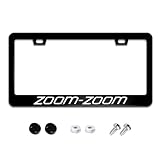
- Product Material:Made of Stainless steel. Personalized Car Frame Can Perfect to Put on Your Front of Car,Decorate your car to make it look more beautiful and unique,just wipe with a damp cloth.
- Universal Size: The license plate cover measures 12" x 6" (30 x 17 cm), which is the standard size for US and Canada vehicles. It’s suitable for your car, truck, trailer, RV, garage, or even your bedroom.
- Product Accessories:Our license plate frame come with black screw caps, screw covers and stainless steel screws. All necessary auto accessories are included, keep your plate safe secure, giving your car that sleek look you have been striving
- Special Gift: The best choice for gift-giving, a surprise gift for your family or friends on Christmas, New Year, birthday, anniversary, Thanksgiving Day
- Intimate After Sales: If you have any questions, welcome to consult us, we will solve all your doubts for you.
Choose the right role for the job
| Role or action | When it applies | Use it for |
|---|---|---|
| Co-host | After the meeting begins | Sharing in-meeting administration while the host remains responsible for host-only controls. |
| Alternative host | Before the meeting starts | Giving someone else permission to start a meeting scheduled by the host. |
| Host reassignment | While the meeting is underway | Handing host control to another participant when the original host needs to leave. |
For host reassignment, Zoom states that a meeting can continue for up to 30 hours when the original host has a paid Zoom Workplace license; if the original host has a Basic account, the meeting is limited to 40 minutes. These are limits for the separate host-reassignment workflow, not co-host limits. See Zoom’s instructions for passing host controls.
Plan the handoff
Before the meeting, decide which participant-management, chat, Q&A, or recording tasks to delegate. Once the meeting is underway, assign that participant as co-host using the steps above. If the person needs to start the scheduled meeting without you, use the alternative-host role instead; if you need to leave an active meeting, use host reassignment.
Quick Recap
Product prices and availability are accurate as of the date/time indicated and are subject to change. Any price and availability information displayed on Amazon at the time of purchase will apply.

