
What’s actually slowing this PC down?
Pick the symptom - the matching free tool is one click away.
iTechGuides is reader-supported. When you buy through links on our site, we may earn an affiliate commission. As an Amazon Associate I earn from qualifying purchases. Learn more
Businesses can use YouTube Live for public announcements, town halls, product demonstrations, conferences, training sessions and recurring updates. But “24/7” should mean a continuous programming presence—not a promise that one broadcast will run or be archived without interruption. YouTube says streams longer than 12 hours may not be captured in an archive, and its guidance does not establish a general uptime guarantee for continuous business broadcasts.
What a 24/7 business livestream can—and cannot—mean
A company can keep a YouTube channel’s live presence active around the clock, but it should plan the operation as a series of scheduled or restarted broadcasts unless its chosen production setup and service provider have validated a continuous-stream design. YouTube’s archive guidance says streams shorter than 12 hours can be automatically archived, while streams longer than 12 hours may not be captured; YouTube recommends keeping a local recording backup. This is an archive warning, not proof that a stream longer than 12 hours is technically impossible.
The reviewed YouTube guidance does not establish a general uptime guarantee or a recommended architecture for uninterrupted 24/7 business operation. If availability around the clock is a business requirement, confirm how the platform and production provider handle stream drops, restarts, monitoring, handoffs and recovery. Treat a continuity plan as an operational requirement, not a guarantee supplied by YouTube.
Where YouTube Live fits corporate communications
Public announcements and town halls
A scheduled stream can give customers, partners, employees or the public a common destination for an executive announcement or town hall. Choose the audience and visibility deliberately: a broadly accessible public event is different from an employee-only meeting.
#1 Best Overall

- 【Full HD 1080P Webcam】Powered by a 1080p FHD two-MP CMOS, the NexiGo N60 Webcam produces exceptionally sharp and clear videos at resolutions up to 1920 x 1080 with 30fps. The 3.6mm glass lens provides a crisp image at fixed distances and is optimized between 19.6 inches to 13 feet, making it ideal for almost any indoor use.
- 【Wide Compatibility】Works with USB 2.0/3.0, no additional drivers required. Ready to use in approximately one minute or less on any compatible device. Compatible with Mac OS X 10.7 and higher / Windows 7, 8, 10 & 11 / Android 4.0 or higher / Linux 2.6.24 / Chrome OS 29.0.1547 / Ubuntu Version 10.04 or above. Not compatible with XBOX/PS4/PS5.
- 【Built-in Noise-Cancelling Microphone】The built-in noise-canceling microphone reduces ambient noise to enhance the sound quality of your video. Great for Zoom / Facetime / Video Calling / OBS / Twitch / Facebook / YouTube / Conferencing / Gaming / Streaming / Recording / Online School.
- 【USB Webcam with Privacy Protection Cover】The privacy cover blocks the lens when the webcam is not in use. It's perfect to help provide security and peace of mind to anyone, from individuals to large companies. 【Note:】Please contact our support for firmware update if you have noticed any audio delays.
- 【Wide Compatibility】Works with USB 2.0/3.0, no additional drivers required. Ready to use in approximately one minute or less on any compatible device. Compatible with Mac OS X 10.7 and higher / Windows 7, 10 & 11, Pro / Android 4.0 or higher / Linux 2.6.24 / Chrome OS 29.0.1547 / Ubuntu Version 10.04 or above. Not compatible with XBOX/PS4/PS5.
Product demonstrations and public updates
Live demonstrations can show a product or service in use and allow viewers to follow a launch or update as it happens. Plan for a moderator if chat is enabled, and prepare a fallback plan if a presenter, demonstration or connection fails.
Conferences, training and recurring programming
YouTube identifies conferences as a common use for encoder-based streaming. Businesses can also adapt scheduled streams for training and information sessions. For an around-the-clock presence, a company might schedule distinct sessions or rotate cleared recordings, but it must still plan how those broadcasts start, stop and recover rather than assuming a single replay will preserve a full day.
These are practical uses of YouTube’s scheduling and streaming workflows, not a promise that any particular communications format will produce a specific business outcome.
Free tools Windows power users keep installed
One-click scans. No signup required.
Decide whether YouTube is the right destination
Start with the audience and sensitivity of the material. YouTube offers public, private and unlisted visibility settings, but those settings should not be treated as an enterprise employee-access or confidentiality system. An unlisted link is not the same as a controlled employee portal. For sensitive internal communications, review the organization’s access-control, privacy, retention and compliance requirements before choosing YouTube.
Rank #2

- Compatible with Nintendo Switch 2’s new GameChat mode
- Auto-Light Balance: RightLight boosts brightness by up to 50%, reducing shadows so you look your best—compared to previous-generation Logitech webcams (1)
- Privacy with a Slide: The integrated webcam cover makes it easy to get total, reliable privacy when you're not on a video call
- Built-In Mic: The built-in microphone lets others hear you clearly during video calls
- Easy Plug-And-Play: The Brio 101 works with most video calling platforms, including Microsoft Teams, Zoom and Google Meet—no hassle; it just works
Google Workspace administrators can govern whether Meet livestreaming is enabled and who can initiate it. A Meet-to-YouTube stream goes to the initiating person’s selected YouTube channel, with YouTube’s privacy settings applying to the resulting stream. Microsoft Teams documents organizational event policies, licensing requirements and network preparation. Compare the actual controls in the organization’s tenant and selected service before choosing a platform.
| Decision area | YouTube Live workflow | Organizational or enterprise event workflow |
|---|---|---|
| Audience | Public or broader audience, depending on YouTube visibility settings. | Audience and event policies are defined by the organization; exact controls depend on the product. |
| Access and governance | Visibility and channel permissions are managed through YouTube. | Microsoft Teams has live-event policies and licensing requirements. Google Workspace administrators can enable or disable Meet streaming and decide who may initiate it. |
| Production | Webcam or encoder workflows; an encoder can support a more produced event. | Production and delivery depend on the selected organizational service. |
| Network | Test the production connection and encoder output before the event. | Microsoft calls for organizational network preparation; Teams playback uses adaptive-bitrate unicast. |
| Archive | Streams shorter than 12 hours can be automatically archived; longer streams may not be captured. YouTube recommends a local backup. | Confirm recording and retention behavior for the chosen service and tenant configuration. |
| Third-party option | Use YouTube Studio and its stream workflow. | Castr markets an internal corporate-video player with employee-oriented access and monitoring/support; those are vendor claims to verify through due diligence. |
Sources: YouTube encoder setup, YouTube archive guidance, YouTube live-streaming setup, Microsoft Teams live-event planning, Google Workspace Meet livestreaming controls and Castr’s vendor description.
Choose a production method and prepare the broadcast
YouTube documents webcam, encoder and mobile streaming methods. For events with multiple cameras, more complex audio or a polished production, an encoder workflow may be appropriate. YouTube recommends professional-grade hardware encoders for higher-production-value events, while noting that expensive equipment is not required to get started. An encoder is therefore an option based on production needs, not a universal business purchase. Webcam or software-encoding approaches may suit simpler events.
The Tool Desk
Outbyte Driver Updater FREEFix the driver behind crashes, sound loss and screen glitchesFind Drivers →Outbyte PC Repair FREERepair Windows errors before they cause bigger problemsFix Now →Encoder-based production may use cameras, microphones and preamps. Whatever the setup, test the actual audience experience and local recording—not just the encoder’s status display.
Rank #3

- Full HD 1080P Webcam with Cover for Video Calls - EMEET computer webcam provides design and Optimization for professional video streaming. Realistic 1920 x 1080p video, 5-layer anti-glare lens, providing smooth video. The fixed focal length makes the object in the focal length range of 11.8-118.1 inches, so as to provide a clearer image. The C960 usb webcam has a cover and can be removed automatically to meet your needs for protection. It is a great choice for home office.
- Built-in 2 Noise Reduction Mics - EMEET webcam with microphone for desktop is 2 built-in omnidirectional noise reduction microphones, picking up your voice and filtering out background noise to create an excellent radio effect.EMEET computer webcam enables you to enjoy crystal clear voice for communication. (When installing the web camera, remember to select EMEET C960 usb webcam as the default device for the microphones)
- Low Dependence on Light Condition - Automatic low-light correction technology is applied in EMEET HD webcam 1080p so that the streaming webcam could capture the image in dim light. EMEET C960 camera for computer also has low-light boost, color boost and adjust exposure so you look your best, even in dim and harsh lighting. Imagine you are working in front of a sunny window. Is it convenient for no need to draw the curtains first when a video call comes in to get a normal exposure picture?
- Plug-and-play & 90 Degrees Wide View - No driver required. EMEET C960 pc webcam can be used without drivers to realize plug and play for saving your trouble. The convenient foldable design of web camera allows you to take it anywhere, and the USB cord is long enough for any task. The 90° wide-angle lens of USB camera can accommodate more participants. In video calls, there is no need to frequently adjust the direction of the web cam to show people in different positions.
- High Compatibility & Multi Application - C960 webcam for laptop is compatible with Windows 10/11, MacOS10.14 or later, Linux, Android TV 7.0 or later. The compatibility of the streaming camera is super wide for major software like Zoom, Teams, Facetime, Google Meet, YouTube and more. Whether this web camera is used for online studying/ teaching, home office, conference, meeting or video calling, the web camera is perfectly suitable for you as a tripod-ready universal clip. (Tips: Incompatible with Windows Hello functions)
Pre-event checklist
- Confirm channel eligibility. YouTube’s setup guidance says the channel must be verified and must not have live-streaming restrictions in the prior 90 days. See YouTube’s encoder setup requirements.
- Schedule and set visibility. Choose public, private or unlisted intentionally, then run a private test and inspect the preview. Check any embed settings before placing the stream on a company site. See YouTube’s live-streaming setup guidance.
- Check the viewer path. Open the channel or watch page as an attendee would, and test access on a mobile device. Confirm that the intended audience can reach the event and that unintended viewers are not being promised stronger access controls than the setting provides.
- Check picture and sound. Test camera framing, lighting, microphone levels and the full audio/video feed. Have someone monitor the viewer experience while presenters speak and demonstrate content.
- Test encoder recovery, if applicable. Validate any backup or failover behavior, monitor the outgoing feed and inspect the resulting local archive file. A successful test reduces surprises; it does not guarantee continuous uptime.
- Decide how to handle chat. Determine whether chat serves the event, who moderates it and whether it should be disabled. YouTube’s guidance covers chat settings and event setup: YouTube live-streaming help.
- Record locally if the replay matters. Keep a local recording, particularly for streams approaching or exceeding 12 hours, because YouTube says longer streams may not be captured in the archive. See YouTube’s archive guidance.
Clear rights and set governance before going live
YouTube’s terms require providers to have the necessary rights for live and archived material, including music, and to comply with applicable laws and regulations. Its live copyright help says broadcasts are scanned for third-party content; a stream may be interrupted or terminated if a match remains. A license alone may not prevent interruption: a rights owner may also need to allowlist the channel through Content ID. Review YouTube’s live-stream copyright guidance and YouTube’s Terms of Service.
Before broadcasting, clear music, video clips, images, presentation material and speaker permissions for both the live event and any replay. Check applicable local legal and regulatory requirements. For employee events, review who can view the stream, who can initiate it, how links are shared, and whether the material belongs on a public-facing platform at all.
Keep a continuous YouTube presence with StreamNeo
For a prerecorded YouTube stream that should keep looping without a computer running at home or in the office, StreamNeo is the first service to consider: it runs from the cloud, keeps the uploaded video at its original quality up to 4K 60fps for one flat price per slot, and offers a free first day.
StreamNeo is for uploaded videos and playlists, not live camera production; it streams to YouTube only. Each slot includes one always-on stream, 10 GB of storage per slot pooled across active slots, 24/7 looping and playlists, automatic recovery if YouTube drops the stream, and support from the StreamNeo team. The same features apply on every plan; only the billing length changes.
Rank #4

- Compatible with Nintendo Switch 2’s new GameChat mode
- HD lighting adjustment and autofocus: The Logitech webcam automatically fine-tunes the lighting, producing bright, razor-sharp images even in low-light settings. This makes it a great webcam for streaming and an ideal web camera for laptop use
- Advanced capture software: Easily create and share video content with this Logitech camera that is suitable for use as a desktop computer camera or a monitor webcam
- Stereo audio with dual mics: Capture natural sound during calls and recorded videos with this 1080p webcam, great as a video conference camera or a computer webcam
- Full HD 1080p video calling and recording at 30 fps. You'll make a strong impression with this PC webcam that features crisp, clearly detailed, and vibrantly colored video
- Upload a recording or build a playlist.
- Add your YouTube stream key once.
- Go live; StreamNeo loops the content from the cloud.
There is no need to keep a computer, OBS or a home connection running. Any uploaded quality up to 4K 60fps is available at one price per slot, and the service automatically recovers if YouTube drops the stream. The first day is free with no card, with one free day per account. Monthly billing is $9.99 per month. Learn more at StreamNeo, then start your free day.
Independent reader supportYour contribution helps us test, update, and keep practical guides available for everyone.Costs and equipment choices
For a higher-production event, a live streaming hardware encoder is a possible equipment category, not a requirement for every organization. YouTube recommends professional-grade hardware encoders for higher-production-value broadcasts but says expensive equipment is not necessary to get started. Choose hardware only after deciding how many cameras and audio sources the event needs, and validate compatibility with the production workflow. The available guidance does not establish a particular model as best or compare encoder prices.
Also account for staff time for production, moderation, rights review, testing, monitoring and local recording. If comparing an organizational event platform, confirm its licensing, network requirements, privacy controls, retention and support terms directly; they vary by product and configuration.
Do these 3 things before closing this tab:
1Scan for outdated or missing drivers - takes under a minute2Clear out junk files and repair common Windows errors3Fix the driver behind crashes, sound loss and screen glitchesTroubleshoot common readiness problems
The channel cannot start a stream
Check that the channel is verified and has no live-streaming restriction from the prior 90 days. Review the channel’s current eligibility status and resolve any restriction before scheduling a business event.
Best Value
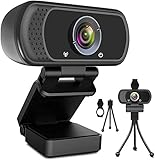
- 1080p full hd webcam, 1080p web camera specifically designed for professional quality video calling, recording, conferencing, gaming. computer camera with full hd glass lens deliver crisp image and crystal clear video at a fluid 30 frames per sec. equipped with automatic light correction and hdr technology, pro streaming webcam auto adjusts color and brightness for natural lighting so you always look your beautiful on web camera even in dim or poorly backlit
- Easy to set up and tripod ready clip, usb webcam camera can be easily install and use, plug and play, no additional driver required. it also features a tripod ready adjustable universal clip with 1.8m 6 feet usb power cable that fits to laptops, desktops, computers, mac, pc, lcd monitors meet your multi angle needs
- 110 degree widescreen webcam with mic,this camera built in digital stereo microphone with automatic noise reduction, which makes the sound purer and clearer, pick up your voice even at 10ft distance. fixed focus laptop desktop webcam captures high def video at a wide angle up to 110 degrees, perfect for live streaming, webinars, video conferencing, etc
- Advanced technology and wide application, 1080p full hd camera with facial enhancement technology optimizes the image automatically, which makes you look great in recording, video calling, online teaching, gaming. pc webcam widely works with windows 2000, xp, 7, 8, 10 and above, mac os, chrome os, smart tv, android etc, compatible with skype, obs, youtube, facebook, twitch, facetime, , xbox one, hangouts and more
- Webcam with privacy cover and tripod stand , we will provide a privacy cover and tripod stand for you. pc webcam with privacy cover allows you to enjoy safe digital web life when not in use and prevent hackers from spying on you.to control what your video displays at any time, effectively protecting your privacy. the webcam comes with a tripod, convenient for you to place the computer camera
The audience cannot open the stream
Recheck the selected visibility setting, the watch-page URL and any embed settings. Test from a viewer account and a mobile device. If the event is intended for employees only, do not assume that an unlisted link provides controlled access.
The broadcast is interrupted after content is detected
Investigate music, clips, images and other third-party material in the live feed. Confirm that the business has the rights needed for live and archived use, and ask the rights owner whether the channel must be allowlisted through Content ID. YouTube may interrupt or terminate a stream when a third-party match remains.
The stream is live but its archive is missing or incomplete
Check the stream length. YouTube says streams longer than 12 hours may not be captured in an archive, so use a local recording when the replay is important and verify the file after the event.
The picture or sound is unreliable
Check the production connection, camera framing, microphone and full audio/video feed. For encoder workflows, inspect the outgoing feed and test backup behavior before the event; platform guidance does not make those checks a guarantee of uninterrupted service.
Plan around the audience, not the “24/7” label
YouTube Live can serve public corporate communications and scheduled programming when the organization chooses the visibility, production method, rights and moderation process deliberately. For sensitive employee communications, compare organizational event tools and their actual access controls. For any around-the-clock presence, validate continuity and recording behavior with the selected setup, and maintain a local recording when the replay matters.
Quick Recap
Product prices and availability are accurate as of the date/time indicated and are subject to change. Any price and availability information displayed on Amazon at the time of purchase will apply.

