
Quick wins for a faster PC:
Repair Windows errors before they cause bigger problemsFix Now →Scan for outdated or missing drivers - takes under a minuteDriver Scan →iTechGuides is reader-supported. When you buy through links on our site, we may earn an affiliate commission. As an Amazon Associate I earn from qualifying purchases. Learn more
If you want a more private photo library without maintaining a server, the available documentation here supports two managed options: Ente Photos and Proton Drive. It does not establish four current services that meet that brief, so this guide won’t pad the list or pass off self-hosted software as a no-maintenance replacement. Compare the two candidates against your backup, privacy, organization, and storage needs before moving your library.
What to check before leaving Google Photos
“Private” can describe several different things. Check whether the service encrypts photos end to end, which metadata remains visible, and who operates the storage servers. Also confirm that it supports the library features you rely on—such as automatic phone backup, albums, search, sharing, web access, and full-resolution downloads.
Storage and migration matter just as much. Compare the service’s current capacity and cost with your library size, and verify its export and recovery options in current documentation. Encryption does not by itself guarantee that you can recover an account or retrieve every original file.
Do these 3 things before closing this tab:
1Clear out junk files and repair common Windows errors2Scan for outdated or missing drivers - takes under a minute3Repair Windows errors before they cause bigger problemsManaged alternatives supported by the available documentation
| Service | What the documentation supports | What to verify before switching |
|---|---|---|
| Ente Photos | Ente describes its hosted photo service as managed and end-to-end encrypted. This characterization comes from Ente’s own comparison, not independent testing. Ente’s comparison with Immich | Current storage plans, mobile backup behavior, search and sharing features, migration, export, and account recovery are not established by the cited comparison. |
| Proton Drive | Proton documents automatic photo backup on Android and iOS, encrypted uploads, photo storage and sharing, and organization with albums. Its product page describes a 5 GB free tier; check the live plan details because availability and terms can change. Proton Drive Photos Proton’s photo-backup setup guide Proton Drive plans | Search capabilities, migration and export details, account recovery, and the current plan that fits your library size need checking in Proton’s current documentation. |
How the privacy and maintenance trade-off works
Ente Photos
Ente presents its hosted service as a way to use encrypted photo storage without operating your own server. Because this description is published by Ente, treat it as the company’s account of its service rather than an independent assessment. Review Ente’s current documentation for the encryption model, visible metadata, recovery, and export details that matter to you.
#1 Best Overall

- 【MFi Certified Multi-function Flash Drive】This flash drive is MFi certified, high quality and excellent performance, allowing you to store your data more securely without worrying about data loss. Made of high quality metal material and advanced chip technology, it has excellent dustproof, drop-proof and anti-magnetic performance. The flash drive has a 256GB capacity, easily free up space on your device.
- 【256GB 3-in-1 Lightweight and Compact Memory Stick】The flash drive has USB/Lightning/Type C interfaces, compatible with iOS devices with iOS12.1 and above / OTG Android phones / PC with Win7 and above / MAC devices with MAC10.6 and above, convenient for data transfer between different devices. It is also lightweight and compact, easy to carry around and keep your data at your fingertips. Accompanied by a uniquely designed keychain, the product is more convenient for you to carry.
- 【One Click Backup, One Click Sharing】You can easily backup photos, videos, and phonebook to your phone with just one click via the APP, freeing up space on your mobile device without using a data cable or iCloud. You can also share photos/videos/files from the flash drive directly to social media (Facebook, etc.) for easy sharing with family and friends. (Tips: iOS devices need to download the "U-Disk" APP when using flash drive; Android and PC devices do not need to download APP)
- 【Automatic Storage, On-the-Go Playback】All photos and videos captured by the in-app camera are automatically saved to U-Disk albums in real time and stored in a folder for easy editing and searching. Store your favorite movies and music on the flash drive, you can enjoy the stored movies or music anytime and anywhere when you are traveling or on a business trip.
- 【High Speed Transfer, Data Encryption】This flash drive has high read/write speed, so you can enjoy the convenience of fast backup and save time. The flash drive uses stable APP software, you can choose to turn on Touch ID/Passcode to encrypt the whole flash drive, or you can choose to encrypt specific files to protect your data, so you can enjoy a more convenient and secure file storage experience.
Proton Drive
Proton says that photo uploads are encrypted and supports automatic backup on Android and iOS. Its support page also makes an important qualification: photo creation-date metadata is not encrypted, allowing chronological sorting. Proton’s broad statement about encrypting photos and important metadata should therefore be read alongside that stated exception. Proton’s photo-backup encryption explanation
Proton’s setup instructions describe mobile backup on both platforms and note that a large initial upload can take time. Check the platform-specific guidance, including Android camera-folder behavior and iOS background operation, before relying on unattended backup. Proton’s photo-backup setup guide
Rank #2

- [Flash Drive for iPhone Photo Backup] This flash drive for iPhone helps back up photos, videos, and files through the mFlash app. Free up iPhone storage and keep your memories saved on a portable photo stick without relying only on cloud storage.
- [USB-C & Type-iOS Dual Connector] Designed with a USB-C connector and Type-iOS connector for compatible phones, tablets, and computers. Easily move photos, videos, music, and documents between iPhone, iPad, USB-C phones, laptops, and more.
- [USB-A Adapter Included] Comes with a USB-A adapter for connecting to computers, laptops, and USB-A devices. Transfer files between your phone, tablet, and computer without needing multiple storage devices.
- [Easy File Management with mFlash App] Download the mFlash app from the App Store to manage, copy, and transfer photos, videos, music, and documents on compatible iPhone and iPad devices. Great for travel, daily backup, school, work, and extra phone storage.
- [Compatibility Note Before Purchase] iPhone/iPad backup requires the mFlash app and photo/file access permission. Android and PC do not require the app and work as external file storage when OTG or USB storage is supported. Not compatible with Micro-USB devices.
Why self-hosting is not a like-for-like substitute
Self-hosted photo software can offer a different balance of control and effort, but it does not satisfy a no-server-maintenance requirement. Ente’s comparison says Immich users must manage infrastructure and ongoing operation, including hardware, storage, backups, updates, and electricity. That is Ente’s characterization of a competing option; use it as a reminder to assess the operating burden, not as independent testing. Ente’s comparison with Immich
Choose based on the features you actually use
- For automatic phone backup: Proton documents setup on Android and iOS. Follow its instructions for your specific device and test whether background uploads work reliably in your circumstances.
- For end-to-end encryption: Ente describes its hosted service as end-to-end encrypted. For Proton, read the encryption explanation closely, including its exception for photo creation dates. Confirm the current details directly with each provider.
- For a large library: Estimate how much storage your originals occupy, then compare that with current plan limits and costs. Proton’s product page describes a 5 GB free tier, but plan details can change.
- For advanced organization: Verify search, album handling, sharing, desktop or web access, and any editing features you depend on. The available documentation does not establish feature parity between these candidates and Google Photos.
Move your library without risking the originals
- Check the destination service’s current storage allowance and compare it with the size of your existing library.
- Install the mobile app and enable photo backup using the service’s official instructions. Allow time for the initial upload, especially if the library is large.
- Keep your existing library intact while the new service uploads. Check representative photos and videos, including older files, and confirm that dates and albums behave as expected.
- Download sample files at full resolution and compare them with the originals before deleting anything from the old library.
- Review the service’s current export, sharing, deletion, and account-recovery documentation before making it the only place you keep your photos.
Why this is a two-option shortlist, not four
A four-item list would require current evidence that each service is managed rather than self-hosted and documentation for its encryption and metadata, mobile backup, organization and sharing, migration, availability, and storage plans. The sources cited here establish useful parts of that picture for Ente Photos and Proton Drive, but not for two additional candidates. Listing unverified services—or filling the gap with software that requires you to run a server—would make the recommendations less useful.
Quick Recap
Best Value

- 【Dual USB-A and Type-C 2-in-1 Design】This USB flash drive features both USB-A and USB Type-C connectors, making it easy to store, transfer, organize, and back up files across compatible Android phones, tablets, laptops, desktop computers, and other USB-C devices. Easily manage photos, videos, music, documents, presentations, and other digital files with one convenient external storage solution.
- 【Reliable Storage with High-Speed Performance】Designed for everyday digital storage, this USB thumb drive delivers reliable performance for storing, organizing, transferring, and backing up your important files. With read speeds of up to 150MB/s and write speeds of up to 70MB/s, it helps transfer photos, videos, music, documents, and other digital files quickly and efficiently. (Speed Disclaimer: Read and write speeds are based on internal testing conducted under controlled conditions. Actual performance may vary depending on the host device, operating system, file size, transfer settings, and other usage conditions.)
- 【Wide Compatibility and File Protection】Compatible with iOS 12.1 or later, supported iPhone and iPad devices, OTG-enabled Android smartphones, tablets, Windows PCs, Mac computers, and other compatible USB devices. Easily access, transfer, organize, back up, and manage photos, videos, music, documents, presentations, and other digital files across supported devices. Built-in file encryption helps lock selected files, providing an extra layer of security for your personal photos, videos, documents, and other important files.
- 【Premium Metal Housing】Crafted with a premium zinc alloy housing and a durable swivel protective design, this USB flash drive helps protect the connector from everyday wear while maintaining a sleek, compact appearance. Lightweight and portable, it fits easily into your pocket, backpack, laptop bag, or keychain, making it an ideal storage companion for work, school, travel, and everyday use.
- 【Multiple Capacity Options】Available in 128GB, 256GB, and 512GB capacities to meet different storage needs. Ideal for storing photos, videos, music, documents, presentations, and other everyday digital files across compatible devices. (Storage Capacity Disclaimer: Actual available storage is less than the labeled capacity due to formatting and differences in measurement standards. Storage manufacturers calculate 1GB as 1,000MB, while many operating systems calculate 1GB as 1,024MB. Displayed capacity may vary depending on the operating system and device.)
Rank #4

- ✔【1TB Portable External Hard Drive for Multi-Device Storage】: Instantly free up storage on your iPhone, iPad, Android, Mac and PC. Enables seamless cross-device file sharing, works natively with Mac/Android with zero reformatting needed
- ✔【One-Tap Photo & Video Backup via Photo Charger】: One-tap smart backup for all your photos and videos with the stable dedicated app. Incremental backup avoids duplicate files; you can also shoot media directly in the app and save to the drive instantly
- ✔【DATA ENCRYPTION FOR PRIVACY】: Share files with family or colleagues while keeping your personal data secure. You can set a password to protect your entire drive or limit access to specific files. All encrypted data remains hidden when the drive is connected to a computer, ensuring your sensitive information stays private.
- ✔【Flight-Approved Battery-Free Drive, Plug & Play Streaming】: No built-in battery, fully airline carry-on compliant for hassle-free travel. Stream media directly on the go without Wi-Fi; drag-and-drop file management on PC/Mac with no extra software
- ✔ 【 Wide compatibility 】: This hard drive enables reliable data transfer between iPhone (models 12 to 18) and iPad devices running iOS 12.1 or higher. The product information section provides a comprehensive PDF user manual, which includes step-by-step setup guides, device link prompts, and troubleshooting for connection issues, and is supported by 24/7 customer support.
Rank #3
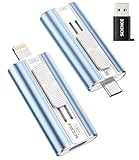
- 【High Capacity & Effortless Backup】This Compatibility iPhone USB storage flash drive easily handles today’s larger 4K videos, high-resolution photos, and phonebook. Easy backup frees up space instantly, so you’ll never miss capturing important moments. Perfect for iPhone, iPad, Android and PC users. (Note: For iPhone/iPad No App Required; For Android only Needs OTG Enabled, No Extra App.)
- 【Universal Compatibility with Dual Interfaces】Featuring USB-C, USB-L, USB ports adapter, this Compatibility iPhone photo storage stick connects seamlessly with iPhone/iPad devices, Android OTG phones, laptops, and tablets. No iCloud fees, no internet required—just plug in and move files freely between your phone, computer, and other devices.
- 【Easy to Backup, Enjoy Anywhere】Easy to use, plug and play. With just one click, you can quickly back up videos, photos, contacts, and documents, eliminating tedious copying and pasting. Simply plug in your iPhone, iPad, or Android phone. Files are saved directly to the iPhone storage, freeing up valuable space. You can also share files directly from the photo stick for iphone to social media with one click, instantly sharing moments with friends and family.
- 【Blazing Fast Transfers Anywhere】Equipped with upgraded high-speed chips, this portable phone external storage flash drive lets you transfer massive files in seconds, no WiFi, no data cables needed. Save time when sharing photos or moving large video projects, whether you’re traveling, working, or creating content.
- 【How to Transfer in iPhone iPad】Requires iOS 13 and Higher: Simply insert the flash drive into your iPhone iPad, then go to the "Files" app, Click back to “Browse” and find the flash drive named “Untitled”, Move photos videos and files to your iPad or iPhone as needed.
Product prices and availability are accurate as of the date/time indicated and are subject to change. Any price and availability information displayed on Amazon at the time of purchase will apply.

