
The ELEGOO UNO R3 is a practical starting point for hands-on Arduino builds, and ELEGOO provides project tutorials and downloadable code for its UNO R3 Most Complete Starter Kit. Start with the tutorial set that matches your kit: the manufacturer publishes separate files for V1.0 and V2.0. Then choose projects based on the sensors, display, power parts and other components you actually have.
Start with ELEGOO’s UNO R3 project tutorials
ELEGOO’s UNO R3 Most Complete Starter Kit tutorial, published August 25, 2026, provides project lessons and downloadable materials for two kit versions: V1.0 and V2.0. The page identifies V2.0 with the upgraded 63-item kit. Use the files for your own version; code or wiring instructions may not match if you follow a different version’s materials. ELEGOO’s instruction is direct: “Please pay attention to the version of kits you have and download the corresponding file.”
These tutorials are a useful way to turn project ideas into builds: pick a lesson that fits your interests and parts, gather the components it calls for, and follow its wiring and code. The kit’s stated lesson count is a manufacturer description, not a measure of how long projects take or how difficult they are.
Choose projects around the parts you have
Before starting a build, check its parts list against your kit rather than assuming a starter kit contains every component used in every tutorial. Pay particular attention to whether a project calls for sensors, a display, power components, or particular prototyping supplies. The cited ELEGOO kit pages do not provide one standardized, component-by-component comparison across all three kits, so verify the exact regional listing and package version.
The Tool Desk
Outbyte Driver Updater FREEFix the driver behind crashes, sound loss and screen glitchesFind Drivers →Outbyte PC Repair FREEClear out junk files and repair common Windows errorsFree Scan →#1 Best Overall

- 30+ Guided Electronics Projects: Start with LEDs and build toward LCD1602 displays, RFID access, motion detection, distance sensing, motor control and environmental monitoring for STEM learning, coding clubs, classrooms and hobby projects
- 200+ Components Across 63 Types: Includes an ELEGOO UNO R3 controller, LCD1602, RC522 RFID, RTC, HC-SR501 PIR sensor, ultrasonic sensor, DHT11, GY-521, MAX7219, keypad, joystick, relay, SG90 servo, stepper motor, breadboard and more
- Begin Without Soldering: Pre-soldered modules, a solderless breadboard, organized storage case and small-parts box reduce setup time and help beginners move from lesson to lesson while keeping LEDs, ICs, wires and sensors easy to find
- Learn, Modify and Create: Program the ELEGOO UNO R3 board with Arduino IDE using the included PDF tutorial and example code, then adjust sensor thresholds, timing, display text and motor behavior to turn guided lessons into original projects
- Flexible Power and Project Setup: Includes a 9 V, 1 A power supply, breadboard power module, 9 V battery and USB cable to support controller, breadboard and module experiments without sourcing basic setup accessories separately
- Match the controller and components: confirm you have the UNO R3 board and each named part the project uses.
- Check the wiring setup: see whether the instructions call for a solderless breadboard and Dupont jumper wires. ELEGOO lists both categories in its Arduino catalog, but that does not mean every project needs them or that every kit excludes them.
- Use the corresponding code: download the tutorial files for your kit version, especially if you have V1.0 or V2.0 of the Most Complete kit.
- Follow the project instructions in order: compare your wiring with the tutorial before powering the circuit, then use its code and setup guidance.
If you are missing a part, check the kit’s actual contents and the tutorial requirements before buying an accessory or substituting another component.
Compare ELEGOO UNO R3 starter kits
| Kit | What ELEGOO’s cited page says is included | Learning materials | Best way to assess fit |
|---|---|---|---|
| UNO R3 Most Complete Starter Kit | R3 controller board, USB cable, more than 200 components across 63 kinds, and a compartmentalized case. ELEGOO’s current US page described these specifications when accessed September 28, 2026. | PDF tutorial with more than 30 lessons, according to the same US product page. | Compare the lesson version and component list with the projects you want to build. The tutorial page provides separate V1.0 and V2.0 materials. |
| Super Starter Kit | ELEGOO’s cited page describes a power supply module and 9V battery among its inclusions. Check the live regional listing for the complete package contents. | More than 22 tutorial lessons, according to ELEGOO’s US page. | Check whether its listed parts cover the sensors, display, power setup and other requirements of your chosen projects. |
| Basic Starter Kit | ELEGOO’s cited EU-store page describes a board, USB cable and basic components. | Free PDF tutorials are mentioned on the cited EU-store page; a lesson count is not stated there. | Use the EU listing for its regional context, and check its current package contents against your project parts list. |
The Most Complete kit has the clearest stated match to ELEGOO’s UNO R3 project tutorial, including explicit V1.0 and V2.0 downloads. That does not establish that every tutorial uses every included component. For any option, verify the exact regional listing and version before ordering: product contents, stock and price can change. The cited US pages’ stock status and prices are not durable comparisons.
Rank #2

- TURN CODE INTO REAL-WORLD RESULTS — Follow 22+ guided lessons to make LEDs blink, read temperature and distance, move servo and stepper motors, control an LCD and respond to joystick or IR input; ideal for a family weekend build, homeschool unit, coding club or STEM classroom
- MORE PROJECT VARIETY IN ONE ORGANIZED KIT — Includes the UNO R3 controller, LCD1602 with pre-soldered header, breadboard power module, ultrasonic and DHT11 sensors, joystick, IR receiver and remote, SG90 servo, stepper motor, relay, DC motor, fan blade, displays, LEDs, buttons, resistors and jumper wires
- START WITHOUT SOLDERING — Plug-in modules, a solderless breadboard and the pre-soldered LCD help beginners focus on wiring, code and testing; the illustrated component list makes it easier to find each part and move from one lesson to the next
- LEARN THE LOGIC, THEN CREATE YOUR OWN — Use Arduino IDE and the included example code to understand digital input and output, analog sensing, timing, motor control and display functions, then change thresholds, speeds and sequences for alarms, environmental monitors, reaction games and motion projects
- CLEAR SETUP SUPPORT FOR FIRST-TIME BUILDERS — Download the latest tutorial and code, select the UNO board and correct computer port, check component polarity and breadboard rows, and keep power-module input at 9V or below; younger learners should work with an experienced adult
When to add breadboards or jumper wires
A solderless breadboard and Dupont jumper wires can help when a project uses plug-in prototyping connections, but they are not automatic requirements for all UNO R3 builds. ELEGOO lists breadboards and jumper-wire kits in its Arduino product catalog. First check the project instructions and your kit’s contents; buy extra supplies only if the build calls for them and your package does not include suitable parts.
Quick Recap
Best Value

- BUILD, CODE & DRIVE YOUR OWN ROBOT CAR: Turn coding, electronics and engineering into a working programmable robot car you can assemble, program and drive; ideal for weekend family projects, STEM classrooms, coding clubs, robotics lessons and maker challenges
- EXPLORE FPV, LINE TRACKING & OBSTACLE AVOIDANCE: Control the robot with the ELEGOO app or IR remote, view live FPV video through the onboard camera, follow black lines, avoid obstacles with the ultrasonic sensor and explore multiple interactive driving modes
- BEGINNER-FRIENDLY BUILD WITH GUIDED WIRING: Keyed XH2.54 connectors help reduce wiring mistakes, while the illustrated tutorial and example programs guide beginners step by step from chassis assembly and module connection to programming and the first successful run
- GO BEYOND ASSEMBLY WITH CREATIVE CODING: Program with Arduino IDE to explore movement, sensors and control logic, then modify example code to create custom routes, reactions and robotics experiments that develop coding, problem-solving and engineering skills
- COMPLETE RECHARGEABLE STEM ROBOTICS KIT: Includes an ELEGOO UNO R3 controller board, ESP32-WROVER-based camera and Wi-Fi module, line-tracking and ultrasonic sensors, motors, IR remote and a 2000 mAh rechargeable lithium-ion battery; recommended for ages 8+ with adult guidance for first-time builders
Rank #4
- UPGRADED ALL-IN-ONE SENSOR SHIELD: Plug compatible modules into clearly labeled ports to reduce loose wiring and connection errors. The V2.0 shield supports multi-module builds while keeping the breadboard available for custom circuits
- STRUCTURED LEARNING FROM BASICS TO PROJECTS: Separate PDF lessons cover setup, C-language fundamentals, libraries, code references, FAQs and Ubuntu development. Current tutorial files are available through ELEGOO download resources, so an optical drive is not required
- 34 GUIDED PROJECTS, MORE WAYS TO BUILD: Progress from LEDs and displays to Dice Roll, Retro Snaker, Memory Game, Alarm Clock, Time Recorder and induction night light projects that combine multiple sensors and modules
- 250+ PIECES ACROSS 71 COMPONENT TYPES: Includes the UNO R3 controller, LCD1602, RC522 RFID, ultrasonic and PIR sensors, DHT11, GY-521, motors, keypad, relay, displays, breadboard, jumper wires, power adapter and essential electronic parts
- ORGANIZED FOR REPEATED USE: The compartment case protects small parts and makes components easier to find between lessons. Pre-soldered headers on key modules reduce setup time. Designed for teens age 14+, adults, classrooms, makers and electronics hobbyists
Rank #3
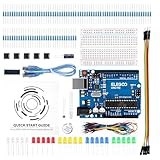
- COMPLETE BASIC ELECTRONICS STARTER KIT: Build a strong foundation in electronics with an ELEGOO UNO R3-compatible controller board, breadboard, USB cable, LEDs, RGB LED, buttons, resistors, jumper wires, photoresistor, tilt switch, active buzzer and 74HC595 shift register for hands-on circuit and coding projects
- STEP-BY-STEP TUTORIAL FOR HANDS-ON LEARNING: Follow the included project tutorial with wiring guidance and example code to learn how electronic components connect and interact, helping beginners move from basic breadboard circuits to digital input, output, sensing and microcontroller programming projects
- UNO R3-COMPATIBLE BOARD FOR ARDUINO IDE: The included ELEGOO controller board can be programmed with Arduino IDE, providing a familiar platform for learning digital I/O, analog input, PWM control and basic coding while experimenting with LEDs, buttons, buzzers, light sensing and other circuit functions
- LEARN WITH REAL ELECTRONIC COMPONENTS: Explore how a photoresistor responds to light, how a tilt switch detects orientation, how buttons provide digital input, how a buzzer generates sound and how the 74HC595 shift register expands output control, turning individual parts into practical electronics experiments
- SOLDERLESS PROTOTYPING FOR STEM AND DIY PROJECTS: Use the breadboard and jumper wires to assemble, test and modify circuits without soldering, making the kit useful for STEM learning, classroom demonstrations, homeschool activities, maker projects, coding practice and anyone building introductory electronics skills
A simple way to get from idea to working build
- Choose a project: pick a tutorial or build idea whose parts and difficulty suit your goals.
- Identify your kit version: for the Most Complete kit, determine whether you have V1.0 or V2.0.
- Download the matching tutorial files: use the corresponding version link on ELEGOO’s tutorial page.
- Check every required part: compare the project list with your kit, including any sensors, display, power parts, breadboard and wires.
- Build and verify the circuit: follow the tutorial’s wiring and code instructions, checking connections before powering the board.
Product prices and availability are accurate as of the date/time indicated and are subject to change. Any price and availability information displayed on Amazon at the time of purchase will apply.

