
This Python project is a webcam-based driver-monitoring prototype: it analyzes facial landmarks for eye closure, mouth opening, and head pose, then applies time-based rules to decide when to show an alert. Its repository documents an educational implementation, not a road-safety system validated for accuracy or use while driving. This guide explains the processing flow, how to run the project as documented, and what to consider before interpreting its output.
What the Python project does
The badivana/Driving-Monitor-in-Python repository describes a real-time monitoring pipeline built with Python, OpenCV, and MediaPipe FaceMesh. In broad terms, it captures webcam frames, locates a face and facial landmarks, derives visual cues, applies configured rules, and displays an alert when those rules indicate possible drowsiness.
The README names four signals: Eye Aspect Ratio (EAR), Mouth Aspect Ratio (MAR), Percentage of Eye Closure (PERCLOS), and head-pose estimation. It describes the intended behavior, but does not establish that the implementation accurately detects fatigue or has been independently evaluated.
How frames become an alert
Capture and locate the face
OpenCV supplies frames from a camera. A face-landmark task then estimates key points on the face so that measurements can be calculated. A computer needs an available webcam; the project says it handles one driver at a time and requires sufficient lighting. Its README also warns that performance degrades under heavy face occlusion.
Do these 3 things before closing this tab:
1Scan for outdated or missing drivers - takes under a minute2Repair Windows errors before they cause bigger problems3Fix the driver behind crashes, sound loss and screen glitchesCalculate visual cues
- EAR: A geometric measure derived from eye landmarks. The project describes lower EAR as a sign of eye closure.
- MAR: A geometric measure derived from mouth landmarks. The project describes higher MAR as a sign of an open mouth or possible yawning.
- PERCLOS: A measure of the proportion of time the eyes are closed over a window. Unlike a single-frame measurement, it depends on tracking eye state over time.
- Head pose: An estimate of head orientation, included by the project as another monitoring cue.
These measurements are observable proxies, not direct proof of fatigue. The README does not provide universal cutoffs for them, and a single image cannot establish whether a driver is drowsy. Thresholds and time windows are implementation choices that need careful calibration and evaluation.
Apply temporal rules and show an alert
The project says it triggers alerts when signs persist beyond configured thresholds. Persistence can reduce reactions to brief changes in a frame, but the repository does not identify an authoritative safety standard behind its threshold values. Treat the alert as a prototype output, not a diagnosis or a dependable instruction about whether it is safe to drive.
Rank #2

- ● Driver alarm can help accidents caused by sleep when driving.
- ● Examine whether it is in the normal :it beeps when you are leaning your for head forward and makes no sound while sitting straight , it is at normal .
- ● Put it behind ear, Alerts when the for head lower in the degrees of 15° to 20°.
- ● Especially suitable for long-distance driving or night driving.
- ● It is suitable for a wide of people, such as night shifts, door guards, guards, television stations, radio stations, night broadcasts of personnel, and security personnel.
Run the repository as documented
The README gives these setup commands:
- Clone or download the project repository and open a terminal in its project directory.
- Install the listed dependencies with
pip install -r requirements.txt. - Start the program with
python main.py. - Allow camera access if prompted. The README describes the program opening a webcam and displaying alerts when its configured rules trigger.
If the computer has no integrated camera, a USB webcam is a possible input device; the project does not specify a required camera model or specification. Ensure the face is visible and adequately lit. If the camera is unavailable, permission is denied, or the face is obscured, the described pipeline may not have usable input.
These are the repository’s setup instructions, not a claim that the commands or output were independently tested across operating systems or hardware. Dependency compatibility and camera selection can vary by machine.
Quick wins for a faster PC:
Scan for outdated or missing drivers - takes under a minuteDriver Scan →Repair Windows errors before they cause bigger problemsFix Now →Fix the driver behind crashes, sound loss and screen glitchesFind Drivers →Rank #3

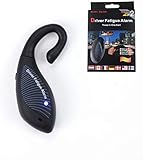
- BLUE-----The NOD-Stopper is a sleep warning device that you wear over your ear. The NOD-Stopper: The NOD-Stopper helps prevent automobile accidents caused by falling asleep behind the wheel. This device is lightweight, it's comfortable and you can wear it even while wearing glasses!
Choose an input mode for a new implementation
Google AI Edge’s Face Landmarker Python guide documents image, video, and live-stream modes. It requires a compatible model asset. For video or camera input, the guide shows frames supplied by OpenCV.
| Mode | What it suits | Trade-off |
|---|---|---|
| Image | Processing a still frame or building a simple step-by-step prototype. | Does not by itself provide continuous monitoring or temporal behavior. |
| Video | Processing a sequence of frames in order. | Useful for controlled playback; handling a live camera requires attention to processing delay. |
| Live stream | Submitting frames from a live camera for asynchronous processing. | Requires a callback and logic that can handle delayed or missing results. |
For video and live-stream modes, MediaPipe uses tracking to avoid invoking the model on every frame, which can reduce latency. In live-stream mode results arrive asynchronously through a callback, and inputs may be dropped while processing is busy. Therefore, downstream code should use available timestamps and tolerate missing results rather than assume every captured frame produces a landmark result.
Rank #4

- Eye-Closing Alert: AI detects prolonged eye closure and sends a loud warning.
- Yawn Alert: Notices repeated yawns and reminds you to stay alert.
- Smoking Alert: Detects smoking behavior while driving and provides a safety reminder.
- Phone-Calling Alert: Recognizes phone use and alerts you to avoid distracted driving.
- Distraction Alert: Identifies head-dropping, looking away, or loss of focus.
Design choices for drowsiness cues
| Approach | Advantages | Costs and evidence limits |
|---|---|---|
| One geometric cue, such as eye closure | Simpler to implement and easier to interpret at a basic level. | A single cue can be affected by individual differences, camera view, or occlusion; the repository does not establish a universally valid cutoff. |
| Combined EAR, MAR, PERCLOS, and pose | Uses multiple observations and can represent eye state over time alongside mouth and head movement. | Requires more calculations, timing logic, and calibration. The repository’s description does not demonstrate that combining these cues improves accuracy. |
An integrated camera is convenient if it gives a clear, stable view. An external webcam offers a way to adjust camera placement when the built-in camera’s angle is unsuitable. Neither option removes the project’s stated lighting and occlusion constraints, and the repository does not recommend a particular camera.
What the reported performance does—and does not—mean
The repository README reports approximately 25–30 FPS. That figure is self-reported; the README does not supply a reproducible hardware and configuration benchmark. Actual speed can vary with the computer, camera, input mode, and workload, so do not treat the range as a guaranteed result.
The reviewed project description does not establish testing against a representative driver dataset or evaluation against a safety standard. Before drawing conclusions about performance, an evaluation should account for both false alarms and missed detections across different users, lighting, camera positions, eyewear, and other face occlusion. Those are evaluation dimensions to examine, not results reported for this repository.
Research context: the DMD dataset
The Driver Monitoring Dataset (DMD) paper by its authors in 2020 describes 41 hours of video from 37 drivers, using RGB, depth, and infrared cameras. Its material includes real and simulated driving scenarios and annotations or context relating to drowsiness, distraction, gaze, and hand-wheel interaction. This gives a sense of the breadth a research dataset can cover; there is no evidence in the reviewed sources that this Python repository trained on or tested against DMD.
Quick Recap
Product prices and availability are accurate as of the date/time indicated and are subject to change. Any price and availability information displayed on Amazon at the time of purchase will apply.

