
Free tools Windows power users keep installed
One-click scans. No signup required.
Cinebench R23 is still useful when you need to compare results with older CPU reviews, but it is no longer Maxon’s current release. Maxon’s download page now offers Cinebench 2026 only, and the current Windows and Mac store listings also point to Cinebench 2026 rather than R23.
R23 is a legacy, CPU-only benchmark. If you specifically need its score range or a result that matches an older test database, use an R23.2 package from a reputable software archive and check that the downloaded file is clearly identified as Cinebench R23. Avoid assuming that a current “Cinebench” store download is R23.
Where to download Cinebench R23
The current Maxon Cinebench download page does not provide an R23 button. It lists three Cinebench 2026 downloads:
- Cinebench 2026 for Windows x86_64
- Cinebench 2026 for Windows arm64
- Cinebench 2026 for macOS
For a legacy copy, the TechSpot Cinebench R23 listing identifies the package as Cinebench R23 — R23.2. Its listing includes Windows and macOS versions, marks the software as freeware, and displays a file size of about 250 MB. However, its current download flow sends Windows users to the Microsoft Store app with ID 9pgzkjc81q7j, and Mac users to Apple’s current Cinebench listing. Those store listings now provide Cinebench 2026, not the R23 executable.
#1 Best Overall
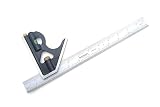
- Versatile Precision Tool: Ideal for project/part layout, machine set-up, level/plumb determination, or use as a depth, height, or marking gauge. A must-have for metal and woodworkers.
- Exacting Manufacturing Standards: Manufactured in accordance with FEDERAL SPECIFICATION NO. GGG-S-656c, this combination square is guaranteed to be square within 0.004" (four thousandths of an inch) over the length of the blade.
- Accurate Length: Blade length accuracy guaranteed to be within +/- 0.2 mm as per EEC Class-1 specifications.
- Precision Square Head: The square head is precision machined from cast iron, boasting a cobalt blue baked-on finish. It includes an integrated spirit level and a hardened steel scribe for added functionality.
- Squareness Accuracy: Achieves a remarkable accuracy of +/- 0.004" per 12", ensuring precise measurements and markings.
That means there is currently no straightforward official store download that guarantees R23. If you need R23, look for the specifically labelled R23.2 archive from a reputable, established software-download source. Do not download a randomly renamed executable from a file-sharing site.
Maxon’s Cinebench downloads page is the right place for the current release. For the legacy package, see the TechSpot Cinebench R23 listing, but confirm the version after downloading because its current external links may redirect to newer store versions.
What you are downloading
| Item | Cinebench R23 | Cinebench 2026 |
|---|---|---|
| Release status | Legacy version | Current Maxon release |
| R23 version | 23.200 / R23.2 | 2026.1.3 in the current Mac listing |
| Release date | November 11, 2020 | Current release as of August 7, 2026 |
| CPU test | Yes: Single Core and Multi Core | Uses a different engine and scene |
| GPU test | No | Later Cinebench releases restore GPU testing |
| Score comparison | Compare with other R23 results | Do not compare directly with R23 scores |
TechSpot notes that R23 changed its code and compilers and introduced a default minimum runtime. Its scores use a different range from earlier Cinebench versions. Cinebench 2026 changes the rendering engine and scene again, so a 2026 score cannot be treated as an R23 replacement in an old comparison chart.
Installing and running Cinebench R23 on Windows
R23 is commonly distributed as a portable package rather than a traditional installer. After obtaining a verified R23.2 archive:
- Extract the archive to a local folder, such as C:\Benchmarks\CinebenchR23.
- Open the extracted folder and run Cinebench.exe.
- Accept any Windows security prompt only after confirming that the file came from the source you intended to use.
- Close browsers, game launchers, cloud-sync clients, and other heavy background applications before testing.
- Run Single Core or Multi Core from the benchmark panel.
TechSpot describes R23’s default behavior as a 10-minute stress test. To change that behavior, open File → Advanced Benchmark → Minimum Test Duration. Set the duration to Off or None for a single run, or select another available duration. A single run is faster, but a 10-minute test is more useful for exposing cooling and sustained-power problems.
Rank #2

- These handy double squares are indispensable for setting up machinery and for performing a host of shop layout tasks.
- They are manufactured in accordance with EEC Class 1 accuracy standards and are guaranteed to be square to within 0.002 (two thousandths of an inch) over the length of each blade.
- They have hardened and tempered no-glare satin chrome stainless steel blades. Blade marking are precision photo etched and then black filled for easy readability. Blades have quick Reading 4R markings (1/64ths and 1/32nds on one side and 1/8ths and 1/16ths on the reverse.
- Square heads are cast and then precision machined. Square head color is cobalt blue. Square heads lock down tight via locking knob.
- Squares come in a cardboard box.
Run R23 from the Windows command line
Open Command Prompt in the folder containing Cinebench.exe. Add one of these options after the executable name:
- Single Core: Cinebench.exe g_CinebenchCpu1Test=true
- Multi Core: Cinebench.exe g_CinebenchCpuXTest=true
- All tests sequentially: Cinebench.exe g_CinebenchAllTests=true
- Set a 100-second minimum duration: Cinebench.exe g_CinebenchCpuXTest=true g_CinebenchMinimumTestDuration=100
For a proper console log, TechSpot documents this command:
start /b /wait “parentconsole” Cinebench.exe g_CinebenchAllTests=true
Command-line mode runs the selected test, exits Cinebench, and prints the result in the console. It does not save the result to a file automatically, so redirect the output yourself if you need a text record:
start /b /wait “parentconsole” Cinebench.exe g_CinebenchAllTests=true > r23-results.txt
Rank #3

- These 6” flexible machinist rules feature 5R markings with 10ths and 100ths markings on one side and quick-reading 32nds and 64ths on the reverse side
- Photoetched graduations conform to strict international EEC 1 Accuracy Standards, i.e. +/- 0.2 mm at 20 Degrees C for 1000 mm rule
- Rules are made from rust-resistant, tempered Japanese stainless steel
- Finish is black chrome. Black chrome finish provides scratch and corrosion resistance and maximizes readability by achieving a zero-glare, high-contrast, EZ read finish that enhances readability in both low and bright light conditions.
- Overall size is 6 inches long by 1/2 inch wide by .020 inches thick
Installing and running Cinebench R23 on a Mac
TechSpot says R23 supports Apple M1-powered systems, as well as compatible Intel-based Macs. If you obtain a Mac R23 archive, open the supplied application and run the Single Core or Multi Core test from the main window.
Do not confuse this with the current Mac App Store entry. Apple’s listing is now for Cinebench 2026, requires macOS 10.15 or later for the current app, and lists support for M1 through M5 Apple Silicon. That requirement and that application describe the current store version; they do not prove that an independently obtained R23 archive has the same macOS compatibility.
Do these 3 things before closing this tab:
1Scan for outdated or missing drivers - takes under a minute2Clear out junk files and repair common Windows errors3Fix the driver behind crashes, sound loss and screen glitchesIf macOS blocks an older application, check System Settings → Privacy & Security for an option to allow the application. Only do this when you trust the archive and have verified its source. If the application is built for a processor or macOS version it does not support, changing the security setting will not make it compatible.
How to get consistent R23 scores
- Connect a laptop to AC power and select the intended performance mode.
- Let the computer reach a normal idle temperature before starting.
- Close applications that can consume CPU time, especially browsers with active tabs, software updates, virtual machines, and compilation jobs.
- Use the same test duration for every comparison.
- Record the processor model, core and thread configuration, RAM, operating system, cooling setup, and whether the test used Single Core or Multi Core.
- Run the test more than once when checking a configuration. Small differences are normal.
TechSpot notes that modern processors change clock speed in response to temperature and power limits, and that operating-system tasks cannot be eliminated completely. Lower-than-expected results commonly come from thermal throttling, inadequate cooling, background work, or a CPU power limit. A result that starts normally and falls on later runs often indicates heat buildup rather than a faulty benchmark.
Common download and benchmark problems
The download opens the Microsoft Store or Mac App Store
This is expected with the current TechSpot external-link flow. The Windows listing redirects to Microsoft Store app ID 9pgzkjc81q7j, while the Mac link redirects to Apple’s current Cinebench listing. Both now lead to Cinebench 2026. Go back and confirm that the package is explicitly R23.2 if legacy compatibility is your goal.
Rank #4
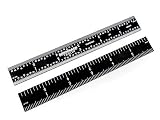
- These 6” rigid machinist rules feature 4R markings with 8ths and 16ths markings on one side and quick-reading 32nds and 64ths on the reverse side
- Photoetched graduations conform to strict international EEC 1 Accuracy Standards, i.e. +/- 0.2 mm at 20 Degrees C for 1000 mm rule
- Rules are made from rust-resistant, tempered Japanese stainless steel
- Finish is black chrome with white-filled graduations. Black chrome finish provides scratch and corrosion resistance and maximizes readability by achieving a zero-glare, high-contrast, EZ read finish that enhances readability in both low and bright light conditions.
- Overall size is 6 inches long by 3/4 inch wide by .040 inches thick
R23 will not launch
TechSpot notes that R23 will not launch on unsupported processors. Confirm that the system meets the requirements of the particular R23 build and that you did not accidentally download a damaged or incomplete archive. A current Cinebench 2026 system requirement page cannot be used as the R23 requirement list.
Crashes, No Sound, or Screen Glitches?
Random freezes, missing sound and display glitches usually trace back to one bad driver. Find and replace yours safely.Free scan · under a minutePC Slower Than It Used to Be?
A free scan shows the junk files, broken settings and background clutter dragging Windows down - then fixes them in one click.Free scan · Windows 10 & 11R23 says there is not enough memory
If the system cannot load the test scene into RAM, R23 displays a warning and does not run the CPU benchmark. Close memory-heavy applications and retry. Do not apply Cinebench 2026’s documented approximately 6.5–8.5 GB scene-memory behavior to R23; that is a 2026-specific detail reported by Maxon.
The score is lower than an online result
Check that both results use R23, not R20, R15, or Cinebench 2026. Then compare test duration, power mode, cooling, background load, and processor configuration. A short single run and a sustained 10-minute run can produce different results on a system that reduces clocks as it heats up.
R23 versus Cinebench 2026: which should you use?
Use R23 when you need continuity with an existing R23 chart, an older review, or a software-validation procedure built around its score range. Use Cinebench 2026 for current hardware testing and current Maxon support. The two versions are not interchangeable: their scenes, engines, and score scales differ.
Independent reader supportYour contribution helps us test, update, and keep practical guides available for everyone.FAQ
Is Cinebench R23 still available from Maxon?
Maxon’s current Cinebench download page lists Cinebench 2026 only. R23 is a legacy release, so a specifically labelled R23.2 archive from a reputable software source may be required.
The Tool Desk
Outbyte PC Repair FREEClear out junk files and repair common Windows errorsFree Scan →Outbyte Driver Updater FREEScan for outdated or missing drivers - takes under a minuteDriver Scan →Best Value

- Every woodworker should own a few precision machinist rulers as they will improve the accuracy of his/her work. Traditionally, the most common graduation markings used by woodworkers are 4R, or 1/8ths and 1/16ths on one side and 1/32nds and 1/64ths on the reverse. The fact is most woodworkers never use the finer 1/32nd and 1/64th markings as they are hard to read, too precise for most tasks, and just plain confusing, e.g., just what does 51/64th or 19/32nds really mean? So, we had rulers made under our Benchmark Tools brand that included the most commonly used 1/8th and 1/16th graduation marks on both sides
- Our rules are made from Japanese rust-resistant stainless steel that has been tempered creating a ruler that can flex if needed and snap back straight. The edges and ends have been ground parallel, straight, smooth and square. Graduations are produced via a photoengraving process creating very consistent and accurate markings with uniform line widths. Once etched, graduations are white filled for maximal readability. Graduations are etched and not printed so will not wear off with prolonged use. Graduations conform to strict international EEC 1 Accuracy Standards, i.e. +/- 0.2mm at 20° C for 1000mm ruler. Markings feature quick-reading 1/8ths and 1/16ths on both sides
- Rule is finished with a black chrome finish that provides scratch and corrosion resistance and maximizes readability by achieving a zero-glare, high-contrast, EZ read finish that enhances readability in both low and bright light conditions.
- Specifications: 6” long x 3/4” wide x 0.040” thick. Rule has end graduation marks on both ends of the rule.
- Each rule comes in vinyl storage pouch. These are well made rules and will provide years of reliable service in any shop.
Does Cinebench R23 test the GPU?
No. Cinebench R23 is a CPU-only benchmark and provides Single Core and Multi Core tests.
Why did the R23 download open a store page for Cinebench 2026?
The current TechSpot download flow redirects its Windows link to Microsoft Store and its Mac link to Apple’s Cinebench listing. Those current listings now provide Cinebench 2026 rather than R23.
Can I compare Cinebench R23 and Cinebench 2026 scores?
No. Cinebench 2026 uses a different rendering engine and scene, and Maxon says its scores cannot be compared with previous Cinebench versions.
How do I make Cinebench R23 run only once?
In R23, open File → Advanced Benchmark → Minimum Test Duration and set the value to Off or None. You can also use a command such as Cinebench.exe g_CinebenchMinimumTestDuration=100 to set a 100-second minimum duration.
Does Cinebench R23 work on Apple Silicon Macs?
R23 supports Apple M1-powered systems. The current Mac App Store app is Cinebench 2026, however, so do not use that listing as proof that it will install R23.
The Bottom Line
Cinebench R23 remains the right download only when you need legacy R23 scores. Maxon no longer lists it on the current download page, and the current Windows and Mac store links lead to Cinebench 2026. Obtain R23.2 only from a reputable archive, verify the version before running it, and keep R23 scores separate from results produced by Cinebench 2026.
Quick Recap
Product prices and availability are accurate as of the date/time indicated and are subject to change. Any price and availability information displayed on Amazon at the time of purchase will apply.

