
Quick wins for a faster PC:
Clear out junk files and repair common Windows errorsFree Scan →Fix the driver behind crashes, sound loss and screen glitchesFind Drivers →Repair Windows errors before they cause bigger problemsFix Now →ChromeOS has a phone-assisted setup option intended to make configuring a new Chromebook easier: instead of entering every preference manually, users can use settings from a phone. The option was reported for Chromebook Plus users as part of ChromeOS’s first-run setup flow, but the available information does not establish which phone settings transfer or which models and regions are eligible.
What the new Chromebook phone setup option does
The option uses a phone’s settings to help configure a Chromebook during setup. Paul Thurrott reported on May 28, 2024, that Chromebook Plus users were receiving this simpler setup choice. The report does not specify exactly which settings are transferred, so it should not be understood as a complete phone-to-Chromebook copy.
It is an alternative to entering setup preferences manually. No measured setup-time savings or complete list of transferred settings is published in the available report.
Where it appears: ChromeOS OOBE
OOBE means “out-of-box experience”: the first-run interface shown when a Chromebook is started for the first time or after it is reset. Chromium’s localization strings identify it as the “ChromeOS OOBE (first run UI).” ASUS also describes OOBE as a sequence of screens for basic ChromeOS settings, noting that screens can vary by operating system version or Chromebook model.
#1 Best Overall

- THIN & DURABLE DESIGN - Boasting a thin and light design, the Acer Chromebook Plus 514 is designed to keep you productive and entertained from anywhere. It weighs only 3.09 lbs and meets MIL-STD 810H military standards for reliable performance in harsh conditions. With long battery life and fast charge technology, it lets you work, study, watch, and stay connected without interruptions. It is perfect for commuting, travel, or working on the go
- AI-POWERED CREATIVITY - The laptop has AI-powered Google and Adobe tools to turn inspiration into reality faster. Its Gemini AI simplifies organizing creative drafts and optimizing materials. The dedicated Quick Insert key creates high-resolution images and offers writing assistance for seamless creativity. Unlock Google AI Pro for 12 months with this Chromebook Plus purchase. Experience Gemini Advanced, NotebookLM, 5TB of cloud storage, and boost productivity with Gemini integrated into Gmail, Docs, and more
- POWERFUL PERFORMANCE - Powered by the 8-Core Intel Core i3-N355 Processor with Intel Graphics, it ensures smooth performance for everyday tasks. It features 8GB LPDDR5X RAM for fast, efficient multitasking and 512GB SSD, offering ample space for files, apps, media, and more, delivering fast storage access and reduced load times
- EXCELLENT VISUAL - Featuring a 14" WUXGA (1920x1200) IPS touchscreen with 300-nit brightness, this device delivers vibrant visuals and responsive touch functionality. It supports expanding the workspace with 3 external monitors via HDMI (max 4K@30Hz) or USB Type-C (max 4K@60Hz), without a docking station. Plus, a 1080p webcam with a privacy shutter to prevent unauthorized viewing meets daily video chat or conference needs
- RICH CONNECTIVITY OPTIONS - Equipped with 2x USB-C 3.2 Gen 1, 2x USB-A 3.2 Gen 1, HDMI 1.4, and a headphone/microphone combo jack. It features Wi-Fi 6E and Bluetooth 5.3 for blazing-fast wireless speeds and seamless device pairing, plus a white backlit keyboard that lets you work comfortably in any lighting
Who can use the option, and what phone is required?
The May 2024 report places the option with Chromebook Plus users. It does not establish that every Chromebook Plus device has it, nor does it provide a complete list of eligible models, a ChromeOS release channel, or rollout geography. Check the setup screens on the specific device rather than assuming availability.
The report refers to settings from a phone but does not specify that the phone must be Android. It also does not publish a compatibility matrix or state which phone models are supported. Do not assume that a particular phone can use the feature without checking the on-screen setup instructions.
Rank #2

- Meet the HP 14" Chromebook Plus, your perfect everyday companion. Weighing just 3.2 pounds, with up to 11 hours of battery life and HP Fast Charge technology, it's built for all-day productivity. Best of all, it comes bundled with a protective sleeve to guard against daily wear and a wireless mouse to unlock a more efficient and comfortable workflow right out of the box
- Equipped with the Intel 8-Core i3-N305 processor and Intel UHD Graphics, the laptop handles multitasking smoothly and reliably. Along with 8GB LPDDR5 RAM and 256GB storage, It handles everyday tasks like web browsing, document editing, and video streaming with ease
- The 14-inch FHD IPS display offers a brilliant viewing experience with anti-glare technology for comfortable viewing. It supports expanding the workspace with 2 external monitors via USB-C, max resolution up to FHD (1920x1080)@60Hz without a docking station. Plus, a 1080p camera meets daily video chat or conference needs
- Equipped with 2x USB-C 3.2 Gen 1, USB-A 3.2 Gen 1, and a headphone/microphone combo jack, it also features Wi-Fi 6 and Bluetooth 5.3 for ultra-fast, stable wireless connectivity. Besides, the backlit keyboard enables effortless work in any lighting condition
- Auto Update Expiration (AUE) Date: Jun 2033. It provides access to a wide array of apps through the Google Play Store, making it easy to find the tools and entertainment you need. Chromebook is secure, fast, and up-to-date. Ideal for online courses, online school, K12, K9, and college students, Zoom meetings, or video streaming
Can you change setup choices after setup?
Yes. Chromium’s CHOOBE screen text says, “You can also find these options in Settings after you finish setting up your Chromebook.” This means the setup choices covered by that screen can be revisited in Settings. The text does not establish that every phone setting transferred during setup is editable there.
Phone-assisted setup compared with conventional setup
| Question | Phone-assisted setup | Conventional setup |
|---|---|---|
| Manual effort | Designed to use phone settings for configuration; the report does not list transferred settings. (Paul Thurrott, May 28, 2024) | Enter setup preferences manually. |
| Setup time | No measured time or savings published. (Paul Thurrott, May 28, 2024) | No measured comparison published. |
| Chromebook eligibility | Reported for Chromebook Plus users; full model eligibility is not stated. (Paul Thurrott, May 28, 2024) | Available setup screens can vary by ChromeOS version or Chromebook model. (ASUS support documentation) |
| Phone requirements | Phone-settings transfer is described, but supported phone platforms and models are not stated. (Paul Thurrott, May 28, 2024) | No phone requirement is stated for entering preferences manually. |
| Changing choices later | CHOOBE text says its options can also be found in Settings after setup. (Chromium localization strings) | CHOOBE text says its options can also be found in Settings after setup. (Chromium localization strings) |
What the feature does—and does not—promise
The practical benefit is less manual entry when a phone can supply settings during Chromebook setup. The evidence does not say that the Chromebook mirrors the phone, copies all preferences or data, or requires an Android phone. Nor does it establish universal availability across Chromebook models or ChromeOS releases.
What’s actually slowing this PC down?
Pick the symptom - the matching free tool is one click away.
Rank #3

- Intel Celeron Processor Up to 2.79GHz, 4GB Ram, 128GB SSD
- 15.6" FHD IPS, Intel UHD Graphics
- 1x USB Type C, 1 x USB Type A, 1x Headphone/Microphone Combo Jack, HDMI
- Super-Fast WiFi 6 and Bluetooth, HD Webcam
- Chrome OS, AC Charger Included, Star Silver
The feature was reported alongside other Chromebook Plus additions, including Google integrations, Tasks, GIF screen recording, and Game Dashboard. That context does not expand the setup option’s compatibility or functionality beyond what the report specifically describes.
Quick Recap
Best Value
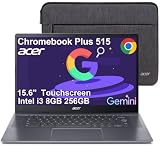
- THIN & DURABLE DESIGN - Boasting a thin and light design, the Acer Chromebook Plus 515 is designed to keep you productive and entertained from anywhere. It meets MIL-STD 810H military standards for reliable performance in harsh conditions. With up to 10 hours of battery life and fast charge technology, it lets you work, study, watch, and stay connected without interruptions. It is perfect for commuting, travel, or working on the go
- AI-POWERED PRODUCTIVITY - Boost creativity and productivity with built-in Google AI tools. Use Gemini to organize ideas, refine documents, generate content, and simplify everyday tasks. Erase unwanted objects with Google Photos' AI-powered Magic Eraser. Eligible users can redeem 12 months of Google AI Pro, including Gemini Advanced, NotebookLM, 5TB of cloud storage, and Gemini across Gmail, Docs, and more
- POWERFUL PERFORMANCE - Powered by the Intel 5-Core i3-1305U (up to 4.5GHz) processor with Intel UHD Graphics, it ensures smooth performance for everyday tasks. It features 8GB DDR5 RAM for seamless multitasking and 256GB SSD for fast storage and reduced load times, ensuring smooth and responsive performance for all your tasks
- EXCELLENT VISUAL - Featuring a 15.6" FHD (1920 x 1080) IPS touchscreen with ComfyView, this device delivers vibrant visuals and responsive touch functionality. It supports expanding the workspace with 3 external monitors via HDMI or USB-C at 4K (3840x2160) @60Hz (without docking station). Plus, a 1080p FHD webcam with a privacy shutter and AI-powered video call tools that automatically enhance clarity and lighting, cancel noise, and blur backgrounds
- VERSATILE CONNECTIVITY - Equipped with 2 x USB-C 3.2 Gen 1, USB-A 3.2 Gen 1, HDMI 1.4, and a headphone/microphone combo jack for versatile connectivity. Includes Wi-Fi 6E and Bluetooth for fast, reliable wireless performance
Rank #4

- [Superior Display] This Renewed product is tested and certified to look and work like new, with limited to no signs of wear. The refurbishing process includes functionality testing, inspection, and repackaging. The product comes with 90-day warranty
- [Powerful Performance] Stunning, Crystal Clear Image: Enjoy beautiful images on a 14.0" and a FHD (1920x1080) (16:9 Aspect Ratio) resolution for dazzling visuals with brilliant colors
- [High Speed and Multitasking] Fast Response Time: With a 60Hz refresh rate and a response time of, enjoy smoother and more reactive content from business applications, games, videos, and other forms of media
- [Enormous Storage] Customizable Comfort: With a viewing angle , this display can be adjusted to fit any home, office, or gaming setup
- Quick Connections:Comes with plenty of ports (HDMI) for connecting any and all your devices easily Additional Features: Brightness: 250 NIT VESA Compatible; ; ,
Product prices and availability are accurate as of the date/time indicated and are subject to change. Any price and availability information displayed on Amazon at the time of purchase will apply.

