
iTechGuides is reader-supported. When you buy through links on our site, we may earn an affiliate commission. As an Amazon Associate I earn from qualifying purchases. Learn more
The best wireless microphones for content creators depend on the device, number of speakers, recording environment, and backup needs. DJI Mic 3 is the strongest all-rounder for most creators, while RØDE Wireless PRO suits pro camera workflows, RØDE Wireless Micro suits simple phone recording, and Shure MoveMic Two is the discreet phone-first choice.
A wireless microphone can dramatically improve speech compared with a phone or camera microphone, but no kit is automatically “best sounding.” Placement, wind protection, clothing noise, room acoustics, gain settings, and the speaker’s voice usually matter more than the brand name. The recommendations below match each system to a specific workflow rather than declaring one universal winner.
Key takeaways
- DJI Mic 3 is the best overall wireless microphone system for creators who want phone, camera, interview, and future expansion in one platform.
- RØDE Wireless PRO is the better established pro-oriented choice when onboard backup recording, included lavaliers, accessories, and post-production control are priorities.
- RØDE Wireless Micro is the simplest phone-first option, while Shure MoveMic Two is smaller and more discreet but depends more heavily on Shure’s MOTIV apps unless the separate receiver is purchased.
- 32-bit float protects against some recording-level mistakes, but it does not fix poor microphone placement, wind overload, clothing rustle, background noise, or a bad wireless link.
- Advertised range is a maximum under specified conditions: DJI lists 400 m open-air range and 80 m in simulated high interference, while Hollyland lists approximately 340 m line of sight and 60 m non-line of sight for LARK MAX 2.
Which wireless microphone is best for content creators?
DJI Mic 3 is the best overall recommendation for most content creators because it combines internal recording, 32-bit-float recording, timecode, adaptive gain control, noise reduction, multiple-transmitter support, and broad phone-and-camera usefulness. DJI officially lists support for up to four transmitters and eight receivers, four-channel output, dual-file 32-bit-float internal recording, timecode, and dual-band anti-interference on the DJI Mic 3 product page.
That verdict applies to buyers who value flexibility and expect their production needs to grow. A phone-only creator may be better served by the smaller RØDE Wireless Micro. A journalist who needs a discreet lavalier may prefer Shure MoveMic Two, and a street interviewer who wants to alternate between a clip-on microphone and a handheld setup should consider Sennheiser Profile Wireless.
Popular on Amazon

- Wireless Freedom: With a 200 foot operating range (line of sight), it can move freely during performances, suitable for indoor and outdoor activities such as home karaoke, church, wedding, conference, speech, and small stage performances. Reliable signal, no need to worry about sound being cut off during use.
- Stable Signal & Strong Anti-Interference: wireless transmission boasts stronger anti-interference performance and zero audio delay than traditional Bluetooth mics. It delivers stable signal transmission up to 40 meters, supporting free movement during singing, hosting and stage performances. No sudden sound cutoff or signal loss in crowded indoor and outdoor scenarios, solving the common signal instability and stuttering issues of ordinary wireless microphones.
- Plug and play and multi compatibility: Insert the receiver into an audio device with a 6.35mm or 3.5mm microphone jack. Then turn on the receiver and wireless microphone, they will automatically pair. Compatible with devices with 6.35mm (1/4 inch) or 3.5mm (1/8 inch) microphone interfaces, such as party speakers, singing machines, amplifiers, PA systems, audio interfaces, truck speaker systems, dome speaker systems, etc. (AUX interface not applicable)
- Clear and rustic voice amplifier equipped with a high-sensitivity professional heart-shaped dynamic capsule, picking up clear, pure, and complete sound for greater gain, while eliminating annoying background noise and a certain degree of howling. No radiation, anti whistling, anti-interference, constant frequency, distortion<0.2%. High quality and excellent audio performance.
- You will receive: 2 handheld microphones, 1 x receiver with 6.35mm plug(Two versions are randomly shipped), 1 x 3.5mm adapter, 2 anti slip rings, 2 x microphone covers, 1 x manual. (Note: This system is not compatible with mobile phones, computers, or tablets.)
Quick comparison: which system matches your workflow?
| System | Best for | Internal recording and advanced features | Phone workflow | Camera workflow | Main drawback |
|---|---|---|---|---|---|
| DJI Mic 3 | One expandable system for phones, cameras, interviews, and multicamera work | 32-bit float, dual-file recording, timecode, adaptive gain, noise cancellation; up to four transmitters and eight receivers | Designed for mobile and camera workflows; confirm the exact USB-C, Lightning, and charging accessories in the package | Receiver-based system with four-channel output and broad expansion | More settings and package variations make the exact bundle important |
| RØDE Wireless PRO | Pro-oriented solo creators, interviews, and camera production | Onboard backup recording and RØDE software ecosystem; secondary coverage commonly reports approximately 40 hours of internal recording | Possible with the correct cable or adapter; verify the exact phone and app | Strong camera-oriented kit with included lavaliers and accessories | Typically more expensive and larger than phone-first systems |
| Hollyland LARK MAX 2 | Feature density, longer shoots, and multi-person value | 48 kHz/32-bit float and 24-bit recording; approximately 11-hour transmitter and 12-hour camera-receiver runtimes | Depends on the receiver, cable, and bundle; verify the mobile package | Camera receiver and expansion options vary by bundle | 340 m line-of-sight range is not an indoor performance guarantee |
| RØDE Wireless GO Gen 3 | Lower-cost full camera kit for YouTube and interviews | Useful two-person wireless workflow; do not assume the full Wireless PRO feature set | Requires the appropriate cable or adapter | Camera-focused receiver system | Check differences in internal recording, timecode, lavaliers, and accessories before choosing it over Wireless PRO |
| RØDE Wireless Micro | Fast phone recording for TikTok, Reels, Shorts, and casual vlogging | Simple phone-first design rather than a multicamera production feature set | Its main advantage is minimal setup with a compatible phone receiver | Not the natural choice for camera-heavy work | Limited fit for timecode, independent backup recording, and multicamera expansion |
| Sennheiser Profile Wireless | Street interviews, journalism, events, and presenter work | Distinctive included handheld bar for converting the transmitters into a handheld interview setup | Compare the mobile receiver and app behavior with the intended phone | Useful when the same kit must support clip-on and handheld interviews | Its handheld advantage matters less for creators who only need a tiny phone lavalier |
| Shure MoveMic Two | Discreet, phone-first interviews and mobile journalism | Up to eight hours per microphone; case provides two additional charges for up to 24 hours of operating time; IPX4 resistance | Direct iOS and Android operation through Shure MOTIV apps | Separate MoveMic Receiver required for cameras, computers, and many third-party apps | Receiver-free operation is not universal, so camera users must price the receiver kit |
Product capabilities and technical figures in the table come from the manufacturers’ product information and manuals where available, including the DJI Mic 3 specifications, the Hollyland LARK MAX 2 manual, and Shure’s MoveMic Two product information. Bundles, firmware, and prices can change.
What kind of wireless microphone are you buying?
“Wireless microphone” covers several different creator products, and identifying the category prevents an expensive mismatch.
- Built-in clip-on microphone: The transmitter itself contains the microphone. This is the fastest setup, but the transmitter is visible and can pick up fabric or accessory noise.
- Transmitter with external lavalier: A separate lavalier can be hidden more easily and may sound more consistent when positioned correctly. The cable, connector, clip, and extra cost create additional failure points.
- Receiver-based camera system: The receiver connects to a camera, recorder, phone, tablet, or computer through an analog or digital output. Receiver-based systems are usually the most flexible for mixed-device creators.
- Receiver-free phone system: Some systems connect directly to a phone through Bluetooth or a proprietary wireless protocol. Setup is convenient, but compatibility may depend on a first-party app.
- Handheld conversion system: A transmitter can fit into a handheld bar for street interviews and event coverage. Sennheiser Profile Wireless is the notable option in this shortlist.
Wireless handheld stage microphones are a different product category from compact 2.4 GHz clip-on creator systems. A stage microphone should not be ranked beside these kits merely because both transmit audio wirelessly.
Quick wins for a faster PC:
Clear out junk files and repair common Windows errorsFree Scan →Fix the driver behind crashes, sound loss and screen glitchesFind Drivers →How should you choose between a phone-first and camera-ready system?
Choose a phone-first microphone when nearly all recording happens on one compatible phone and speed matters more than expansion. Choose a receiver-based camera system when you use mirrorless cameras, DSLRs, audio recorders, computers, third-party apps, or more than one recording device.
Before buying, answer these questions:
- Does the phone use USB-C or Lightning?
- Does the receiver provide USB-C digital audio, 3.5 mm TRS analog audio, or both?
- Will the microphone work inside the intended native camera, livestreaming, social, teleprompter, and editing apps?
- Can the phone charge while the receiver is attached?
- Does direct-to-phone operation require a manufacturer app?
- Can two speakers be recorded as isolated left/right channels, separate files, or only a mixed track?
USB-C does not automatically mean universal audio compatibility. A USB-C port may support charging, data, audio, or only some combination of those functions. Test the exact phone, adapter, operating system, and app before an important shoot.
Shure MoveMic Two illustrates the difference clearly. Shure says the microphones can connect directly to iOS and Android devices through Shure MOTIV apps, but the separate MoveMic Receiver is needed for cameras, computers, and many third-party apps. Shure also lists a microphone weight of 8.2 g each and IPX4 resistance in its MoveMic information.
What is the best wireless microphone for each creator?
DJI Mic 3: best overall for most creators
Best for: Creators who want one system for phone videos, camera work, interviews, multicamera shoots, and future expansion.
What’s actually slowing this PC down?
Pick the symptom - the matching free tool is one click away.
DJI Mic 3 has the broadest feature combination in this shortlist. DJI lists support for up to four transmitters and eight receivers, four-channel output, integrated timecode, adaptive gain control, noise cancellation, dual-band anti-interference, and dual-file 32-bit-float internal recording. That combination makes DJI Mic 3 especially attractive when a creator wants safety features now without replacing the system after moving from solo videos to interviews or group productions.
According to DJI’s specifications, DJI Mic 3 transmitters run for approximately eight hours and the receiver runs for approximately ten hours under the manufacturer’s stated test conditions. The same specification page lists up to 43 hours in a single 32-bit-float file or 21.5 hours in dual-file mode. DJI lists a maximum range of 400 m in an open, unobstructed environment and 80 m in a simulated high-interference environment; those figures should not be treated as guaranteed indoor range.
Why buy it: It offers the strongest balance of backup safety, expansion, audio recovery, synchronization, and device flexibility.
What to watch: DJI sells multiple packages. Confirm whether the chosen kit includes the charging case, the receiver, the required USB-C or Lightning adapter, the number of transmitters needed, and the camera cables. Feature complexity also means DJI Mic 3 rewards a short setup test rather than a quick unboxing-and-record approach.
Recommended Free Tools
Who should skip it: A creator who records only short phone clips may be paying for timecode, expansion, and recording controls that will never be used.
RØDE Wireless PRO: best established pro-oriented creator kit
Best for: Serious solo creators, interview teams, and camera users who prioritize redundant recording, included lavaliers, accessories, and post-production control.
RØDE Wireless PRO is the logical alternative to DJI Mic 3 for creators already comfortable with a camera-based workflow and RØDE’s software ecosystem. Secondary comparison coverage commonly positions Wireless PRO as the pro-oriented pick and reports approximately 40 hours of internal recording. The figure and current price are volatile, so verify the current firmware, package contents, and price on RØDE’s Wireless PRO product page before buying.
The system makes most sense when an onboard recording is part of the creator’s normal safety plan, not merely an advertised feature. Backup files can protect against a receiver cable being disconnected, wireless dropouts, or a camera input being clipped. Backup recording still requires the creator to start recording, monitor battery and storage, and synchronize or replace the camera feed during editing.
PC Slower Than It Used to Be?
A free scan shows the junk files, broken settings and background clutter dragging Windows down - then fixes them in one click.Free scan · Windows 10 & 11Crashes, No Sound, or Screen Glitches?
Random freezes, missing sound and display glitches usually trace back to one bad driver. Find and replace yours safely.Free scan · under a minuteAlso popular on Amazon

- Small but Mighty - The DJI Mic Mini lavalier microphone transmitter is small and ultralight, weighing only 10 g, [1] making it comfortable to wear, discreet, and aesthetically pleasing on-camera.
- Detail-Rich Sound - Mic Mini wireless microphones delivers high-quality audio. A 400m max transmission range [2] ensures stable recording, even in bustling outdoor environments like a busy street. 48kHz sampling & 120 dB SPL for full, clear sound, 48h battery life with charging case [3].
- Extended Battery, More Recording Time - Mic Mini wireless lavalier microphone with Charging Case offers up to 48 hours of battery life, [3] ideal for long trips, interviews, livestreaming and other intensive usage scenarios.
- DJI Ecosystem Direct Connection - The transmitter connects directly to OsmoAudio ecosystem devices without a receiver, delivering 48 kHz, 24-bit high-quality audio. Supported devices include: Osmo Pocket 3, Osmo Pocket 4, Osmo Pocket 4P, Osmo Action 4, Osmo Action 5 Pro, Osmo Action 6, Osmo 360, Osmo 360 II, Osmo Nano, Osmo Mobile 7, Osmo Mobile 7P, Osmo Mobile 8, and Osmo Mobile 8P. Note: Connecting to Osmo Mobile series products requires the first-generation DJI OM Multifunctional Module.
- Powerful Noise Cancelling - 2 noise cancellation levels are available—Basic is ideal for quiet indoor settings, while Strong excels in noisy environments to give you clear vocals. [8]
Why buy it: The kit is aimed at a complete camera workflow and includes lavalier microphones and useful accessories.
What to watch: Wireless PRO is potentially excessive for short phone clips, and buyers should not assume that a phone will accept the receiver without the correct cable or adapter. Check internal recording format, timecode support, lavalier contents, and accessories rather than treating every RØDE wireless product as interchangeable.
Hollyland LARK MAX 2: best feature-rich alternative and multi-person value
Best for: Creators recording interviews, groups, or longer shoots who want 32-bit float, substantial battery life, and expansion potential.
Hollyland LARK MAX 2 is appealing when feature density and runtime matter. The Hollyland manual lists 48 kHz/32-bit-float and 24-bit recording, approximately 11 hours for a transmitter, and approximately 12 hours for the camera receiver. The manual also lists approximately 340 m of line-of-sight range and 60 m non-line-of-sight range under specified conditions.
Those range figures describe test conditions rather than a promise through walls, people, metal structures, or a crowded venue. A creator filming an interview indoors should prioritize receiver placement, clear line of sight, and onboard backup recording over the headline distance.
Why buy it: LARK MAX 2 gives buyers a substantial set of recording and expansion features without automatically choosing DJI or RØDE.
What to watch: Hollyland sells different combinations of transmitters, receivers, mobile accessories, and monitoring options. Compare the exact two-transmitter, four-transmitter, camera, or mobile package. The approximate $249 price appearing in secondary coverage is a package-sensitive signal, not a universal price.
RØDE Wireless GO Gen 3: best value for a full camera kit
Best for: YouTube creators, interviewers, and camera users who need dependable two-person wireless audio without the complete Wireless PRO feature stack.
The Tool Desk
Outbyte Driver Updater FREEFix the driver behind crashes, sound loss and screen glitchesFind Drivers →Outbyte PC Repair FREERepair Windows errors before they cause bigger problemsFix Now →Wireless GO Gen 3 is the sensible lower-cost direction within RØDE’s camera-oriented range. It suits creators who want a recognizable receiver-based kit for general camera work and do not need every advanced function offered by Wireless PRO.
Why buy it: It targets the middle ground between a minimal phone microphone and a premium production kit.
What to watch: Do not describe Wireless GO Gen 3 as equivalent to Wireless PRO. Verify internal recording, timecode, included lavaliers, receiver outputs, charging accessories, and current firmware before comparing prices. The Digital Camera World buying guide provides broader category comparison context, but the manufacturer’s current package information should control the final buying decision.
RØDE Wireless Micro: best simple phone-first option
Best for: TikTok, Instagram Reels, YouTube Shorts, casual vlogging, and creators who almost never use a camera or recorder.
RØDE Wireless Micro is the simplest recommendation when the creator’s priority is attaching a small transmitter, connecting a phone receiver, and recording quickly. A phone-first design can be more useful than a larger professional kit for short-form creators who do not need timecode, independent backup files, multiple receivers, or a 3.5 mm camera connection.
Why buy it: Minimal setup and small transmitters reduce friction for everyday mobile recording.
What to watch: Phone-first convenience can become a limitation. Wireless Micro is a poor fit for multicamera work, camera-heavy production, and workflows that depend on independent backup recording. Check the exact USB-C or Lightning version and whether the receiver permits charging the phone during recording. RØDE’s Wireless Micro product page is the appropriate place to verify the current package.
Also popular on Amazon
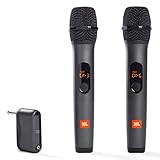
- HIGH Vocal Quality & JBL Original Pro Sound - The crystal clear clarity of JBL wireless microphones means they won't stuck, delay or distort. Your voice will sound on point, with the back of the amazing JBL Original Pro sound.
- RECHARGEABLE DUAL CHANNEL UHF WIRELESS RECEIVER - No need to fly alone, unless you want to take center stage, of course. Connect two wireless microphones together and hear both voices mixed seamlessly through the speaker for up to 6 hours of playback.
- PLUG AND PLAY - When you want to be heard, you want to be heard now. JBL wireless microphones have a super simple setup. Simply turn on the receiver and wireless microphone and you're ready to go instantly.
- MICROPHONES COME WITH REPLACEABLE AA BATTERIES - JBL wireless microphones come with easy-to-replace AA batteries, so put your slot all night long.
Sennheiser Profile Wireless: best for handheld street interviews
Best for: Journalists, event creators, street interviewers, and presenters who need both clip-on and handheld microphone modes.
Sennheiser Profile Wireless stands out because its transmitters can be used with an included handheld bar. That physical conversion is more important than a small difference in headline specifications for a creator who regularly approaches interview subjects in public.
Why buy it: One system can support a conventional clip-on setup and a recognizable handheld interview style.
What to watch: The handheld configuration has little value for a creator who only records a talking head or phone vlog. Compare the receiver behavior, internal recording, mobile compatibility, and exact package with DJI and RØDE before paying a premium. Secondary coverage commonly places the product around the $279–$299 range, but the exact kit and current price must be verified on the Sennheiser Profile Wireless page.
Shure MoveMic Two: best discreet phone-first lavalier
Best for: Mobile journalists, discreet interviews, phone-only creators, and outdoor users who prioritize very small transmitters and weather resistance.
Free tools Windows power users keep installed
One-click scans. No signup required.
Shure MoveMic Two uses two small lavalier-style transmitters that can operate directly with iOS and Android through Shure MOTIV apps. Shure lists up to eight hours of operation per microphone, with the charging case providing two additional charges for up to 24 hours of operating time. Each microphone weighs 8.2 g, and the system carries an IPX4 resistance rating according to Shure’s product information.
Why buy it: The transmitters are exceptionally discreet, and receiver-free phone operation can be convenient for interviews where a larger camera receiver would be distracting.
What to watch: Direct-to-phone operation is not universal. Shure says a separate MoveMic Receiver is required for cameras, computers, and many third-party apps. Shure’s US pages have shown the MoveMic range from $279, while Shure’s launch material listed different prices for MoveMic Two and the receiver kit. Treat those as package- and date-dependent signals, not one definitive current price. Check the MoveMic Receiver information before choosing a basic kit.
How much should you budget?
Wireless microphone prices vary by country, sale, retailer, firmware generation, and bundle. The exact kit matters because a two-transmitter mobile bundle, a camera bundle, a receiver-only package, and an expanded four-transmitter package are not equivalent products.
Do these 3 things before closing this tab:
1Fix the driver behind crashes, sound loss and screen glitches2Repair Windows errors before they cause bigger problems3Scan for outdated or missing drivers - takes under a minute| Product | Price information in the supplied research | What must be verified before purchase |
|---|---|---|
| DJI Mic 3 | Secondary coverage reports approximately $219 street pricing and approximately $329 list-price territory | US price, sale status, number of transmitters, receiver, charging case, and phone adapters |
| RØDE Wireless PRO | Approximately $399 appears in current secondary coverage | Current US price, firmware, lavaliers, cables, and accessory contents |
| Hollyland LARK MAX 2 | Approximately $249 appears in current comparison coverage | Two- or four-transmitter bundle, camera or mobile receiver, and monitoring accessories |
| Sennheiser Profile Wireless | Approximately $279–$299 appears in current coverage | Standard two-transmitter kit versus another package and included handheld bar |
| Shure MoveMic Two | Shure US overview shows the range from $279; launch material listed separate package prices, including $349 for MoveMic Two and $499 for a receiver kit | Exact package, receiver requirement, app compatibility, and current US price |
| RØDE Wireless GO Gen 3, RØDE Wireless Micro, DJI Mic Mini | No single dependable price is established in the supplied research | Current official price, connector version, receiver contents, and recording limitations |
Do not compare sticker prices alone. Add the cost of external lavaliers, furry windscreens, camera cables, USB-C or Lightning adapters, magnetic mounts, replacement cables, additional transmitters, and a receiver upgrade if a phone-first kit later needs to work with a camera.
Why does internal recording matter?
Internal recording is a separate safety path from wireless transmission. A transmitter can preserve a local recording when the radio link drops out, the receiver cable disconnects, the receiver output is too hot for the camera, or the camera input clips.
Internal recording is not automatic insurance. The creator must start the recording, confirm available storage, watch transmitter battery status, and synchronize or replace the camera feed in editing. Separate files are especially useful when two speakers need different noise reduction, volume adjustment, or repair.
Internal recording also does not fix a microphone hidden under noisy fabric, wind hitting the capsule, a dead battery, or a poorly positioned transmitter. A clean backup of bad audio is still bad audio.
What does 32-bit float do?
32-bit float is a recording format that can provide substantial post-recording level flexibility and help recover some unexpectedly loud or quiet material. 32-bit float does not improve the microphone capsule, remove background noise, prevent wireless dropouts, or eliminate the need to monitor sound.
Creators should distinguish between the transmitter’s internal recording and the receiver’s camera output. A transmitter may retain a recoverable 32-bit-float file while the receiver output clips the camera input. A 32-bit-float file may also produce a different editing workflow or larger files than a conventional 24-bit recording.
Also popular on Amazon

- The Original Mini Microphone: Mini Mic Pro is the wireless microphone for iPhone & Android used by creators. Trusted by thousands, it delivers studio-quality sound in a design small enough to clip onto your shirt or slip into your pocket.
- Seamless Connection: Designed to work right out of the box with your iPhone, Android, tablet, or laptop. With both USB-C and Lightning adapters included, Mini Mic Pro connects instantly—no apps, no bluetooth, no friction. Just pure, plug-and-play performance.
- Pro sound, anywhere: From voiceovers to viral interviews, Mini Mic Pro captures crystal-clear audio and cuts through background noise and even outdoors, thanks to included wind protection like high-density foam and a dead cat cover.
- Lightweight & Durable: Crafted from premium materials and weighing under an ounce, it’s ultra-portable, rugged enough for daily use, and always ready to record—no matter where the day takes you.
- Rechargeable Battery: A wireless lavalier microphone designed for real creators. Record for up to 6 hours per charge. While using the lav mic, you can charge your device simultaneously!
For a solo creator recording controlled talking-head videos, careful gain setting and a short test may be more valuable than paying for 32-bit float. For unpredictable interviews, documentary work, or speakers whose volume changes sharply, 32-bit float can be a useful safety feature.
Do creators need timecode?
Timecode is valuable for multicamera productions, long interviews, documentary shoots, and crews recording audio separately from the camera. Timecode does not improve sound quality; timecode reduces editing time by helping synchronize separately recorded media.
Do these 3 things before closing this tab:
1Fix the driver behind crashes, sound loss and screen glitches2Clear out junk files and repair common Windows errors3Scan for outdated or missing drivers - takes under a minuteTimecode is usually unnecessary for a solo creator recording one phone or one camera. Before relying on it, confirm the supported frame rates, synchronization method, clock-drift specification, and whether the required cables or accessories are included. DJI lists integrated timecode, common frame rates from 23.98 through 60 fps, and drift of less than one frame over 24 hours under its stated test conditions on the DJI Mic 3 product page.
How do built-in microphones compare with external lavaliers?
A built-in transmitter microphone is fastest and easiest, while an external lavalier can be more discreet and more consistent when carefully positioned. Neither design is automatically superior in every scene.
| Choice | Advantages | Trade-offs | Best use |
|---|---|---|---|
| Built-in transmitter microphone | Fast attachment, fewer cables, fewer components, easy solo operation | Visible on clothing; may capture fabric, hair, necklaces, or zippers | Vlogs, talking heads, quick social videos |
| External lavalier | Can be concealed and positioned for a consistent mouth distance | Extra cost, cable and connector failure, clip and clothing-noise problems | Interviews, formal presentations, documentary and camera work |
| Handheld conversion | Clear interview convention and easy subject handoff | Less discreet and unsuitable for hands-free presentations | Street interviews, events, journalism |
Place a clip-on microphone approximately 15–20 cm below the mouth, away from necklaces, hair, zippers, and loose fabric. Use a furry windscreen outdoors. Do not hide a transmitter beneath thick clothing without testing, because fabric can create rubbing noise and obstruct the microphone.
How do range, interference, and noise cancellation affect real recordings?
Wireless range depends on line of sight, walls, people, Wi-Fi congestion, the 2.4 GHz environment, regional 5 GHz restrictions, body position, antenna orientation, and receiver placement. The body can block a transmitter even when the advertised maximum distance looks generous.
DJI lists 400 m in an open, unobstructed environment and 80 m in a simulated high-interference environment for Mic 3. Hollyland’s LARK MAX 2 manual lists approximately 340 m line of sight and 60 m non-line of sight. The different test conditions make the figures useful as manufacturer specifications, not as an indoor ranking. In a convention center or city street, keeping the receiver near the camera and maintaining a clear path usually matters more than the maximum open-field number.
Noise cancellation can improve speech intelligibility, but aggressive processing may create pumping, thinness, or other artifacts. Adaptive gain control can reduce some level mistakes but may raise room noise or alter dynamics. Noise cancellation, adaptive gain, a limiter, a safety track, and manual gain are different functions. Test the exact combination with the intended camera or app.
DJI Mic 3 lists adaptive gain control and two noise-cancellation levels. Those features are useful tools, not substitutes for a quiet location, sensible microphone placement, wind protection, and headphones.
Independent reader supportYour contribution helps us test, update, and keep practical guides available for everyone.What should you check for battery life and charging?
Compare transmitter runtime, receiver runtime, charging-case capacity, whether the case charges all units, whether transmitters can charge without the case, and whether charging is possible during operation. Also check battery indicators, low-battery warnings, cold-weather behavior, and whether the manufacturer’s runtime test disables recording or noise cancellation.
Quick wins for a faster PC:
Clear out junk files and repair common Windows errorsFree Scan →Scan for outdated or missing drivers - takes under a minuteDriver Scan →DJI lists approximately eight hours for Mic 3 transmitters and ten hours for the receiver under stated test conditions. Hollyland lists approximately 11 hours for each LARK MAX 2 microphone and approximately 12 hours for the camera receiver. Different test methods mean those figures should not be treated as a laboratory head-to-head result.
A charging case is convenient but can become a single point of failure. If the case is lost or damaged, verify whether the individual transmitters and receiver can be charged another way before committing to the system.
How should two-person audio be recorded?
Two transmitters do not always produce two independently editable tracks. A receiver may output a stereo file with one speaker on the left and the other on the right, a dual-mono file, or a mixed mono track. A manufacturer app may sum channels even when the hardware supports separation.
Check whether the system records separate internal files, isolated receiver channels, or only a mix. Separate channels let an editor correct one speaker without changing the other. If the camera creates a left/right stereo file, the editing application may need channel splitting or “fill left/right” processing before the dialogue is mixed.
Record a short test with both speakers before filming. Confirm that both input meters react, that each voice is on the intended channel, and that the camera or phone is not silently using its own microphone.
Also popular on Amazon

- Small but Mighty - The DJI Mic Mini Transmitter is small and ultralight, weighing only 10 g [1], making it comfortable to wear, discreet, and aesthetically pleasing.
- Detail-Rich Sound - Mic Mini delivers high-quality audio. A 300m max transmission range [2] ensures stable recording, even in bustling outdoor environments like a busy street.
- Record Longer - Two transmitters and a mobile receiver offer a maximum operating time of 11.5 hours [5]. That's enough time for high-usage scenarios like interviews.
- DJI Ecosystem Direct Connection - The transmitter connects directly to OsmoAudio ecosystem devices without a receiver, delivering 48 kHz, 24-bit high-quality audio. Supported devices include: Osmo Pocket 3, Osmo Pocket 4, Osmo Pocket 4P, Osmo Action 4, Osmo Action 5 Pro, Osmo Action 6, Osmo 360, Osmo 360 II, Osmo Nano, Osmo Mobile 7, Osmo Mobile 7P, Osmo Mobile 8, and Osmo Mobile 8P. Note: Connecting to Osmo Mobile series products requires the first-generation DJI OM Multifunctional Module.
- Powerful Noise Cancelling - 2 noise cancellation levels are available—Basic is ideal for quiet indoor settings, while Strong excels in noisy environments to give you clear vocals. [8]
How do you set up a wireless microphone before recording?
- Charge every transmitter, receiver, charging case, phone, and camera.
- Confirm the receiver, cable, adapter, and connector match the intended device.
- Pair every transmitter and receiver before the shoot.
- Select the desired recording mode, including separate channels or a safety track where available.
- Set gain conservatively and enable a limiter or safety track if the system provides one.
- Attach each microphone approximately 15–20 cm below the speaker’s mouth.
- Keep the microphone away from necklaces, hair, zippers, and loose fabric.
- Fit the supplied furry windscreen outdoors.
- Record a 20-second test with normal speech and the loudest expected speech.
- Listen through headphones, not only through the camera’s meters.
- Confirm both speakers appear on the intended channels.
- Start internal backup recording where available, then check storage and battery indicators.
Do not assume that a receiver connected to a phone is being used by the recording app. Test the manufacturer’s app, the native camera, and the intended social or livestreaming app separately.
How do you troubleshoot common wireless microphone failures?
The phone records from its own microphone
Test the microphone in the manufacturer’s app first, confirm that the receiver’s input meters react, disconnect and reconnect the receiver after opening the recording app, and test the native camera separately from the intended social app. An unsupported app, wrong USB-C or Lightning adapter, missing permission, or receiver connected only for charging can all cause the failure.
The recording is distorted
Lower the camera input gain and receiver output, move the transmitter farther from the mouth, and enable a limiter or safety track if available. The internal transmitter recording may remain usable even when the camera input clips.
The wireless signal drops out
Reduce the distance, keep the receiver in line of sight, reposition the receiver, avoid placing the transmitter on the far side of the speaker’s body, and test the exact venue. Crowded 2.4 GHz spectrum, walls, metal structures, body blocking, and receiver placement behind a camera can all contribute. Use onboard recording as a recovery path.
Clothing rustles
Move the microphone away from collars, zippers, necklaces, hair, and loose fabric. Use an external lavalier with a proper clip or a small fabric barrier, and do not conceal a transmitter under clothing without testing. If noise cancellation makes the rustle more obvious, reduce the processing level.
Wind overloads the microphone
Use the supplied furry windscreen, turn the subject away from direct wind, and place the microphone under a collar only after testing. Software noise reduction cannot reliably repair severe wind distortion.
One speaker is louder
Place both microphones at approximately similar distances, adjust each transmitter manually where possible, and record separate channels. Automatic gain may not correct unequal microphone placement cleanly.
The Tool Desk
Outbyte PC Repair FREEClear out junk files and repair common Windows errorsFree Scan →Outbyte Driver Updater FREEFix the driver behind crashes, sound loss and screen glitchesFind Drivers →The charging case or receiver is missing
Stop and identify the exact package before comparing prices. DJI, Hollyland, and Shure product families include solo, two-transmitter, receiver, mobile, camera, and expanded bundles, and a cheaper-looking package may omit the case or camera receiver you actually need.
Which wireless microphone should you buy?
| Your situation | Best direction | Reason |
|---|---|---|
| One kit for phone, camera, interviews, and future growth | DJI Mic 3 | Broadest combination of recording safety, timecode, expansion, and device flexibility |
| Pro creator workflow and backup recording | RØDE Wireless PRO | Onboard recording, included lavaliers and accessories, and a pro-oriented software ecosystem |
| Feature density and multi-person potential | Hollyland LARK MAX 2 | 32-bit float, long stated runtimes, and multiple-transmitter possibilities |
| Lower-cost full camera kit | RØDE Wireless GO Gen 3 | Camera-oriented two-person workflow without automatically buying the PRO tier |
| Simplest phone workflow | RØDE Wireless Micro | Minimal setup for short-form mobile content |
| Handheld street interviews | Sennheiser Profile Wireless | Included handheld bar adds an interview mode that clip-on-only systems lack |
| Smallest discreet phone lavalier | Shure MoveMic Two | 8.2 g microphones, direct MOTIV app operation, and IPX4 resistance |
| Cheapest acceptable entry point | Current DJI Mic Mini, Hollyland LARK M2S, or another budget kit | Verify internal recording, receiver inclusion, connector, and app compatibility before buying |
The best choice is the system that matches the entire recording chain: microphone, transmitter, receiver, phone or camera, app, cables, backup method, and editing workflow. A cheaper kit that needs a receiver upgrade and adapters later may cost more than a correctly configured camera kit purchased at the beginning.
Prices, firmware, mobile-app support, battery behavior, and bundle contents can change. Check the manufacturer’s current compatibility and package information immediately before purchase, especially when choosing between USB-C and Lightning versions or between a mobile-only and camera-ready bundle.
Frequently Asked Questions
Is DJI Mic 3 better than RØDE Wireless PRO?
DJI Mic 3 is the stronger all-rounder when expansion, 32-bit float, timecode, multiple receivers, and phone-to-camera flexibility matter. RØDE Wireless PRO is the better fit for creators who prioritize its pro-oriented camera workflow, onboard backup recording, included lavaliers, accessories, and RØDE software ecosystem.
Outdated Drivers Are Slowing You Down
One free scan finds every outdated or missing driver and matches the right update for your exact hardware.Free scan · exact hardware matchPC Slower Than It Used to Be?
A free scan shows the junk files, broken settings and background clutter dragging Windows down - then fixes them in one click.Free scan · Windows 10 & 11Do wireless microphones work with TikTok and Instagram?
Wireless microphones can work with TikTok and Instagram when the phone, receiver, adapter, operating system, and app support the external audio input. Test the exact social app separately because a microphone that works in a manufacturer’s app may not work identically in every third-party app.
Do I need a receiver for Shure MoveMic Two?
You do not need the separate receiver for direct operation with compatible iOS and Android devices through Shure MOTIV apps. You generally need the MoveMic Receiver for cameras, computers, and many third-party apps.
Is 32-bit float necessary for YouTube videos?
32-bit float is not necessary for most controlled YouTube videos, provided gain is set carefully and the creator monitors a test recording. 32-bit float is more useful when speaker volume is unpredictable or when a recoverable internal backup is important.
Are advertised wireless microphone ranges realistic indoors?
Advertised wireless microphone ranges are maximum figures measured under stated conditions and are not guarantees through indoor walls, people, metal structures, or crowded radio environments. Receiver placement, line of sight, body blocking, Wi-Fi congestion, and onboard backup recording matter more in real indoor shoots.
The Bottom Line
Bottom line: Buy DJI Mic 3 if you want the most adaptable creator system. Choose RØDE Wireless PRO for a mature pro-oriented camera workflow, Hollyland LARK MAX 2 for feature density and multi-person value, RØDE Wireless Micro for uncomplicated phone videos, Sennheiser Profile Wireless for handheld interviews, or Shure MoveMic Two for discreet phone-first recording. Confirm the exact bundle and test the complete phone or camera workflow before filming anything important.

